
NC M10
NC TWS Bluetooth 5.1 Earphones User Manual
Модел: M10
Важни безбедносни информации
Please read this manual carefully before using the product and retain it for future reference. Improper use may result in product damage or personal injury.
- Не го изложувајте уредот на екстремни температури, влажност или корозивни средини.
- Избегнувајте испуштање, удар или расклопување на уредот.
- Чувајте го уредот подалеку од деца и домашни миленици.
- Use only the provided or certified charging cable and power adapter.
- Do not use the earbuds at excessively high volumes for extended periods to prevent hearing damage.
- Exercise caution when using the earbuds in situations requiring awareness of surroundings, such as driving or walking in traffic.
Производот завршиview
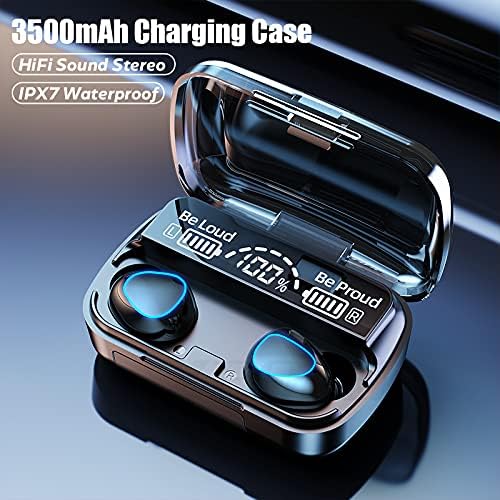
The NC TWS Bluetooth 5.1 Earphones are designed for high-fidelity audio and convenient wireless use. They feature a portable charging case that also functions as a power bank.
Содржина на пакетот
- 2 x Bluetooth слушалки (лева и десна)
- 1 x торбичка за полнење
- 1 x USB кабел за полнење
- 1 x Упатство за употреба (Овој документ)
- 2 x Pairs of Earphone Cups (L, M Size)
Компоненти



Поставување
Полнење на слушалките и футролата
Пред првата употреба, целосно наполнете ги слушалките и кутијата за полнење.
- Place both earbuds into the charging case. Ensure they are properly seated; the earbuds will light up to indicate charging.
- Connect the USB charging cable to the charging case's port and the other end to a compatible USB power source (e.g., computer USB port, wall adapter).
- Дигиталниот дисплеј на кутијата за полнење ќе го покаже процентот на батеријатаtage. A full charge for the case takes approximately 1.5 hours.
- When the earbuds are fully charged, the indicator lights on the earbuds will turn off. The charging case can fully charge the earbuds approximately 8 times.

Спарување со уред
Слушалките имаат едностепено спарување за погодност.
- Open the charging case and remove both earbuds. They will automatically power on and enter pairing mode, indicated by flashing lights.
- На вашиот уред со Bluetooth (паметен телефон, таблет, лаптоп), одете во поставките за Bluetooth.
- Пребарај за достапни уреди и изберете „M10“ (или слично име) од листата.
- Откако ќе се поврзат, индикаторските светла на слушалките ќе престанат да трепкаат и ќе слушнете тон за потврда.
- After the initial pairing, the earbuds will automatically connect to the last-paired device when removed from the case.

Упатства за работа
The earbuds feature touch controls for various functions.
| Акција | Функција |
|---|---|
| Light touch (Left or Right earbud) once | Пушти/Паузирај музика |
| Light touch (Left or Right earbud) once | Одговори/исклучи телефонски повик |
| Long press (Left or Right earbud) for 1 second | Summon Siri / Voice Assistant |
| Touch (Left earbud) triple in a row | Намалување на јачината на звукот |
| Touch (Right earbud) triple in a row | Зголемување на волуменот |
| Touch (Left earbud) for 2 seconds | Префрли се на претходната песна |
| Touch (Right earbud) for 2 seconds | Префрлете се на следната песна |
| Long press (Left or Right earbud) for 5 seconds | Вклучи/Исклучи |
For optimal fit and sound quality, try the different sizes of earphone cups included in the package. A comfortable and stable fit is crucial for the best audio experience and during physical activity.

Одржување
- Чистење: Regularly clean the earbuds and charging case with a soft, dry, lint-free cloth. Do not use abrasive cleaners or solvents. For earwax buildup, gently clean the earbud mesh with a small, soft brush.
- Складирање: When not in use, store the earbuds in their charging case to protect them and keep them charged. Store the device in a cool, dry place away from direct sunlight.
- Отпорност на вода: The earbuds are IPX7 waterproof, meaning they can withstand submersion in up to 1 meter of water for 30 minutes. However, they are not designed for swimming or showering. Ensure the earbuds are dry before placing them back in the charging case to prevent damage.
Решавање проблеми
| Проблем | Можна причина | Решение |
|---|---|---|
| Слушалките не се спаруваат со уредот. | Earbuds not in pairing mode; Bluetooth off on device; previously paired with another device. | Ensure earbuds are removed from case and flashing. Turn Bluetooth off and on again on your device. Forget previous pairings on your device and re-pair. |
| Работи само една слушалка. | Earbuds not properly connected to each other (TWS mode). | Place both earbuds back into the charging case, close the lid, wait a few seconds, then remove them simultaneously to re-establish TWS connection. |
| Слушалките не се полнат. | Poor contact with charging pins; charging cable or adapter faulty; case battery depleted. | Ensure earbuds are correctly seated in the case. Check charging cable and adapter. Charge the charging case. |
| Ниска јачина на звук или лош квалитет на звукот. | Earbuds not properly seated in ear; earwax buildup; device volume too low. | Adjust earbud position or try different size ear tips. Clean earbud mesh. Increase volume on both earbuds and connected device. |
| Прекината врска. | Премногу далеку од уредот; пречки; слаба батерија. | Stay within 15 meters of your device. Avoid strong electromagnetic interference. Charge earbuds and case. |
Спецификации
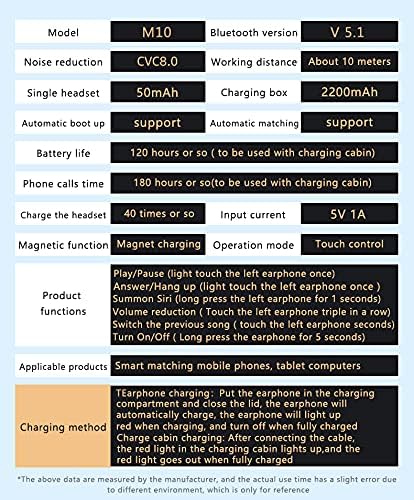
Below are the technical specifications for the NC TWS Bluetooth 5.1 Earphones (Model M10).
| Карактеристика | Детал |
|---|---|
| Модел | М10 |
| Bluetooth верзија | 5.1 |
| Опсег | До 15 метри (49 стапки) |
| Поништување на бучава | CVC 8.0 Noise Cancelling |
| Капацитет на батеријата Ербуд | 50 mAh (секоја слушалка) |
| Капацитет на батеријата на кутијата за полнење | 3500 mAh |
| Време за репродукција на слушалки | 5-6 часа со едно полнење |
| Вкупно време за играње (со футрола за полнење) | До 180 часа |
| Куќиште за полнење Време на полнење | Приближно 1.5 часа (USB-C) |
| Оценка за отпорност на вода | IPX7 |
| Контролен метод | Допрете Контрола |
| Компатибилни уреди | Паметни телефони, лаптопи, таблети, паметни звучници |
Гаранција и поддршка
For warranty information and technical support, please refer to the official NC product webстраницата или директно контактирајте ја нивната служба за корисници. Чувајте ја сметката за купување како доказ за купување за гаранциски побарувања.
Поддршка преку Интернет: Посетете го NC Store on Amazon за информации за производот и ажурирања.
Ask a question about this manual
Ask about setup, troubleshooting, compatibility, parts, safety, or missing instructions. Manuals+ will review the question and use this page’s manual context to help answer it.