
Вовед
The Poly DA75 is a versatile USB-A/USB-C digital adapter designed to connect Poly Quick Disconnect (QD) headsets to computers. It ensures clear audio quality for call center environments, supporting both USB-A and USB-C connections for compatibility with various systems. This adapter is engineered to work seamlessly with platforms such as Avaya, Genesys, and Cisco, providing a reliable audio solution for professionals.
Главните карактеристики вклучуваат:
- Универзална поврзаност: Equipped with both USB-A and USB-C connectors on the cable for broad compatibility with new and legacy equipment.
- Intelligent Headset Recognition: Automatically adjusts audio performance to the specific Poly Quick Disconnect headset for optimized call quality.
- Acoustic Protection: Incorporates features to manage safe volume levels, protecting user hearing.
- Интеграција на платформата: Fully compatible with leading call center platforms including Avaya, Genesys, and Cisco.
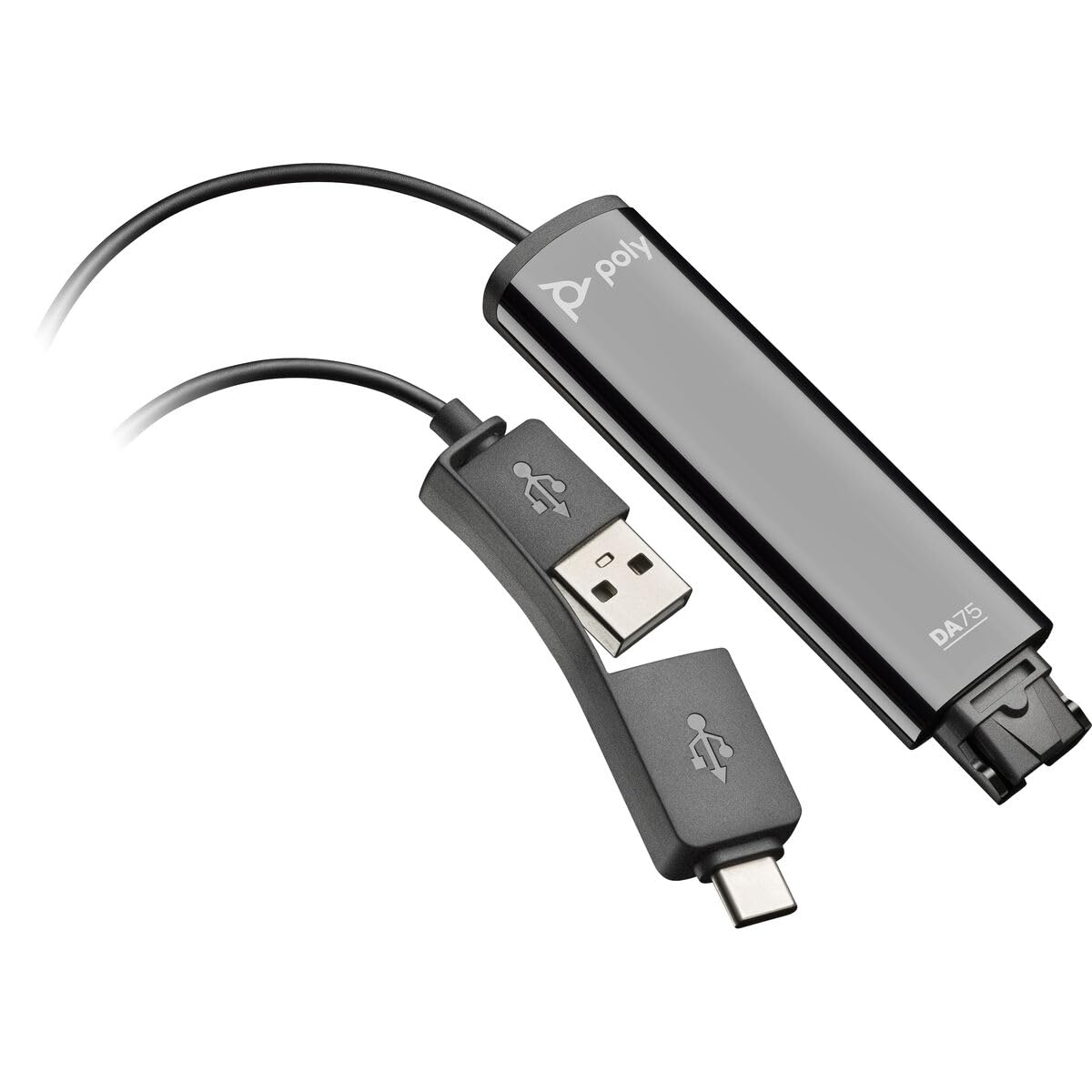
Image: The Poly DA75 USB-A/USB-C Digital Adapter, showing its dual USB-A and USB-C connectors and the Quick Disconnect port for headsets.
Што има во кутијата
The Poly DA75 package typically includes the following items:
- Poly DA75 USB-A/USB-C Digital Adapter
- Документација (Водич за брз почеток, Информации за безбедност)
Note: Headsets are sold separately and are not included with the DA75 adapter.
Поставување
Follow these steps to set up your Poly DA75 Digital Adapter:
- Поврзување на слушалки: Connect your Poly Quick Disconnect (QD) headset to the QD port on the Poly DA75 adapter. Ensure the connection is secure.
- Поврзете се со компјутер:
- If your computer has a USB-A port, use the USB-A connector on the DA75 cable.
- If your computer has a USB-C port, use the USB-C connector on the DA75 cable.
Plug the appropriate USB connector into an available USB port on your computer.
- Инсталација на драјвери: The DA75 is a plug-and-play device. Your operating system (Windows, macOS) should automatically detect the device and install the necessary drivers. This process may take a few moments.
- Потврди препознавање на уредот:
- Windows: Одете на Поставки > Систем > Звук or Контролен панел > Звук. The Poly DA75 should appear as an audio input and output device.
- MacOS: Одете на System Settings > Sound. The Poly DA75 should appear as an input and output device.
Select the Poly DA75 as your default communication device for both playback and recording.
- Конфигурација на софтвер: If you are using communication software (e.g., Avaya, Genesys, Cisco, Microsoft Teams, Zoom), ensure that the Poly DA75 is selected as the audio device within the application's settings.
Упатства за работа
The Poly DA75 adapter facilitates audio communication through your connected Poly QD headset. Its operation is primarily managed through your computer's operating system and communication software.
- Воспоставување/Примање повици: Use your communication software to initiate or answer calls. The audio will be routed through your connected Poly QD headset via the DA75 adapter.
- Контрола на јачината на звукот: Adjust the listening volume using your computer's system volume controls or the volume controls within your communication application.
- Исклучување на микрофонот: Mute and unmute your microphone using the controls provided by your communication software.
- Audio Optimization: The DA75 automatically optimizes audio for your specific Poly QD headset. No manual adjustments are typically required for audio profiles.
Одржување
To ensure the longevity and optimal performance of your Poly DA75 Digital Adapter, follow these maintenance guidelines:
- Чистење: Gently wipe the adapter with a soft, dry, anti-static cloth. Do not use liquid cleaners or abrasive materials.
- Складирање: Чувајте го адаптерот на ладно и суво место, подалеку од директна сончева светлина и екстремни температури.
- Ракување: Избегнувајте прекумерно виткање или извиткување на кабелот, особено во близина на конекторите, за да спречите внатрешно оштетување.
- Поврзување: Ensure the Quick Disconnect (QD) connection and USB connections are clean and free of debris before connecting.
Решавање проблеми
If you encounter issues with your Poly DA75 Digital Adapter, refer to the following troubleshooting steps:
| Проблем | Можна причина | Решение |
|---|---|---|
| Нема аудио од слушалките |
|
|
| Микрофонот не работи |
|
|
| Adapter not recognized by computer |
|
|
Спецификации
| Карактеристика | Детал |
|---|---|
| Број на модел | 218266-01 |
| Бренд | ПОЛИ |
| Тип на конектор | USB-A, USB-C (dual connector) |
| Компатибилни уреди | Poly Quick Disconnect (QD) Headsets |
| Специфична употреба | PC, Call Center Platforms (Avaya, Genesys, Cisco) |
| Боја | Црното |
| Димензии на ставката (Д x Ш x В) | 0.98 x 0.39 x 2.95 инчи |
| Тежина на ставката | 30 грама |
| Број на пристаништа | 2 (USB-A/USB-C to QD) |
| UPC | 197029650054, 017229175112 |
Гаранција и поддршка
Информации за гаранцијата: The Poly DA75 Digital Adapter comes with a 2-годишна ограничена гаранција од производителотОваа гаранција ги покрива дефектите во материјалите и изработката при нормална употреба. Ве молиме задржете го доказот за купување за гаранциски барања.
Техничка поддршка: For technical assistance, product inquiries, or warranty service, please contact Poly customer support. Visit the official Poly website for the most up-to-date support contact information, FAQs, and additional resources.
Онлајн ресурси: Поли поддршка Webсајт