
1. Вовед
This manual provides detailed instructions for the Tyler 16-inch Portable LCD TV Monitor, Model T709. Please read this manual thoroughly before using the product to ensure proper operation and to maximize its lifespan. Keep this manual for future reference.
2. Информации за безбедност
- Не го изложувајте уредот на дожд или влага за да спречите пожар или електричен удар.
- Не го отворајте casing. Целото сервисирање обратете се на квалификуван персонал.
- Обезбедете соодветна вентилација. Не ги блокирајте отворите за вентилација.
- Use only the power adapter and car charger provided by the manufacturer.
- Избегнувајте екстремни температури и директна сончева светлина.
- Handle the screen with care to prevent damage.
3. Содржина на пакетот
Проверете дали сите артикли наведени подолу се вклучени во вашиот пакет:
- Tyler 16-inch Portable LCD TV Monitor (Model T709)
- Далечински управувач
- Батерии за далечински управувач
- AC/DC адаптер за напојување
- Car Charger Adapter (12V)
- Antenna Set (for digital TV and FM receivers)
- RCA Cable (for analogue video input)

Image: All components included with the Tyler 16-inch Portable TV Monitor, including the TV, remote control, batteries, AC/DC adapter, car charger, antenna, and RCA cable.
4. Производот завршиview
The Tyler 16-inch Portable LCD TV Monitor (Model T709) is designed for versatile entertainment on the go. It features a 16-inch widescreen LED display, built-in rechargeable battery, and multiple connectivity options.
Предна страна View

Слика: напред view of the Tyler 16-inch Portable TV Monitor, showcasing the screen, integrated stand, and the included remote control and antenna.
Странични и задни врски
The unit provides various ports for connecting external devices:

Слика: Детална view of the side panel connections, including the USB port, Analogue Video port, HDMI digital video and audio port, and FM radio antenna input.
- USB порта: For external audio/video playback.
- Analogue Video Port: За поврзување на постари уреди.
- HDMI порта: За дигитален видео и аудио влез со висока дефиниција.
- FM Radio Antenna Input: За прием на FM радио.
- DC 12V влез: For power adapter or car charger.
- AV In/Out: Dual AV inputs for DVD players or game systems.
- Jackек за слушалки: За приватно слушање.
5. Поставување
5.1 Почетно полнење
Before first use, fully charge the built-in battery. Connect the AC/DC power adapter to the DC 12V input on the TV and plug it into a wall outlet. The charging indicator will illuminate. A full charge typically takes several hours.
5.2 Антенско поврзување
For receiving digital TV or FM radio signals, connect the included antenna to the appropriate antenna input port on the TV. Extend the antenna fully for optimal reception.
5.3 Вклучување/исклучување
Притиснете го МОЌ button on the TV or the remote control to turn the unit on or off.
5.4 Поврзување на надворешни уреди
- HDMI: Connect an HDMI cable from your device (e.g., Roku, Firestick, game console) to the HDMI port on the TV.
- USB: Вметнете USB-уред во USB-портата за репродукција на медиуми.
- RCA (AV In): Use the provided RCA cable to connect devices like DVD players to the AV In ports.
5.5 Прилагодување на држачот
The TV features a built-in steel stand that can be adjusted for optimal viewing angles. Simply pull out the stand from the back of the unit and position it as desired. The stand allows for a wide range of rotation.

Image: The rear of the TV demonstrating the adjustable, rotating stand for flexible positioning.
6. Упатства за работа
6.1 Функции на далечинскиот управувач
The included remote control provides full functionality for the TV. Ensure batteries are correctly inserted.

Image: The Tyler multimedia remote control, showing various buttons for power, channel, volume, menu navigation, and input selection.
- МОЌНОСТ: Го вклучува/исклучува телевизорот.
- МЕНИ: Пристапува до главното мени за поставки.
- CH +/-: Ги менува каналите.
- VOL +/-: Ја прилагодува јачината на звукот.
- ВЛЕЗ/ИЗВОР: Selects input source (HDMI, AV, USB, TV).
- OK/ENTER: Ги потврдува изборите.
- МУТИРА: Исклучува/вклучува звук на звукот.
- ИНФОРМАЦИИ: Displays channel information.
6.2 Channel Scan (First Time Setup)
- Проверете дали антената е поврзана.
- Вклучете го телевизорот.
- Притиснете го МЕНИ копче на далечинскиот управувач.
- Одете во менито „Канал“ или „Поставување“.
- Select "Auto Scan" or "Auto Tune" and confirm. The TV will search for available digital channels. This process may take several minutes.
6.3 Репродукција на медиуми преку USB
Вметнете USB флеш-уред што содржи компатибилен медиум files (AVI, MOV, MPEG, MP4, MP3, JPEG, etc.) into the USB port. Select "USB" as the input source using the ВЛЕЗ button. Navigate through your files користејќи го далечинскиот управувач.
6.4 Работа со FM радио
Select "FM Radio" as the input source. Use the channel buttons to tune to different radio stations. Perform an auto-scan in the FM radio menu for the first time to find available stations.
6.5 Употреба на слушалки
Connect standard 3.5mm headphones to the headphone jack for private listening. The built-in speakers will automatically mute when headphones are connected.
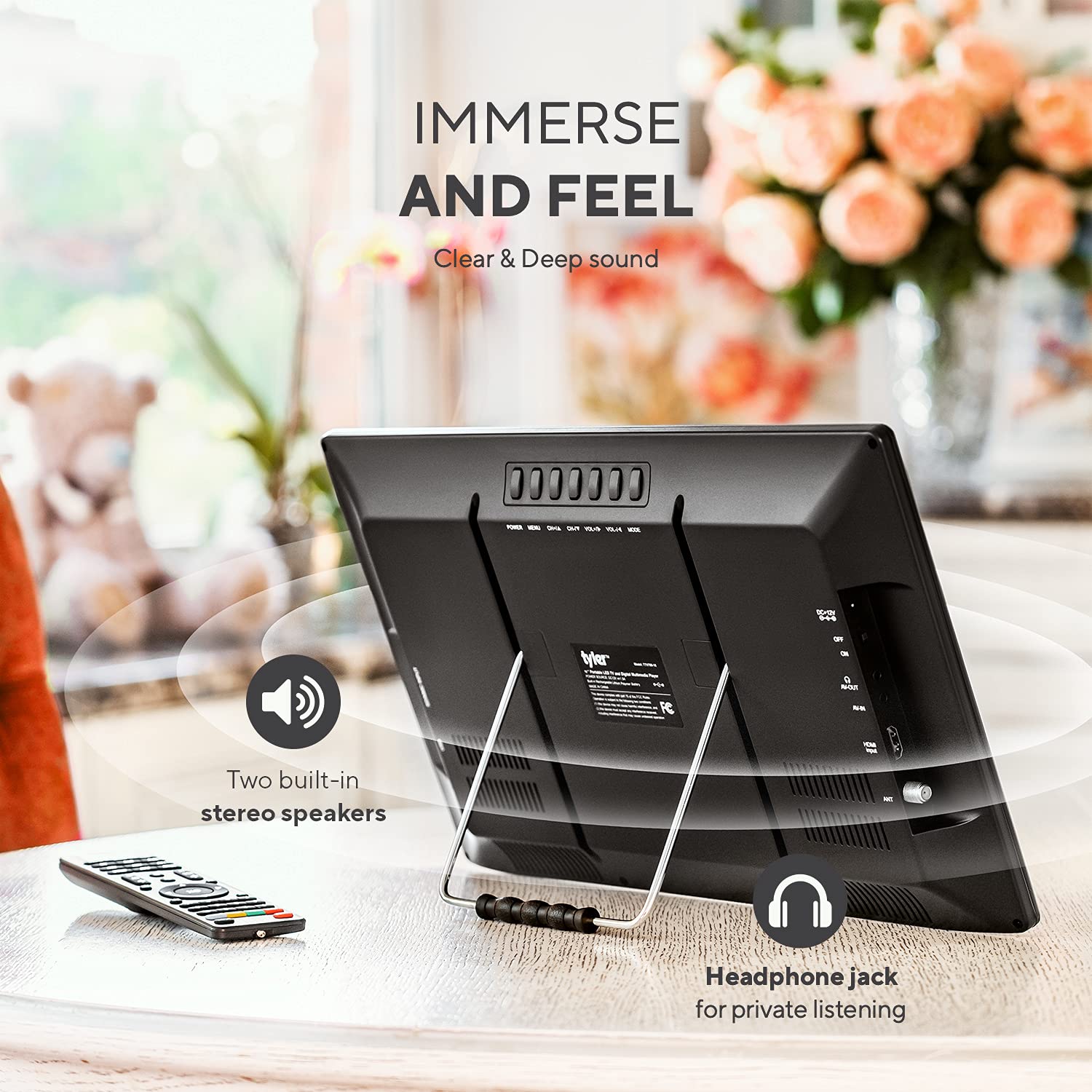
Image: The rear of the TV, indicating the location of the headphone jack for private listening and the two built-in stereo speakers.
7. Одржување
7.1 Чистење на единицата
Избришете го екранот и вasing with a soft, dry, lint-free cloth. For stubborn marks, slightly dampИзмијте ја крпата со вода. Не користете абразивни средства за чистење, восоци или растворувачи.
7.2 Грижа за батерии
- За да го продолжите животниот век на батеријата, избегнувајте често целосно празнење на батеријата.
- If storing the unit for an extended period, charge the battery to approximately 50% every 3-6 months.
- Не ја изложувајте батеријата на екстремна топлина или студ.
8 Смена на проблеми
| Проблем | Можна причина | Решение |
|---|---|---|
| Нема моќ | Battery discharged; Power adapter not connected; Remote control batteries dead. | Charge the battery; Connect the power adapter; Replace remote control batteries. |
| No signal/Poor picture quality | Antenna not connected or positioned correctly; No channel scan performed; Weak broadcast signal. | Connect/adjust antenna; Perform auto channel scan; Try repositioning the TV or antenna. |
| Нема звук или низок волумен | Volume too low; Mute activated; External speakers/headphones not connected properly. | Increase volume; Deactivate mute; Check external audio connections. Note: Built-in speakers are designed for portability and may not offer high fidelity. |
| HDMI влезот не работи | Incorrect input source selected; Faulty HDMI cable; External device not powered on. | Select correct HDMI input; Try a different HDMI cable; Ensure external device is on. |
| Мртви пиксели или линии на екранот | Manufacturing defect or physical damage. | Контактирајте ја поддршката за корисници за помош. |
| Далечинскиот управувач не реагира | Батериите се празни или се неправилно вметнати; Пречка помеѓу далечинскиот управувач и телевизорот. | Заменете ги батериите; Обезбедете ја чистата линија на гледање до инфрацрвениот приемник на телевизорот. |
9. Спецификации
| Карактеристика | Детал |
|---|---|
| Број на модел | Т709 |
| Големина на екранот | 16 инчи |
| Технологија на прикажување | LCD, LED |
| Резолуција | 1080 стр |
| Стапка на освежување | 60 Hz |
| Сооднос на аспект | 16:9 |
| Поврзување | HDMI, USB, VGA, RCA (AV In/Out), Headphone Jack, FM Antenna |
| Извор на енергија | AC/DC Adapter, 12V Car Charger, Built-in Lithium Ion Battery |
| Траење на батеријата | Approximately 4+ hours (TV playback), 25 minutes (HDMI with DVD player) |
| Димензии на производот | 1"D x 1"W x 2"H (Note: These dimensions are as provided in product data and may refer to packaging or a specific component.) |
| Тежина | 4.35 фунти |
| Производител | Тајлер |
10. Гаранција и поддршка
10.1 Информации за гаранцијата
This product is covered by a manufacturer's warranty. Please refer to the warranty card included in your package or visit the official Tyler webстраница за детални услови за гаранција. Зачувајте го доказот за купување за рекламации за гаранција.
10.2 Поддршка за корисници
For technical assistance, troubleshooting not covered in this manual, or warranty inquiries, please contact Tyler customer support. Contact details can typically be found on the manufacturer's webна локацијата или на пакувањето на производот.
Note: Specific contact information is not provided in this manual. Please refer to the product packaging or manufacturer's webстраница за најактуелните детали за поддршка.