
1. Вовед
This manual provides detailed instructions for the installation, operation, and maintenance of your Wavtech link2 2-Channel Line Output Converter. Please read this manual thoroughly before attempting installation or operation to ensure proper function and to prevent damage to the unit or connected components. The Wavtech link2 is designed to convert high-level speaker signals from a factory or aftermarket head unit into low-level RCA signals, allowing for the addition of aftermarket amplifiers to your audio system.
2. Информации за безбедност
- Секогаш исклучувајте го негативниот терминал на батеријата на возилото пред да започнете со какви било електрични работи.
- Осигурајте се дека сите жици се правилно изолирани и обезбедени за да се спречат кратки споеви и оштетувања.
- Do not install the unit in locations where it may be exposed to excessive heat, moisture, or direct sunlight.
- Консултирајте се со професионален инсталатер на аудио системи за автомобили ако не сте сигурни за кој било дел од процесот на инсталација.
- Use appropriate fuses for all power connections to protect against electrical surges.
3. Содржина на пакетот
Проверете дали сите артикли се присутни во пакувањето:
- Wavtech link2 2-Channel Line Output Converter
4. Производот завршиview
The Wavtech link2 is a compact and efficient line output converter. Familiarize yourself with its components and connections.

Слика 4.1: Предна страна view of the Wavtech link2, showing the Wavtech logo and 'link2' model designation.
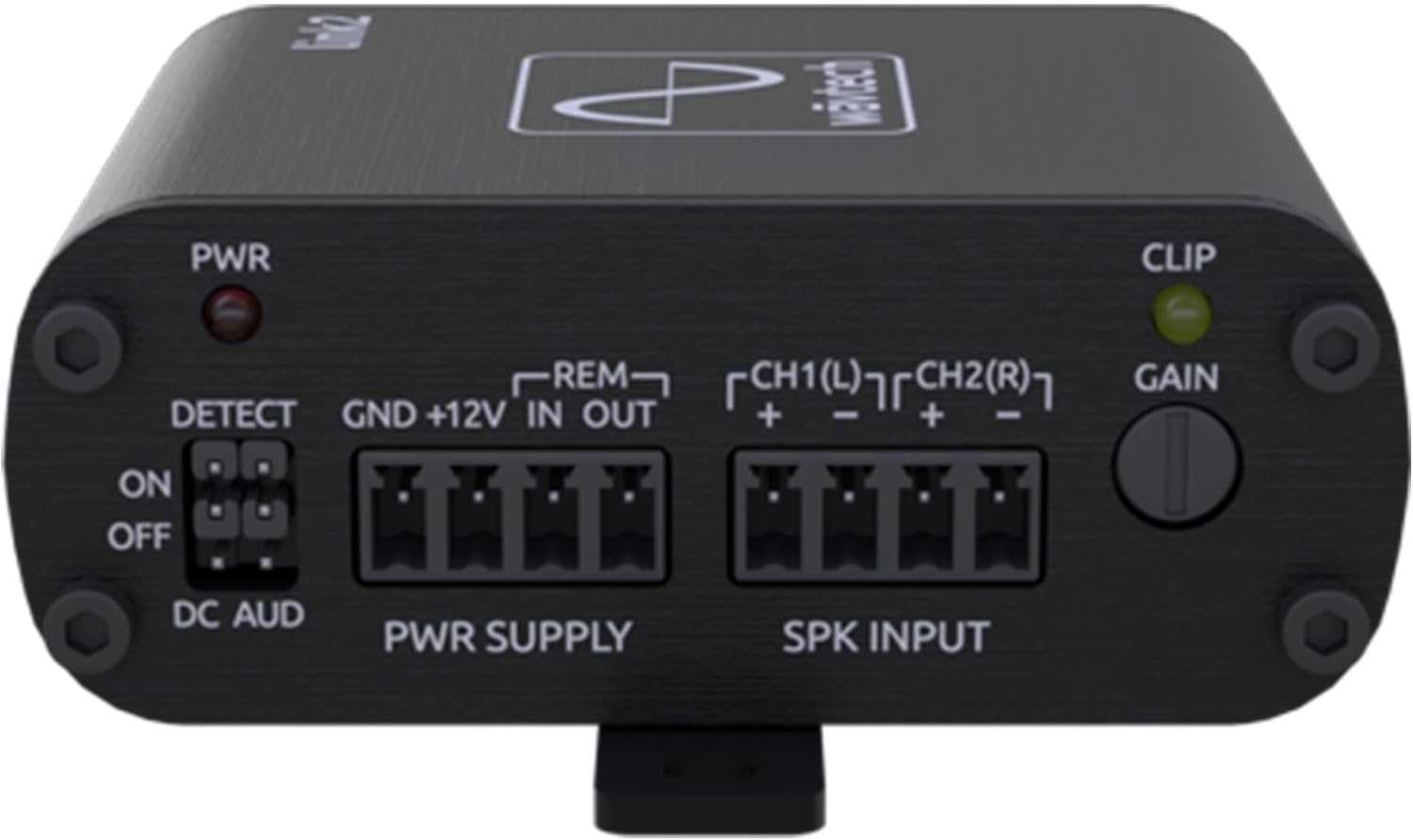
Слика 4.2: Врвот view of the Wavtech link2, illustrating the power (PWR), detect (DETECT), power supply (PWR SUPPLY), speaker input (SPK INPUT), clip indicator (CLIP), and gain control (GAIN) sections.

Слика 4.3: Заден дел view of the Wavtech link2, displaying the CH1(L) and CH2(R) RCA output connectors.

Слика 4.4: Врвот view of the Wavtech link2, indicating approximate width (2.5 inches) and depth (2.9 inches) dimensions.

Слика 4.5: Страна view of the Wavtech link2, showing the approximate height dimension (1.1 inches).
5. Поставување и инсталација
Правилната инсталација е клучна за оптимални перформанси. Внимателно следете ги овие чекори.
5.1 Приклучоци за жици
- Power Supply (PWR SUPPLY):
- ГНД: Connect to a clean, solid chassis ground point in the vehicle. Ensure good metal-to-metal contact.
- + 12V: Connect to a constant +12V power source from the vehicle's battery, fused appropriately (e.g., 1A fuse, not included).
- ОСТАВЕТЕ ВО: Connect to the remote turn-on output of your head unit (if available). This will turn the link2 on/off with the head unit.
- ОТСТРАНЕТЕ се: Provides a remote turn-on signal for your aftermarket ampживописен.
- Speaker Input (SPK INPUT): Connect the high-level speaker wires from your factory or aftermarket head unit to these terminals. Ensure correct polarity.
- CH1(L) + / -: Connect to the left channel speaker output wires.
- CH2(R) + / -: Connect to the right channel speaker output wires.
- The link2 accepts up to 40V RMS input.
- Output (OUTPUT): Connect standard RCA cables from the link2's CH1(L) and CH2(R) outputs to the input of your aftermarket ampживописен.
5.2 DETECT Switch
The DETECT switch manages how the link2 turns on and off.
- НА: The link2 will turn on when it detects an audio signal on the speaker inputs. This is suitable for most factory systems that do not provide a remote turn-on wire.
- OFF (DC AUD): The link2 will turn on when it detects a DC offset on the speaker inputs. This is common in some factory systems.
- If using the REM IN terminal for turn-on, the DETECT switch setting is less critical, but it is generally recommended to set it to 'OFF' or 'DC AUD' if a dedicated remote wire is used.
5.3 Прилагодување на засилување
The GAIN knob controls the output level of the link2. Adjust this to match the input sensitivity of your ampживописен.
- Start with the GAIN knob fully counter-clockwise (minimum).
- Play a test tone (e.g., 0dB, 1kHz) at about 75% of your head unit's maximum volume.
- Slowly turn the GAIN knob clockwise until the CLIP indicator light just begins to flicker, then back it off slightly until the light remains off. This ensures a clean, unclipped signal to your ampживописен.
5.4 Load Sense
The link2 features load detect functionality for factory systems that require resistance on the speaker outputs to remain active. This ensures the factory head unit does not shut down or reduce output when connected to the link2.
6. Упатства за работа
Once installed and configured, the Wavtech link2 operates automatically. It will turn on and off with your head unit based on the DETECT switch setting or the remote input. The primary operational aspect is ensuring the gain is set correctly to provide a clean signal to your amplifier without clipping.
7. Одржување
The Wavtech link2 requires minimal maintenance.
- Држете го уредот чист од прашина и остатоци. Користете мека, сува крпа за чистење.
- Осигурајте се дека сите врски се безбедни. Периодично проверувајте ги жиците за какви било знаци на абење или корозија.
- Избегнувајте изложување на уредот на екстремни температури или влага.
8 Смена на проблеми
If you encounter issues with your Wavtech link2, refer to the following common problems and solutions:
| Проблем | Можна причина | Решение |
|---|---|---|
| Нема аудио излез |
|
|
| Уредот не се вклучува |
|
|
| Искривен звук |
|
|
9. Спецификации
- Тежина на ставката: 8 унци
- Димензии на производот: 78.74 x 78.74 x 23.62 inches (Note: These dimensions appear to be incorrect based on product images showing 2.5" x 2.9" x 1.1". Please refer to physical product for accurate measurements.)
- Број на модел на ставка: link2
- ASIN: B09BB4SRTY
- Производител: Wavtech
- Влез волуменtage: Up to 40V RMS (Speaker Level)
- Канали: 2-Канал
- Карактеристики: Load Detect, Remote Turn-On Output
10. Гаранција и поддршка
The Wavtech link2 comes with a 1-годишна гаранција на производителот. For warranty claims or technical support, please contact Wavtech customer service or the authorized dealer from whom you purchased the product. Keep your proof of purchase for warranty validation.
For further assistance, visit the Wavtech website or consult your local authorized dealer.