
1. Производот завршиview
The NC GBS-8100 is a versatile video converter board designed for arcade game systems. It facilitates the conversion of VGA/SVGA/XGA/SXGA signals to CGA, RGBS, CVBS, or S-Video outputs, making it compatible with a wide range of display devices, including older arcade monitors and standard definition televisions. This board features true digital 24-bit A/D conversion for accurate color reproduction and offers user controls for image adjustment.
Клучни карактеристики:
- Влез на енергија: DC 5V/2A via 6.3mm connector.
- Input Signal Support: VGA/SVGA/XGA/SXGA resolutions (640x480, 800x600, 1024x768, 1280x1024).
- Излезни опции: CGA (15K), VGA bypass, Video (CVBS), S-Video.
- Контрола на сликата: Supports position and zoom adjustments.
- Длабочина на боја: True digital 24-bit A/D converter for 16.7-million color conversion.
- Мени за OSD: English On-Screen Display for adjustments.
- Контроли на корисникот: Dedicated keys for Output Switch, Image Zoom, Image Position, and Output Adjust.
- Компатибилност: Supports NTSC and PAL video standards.
Содржина на пакетот:
- 1x Video Output Converter Board (GBS-8100)
- 1x Power supply wire

Figure 1: The GBS-8100 converter board along with the included power supply wire and a multi-color signal cable.
2. Поставување и инсталација
This section provides instructions for connecting and setting up your GBS-8100 converter board.
2.1. Идентификација на компоненти
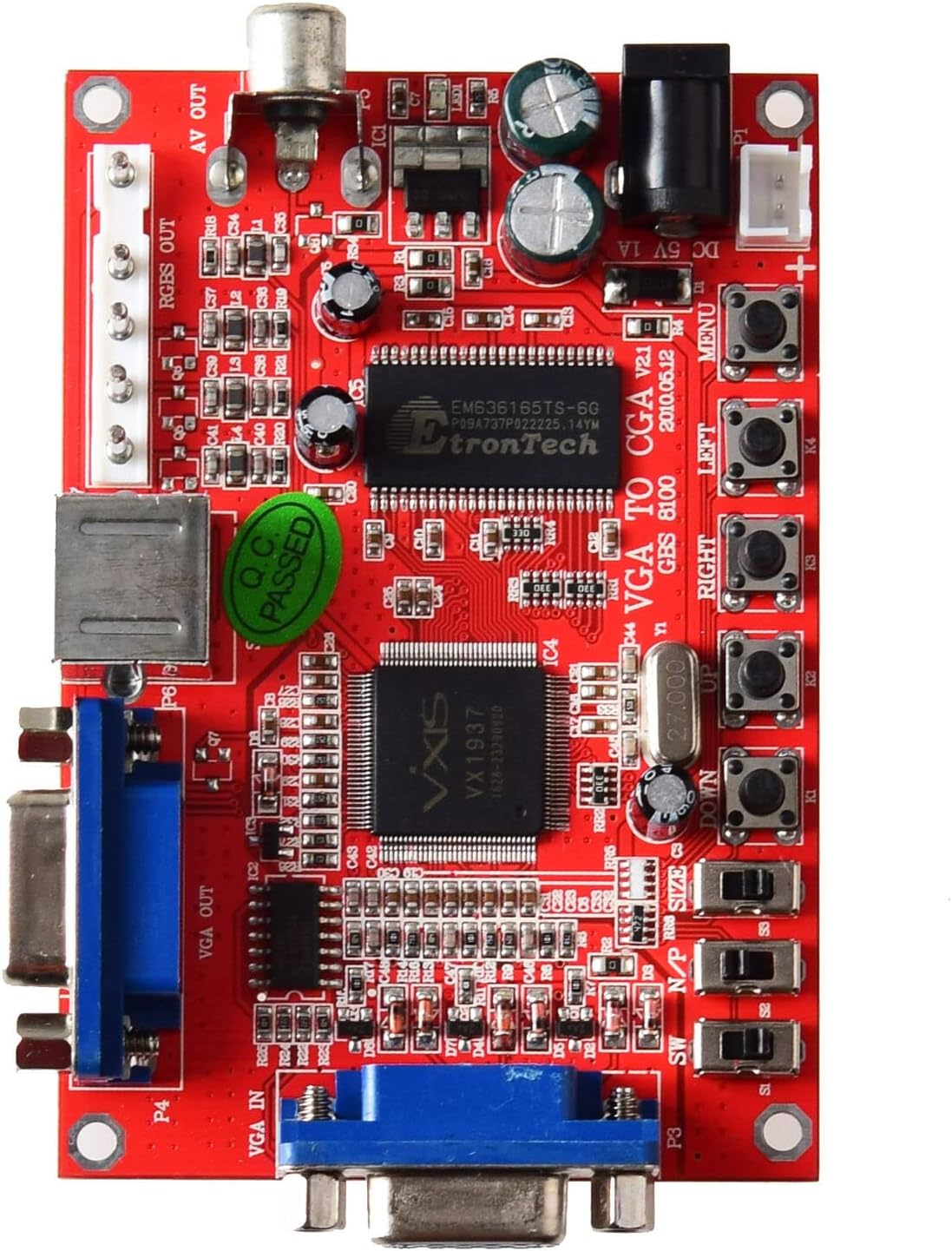
Слика 2: Врв view of the GBS-8100 board, highlighting VGA IN, VGA OUT, AV OUT, RGBS OUT, S-Video port, DC 5V input, and control buttons.
- VGA IN (P3): Connect your source device (e.g., PC, game console) with a VGA output here.
- VGA OUT (P4): For VGA bypass, connect a VGA monitor here.
- RGBS/CGA OUT (P7): Connect to an arcade monitor or display that accepts RGBS or CGA signals.
- AV OUT (P5): Connect to a standard definition TV using a composite video cable.
- S-Video OUT (P6): Connect to a TV or display using an S-Video cable.
- Влез на еднонасочна струја 5V/2A: Connect the included power supply wire here. Ensure the power supply provides 5V DC at 2A.
- Контролни копчиња: Buttons for MENU, UP, DOWN, LEFT, RIGHT, Output Switch, Image Zoom, Image Position, Output Adjust.
2.2. Чекори за поврзување
- Поврзување за напојување: Connect the provided power supply wire to the DC 5V/2A input on the GBS-8100 board. Connect the other end to a suitable 5V DC power source (not included, typically a power adapter).
- Влезен извор: Connect your VGA source (e.g., PC, arcade JAMMA board with VGA output) to the VGA IN (P3) port on the converter board.
- Излезен екран:
- За CGA/RGBS output: Connect your arcade monitor or display to the RGBS/CGA OUT (P7) пристаниште.
- За Composite Video (AV) output: Connect your TV to the AV OUT (P5) пристаниште.
- За С-Видео output: Connect your TV to the S-Video OUT (P6) пристаниште.
- За VGA Bypass: Connect a VGA monitor to the VGA OUT (P4) пристаниште.
- Аудио (опционално): If your source provides audio via VGA, ensure your display setup can handle it, or use a separate audio solution as this board primarily handles video.

Слика 3: Одблиску view of the VGA IN, VGA OUT, and S-Video ports on the GBS-8100 board.
3. Упатства за работа
Once connected, power on the GBS-8100 board and your display. The board will automatically detect the input signal. Use the onboard buttons to navigate the OSD menu and adjust settings.
3.1. Мени за приказ на екран (OSD).
Притиснете го МЕНИ button to access the OSD. Use the UP и ДОЛУ buttons to navigate through menu options, and ЛЕВО и ТОЧНО buttons to change values or select sub-menus.
3.2. Кориснички контроли
- Излезен прекинувач: Cycles through available output modes (CGA, Video, S-Video, VGA Bypass).
- Зумирање на сликата: Adjusts the zoom level of the displayed image.
- Image Position: Adjusts the horizontal and vertical position of the image on the screen.
- Прилагодување на излезот: Fine-tunes specific output parameters.
3.3. Supported Input/Output Resolutions
| Категорија | Детали |
|---|---|
| Input Signal (Auto Scan) |
|
| Излезен сигнал |
|
4. Одржување
The GBS-8100 converter board is designed for durability and requires minimal maintenance.
- Чистење: Use a soft, dry cloth to gently wipe the surface of the board. Avoid using liquid cleaners or solvents, as they may damage the electronic components.
- Животна средина: Operate the board in a clean, dry environment, away from excessive dust, moisture, and extreme temperatures.
- Ракување: Handle the board by its edges to avoid touching components, especially when powered on.
- Исклучено: Секогаш исклучувајте го напојувањето пред да правите или менувате какви било поврзувања.
5 Смена на проблеми
If you encounter issues with your GBS-8100 converter board, refer to the following common problems and solutions:
| Проблем | Можна причина / решение |
|---|---|
| Нема слика на екранот. |
|
| Сликата е искривена или трепка. |
|
| OSD menu not appearing or unresponsive. |
|
| Боите се неточни. |
|
6. Спецификации
Detailed technical specifications for the GBS-8100 converter board.
| Параметар | Вредност |
|---|---|
| Број на модел | ГБС-8100 |
| Влез за напојување | DC 5V/2A (6.3mm connector) |
| Поддршка за влезен сигнал | VGA/SVGA/XGA/SXGA (640x480, 800x600, 1024x768, 1280x1024) |
| Input Signal Frequencies |
|
| Видови излезни сигнали | CGA (15K), VGA (Bypass), Video (CVBS), S-Video |
| Output Signal Resolutions |
|
| Конверзија на боја | True digital 24-bit A/D converter (16.7 million colors) |
| Јазик на OSD | Англиски јазик |
| Димензии (приближно) | 3.94 x 3.15 x 1.18 инчи (Димензии на пакетот) |
| Тежина на ставката | 3.52 унци (0.1 килограми) |
7. Гаранција и поддршка
This section provides information regarding product warranty and customer support.
7.1. Информации за гаранцијата
Specific warranty details for the NC GBS-8100 converter board are typically provided at the point of purchase or within the product packaging. Please refer to your purchase receipt or contact the seller for precise warranty terms and conditions. Generally, electronic components may come with a limited manufacturer's warranty covering defects in materials and workmanship.
7.2. Поддршка за корисници
For technical assistance, troubleshooting beyond this manual, or inquiries regarding your product, please contact the seller or manufacturer directly. Contact information can often be found on the product packaging, the seller's webстраницата или вашата документација за купување.
За општи прашања, можете да ја посетите NC Store on Amazon.