
1. Вовед
Ви благодарам за купувањетоasing the SIMATE 6.5-inch Self-Balancing Hoverboard. This manual provides essential information for the safe operation, maintenance, and troubleshooting of your device. Please read this manual thoroughly before using the hoverboard to ensure a safe and enjoyable experience. Keep this manual for future reference.

Image 1.1: The SIMATE 6.5-inch Self-Balancing Hoverboard, showcasing its design and LED lights.
2. Информации за безбедност
Your safety is paramount. Operating a hoverboard carries inherent risks. Adhere to all safety guidelines to prevent injury or damage.
- UL2272 Safety Certified: This hoverboard has passed UL2272 safety certification, ensuring compliance with U.S. safety regulations for electrical systems.
- Заштитна опрема: Always wear a helmet, knee pads, elbow pads, and wrist guards when riding.
- Граници за возраст и тежина: This product is recommended for users within the specified age and weight ranges. Refer to the specifications section for details.
- Еколошки услови: Do not ride in wet conditions, on uneven terrain, or near traffic. Avoid steep inclines.
- Свесност: Be aware of your surroundings, pedestrians, and obstacles.
- Контрола на брзина: Operate at a safe speed. The hoverboard has built-in over-speed protection.
- Поставување на стапалата: Always place your feet firmly on the non-slip footpads.

Image 2.1: Visual representation of the hoverboard's key performance and safety features, including UL2272 certification, max speed, max distance, max weight, and solid rubber wheels.
3. Содржина на пакетот
Проверете дали сите артикли се присутни во пакувањето:
- SIMATE 6.5-inch Self-Balancing Hoverboard
- Полнач за напојување
- Упатство за употреба
4. Производот завршиview
Familiarize yourself with the different parts of your SIMATE hoverboard.

Image 4.1: Labeled diagram of the hoverboard, indicating the Non-Slip Footpad, Battery Indicator light, 360° Rotation Axis, LED Front Light, Switch and Charging port, and 6.5" Wheel with LED Lights.
- Non-Slip Footpad: Provides grip for your feet during operation.
- Индикаторска светлина за батерија: Го прикажува тековното ниво на батерија.
- 360° Rotation Axis: Allows for smooth turns and maneuvers.
- LED предно светло: Enhances visibility and adds to the aesthetic.
- Switch and Charging Port: Power button and port for connecting the charger.
- 6.5" Wheel with LED Lights: Solid rubber wheels with integrated LED lighting.
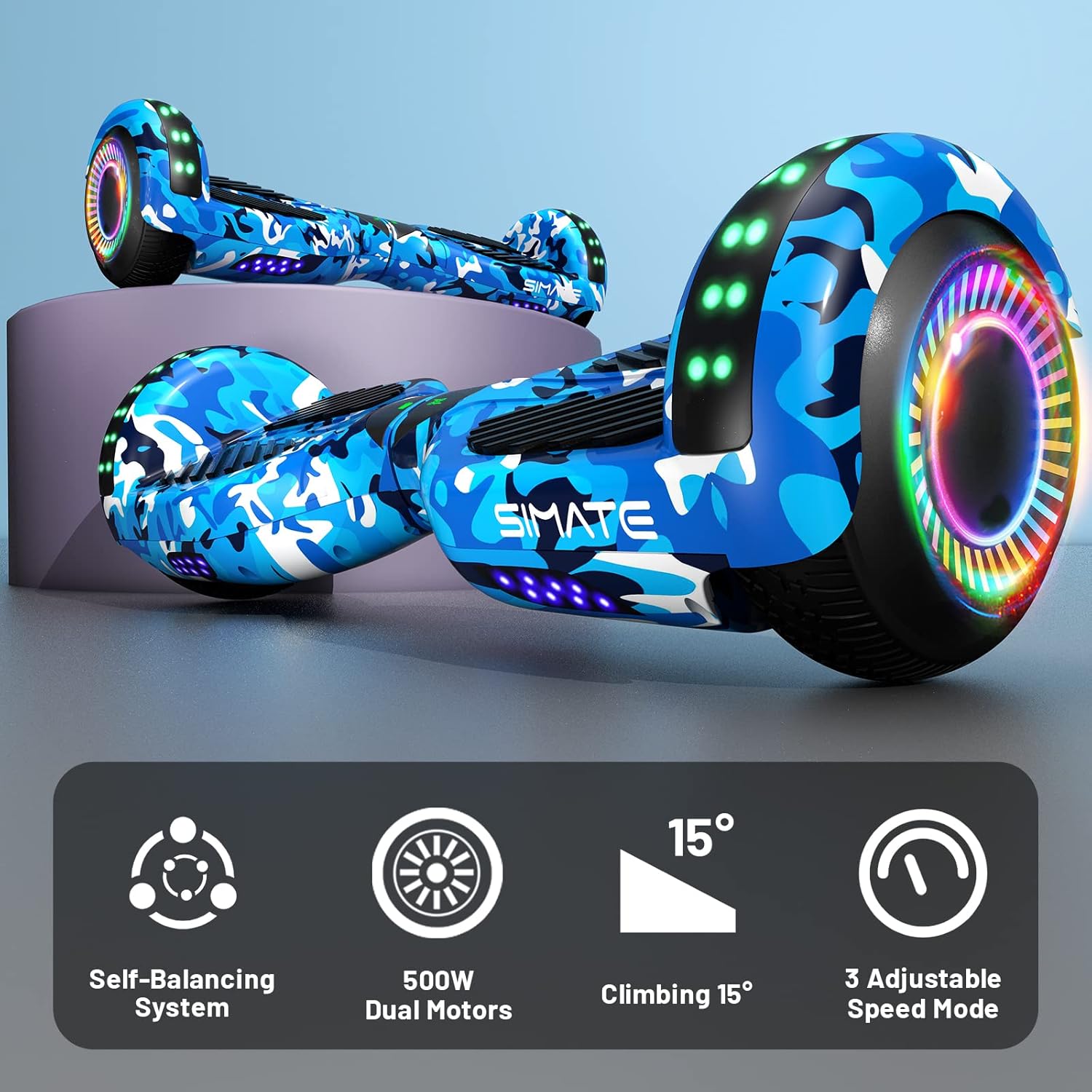
Image 4.2: Icons illustrating key features: Self-Balancing System, 500W Dual Motors, 15° Climbing capability, and 3 Adjustable Speed Modes.
5. Поставување
5.1 Почетно полнење
- Осигурајте се дека ховербордот е исклучен.
- Поврзете го полначот со приклучокот за полнење на ховербордот.
- Приклучете го полначот во стандарден штекер.
- The battery indicator light will show charging status. Charge until the indicator shows a full charge (typically 2-3 hours).
- Не преполнувајте ја батеријата. Исклучете го полначот откако целосно ќе се наполни.
5.2 Calibration (First Use)
For optimal performance, it is recommended to calibrate the hoverboard before its first use or if it seems unbalanced.
- Поставете го ховербордот на рамна, рамна површина.
- Осигурајте се дека ховербордот е исклучен.
- Press and hold the power button for approximately 5-10 seconds until the indicator lights flash.
- Release the power button. The hoverboard is now calibrated.
- Power off and then power on the hoverboard normally before riding.
6. Упатства за работа
6.1 Возење на ховерборд
- Power on the hoverboard. The self-balancing system will activate.
- Place one foot on a footpad, ensuring the hoverboard remains level.
- Quickly step onto the other footpad with your second foot. Maintain a relaxed posture.
- Наведнете се малку напред за да се движите напред и наведнете се назад за да забавите или да се вратите наназад.
- To turn, apply gentle pressure with one foot (e.g., press left footpad down to turn right).
- За да се симнете од коњот, симнете се од една нога одеднаш, осигурувајќи се дека ховербордот останува стабилен.
6.2 Функција на Bluetooth звучник
The hoverboard features a built-in Bluetooth speaker for audio playback.
- Ensure the hoverboard is powered on.
- Активирајте Bluetooth на вашиот паметен телефон или аудио уред.
- Пребарај за available Bluetooth devices and select "SIMATE Hoverboard" (or similar name).
- Once paired, you can play audio through the hoverboard's speakers.

Image 6.1: The hoverboard's integrated Bluetooth speaker and LED lights, enhancing the riding experience.
6.3 LED светла
The hoverboard is equipped with bright LED lights on the front and wheels. These lights activate automatically when the hoverboard is powered on, providing increased visibility and a dynamic appearance during use.
6.4 режими на брзина
The SIMATE hoverboard offers 3 adjustable speed modes. Consult the specific instructions provided with your hoverboard for details on how to switch between these modes, typically involving a sequence of power button presses or an associated mobile application if available.
7. Одржување
7.1 Чистење
- Power off the hoverboard before cleaning.
- Користете мека, гamp cloth to wipe down the exterior. Avoid using harsh chemicals or abrasive cleaners.
- Do not spray water directly onto the hoverboard, as this can damage electronic components.
7.2 Грижа за батерии
- Полнете ја батеријата целосно пред првата употреба.
- Avoid completely draining the battery. Recharge it regularly, even if not in frequent use.
- Чувајте го ховербордот на ладно и суво место, подалеку од директна сончева светлина и екстремни температури.
7.3 Складирање
When storing the hoverboard for extended periods, ensure it is fully charged and stored in a dry environment. Periodically charge the battery (e.g., every 2-3 months) to maintain battery health.
8 Смена на проблеми
If you encounter issues with your SIMATE hoverboard, refer to the following common problems and solutions:
| Проблем | Можна причина | Решение |
|---|---|---|
| Ховербордот не се вклучува | Слаба батерија; Копчето за вклучување не е правилно притиснато | Charge the hoverboard; Ensure power button is pressed firmly. |
| Hoverboard is unbalanced or beeping | Needs calibration; Sensor issue | Perform calibration as described in Section 5.2. If issue persists, contact support. |
| Светлата не работат | Loose connection; LED malfunction | Ensure hoverboard is powered on. If issue persists, contact support. |
| Bluetooth не се поврзува | Hoverboard not in pairing mode; Device Bluetooth off | Ensure hoverboard is on. Check device Bluetooth settings. Try re-pairing. |
| Краток век на батеријата | Батеријата не е целосно наполнета; Стара батерија | Ensure full charge. Battery performance may degrade over time. |
For issues not listed here or if troubleshooting steps do not resolve the problem, please contact SIMATE customer support.
9. Спецификации
Detailed technical specifications for the SIMATE 6.5-inch Self-Balancing Hoverboard:
| Карактеристика | Спецификација |
|---|---|
| Име на моделот | SIMATE Hoverboard (P6) |
| Димензии на производот | 55.88 x 17.78 x 17.78 cm |
| Тежина на производот | 6.35 кг |
| Големина на тркала | 6.5 inches (Solid Rubber Wheels) |
| Моќност на моторот | Dual 250W motors (Total 500W) |
| Максимална брзина | 7.5 Miles per Hour (approx. 12 km/h) |
| Максимален опсег | 7.5 Miles (approx. 12 km) |
| Максимално оптоварување | 220 фунти (приближно 100 кг) |
| Агол на качување | До 15 степени |
| Тип на батерија | Lithium (1 A battery included) |
| Сертификација за безбедност | Сертифициран UL2272 |
| Посебни карактеристики | Built-In Bluetooth speaker, LED Lights, Light Up Wheels, Self-Balancing System, 3 Adjustable Speed Modes |
| Препорачана употреба | Затворен, Надворешен |
| Материјал | Aluminum frame and solid rubber wheels |
10. Гаранција и поддршка
For warranty information, please refer to the documentation included with your purchase or contact the retailer. For technical support, replacement parts, or any other inquiries, please reach out to SIMATE customer service through their official channels.