
Fnatic BOLT
Fnatic BOLT Wireless Gaming Mouse User Manual
Вовед
This manual provides detailed instructions for the setup, operation, maintenance, and troubleshooting of your Fnatic BOLT Wireless Gaming Mouse. Please read this manual thoroughly before using the product to ensure optimal performance and longevity.
Производот завршиview
The Fnatic BOLT is a lightweight wireless gaming mouse designed for high performance. It features a durable construction and versatile connectivity options.
Компоненти
- Копчиња за лев и десен клик
- Тркало за лизгање
- DPI Cycle Button (typically located on the bottom or top)
- Странични копчиња (напред/назад)
- Приклучок за полнење USB-C
- Wireless Receiver (dongle)

Слика 1: Врв view of the Fnatic BOLT Wireless Gaming Mouse, showing the main click buttons and scroll wheel.

Слика 2: Аголна view of the Fnatic BOLT Wireless Gaming Mouse, highlighting the two programmable side buttons.

Слика 3: Предна страна view of the Fnatic BOLT Wireless Gaming Mouse, displaying the USB-C charging port.
Поставување
1. Почетно полнење
Before first use, it is recommended to fully charge the Fnatic BOLT mouse.
- Поврзете го испорачаниот USB-C кабел со приклучокот за полнење на предната страна од глувчето.
- Поврзете го другиот крај од USB-C кабелот со напојуван USB порт на вашиот компјутер или со USB адаптер за ѕид.
- The mouse's indicator light will show charging status (refer to product documentation for specific light patterns). A full charge typically takes a few hours.
2. Поврзување со вашиот компјутер
The Fnatic BOLT supports two wireless connection modes: 2.4 GHz wireless (via USB dongle) and Bluetooth.
2.1. Безжична конекција од 2.4 GHz
- Locate the USB wireless receiver (dongle) that came with your mouse.
- Приклучете го USB-приемникот во достапна USB порта на вашиот компјутер.
- Вклучете го глувчето користејќи го прекинувачот за вклучување што се наоѓа на дното од глувчето.
- The mouse should automatically connect to the receiver. The indicator light will confirm a successful connection.
2.2. Поврзување со Bluetooth
- Проверете дали Bluetooth-от на вашиот компјутер е овозможен.
- Turn on the mouse and switch it to Bluetooth mode (refer to the mouse's bottom switch or button for mode selection).
- На вашиот компјутер, одете во поставките за Bluetooth и пребарајте нови уреди.
- Select "Fnatic BOLT" from the list of available devices to pair.
- The mouse's indicator light will confirm successful pairing.
Упатства за работа
Прилагодување на DPI
The Fnatic BOLT mouse allows you to adjust its Dots Per Inch (DPI) sensitivity. This mouse features 4 preset DPI levels.
- Locate the DPI cycle button, typically on the bottom of the mouse.
- Press the DPI button to cycle through the available sensitivity settings.
- An indicator light (often on the scroll wheel or top of the mouse) may change color or flash to indicate the current DPI level.
Функции на копчињата
- Лев клик: Примарна акција, селекција.
- Десен клик: Контекстно мени, секундарно дејство.
- Кликнување на тркалото за скролување: Middle click, often used for opening links in new tabs or specific in-game functions.
- Скролувајте нагоре/надолу: Navigating documents or web страници.
- Странични копчиња: Default to Forward/Back in web browsers. These can often be customized via software (if available).
Управување со енергија
- To conserve battery life, turn off the mouse using the power switch when not in use for extended periods.
- The mouse may enter a sleep mode after a period of inactivity. Move the mouse or click a button to wake it up.
- Monitor the battery indicator (if available) to know when to recharge.
Одржување
Чистење
- Regularly clean the mouse surface with a soft, dry, lint-free cloth.
- За тврдокорна нечистотија, малку дampИзбришете ја крпата со вода или благ раствор за чистење. Избегнувајте груби хемикалии.
- Clean the optical sensor on the bottom of the mouse with a cotton swab to ensure accurate tracking.
- Не дозволувајте течностите да навлезат во внатрешните компоненти на глувчето.
Нега на батерии
- Избегнувајте често целосно празнење на батеријата.
- Чувајте го глувчето на ладно и суво место кога не го користите подолг период.
- Не го изложувајте глувчето на екстремни температури.
Решавање проблеми
Глувчето не реагира
- Проверете ја батеријата: Ensure the mouse is charged. Connect it to the USB-C cable and allow it to charge for a period.
- Прекинувач: Verify the mouse's power switch is in the "ON" position.
- Wireless Connection (2.4 GHz):
- Проверете дали USB приемникот е безбедно приклучен во функционален USB порт. Обидете се со друг USB порт.
- Ensure the mouse is within range of the receiver.
- Avoid sources of interference (e.g., other wireless devices, large metal objects).
- Bluetooth конекција:
- Проверете дали Bluetooth-от на вашиот компјутер е овозможен.
- Check if the mouse is in Bluetooth pairing mode or already paired. Re-pair if necessary.
- Remove and re-add the device in your computer's Bluetooth settings.
- Рестартирајте: Рестартирајте го компјутерот.
Неточно следење
- Чист сензор: Исчистете го оптичкиот сензор на дното на глувчето.
- Површина: Ensure you are using the mouse on a suitable surface. Highly reflective or uneven surfaces can affect tracking. A mouse pad is recommended.
- Поставување DPI: Adjust the DPI setting to a level that suits your preference and task.
Краток век на батеријата
- Полнење: Осигурајте се дека глувчето е целосно наполнето.
- Исклучено: Remember to turn off the mouse when not in use.
- Употреба: High-intensity usage or certain settings might consume more power.
Спецификации
| Карактеристика | Детал |
|---|---|
| Бренд | Fnatic |
| Име на моделот | FnaticGear BOLT |
| Број на модел на ставка | БОЛТ |
| Боја | бело |
| Технологија за поврзување | Bluetooth, Wi-Fi (2.4 GHz Wireless) |
| Технологија за откривање на движење | Оптички |
| Број на копчиња | 6 |
| Ориентација на рацете | Во право |
| Посебни карактеристики | Лесни |
| Тип на извор на енергија | Безжичен (батерија што може да се полни) |
| Вклучени батерии | Yes (1 Lithium Metal battery) |
| Содржина на енергија од литиумска батерија | 470 милиониamp Часови (mAh) |
| Димензии на производот | 12.5 x 6.5 x 0.1 см; 69 гр |
| Компатибилни уреди | Лаптоп, персонален компјутер |
| Оперативни системи | Linux, Windows 7, Windows XP (and newer) |
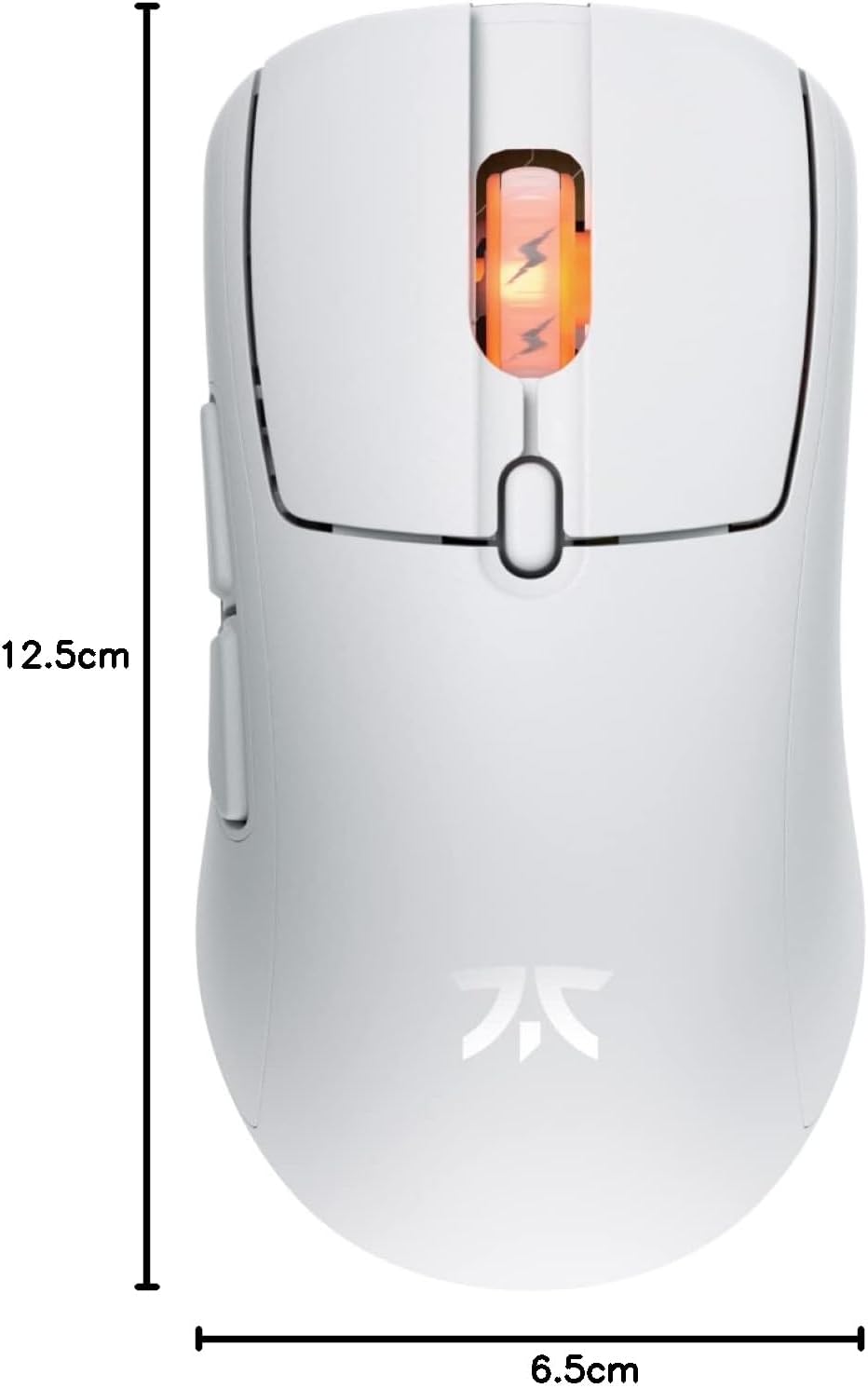
Figure 4: Diagram showing the dimensions of the Fnatic BOLT Wireless Gaming Mouse.
Гаранција и поддршка
For information regarding warranty coverage and technical support, please refer to the official Fnatic webлокацијата или гарантната картичка вклучена со вашиот производ.
You can typically find support resources, FAQs, and contact information on the manufacturer's official support pages.
Ask a question about this manual
Ask about setup, troubleshooting, compatibility, parts, safety, or missing instructions. Manuals+ will review the question and use this page’s manual context to help answer it.