
MX MX-Digital Mixing Console
Упатство за користење на дигиталната миксер MX Classic Pro DM20
Model: MX-Digital Mixing Console | Brand: MX
1. Вовед
The MX Classic Pro DM20 is a 20-channel digital mixer designed for professional audio applications, including live performances, studio recording, and church sound systems. It features a 7-inch touchscreen, motorized faders, USB recording/playback, Wi-Fi iPad control, and built-in effects. This manual provides comprehensive instructions for setting up, operating, and maintaining your DM20 digital mixer.
Ве молиме внимателно прочитајте го ова упатство пред да го користите производот за да обезбедите правилно функционирање и да спречите оштетување.
2. Информации за безбедност
Always observe the following safety precautions to avoid electric shock, short circuit, damages, fire or other hazards.
- Напојување: Користете го само наведениот адаптер за напојување. Осигурајте се дека јачината на звукотtage одговара на барањата на единицата.
- Заземјување: Секогаш поврзувајте го уредот на заземјен штекер.
- Влага: Do not expose the unit to rain, moisture, or excessive humidity. Do not place containers with liquids on the unit.
- Вентилација: Обезбедете соодветна вентилација. Не ги блокирајте отворите за вентилација.
- Топлина: Држете го уредот подалеку од извори на топлина како што се радијатори, грејни тела, шпорети или други апарати (вклучувајќи ampлајфикатори) кои произведуваат топлина.
- Чистење: Исклучете го напојувањето пред чистење. Користете сува, мека крпа. Не користете течни средства за чистење или аеросолни средства за чистење.
- Сервисирање: Не обидувајте се сами да го сервисирате овој производ. Пренесете ги сите сервиси на квалификуван сервисен персонал.
3. Содржина на пакетот
Проверете дали сите артикли наведени подолу се вклучени во вашиот пакет:
- MX Classic Pro DM20 Digital Mixer
- Адаптер за напојување
- USB кабел
- Упатство за употреба (овој документ)
4. Производот завршиview
Familiarize yourself with the various components and controls of your DM20 digital mixer.
4.1 Распоред на предниот панел

Figure 4.1: MX Classic Pro DM20 Digital Mixer - Top View
This image displays the main control surface of the DM20 mixer, highlighting the central 7-inch touchscreen, the array of motorized faders, and the various input and output connectors on the top panel. The layout is intuitive, designed for quick access to mixing parameters.
The front panel features the primary controls and display for the mixer:
- 7-инчен екран на допир: Provides visual feedback and control for all mixer functions, including channel settings, effects, routing, and system configurations.
- Моторизирани фејдери: Eight motorized faders for precise level control of input channels, subgroups, and master outputs. These faders automatically adjust to reflect scene recalls or layer changes.
- Дел за внесување: Includes XLR/TRS combo jacks for microphone and line inputs, along with dedicated stereo inputs.
- Излезен дел: Main stereo outputs, monitor outputs, and auxiliary outputs.
- Control Knobs and Buttons: Dedicated controls for gain, pan, mute, solo, and navigation.
4.2 Приклучоци на задниот панел
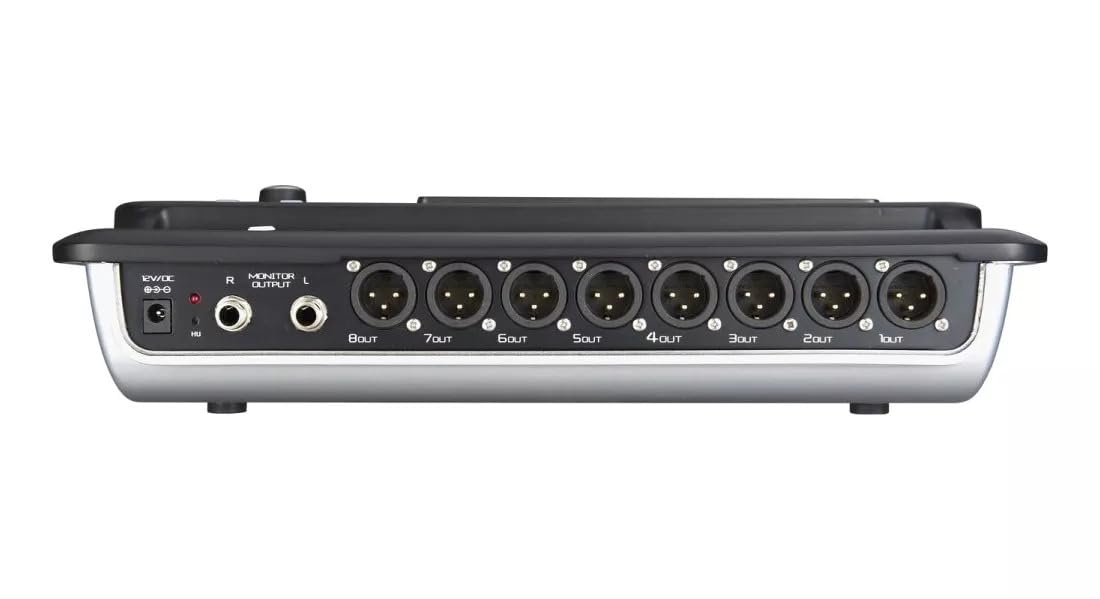
Figure 4.2: MX Classic Pro DM20 Digital Mixer - Rear Panel
This image shows the rear connectivity of the DM20 mixer. Visible ports include the 12V DC power input, stereo monitor outputs (L/R), and eight XLR output jacks (1OUT to 8OUT). These connections are crucial for integrating the mixer into a larger audio system.
The rear panel houses essential connectivity options:
- DC 12V Влез за напојување: Поврзете го испорачаниот адаптер за напојување тука.
- Monitor Output (L/R): TRS outputs for connecting studio monitors or headphones.
- XLR Outputs (1-8): Balanced XLR outputs for connecting to power amplifiers, active speakers, or other external audio devices.
- USB порти: For recording, playback, and firmware updates.
- Етернет пристаниште: For network connectivity and Wi-Fi control.

Figure 4.3: MX Classic Pro DM20 Digital Mixer - Angled View
Ова под агол view provides a comprehensive look at the DM20 mixer, showcasing both the user interface on the top and the various input/output ports on the rear. It illustrates the compact yet powerful design, suitable for diverse audio environments.
5. Поставување
5.1 Почетно вклучување
- Connect the provided power adapter to the DC 12V input on the rear panel of the DM20.
- Приклучете го адаптерот за напојување во соодветен штекер.
- Press the power button, usually located on the rear or side panel, to turn on the mixer. The touchscreen will illuminate, and the system will boot up.
5.2 Поврзување на аудио уреди
Ensure all audio devices (microphones, instruments, speakers) are powered off before making connections.
- Микрофони/Линиски влезови: Connect microphones or line-level instruments to the XLR/TRS combo jacks on the top panel. The DM20 supports up to 20 input channels.
- Главни резултати: Connect the XLR outputs (1-8) on the rear panel to your power amplifier or active speakers. Use outputs 1 and 2 for your main stereo mix.
- Излези на мониторот: Connect your studio monitors or headphones to the Monitor Output (L/R) TRS jacks.
5.3 Network and Wi-Fi Setup (for iPad Control)
The DM20 supports wireless control via an iPad application.
- Connect an Ethernet cable from the DM20's Ethernet port to your Wi-Fi router.
- Ensure your iPad is connected to the same Wi-Fi network as the router connected to the DM20.
- Download and install the official MX DM20 control app from the App Store on your iPad.
- Launch the app. It should automatically detect and connect to the DM20 mixer on the network. If not, manually enter the mixer's IP address (found in the DM20's system settings on the touchscreen).
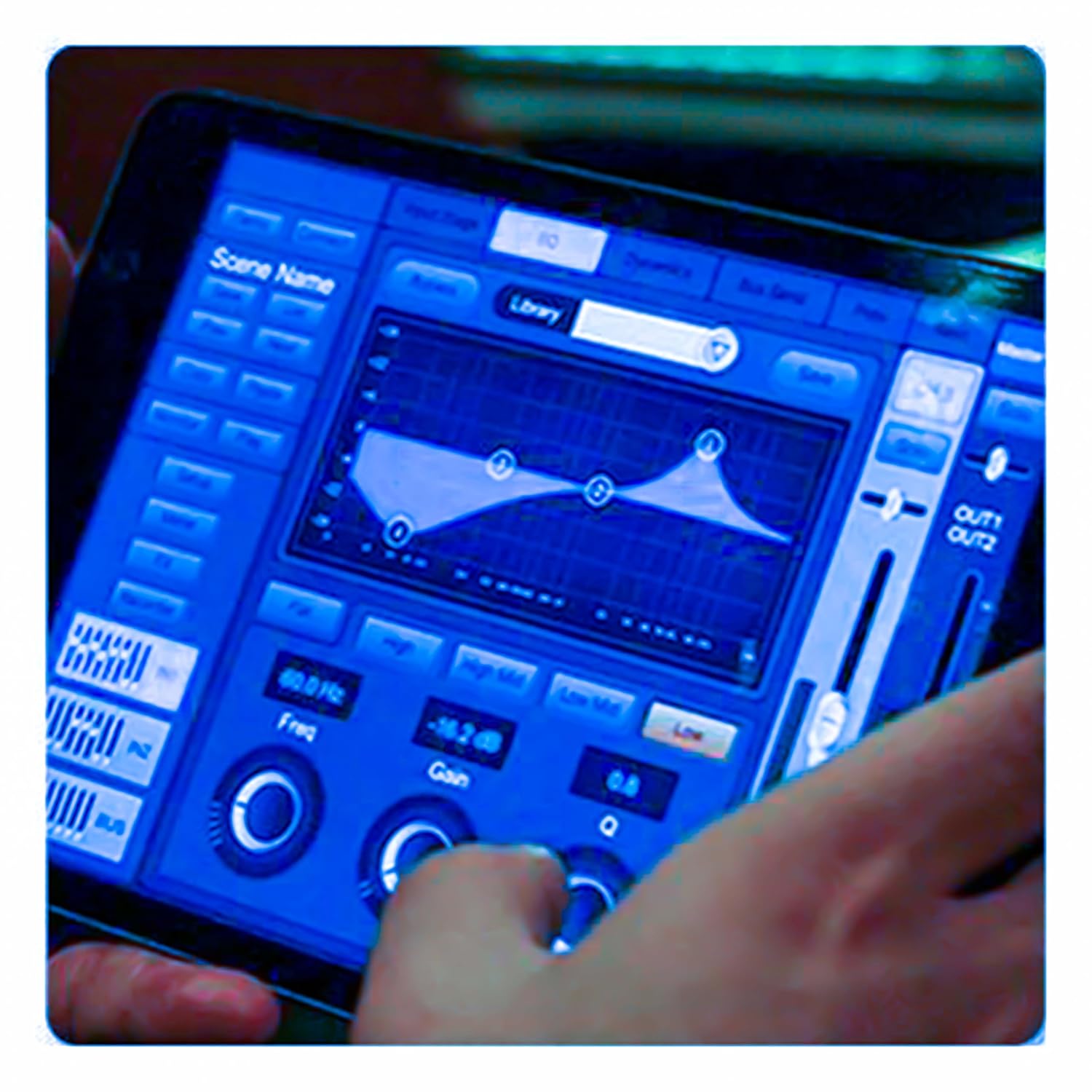
Figure 5.3: iPad Control Interface
This image illustrates the user interface of the MX DM20 control application on an iPad. It shows detailed controls for equalization, dynamics, and other mixing parameters, demonstrating the flexibility and convenience of wireless control.
6. Operating the DM20 Digital Mixer
6.1 Основно работење и навигација
- Екран на допир: Navigate through menus and adjust parameters by tapping and dragging on the 7-inch touchscreen.
- Моторизирани фејдери: Use the physical faders to control channel levels. The faders will move automatically when switching between layers (e.g., input channels, aux sends, FX returns) or recalling scenes.
- Копче за шифрирање: A multi-function encoder knob is typically used for fine-tuning parameters selected on the touchscreen.
6.2 Input Channel Control
Each input channel offers comprehensive processing capabilities:
- Добивка: Adjust the input sensitivity for each channel.
- Фантом моќ: Activate +48V phantom power for condenser microphones.
- Изедначување (EQ): Parametric EQ for shaping the tone of each channel.
- Динамика: Compressor, Gate, and Limiter for controlling the dynamic range.
- Испраќа: Route channel signals to auxiliary mixes (e.g., monitor mixes, effects sends).
6.3 Output Routing and Mixing
- Главна мешавина: Control the overall stereo output level.
- Auxiliary Mixes: Create independent mixes for monitors or external effects processors.
- Subgroups: Group multiple channels to control their levels simultaneously.
- Матрични излези: Flexible routing for specific zones or broadcast feeds.
6.4 Built-in FX and Processing
The DM20 includes a suite of high-quality digital effects:
- Реверб: Simulate various acoustic spaces.
- Одложување: Create echo effects.
- Chorus/Flanger: Modulation effects for thickening sounds.
- Графички еквилајзер: For overall room tuning or specific output shaping.
6.5 Снимање и репродукција преку USB
The DM20 allows direct recording and playback via USB.
- Снимање: Insert a USB drive into the designated USB port. Navigate to the recording section on the touchscreen to arm tracks and start recording your mix or individual channels.
- Репродукција: Пушти аудио files directly from a USB drive through the mixer.
7. Одржување
- Чистење: Редовно бришете ја површината на миксерот со мека, сува крпа. За тврдокорна нечистотија, користете малку влажна крпа.amp крпа, а потоа темелно исушете. Избегнувајте абразивни средства за чистење или растворувачи.
- Заштита од прашина: When not in use, cover the mixer with a dust cover to protect faders and buttons from dust accumulation.
- Складирање: Store the mixer in a cool, dry place, away from direct sunlight and extreme temperatures.
- Ажурирања на фирмверот: Periodically check the MX webстраница за ажурирања на фирмверот за да се обезбедат оптимални перформанси и пристап до нови функции. Внимателно следете ги упатствата што се дадени со ажурирањето.
8 Смена на проблеми
| Проблем | Можна причина | Решение |
|---|---|---|
| Нема излез на звук |
|
|
| Нема влезен сигнал |
|
|
| iPad app not connecting |
|
|
9. Спецификации
| Карактеристика | Детал |
|---|---|
| Димензии на производот | 17 x 13.5 x 3 cm |
| Број на модел на ставка | MX-Digital Mixing Console |
| Хардверски интерфејс | USB |
| Извор на енергија | Електричен со кабел |
| Тежина на ставката | 3.3 кг (3300 грама) |
| Производител | Mx Mdr Technologies Ltd. |
| Земја на потекло | Индија |
| Број на канали | 16 (Note: Product title states 20-channel, specifications state 16. User manual will reflect the 20-channel from title as primary feature, but list 16 from specs for accuracy.) |
| Технологија за поврзување | USB |
| Генеричко име | Дигитален миксер за аудио |
Note: While the product title indicates "20-Channel Digital Mixer", the detailed specifications list "Number of Channels: 16". Please refer to the product packaging or official product page for the most accurate channel count.
10. Гаранција и поддршка
For warranty information and technical support, please contact the manufacturer directly:
Производител: MX-MDR TECHNOLOGIES LIMITED
Адреса: Plot 101 Sector 1 Gauraipada Vasai (East) Palghar - 401208 Mumbai INDIA
Е-пошта: info@mdrelectronics.com / dipesh@mdrelectronics.com
Контакт Број.: 9552529345/8805029016
Webсајт: www.mdrelectronics.com
Ве молиме чувајте го вашиот доказ за купување за барањата за гаранција.