
1. Вовед
The Sunshine DT-17N Digital Multimeter is a versatile and reliable tool designed for accurate electrical measurements. It is particularly suitable for phone repair technicians and general electronics work, capable of measuring various electrical parameters including voltage, current, resistance, capacitance, and temperature. Its compact design and user-friendly features make it an essential tool for diagnosing and repairing electronic devices.

Figure 1: The Sunshine DT-17N Digital Multimeter, demonstrating its compact size for portability.
2. Информации за безбедност
To ensure safe operation and prevent damage to the meter, please read and follow all safety instructions carefully. This multimeter features double insulation protection for enhanced user safety.
- Always ensure the test leads are in good condition and properly connected before taking measurements.
- Не применувајте томtage or current that exceeds the maximum rated values for each range.
- Never use the multimeter if it appears damaged or if the test leads are frayed.
- Бидете внимателни кога работите со вол.tagнад 30V AC RMS, 42V врв или 60V DC, бидејќи тие претставуваат опасност од струен удар.
- Always disconnect power to the circuit and discharge high-voltage capacitors before measuring resistance, continuity, or diodes.
- Заменете ја батеријата веднаш кога ќе се појави индикаторот за слаба батерија за да се обезбедат точни мерења.
3. Производот завршиview
3.1. Multimeter Components

Слика 2: Предна страна view of the DT-17N Multimeter, highlighting its main display and controls.
3.2. Карактеристики на екранот
The DT-17N features a large LCD display with a backlight, ensuring clear readability in various lighting conditions.

Figure 3: The multimeter's LCD display with its backlight feature, improving visibility in low-light environments.
- Голем LCD дисплеј: Provides clear numerical readings.
- Задно осветлување: Improves visibility in dark or low-light conditions. Activated by pressing and holding the HOLD button.
- Единица за мерење: Displays the appropriate unit (e.g., V, A, Ω, °C/°F).
- Статус на батеријата: Го покажува моменталното ниво на батеријата.
- Automatic Polarity Display: Shows positive or negative polarity automatically.
3.3. Controls and Input Ports
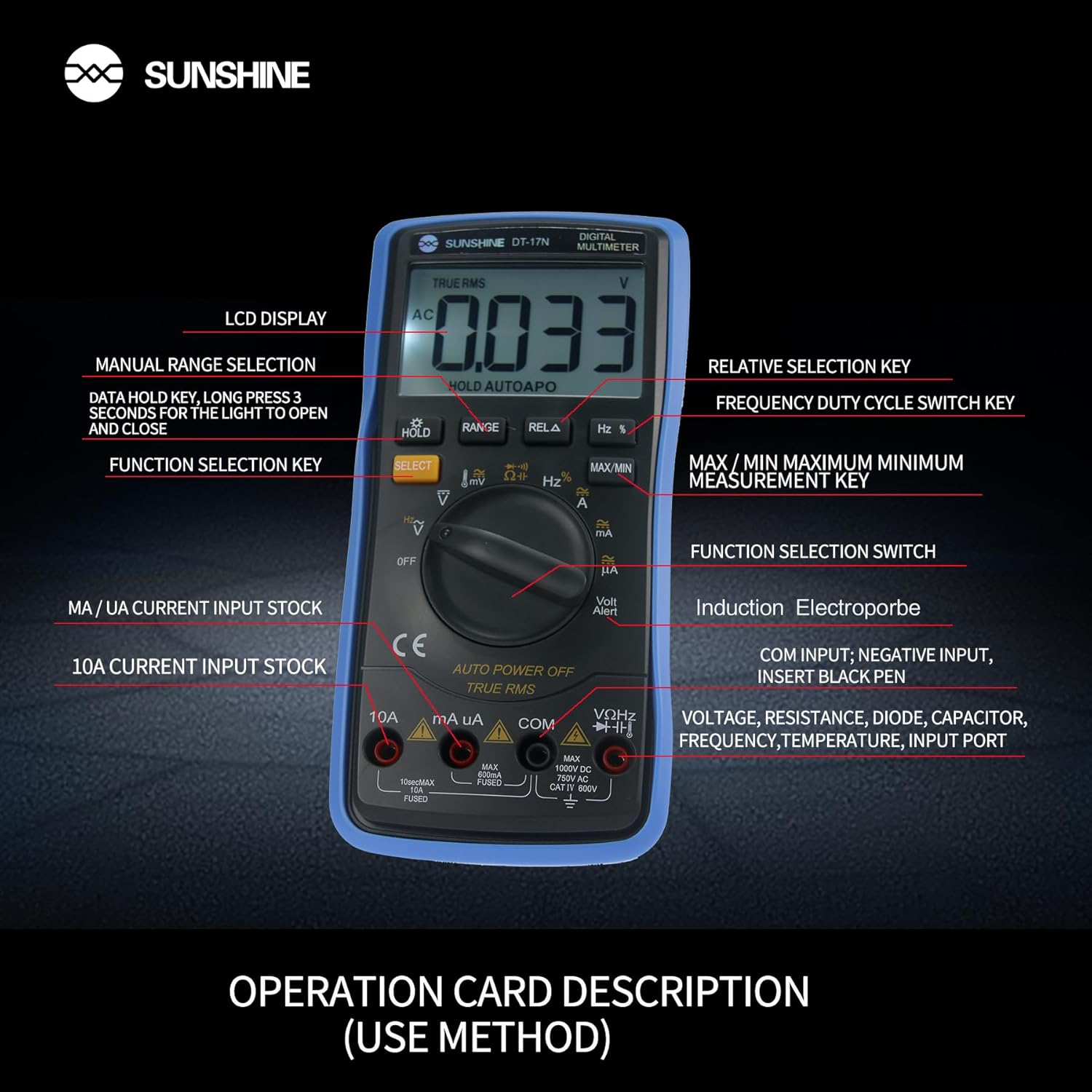
Слика 4: Детално view of the multimeter's controls and input ports with their respective functions.
- Ротационен прекинувач за функција: Се користи за избор на саканата функција за мерење (на пр., Voltage, струја, отпор, температура).
- Избери копче: Префрлува помеѓу различни режими на мерење во рамките на една позиција на ротирачки прекинувач (на пр., јачина на звук AC/DC)tage, Диода/Континуитет).
- Копче HOLD: Freezes the current reading on the display. Press and hold to activate/deactivate the backlight.
- Копче RANGE: Allows manual selection of measurement ranges, overriding the automatic ranging feature.
- RELA Button (Relative Selection Key): Ја мери разликата помеѓу зачуваната референтна вредност и моменталното отчитување.
- Hz % Button (Frequency Duty Cycle Switch Key): Префрлува помеѓу мерењата на фреквенцијата и работниот циклус.
- Копче MAX/MIN: Displays the maximum or minimum measured value during a measurement session.
- VΩHz Input Port: Connect the red test lead for voltage, resistance, frequency, capacitance, diode, and temperature measurements.
- COM влезен порт: Connect the black test lead (common ground) for all measurements.
- mA/uA Input Port: Connect the red test lead for measuring small currents (milliamperes and microampерес).
- 10A Input Port: Connect the red test lead for measuring large currents (up to 10 Ampерес).
- Volt Alert (NCV): Бесконтактно волtage detection feature.
4. Поставување
4.1. Инсталација на батерија
The DT-17N is battery-powered. To install or replace the battery:
- Осигурајте се дека мултиметарот е исклучен.
- Пронајдете го капакот на преградата за батерии на задната страна од уредот.
- Одвртете ги завртките за прицврстување и извадете го капакот.
- Insert the new battery, observing correct polarity (+ and -).
- Вратете го капакот на преградата за батерии и прицврстете го со завртката/шрафовите.
4.2. Поврзување на тест кабли
Always connect the black test lead to the COM input jack. Connect the red test lead to the appropriate input jack based on the measurement you intend to perform:
- За Voltage, Resistance, Capacitance, Frequency, Diode, and Temperature measurements: Connect the red test lead to the VΩHz џек.
- For Current measurements (mA/uA): Connect the red test lead to the mA/uA џек.
- For High Current measurements (10A): Connect the red test lead to the 10 А џек.
5. Упатства за работа
The Sunshine DT-17N features automatic identification for most ranges, simplifying operation. Use the rotary switch to select the primary function and the SELECT button to toggle sub-functions.
5.1. Measuring Voltage (AC/DC)
- Свртете го ротирачкиот прекинувач на V позиција.
- Доколку е потребно, притиснете на ИЗБЕРИ button to toggle between AC (~) and DC (—) voltage.
- Поврзете го црниот тест кабел со COM Џек и црвената тест-сонда до VΩHz џек.
- Поврзете ги тест сондите паралелно со колото или компонентата што сакате да ја измерите.
- Прочитајте го томtagе вредност на екранот.

Figure 5: The multimeter showing a DC millivolt measurement on its display.
5.2. Measuring Current (AC/DC)
Внимание: Never connect the multimeter in parallel when measuring current, as this can damage the meter and the circuit. Always connect in series.
- Свртете го ротирачкиот прекинувач на mA/uA or 10 А position, depending on the expected current.
- Доколку е потребно, притиснете на ИЗБЕРИ button to toggle between AC (~) and DC (—) current.
- Поврзете го црниот тест кабел со COM приклучок. Поврзете го црвениот тест кабел со mA/uA or 10 А jack accordingly.
- Отворете го колото и поврзете ги тест сондите сериски со товарот.
- Прочитајте ја моменталната вредност на екранот.
5.3. Мерење на отпор
- Свртете го ротирачкиот прекинувач на Ω позиција.
- Поврзете го црниот тест кабел со COM Џек и црвената тест-сонда до VΩHz џек.
- Осигурајте се дека колото е исклучено од напон и дека сите кондензатори се испразнети.
- Поврзете ги тест сондите преку компонентата за да го измерите нејзиниот отпор.
- Прочитајте ја вредноста на отпорот на екранот.
5.4. Мерење на капацитет
- Свртете го ротирачкиот прекинувач на Капацитет symbol (often shared with diode/continuity).
- Притиснете го ИЗБЕРИ button until the capacitance mode is active.
- Поврзете го црниот тест кабел со COM Џек и црвената тест-сонда до VΩHz џек.
- Ensure the capacitor is fully discharged before connecting the test probes.
- Поврзете ги тест сонди преку кондензаторот.
- Прочитајте ја вредноста на капацитетот на екранот.
5.5. Measuring Frequency / Duty Cycle
- Свртете го ротирачкиот прекинувач на Hz % позиција.
- Притиснете го Hz % копче за префрлување помеѓу фреквенција (Hz) и работен циклус (%).
- Поврзете го црниот тест кабел со COM Џек и црвената тест-сонда до VΩHz џек.
- Поврзете ги тест сондите паралелно со изворот на сигнал.
- Прочитајте ја вредноста на фреквенцијата или работниот циклус на екранот.
5.6. Мерење на температурата
The DT-17N can measure temperature using a K-type thermocouple (not always included, check package contents).

Слика 6: Прample of temperature measurement using the DT-17N Multimeter with a thermocouple.
- Свртете го ротирачкиот прекинувач на ° C / ° F позиција.
- Доколку е потребно, притиснете на ИЗБЕРИ button to choose between Celsius or Fahrenheit.
- Connect the K-type thermocouple to the VΩHz и COM дигалки, набљудувајќи го поларитетот.
- Поставете го врвот на термоспојката на или во предметот чија температура сакате да ја измерите.
- Прочитајте ја вредноста на температурата на екранот.
5.7. Тест на диода и континуитет
- Свртете го ротирачкиот прекинувач на Диода/Континуитет симбол.
- Притиснете го ИЗБЕРИ копче за префрлување помеѓу тест на диода и тест на континуитет.
- Поврзете го црниот тест кабел со COM Џек и црвената тест-сонда до VΩHz џек.
- For Diode Test: Connect the probes across the diode. The display will show the forward voltagпад. Свртете ги сондите за да проверите дали има отворено коло.
- For Continuity Test: Connect the probes across the circuit or component. A beep indicates continuity (low resistance).
5.8. Бесконтактен томtage (NCV) Откривање
The NCV function allows detection of AC voltage without direct contact with conductors.
- Свртете го ротирачкиот прекинувач на NCV position (often indicated by a Volt Alert symbol).
- Move the top part of the multimeter near the conductor.
- The meter will beep and/or flash an indicator light if AC voltagе откриена.
5.9. Data Hold and Backlight
- Задржување на податоци: Притиснете го ДРЖИ кратко притиснете го копчето за да го замрзнете тековното отчитување на екранот. Притиснете повторно за да го ослободите.
- Задно осветлување: Притиснете и задржете го ДРЖИ button for approximately 3 seconds to turn the display backlight ON or OFF.
5.10. MAX/MIN Measurement
This function records the maximum and minimum values measured during a session.
- Изберете ја саканата функција за мерење (на пр., Voltagд)
- Притиснете го MAX/MIN button. The display will show 'MAX' and the maximum value recorded.
- Притиснете MAX/MIN again to cycle to 'MIN' and view the minimum value.
- Притиснете и задржете MAX/MIN за да излезете од овој режим.
6. Одржување
Правилното одржување обезбедува долготрајност и точност на вашиот мултиметар.
6.1. Чистење
Избришете го случајот со рекламаamp крпа и благ детергент. Не користете абразивни средства или растворувачи. Пред употреба, проверете дали мерачот е целосно сув.
6.2. Замена на батеријата
Refer to Section 4.1 for battery replacement instructions. Always use the specified battery type.
6.3. Holster Care
The multimeter is protected by a thick rubber shockproof holster, designed for durability and a non-slip grip. Keep the holster clean and free from debris.

Figure 7: The durable rubber holster provides protection and a comfortable grip for the multimeter.
7 Смена на проблеми
If you encounter issues with your DT-17N multimeter, refer to the table below for common problems and solutions.
| Проблем | Можна причина | Решение |
|---|---|---|
| Нема екран или екранот е затемнет | Low or dead battery; Poor battery contact | Replace battery; Check battery contacts |
| Неточни читања | Wrong function selected; Improper test lead connection; Damaged test leads; Out of range | Select correct function; Ensure leads are in correct jacks; Replace leads; Select higher range or check specifications |
| Нема континуиран звучен сигнал | Circuit resistance too high; Continuity mode not selected | Ensure resistance is below threshold; Press SELECT to enter continuity mode |
| Fuse blown (for current measurements) | Overcurrent applied | Replace fuse with specified type and rating; Ensure correct current measurement procedure |
8. Спецификации
Technical specifications for the Sunshine DT-17N Digital Multimeter.
| Карактеристика | Спецификација |
|---|---|
| Модел | ДТ-17Н |
| Тип на мерење | Мултиметар |
| Приказ | 5999 (5 5/6) counts, Automatic Polarity Display, Backlit LCD |
| Sampling Стапка | Околу 3 пати во секунда |
| Извор на енергија | Напојува со батерија |
| Минимално работење Voltage | 3 волти (DC) |
| Опсег на мерење на температурата | 0°C до 1000°C (32°F до 1832°F) |
| Induction Electroprobe Function | Yes (NCV) |
| Двојна интегрална A/D конверзија | Да |
| Димензии на ставката | 5.51 x 2.76 x 1.18 инчи |
| Тежина на ставката | 0.55 килограми |
| Боја | Сино |
9. Гаранција и поддршка
9.1. Информации за гаранцијата
This product comes with a warranty of 3 месеци од датумот на купување. Please retain your proof of purchase for warranty claims. The warranty covers manufacturing defects under normal use.
9.2. Поддршка за корисници
For technical assistance or inquiries regarding your Sunshine DT-17N Digital Multimeter, please contact your retailer or the manufacturer's customer service department. Refer to your purchase documentation for specific contact details.