
Производот завршиview
The typecase Touch Keyboard Case is designed to enhance the functionality and protection of your iPad Air. It features a full-size keyboard with a multi-gesture trackpad, offering a laptop-like experience. The case boasts a 360° rotatable hinge, allowing for multiple viewing angles and usage modes. An adjustable 11-color RGB LED backlight provides comfortable typing in various lighting conditions. Integrated smart features like auto sleep/wake help conserve battery life, and a dedicated holder keeps your Apple Pencil secure.
Клучни карактеристики:
- Компатибилност: Specifically designed for iPad Air 11-inch (M3 2025 / M2 2024), iPad Air 5th Gen (2022, 10.9"), and iPad Air 4th Gen (2020, 10.9").
- Integrated Trackpad: Supports multi-gesture controls for precise navigation.
- Тастатура со позадинско осветлување: 11 adjustable RGB backlight colors with laser-etched keys and a full row of iPadOS shortcuts.
- Разновидни режими на употреба: 360° rotatable hinge for 7 different viewing modes (Laptop, Stand, Tent, Tablet, Corner, Share, Protect).
- Паметна заштита: Premium hardshell design protects all sides of your iPad, with auto sleep/wake function.
- Pencil Holder: Conveniently stores your Apple Pencil.
Содржина на пакетот
Ве молиме проверете дали сите артикли се присутни во пакетот:
- 1 x typecase Touch Keyboard Case for iPad Air 5th/4th Gen (10.9 inch)
- 1 x кабел за полнење USB-C
- 1 x Упатство за употреба
Водич за поставување
1. Charging the Keyboard Case
Before initial use, fully charge the keyboard case. Connect the provided USB-C charging cable to the charging port on the keyboard and to a USB power adapter (not included).
Charging indicator: The LED indicator will show charging status. Refer to the keyboard's specific LED behavior for full charge indication.
2. Inserting Your iPad into the Case
Carefully align your iPad with the protective shell of the keyboard case. Gently press the iPad into place, ensuring all corners are securely seated. The case is designed to protect all sides of your iPad.
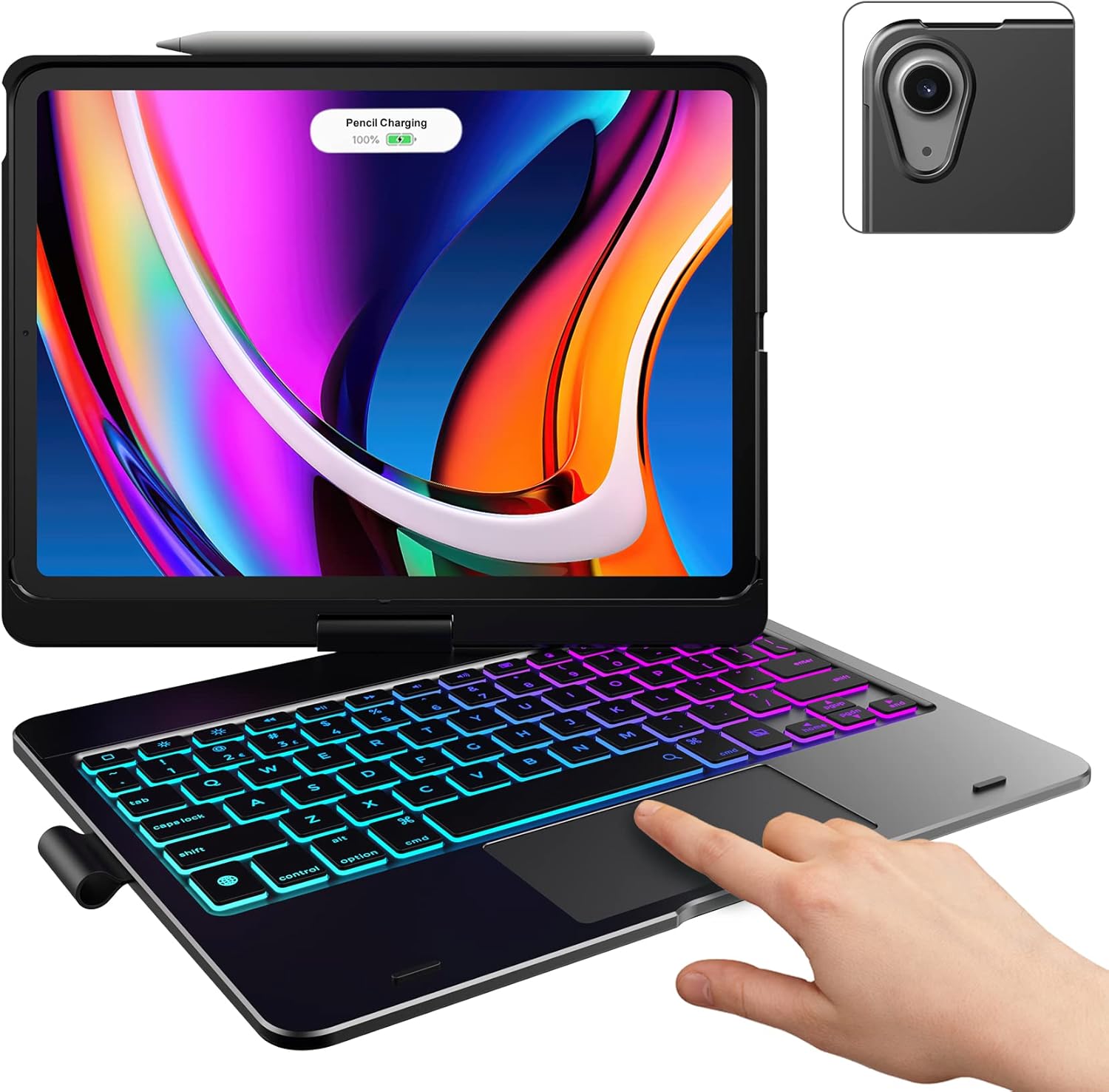
Image: The typecase keyboard case with an iPad securely inserted, ready for use. Note the integrated trackpad and backlit keys.

Image: Visual representation of the 7 versatile modes supported by the 360° rotatable hinge, including Laptop, Stand, and Tablet modes.
3. Pairing with Your iPad (Bluetooth)
- Вклучете ја тастатурата со лизгање на прекинувачот за вклучување во положба ВКЛУЧЕНО.
- Притиснете го Поврзете се button (or a similar Bluetooth pairing button, usually indicated by a Bluetooth icon) on the keyboard. The Bluetooth indicator light will start blinking.
- На вашиот iPad, одете на Поставки > Bluetooth.
- Проверете дали Bluetooth е вклучен On.
- Locate "typecase Keyboard" or a similar name in the "Other Devices" list and tap on it to pair.
- Once paired, the Bluetooth indicator light on the keyboard will stop blinking and remain solid, or turn off.
Note: The keyboard will automatically enter sleep mode after a period of inactivity to conserve battery. Press any key to wake it up.
Упатства за работа
Функции на тастатурата
The keyboard features a standard layout with 78 comfortably spaced keys and a dedicated row of iPadOS shortcut keys.

Слика: Детална view of the backlit keyboard, highlighting the iPadOS shortcut keys and the vibrant 11-color RGB backlight.
Кратенки на iPadOS:
| Клучна икона | Функција |
|---|---|
| Дома | Се враќа на почетниот екран. |
| Осветленост надолу | Ја намалува осветленоста на екранот. |
| Осветленост горе | Ја зголемува осветленоста на екранот. |
| Keyboard Hide/Show | Ја вклучува/исклучува тастатурата на екранот. |
| Барај | Activates iPad search. |
| Претходна песна | Skips to the previous media track. |
| Пушти/Пауза | Репродуцира или паузира медиуми. |
| Следна песна | Прескокнува на следната медиумска песна. |
| Исклучи звук | Го исклучува или исклучува звукот на аудио. |
| Намалување на јачината на звукот | Ја намалува јачината на звукот. |
| Јачина на звук нагоре | Ја зголемува јачината на звукот. |
| Заклучување на екранот | Го заклучува екранот на iPad. |
Употреба на тракпадот
The integrated multi-gesture trackpad allows for precise control and navigation of your iPad. Ensure the trackpad is enabled in your iPad's settings if you experience issues.
Common Trackpad Gestures:
- Допир со еден прст: Click/Select.
- Лизгање со два прста: Скролувајте нагоре или надолу.
- Штипнете за зумирање: Зголемете или одзумирајте ја содржината.
- Повлекување нагоре со три прста: Одете на почетниот екран.
- Three Finger Swipe Left/Right: Префрлете се помеѓу отворени апликации.
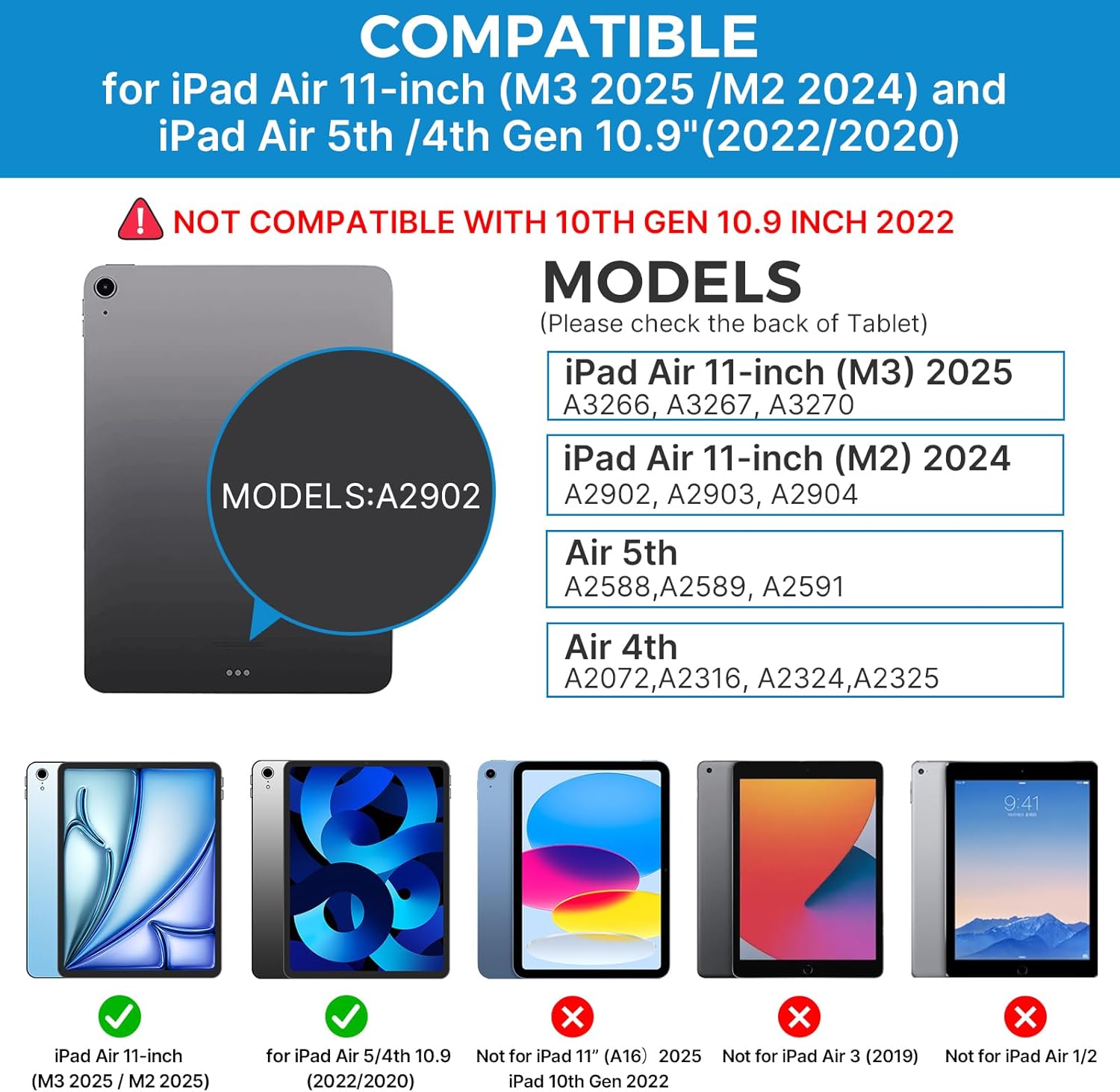
Image: A hand demonstrating the use of the multi-touch trackpad for precise cursor control on the iPad screen.
Прилагодување на задното осветлување
The keyboard features 11 adjustable RGB backlight colors and 3 levels of brightness. Use the dedicated backlight keys on the keyboard to cycle through colors and adjust brightness levels.
Video: This video demonstrates the 360-degree rotation feature of the typecase Touch Keyboard Case, showcasing its versatility in different viewрежими на внесување.
Video: This video provides a step-by-step guide on how to properly install and remove your iPad from the typecase Touch Keyboard Case, ensuring a secure fit and preventing damage.
Одржување и нега
- Чистење: Користете мека, гamp cloth to clean the exterior of the case and keyboard. Avoid harsh chemicals or abrasive materials.
- Складирање: When not in use for extended periods, store the keyboard case in a cool, dry place. Ensure the iPad is removed if storing for very long durations.
- Траење на батеријата: To maximize battery life, turn off the keyboard when not in use. The auto sleep/wake function helps conserve power.
- Избегнувајте течности: Do not expose the keyboard case to excessive moisture or liquids.
- Ракувајте со внимание: While durable, avoid dropping the case or applying excessive force to the hinge or keyboard.
Решавање проблеми
If you encounter any issues with your typecase Touch Keyboard Case, please refer to the following common solutions:
Keyboard Not Connecting/Typing:
- Уверете се дека тастатурата е ВКЛУЧЕНА и целосно наполнета.
- Check your iPad's Bluetooth settings to confirm the keyboard is paired and connected. If not, try re-pairing.
- Рестартирајте ги и iPad-от и тастатурата.
- Осигурајте се дека ниедни други Bluetooth уреди не се мешаат во врската.
Тракпедот не реагира:
- Verify the keyboard is connected via Bluetooth.
- Check iPad settings: Поставки > Пристапност > Допрете > AssistiveTouch. Ensure "Mouse Keys" is off if it's causing interference.
- Clean the trackpad surface to remove any debris.
Задно осветлување не работи:
- Осигурајте се дека тастатурата е доволно наполнета.
- Притиснете ги копчињата за прилагодување на задното осветлување за да менувате нивоа на осветленост и бои.
iPad Not Entering Sleep/Wake Mode:
- Ensure the iPad is correctly seated in the case.
- Check iPad settings: Поставки > Екран и осветленост > Заклучи/Отклучи. Ensure this feature is enabled.
If problems persist, please contact typecase customer support for further assistance.
Спецификации
| Карактеристика | Детал |
|---|---|
| Модел | B09WVRD5JD |
| Компатибилност | iPad Air 11-inch (M3 2025 / M2 2024), iPad Air 5th Gen (2022, 10.9"), iPad Air 4th Gen (2020, 10.9") |
| Поврзување | Bluetooth |
| Распоред на тастатура | 78-key standard with iPadOS shortcuts |
| Задно осветлување | 11-боен RGB, 3 нивоа на осветленост |
| Подлога за песна | Multi-functional, multi-gesture |
| Hinge Rotation | 360° (20,000-cycle stress tested) |
| Извор на енергија | Напојува со батерија (вклучена е 1 литиум полимерна батерија) |
| Тежина на ставката | 1.52 фунти |
| Димензии на производот (ДxШxВ) | 11.02 x 8.66 x 0.79 инчи |
| Материјал | Premium hardshell design |
Гаранција и поддршка
typecase offers a comprehensive warranty and support for your product:
- 1-годишна услуга за замена: Enjoy worry-free after-sales support with a 1-year replacement service for manufacturing defects.
- 30-Day Refund: If you are not satisfied with your purchase, you may be eligible for a refund within 30 days of purchase.
- Поддршка за корисници: For any questions, technical assistance, or warranty claims, please contact typecase customer service. Refer to the contact information provided in the product packaging or on the official typecase webсајт.

Слика: Надview of typecase's customer support and warranty policy, including 1-year replacement and 30-day refund.