
Ysametp M10
Ysametp Mini Projector M10 User Manual
1080P Full HD Supported Portable Video Projector
Вовед
Ви благодарам за купувањетоasing the Ysametp Mini Projector M10. This portable video projector is designed to provide a high-quality home theater experience with its 1080P Full HD support and 10000 Lux LED light source. It features dual built-in stereo speakers with an SRS sound system for immersive audio. Its compact size and multi-connection capabilities make it ideal for various entertainment and presentation needs. Please read this manual thoroughly before operating the projector to ensure proper use and maintenance.
Информации за безбедност
To ensure safe operation and prolong the lifespan of your projector, please observe the following safety precautions:
- Не ги блокирајте отворите за вентилација. Обезбедете соодветен проток на воздух околу проекторот за да спречите прегревање.
- Do not expose the projector to rain or moisture to avoid electric shock or fire.
- Не го отворајте проекторот casing. Целото сервисирање обратете се кај квалификуван сервисен персонал.
- Користете го само адаптерот за напојување што е испорачан со проекторот.
- Поставете го проекторот на стабилна, рамна површина за да спречите паѓање.
- Избегнувајте директно изложување на очите на леќата на проекторот кога е lamp е вклучено.
- Исклучете го проекторот од штекерот за време на грмотевици или кога не се користи подолг период.
Содржина на пакетот
Ве молиме проверете ја содржината на пакувањето при отпакувањето:
- 1 x Ysametp Mini Projector M10
- 1 x HDMI кабел
- 1 x 3-in-1 AV Line
- 1 x кабел за напојување
- 1 x статив
- 1 x Drawstring Backpack
- 1 x далечински управувач (батериите не се вклучени)
- 1 x Упатство за употреба

Производот завршиview
Запознајте се со компонентите и приклучоците на проекторот.

Влезни/излезни порти:
- HDMI порта: Connect to devices like TV sticks, laptops, gaming consoles.
- USB порта: Поврзете USB-уреди за репродукција на медиуми.
- Слот за картичка TF: Insert TF cards for media playback.
- VGA порта: Connect to computers or laptops.
- AV порт: Connect to older devices like DVD players using the 3-in-1 AV cable.
- Аудио приклучок од 3.5 мм: Поврзете надворешни слушалки или звучници.
Поставување
1. Поставување и големина на екранот
Position the projector on a flat, stable surface. The projection size can range from 32 inches to 200 inches, with an optimal projection distance between 3.6 feet and 16.4 feet.

2. Поврзување за напојување
Connect the supplied power cord to the projector's power input and then plug it into a power outlet.
3. Фокус и прилагодување на трапезоидот
After powering on, adjust the focus and keystone knobs located on top of the projector to achieve a clear and rectangular image. The focus ring adjusts image sharpness, while the keystone correction corrects trapezoidal distortion if the projector is not perfectly perpendicular to the screen.
Упатства за работа
1. Вклучување/исклучување
- За да се вклучи: Притиснете го копчето за вклучување на проекторот или на далечинскиот управувач.
- Да се исклучи: Press the power button again. The projector will go through a shutdown sequence.
2. Избор на влезен извор
Use the "Source" button on the remote control or the projector's control panel to select the desired input source (HDMI, USB, TF, VGA, AV).
3. Поврзување на уредите
- HDMI: Connect an HDMI cable from your device (e.g., TV Stick, laptop, game console) to the projector's HDMI port.
- USB/TF картичка: Insert a USB drive or TF card into the respective port. The projector will automatically detect the media or prompt you to select it.
- VGA: Connect a VGA cable from your PC/laptop to the projector's VGA port.
- АВ: Use the provided 3-in-1 AV cable to connect to devices with AV output.
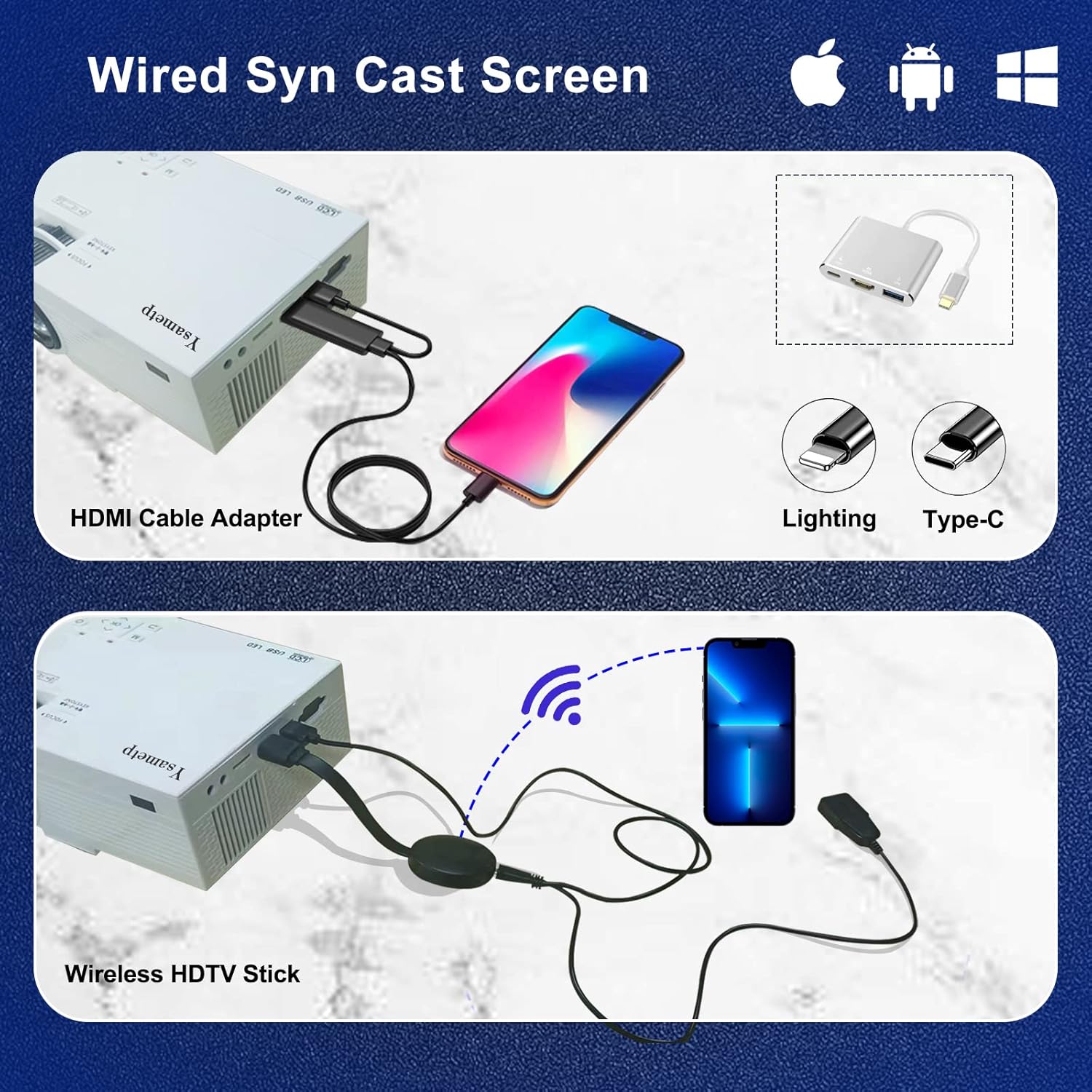
4. Wired Screen Mirroring (for Smartphones)
To mirror your smartphone screen, you will need an HDMI adapter (e.g., Lightning to HDMI for iPhone, USB-C to HDMI for Android) or a Miracast dongle/TV stick (like Roku, Fire TV Stick).

5. Аудио излез
The projector has dual built-in stereo speakers. For external audio, connect headphones or external speakers to the 3.5mm audio jack.

Одржување
1. Чистење
- Објектив: Користете мека крпа без влакненца, специјално дизајнирана за оптички леќи. Не користете абразивни средства за чистење.
- Casing: Wipe the projector's exterior with a soft, dry cloth. Do not use liquid or aerosol cleaners.
- Вентилација: Regularly check and clean the ventilation openings to prevent dust buildup, which can affect cooling performance.
2. Складирање
When not in use, store the projector in a cool, dry place, away from direct sunlight and extreme temperatures. Use the provided drawstring backpack for protection during storage or transport.
3. LED Lifespan
The built-in LED light source is designed to support up to 55,000 hours of use, providing long-lasting performance.
Решавање проблеми
| Проблем | Можна причина / решение |
|---|---|
| Нема слика на екранот. |
|
| Сликата е заматена. |
|
| Сликата е трапезоидна. |
|
| Нема звук. |
|
| Далечинскиот управувач не работи. |
|
Спецификации
| Карактеристика | Детал |
|---|---|
| Бренд | Исметп |
| Модел | М10 |
| Технологија на прикажување | LCD екран |
| Мајчин резолуција | 1920 x 1080 Pixels (Full HD Supported) |
| Осветленост на сликата | 11000 лукс |
| Сооднос на контраст на слика | 10000:1 |
| Сооднос на аспект | 4:3 |
| Големина на проекција | 32 - 200 инчи |
| Растојание на проекција | 3.6ft - 16.4ft |
| LED животен век | 55,000 часа |
| Ниво на бучава | 31 dB |
| Ватtage | 60 вати |
| Хардверски интерфејс | VGA, USB, HDMI, 3.5mm Audio, TF Card |
| Димензии (Д x Ш x В) | 23.88 x 15.49 x 8.13 cm |
| Тежина | 975.22 г (приближно 2.15 фунта) |
Гаранција и поддршка
Ysametp provides a 3-годишна гаранција на производот for the Mini Projector M10.
If you encounter any problems or have questions regarding your projector, please do not hesitate to contact our customer support. Refer to the contact information provided on the product packaging or the official Ysametp webсајт за помош.
Ask a question about this manual
Ask about setup, troubleshooting, compatibility, parts, safety, or missing instructions. Manuals+ will review the question and use this page’s manual context to help answer it.