1. Во текотview
The BIGTREETECH 5-inch HDMI Touch Screen Display is a versatile monitor designed for various applications, offering an 800x480 resolution with a 160° IPS viewing angle. It features 5-point capacitive touch functionality and includes audio output capabilities. This display is compatible with devices such as Raspberry Pi, Sovol-SV08 3D printers, and Windows PCs.

Figure 1: BIGTREETECH 5-inch HDMI Touch Screen Display
Оваа слика го прикажува предниот дел view of the BIGTREETECH 5-inch HDMI Touch Screen Display, highlighting its compact design and touch interface.

Слика 2: Широк ViewДемонстрација на аголот
This image illustrates the 160-degree wide viewing angle of the IPS display, showing consistent image quality from various perspectives.
2. Спецификации на производот
| Параметар | Вредност |
|---|---|
| Димензии на производот | 121 x 76 mm |
| Влез на енергија | DC 5V |
| Logic Voltage | DC 3.3V |
| Големина на екранот | 5-инчен IPS дисплеј |
| Резолуција на екранот | 800x480 |
| Екран Viewинголен агол | 160° |
| Допрете Тип | Capacitive, 5-point touch |
| Аудио излез | 3.5mm earphone/speaker jack |
3. Содржина на пакетот
Пакетот обично ги вклучува следниве артикли:
- BIGTREETECH 5-inch HDMI Touch Screen Display
- HDMI кабел
- USB Cable (for touch and power)
- Mounting hardware (e.g., screws, standoffs, brackets)
4. Поставување и инсталација
4.1 Connecting to a Display Output Device (e.g., Raspberry Pi, Sovol-SV08, PC)
- Connect the display to your device using the provided HDMI cable. Ensure a secure connection.
- Connect the display to your device using the Type-C data cable. This cable provides power and enables touch functionality.
- For PC connections, the operating system will typically load the necessary drivers automatically. Once drivers are loaded, the touch device should be recognized.
- After connecting the HDMI cable, the LCD should display content within approximately 5 seconds.
Video 1: Hosyond 5-inch Touchscreen IPS Display Driver-Free Interface
This video demonstrates the physical connection of the 5-inch display to a Raspberry Pi board, including securing it with screws and connecting the DSI ribbon cable (if applicable, though the product description mentions HDMI and Type-C for this model). It shows the display booting up with the Raspberry Pi desktop and basic touch interaction.
Video 2: ELECROW 5-inch Raspberry Pi Screen 800x480 LCD Display Setup
This video illustrates the connection process of a 5-inch 800x480 LCD display to a Raspberry Pi, demonstrating how to connect the HDMI and USB cables for display and touch functionality. It also shows the display working with a Raspberry Pi operating system.
4.2 Аудио излез
To enable audio output, plug a 3.5mm earphone or speaker into the AUDIO interface located on the display.

Figure 3: Audio Output Interface
This image highlights the 3.5mm audio jack on the display, indicating where to connect external headphones or speakers for audio output.
5. Упатства за работа
5.1 Индикаторски светла
- D6 (Red Light): The power indicator. Lights up when the motherboard is powered on, indicating normal power supply.
- D7 (Green Light): The working status indicator. Flashes when the screen is operating normally.
5.2 Прилагодување на осветленоста на екранот
The BIGTREETECH HDMI5 V1.0 supports brightness adjustment:
- Притиснете го Ks1 button да се зголеми осветленоста.
- Притиснете го Ks3 button да се намали осветленоста.

Слика 4: Функција за прилагодување на осветленоста
This image visually represents the adjustable brightness feature of the display, showing a slider for control.
5.3 Прилагодување на насоката на екранот
The BIGTREETECH HDMI5 V1.0 supports horizontal display direction adjustment:
- Притиснете го Ks2 button to adjust the display orientation horizontally.
5.4 Функционалност на допир
The display features a 5-point capacitive touch screen, allowing for intuitive interaction with compatible operating systems.
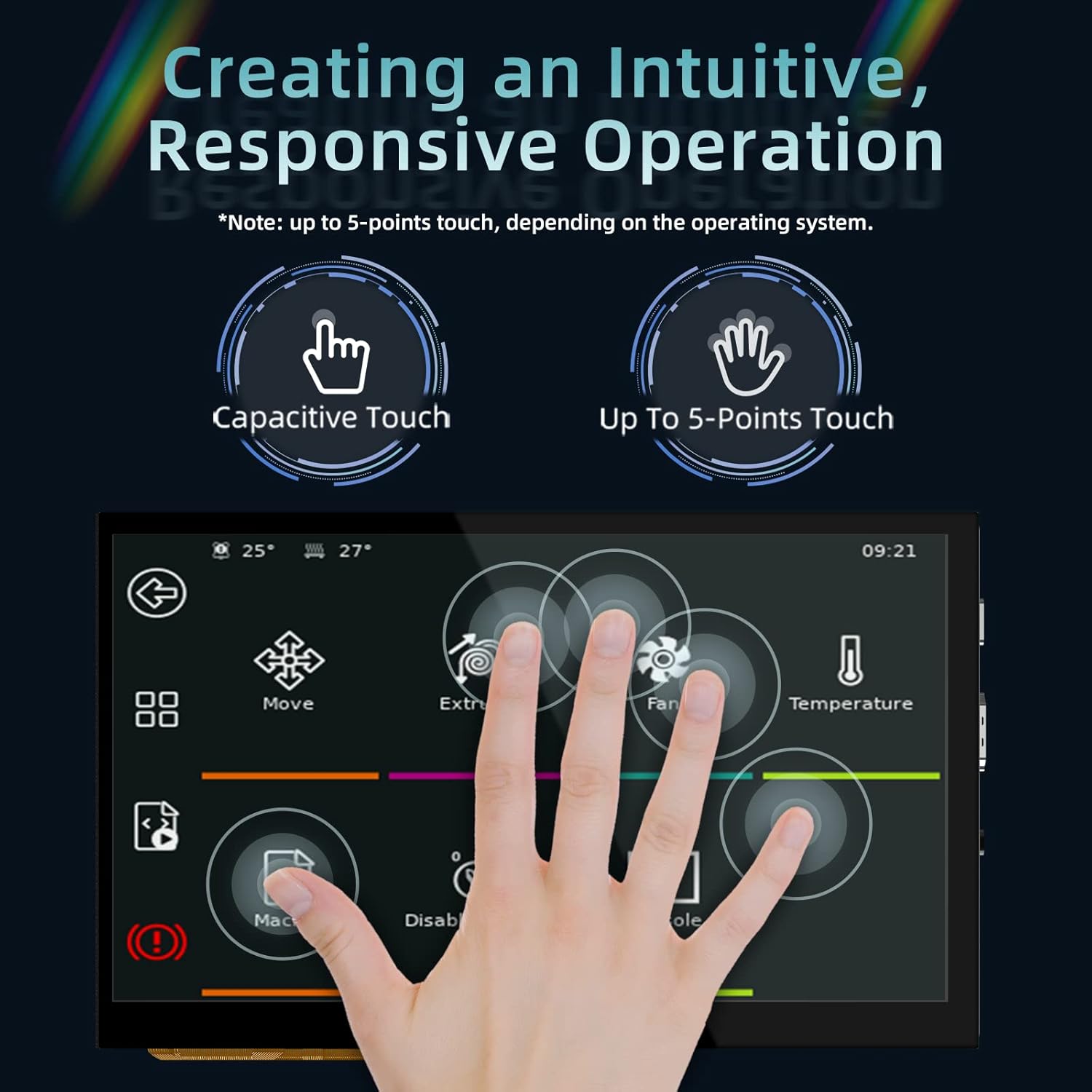
Figure 5: 5-Point Capacitive Touch
This image demonstrates the 5-point capacitive touch capability of the display, showing multiple finger touches recognized simultaneously.
Video 3: LESOWN 5-inch IPS Small HDMI LCD Screen Portable Monitor Usage
This video showcases the 5-inch display connected to a computer, demonstrating its use as a secondary screen and highlighting the touch functionality for navigating the operating system interface.
6 Смена на проблеми
- Нема приказ: Ensure both the HDMI cable and the Type-C data cable are securely connected. Verify that the power indicator (D6 red light) is on.
- Без одговор на допир: For PC connections, confirm that the operating system has successfully loaded the touch screen drivers. Reconnect the Type-C data cable.
- Неточна ориентација на екранот: Use the Ks2 button to adjust the display direction.
- Затемнет екран: Adjust the brightness using the Ks1 and Ks3 buttons.
7. Одржување
- Одржувајте го екранот чист со мека крпа што не остава влакненца. Избегнувајте абразивни средства за чистење.
- Protect the display from extreme temperatures and humidity.
- Avoid applying excessive force to the screen or connections.
8. Гаранција и поддршка
For warranty information and technical support, please refer to the official BIGTREETECH webлокација или директно контактирајте ја нивната служба за корисници. Зачувајте ја сметката за купување за гаранциски барања.
Службен Webсајт: BIGTREETECH Store on Amazon