
1. Производот завршиview
The Point Wired Mini Keyboard Pt-350 is a compact and versatile keyboard designed for both gaming and general typing. It features a high-quality build and a modern design, adhering to industry standards for reliable performance. This keyboard is an ideal choice for users seeking a durable and efficient input device.
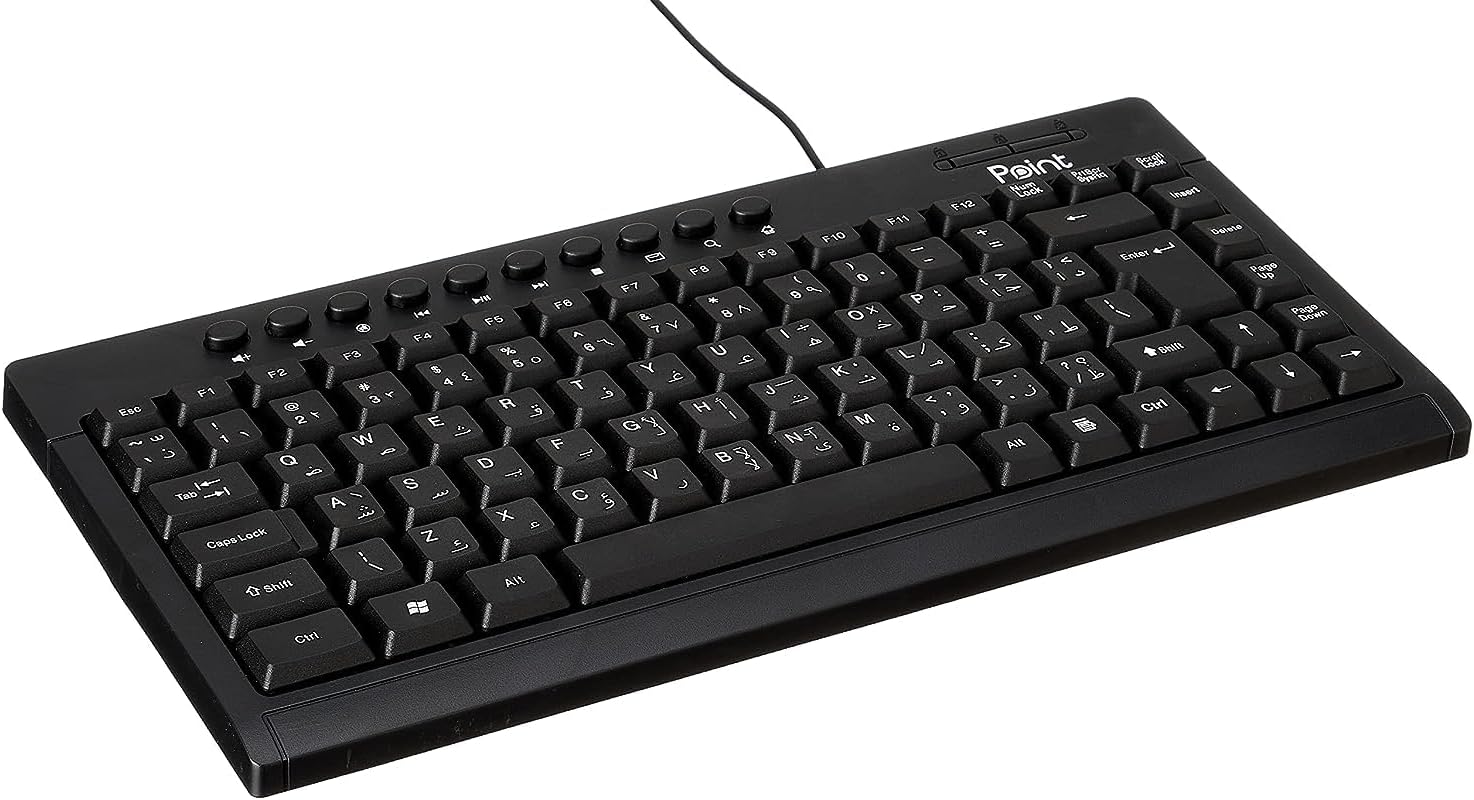
Слика 1.1: Аголна view of the Point Wired Mini Keyboard Pt-350, showcasing неговиот компактен дизајн и распоред на копчињата.
Клучни карактеристики:
- Wired connectivity for stable performance.
- Compact design suitable for various setups.
- Durable construction from high-quality plastic materials.
- Designed for both gaming and typing applications.
2. Содржина на пакетот
Внимателно проверете го пакувањето за да бидете сигурни дека сите елементи се присутни:
- Point Wired Mini Keyboard Pt-350
- Упатство за употреба (овој документ)
3. Поставување
Follow these steps to set up your Point Wired Mini Keyboard Pt-350:
- Отпакувајте ја тастатурата: Внимателно извадете ја тастатурата од пакувањето.
- Идентификувајте го USB конекторот: The keyboard comes with an integrated USB cable.
- Поврзете се со вашиот компјутер: Locate an available USB port on your computer (desktop PC, laptop, etc.). Insert the keyboard's USB connector firmly into the USB port.
- Инсталација на драјвер (Plug & Play): The keyboard is plug-and-play compatible. Your operating system (Windows, macOS, Linux) should automatically detect and install the necessary drivers. This process usually takes a few seconds.
- Потврдете ја функционалноста: Once connected, open a text editor or any application that accepts text input and test the keys to ensure proper operation.

Слика 3.1: Од горе надолу view of the keyboard, illustrating the key layout and integrated cable for connection.
4. Упатства за работа
The Point Wired Mini Keyboard Pt-350 operates like a standard computer keyboard. Below are general instructions and tips for use:
Basic Typing:
- Simply press the desired keys to input characters, numbers, and symbols into your active application.
- Користете го Смена key for uppercase letters and alternative symbols on keys.
- На Caps Lock key toggles permanent uppercase typing.
- На Backspace key deletes characters to the left of the cursor.
- На Внесете key confirms input or moves to the next line.
Функциски копчиња (F1-F12):
The function keys (F1 through F12) perform various tasks depending on the active program or operating system. Some common uses include:
- F1: Often opens help for the active program.
- F2: Renames a selected item.
- F5: Освежува a web page or document.
- F11: Toggles full-screen mode in many browsers.
Мултимедијални клучеви:
The keyboard may include dedicated multimedia keys or secondary functions on the F-keys (accessed via the Fn key, if present). These typically control:
- Volume control (Mute, Volume Up, Volume Down)
- Media playback (Play/Pause, Stop, Previous Track, Next Track)
5. Одржување
Правилното одржување обезбедува долготрајност и оптимални перформанси на вашата тастатура:
- Чистење: Regularly clean the keyboard to prevent dust and debris buildup. Use a soft, lint-free cloth slightly dampсо вода или благ раствор за чистење. Избегнувајте груби хемикалии или абразивни материјали.
- Отстранување прашина: Use compressed air to blow out dust and crumbs from between the keys.
- Избегнувајте излевање: Држете ги течностите подалеку од тастатурата за да спречите оштетување на внатрешните компоненти. Во случај на истурање, веднаш исклучете ја тастатурата и оставете ја целосно да се исуши пред повторно да ја поврзете.
- Складирање: Кога не ја користите, чувајте ја тастатурата во чиста, сува средина, подалеку од екстремни температури.
6 Смена на проблеми
If you encounter issues with your Point Wired Mini Keyboard Pt-350, refer to the following common problems and solutions:
Тастатурата не реагира:
- Проверете ја USB конекцијата: Проверете дали USB-кабелот е безбедно приклучен во функционален USB-порт на вашиот компјутер. Обидете се со друг USB-порт.
- Рестартирајте го компјутерот: Едноставно рестартирање често може да ги реши проблемите со поврзувањето.
- Тест на друг компјутер: Connect the keyboard to another computer to determine if the issue is with the keyboard or your computer's setup.
- Проверете го Управувачот со уреди (Windows): In Windows, go to Device Manager and check if the keyboard is listed under 'Keyboards' and if there are any error symbols. You might need to update or reinstall the driver.
Keys Not Working or Sticky:
- Чисти клучеви: Dust, crumbs, or liquid residue can cause keys to stick or malfunction. Refer to the Maintenance section for cleaning instructions.
- Физичко оштетување: Inspect the keys for any visible physical damage.
Неточен излез на знаци:
- Проверете ги поставките за јазик: Ensure your operating system's keyboard language settings match the physical layout of your keyboard.
- Driver Issue: Reinstalling the keyboard driver might resolve this.
Ако проблемот продолжи откако ќе ги испробате овие чекори, контактирајте ја корисничката поддршка.
7. Спецификации
Technical specifications for the Point Wired Mini Keyboard Pt-350:

Слика 7.1: Страна view of the keyboard, highlighting its profile and compact form factor.
| Карактеристика | Детал |
|---|---|
| Име на брендот | Точка |
| Модел | Pt-350 |
| Технологија за поврзување | Жичен |
| Компатибилни уреди | Компјутер |
| Опис на тастатурата | Мултифункционален |
| Препорачана употреба | PC игри |
| Посебни карактеристики | Играње |
| Боја | Црното |
| Стил | Модерен |
| Материјал | Пластика |
| Димензии на испорака | 34.5 x 26.4 x 3 cm |
| Тежина | 800 грама |
| Прво достапен датум | 4 септември 2022 година |
| ASIN | B0BD2DM9ZJ |
8. Гаранција и поддршка
This product is covered by a standard manufacturer's warranty. Please refer to the warranty card included with your purchase for specific terms and conditions, including the warranty period and coverage details.
For technical support, troubleshooting assistance, or warranty claims, please contact Point customer service through the contact information provided on the product packaging or the official Point website. When contacting support, please have your product model (Pt-350) and purchase details ready.