
1. Вовед
The Orange Pi 5 is a high-performance single board computer (SBC) designed for a wide range of applications, from embedded systems to mini PCs. It features the Rockchip RK3588S 8-core 64-bit processor, combining quad-core A76 and quad-core A55 architectures, manufactured with an 8nm process. With a main frequency of up to 2.4GHz, integrated ARM Mali-G610 GPU, and a built-in NPU delivering 6 TOPS of computing power, the Orange Pi 5 offers robust processing capabilities. This model comes with 16GB of LPDDR4/4x RAM and supports up to 8K video display processing.
This manual provides essential information for setting up, operating, and maintaining your Orange Pi 5, ensuring you can maximize its potential for your projects.
2. Што има во кутијата
Откако ќе го отворите пакувањето, проверете дали се присутни сите компоненти:
- Orange Pi 5 16GB Single Board Computer
- 5V4A Type C Power Supply
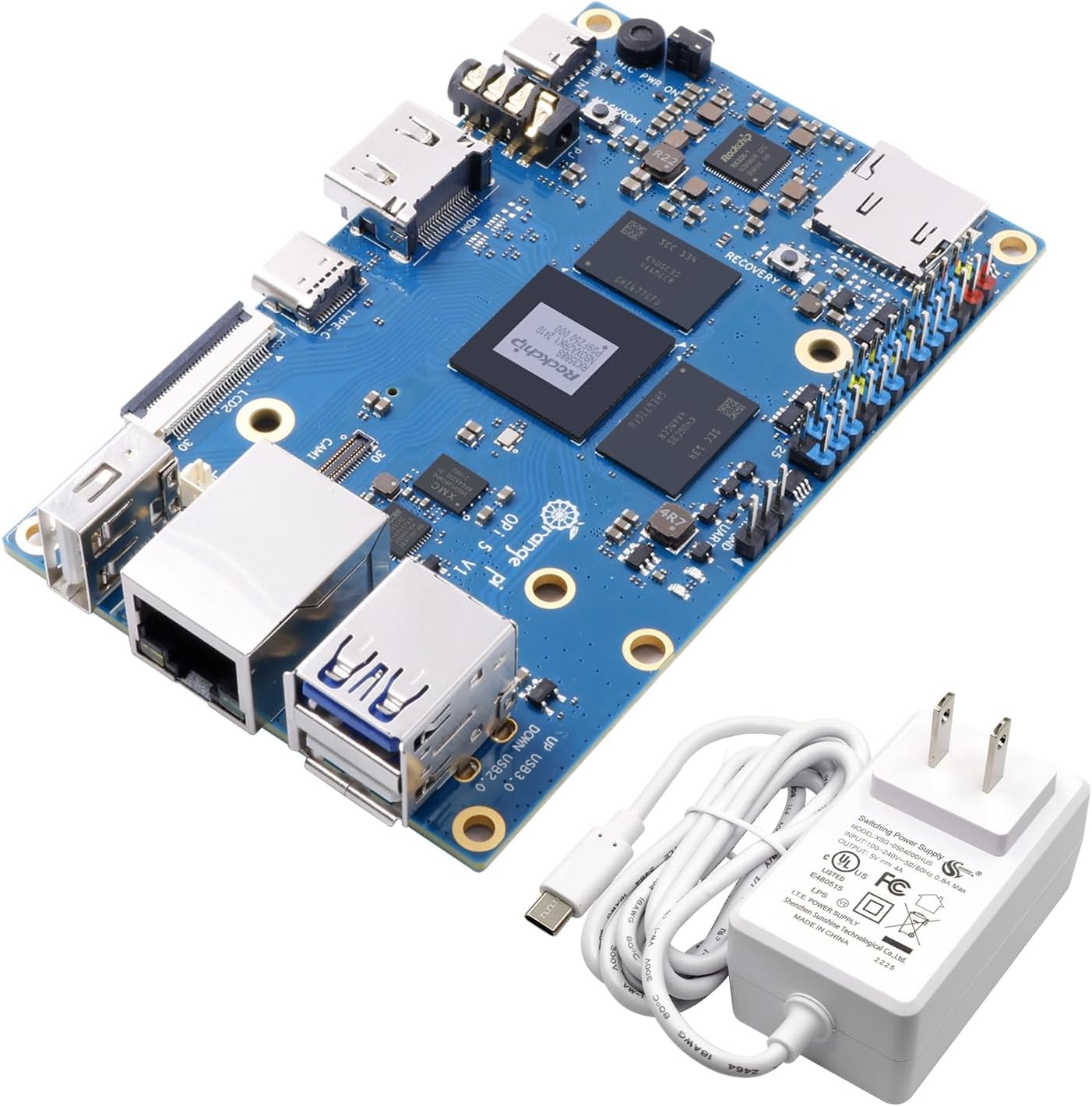
Image: The Orange Pi 5 single board computer shown alongside its included 5V4A Type C power supply.
3. Производот завршиview
3.1 Клучни карактеристики
- Процесор: Rockchip RK3588S, 8-core 64-bit (Quad-core A76 + Quad-core A55), up to 2.4GHz.
- GPU: ARM Mali-G610, with high-performance 3D/2D image acceleration.
- NPU: Built-in Neural Processing Unit with 6 TOPS computing power for AI applications.
- Меморија: 16GB LPDDR4/4x RAM.
- Видео излез: HDMI 2.1 supporting 8K resolution, USB-C (DP1.4), dual MIPI D-PHY video output for multi-screen display.
- Проширување на просторот за складирање: Onboard M.2 PCIe 2.0 interface for NVMe SSDs.
- Поврзување: Gigabit LAN port, 2x USB 2.0, 1x USB 3.0, Type-C port.
- Поддршка за оперативен систем: Orange Pi OS, Android 12, Debian 11.

Image: Diagram highlighting the core features of the Orange Pi 5, including the RK3588S processor, 16GB LPDDR4/4x RAM, Gigabit Ethernet, HDMI 2.1, 26-pin headers, and Type-C power supply.
3.2 Board Layout and Interfaces
Familiarize yourself with the various ports and components on the Orange Pi 5 board:

Слика: Горе view of the Orange Pi 5 board with key components and interfaces labeled, including USB ports, Ethernet, HDMI, Type-C, and GPIO pins.
- Rockchip RK3588S: The central processing unit.
- Слот за MicroSD картичка: For booting operating systems or expanding storage.
- 26 Pin Headers: General Purpose Input/Output (GPIO) pins for connecting external hardware and sensors.
- HDMI ИЗЛЕЗ: For connecting to displays, supporting up to 8K resolution.
- USB 3.0 (Blue): High-speed USB port.
- USB 2.0 (Black): Стандардни USB порти.
- Гигабитен етернет: За поврзување со жична мрежа.
- Type-C/Power Supply (5V/4A): Primary power input and data/display output (DP1.4).
- M.2 PCIe 2.0: Slot for NVMe SSD expansion (located on the underside).
- MIPI D-PHY (Camera/LCD): Interfaces for camera and display modules.
- Аудио Влез/Излез: 3.5 мм аудио приклучок.
- Recovery Key: Button for system recovery or flashing.

Слика: Долу view of the Orange Pi 5 board, clearly showing the M.2 PCIe 2.0 slot for NVMe SSDs.

Image: Detailed pin definition diagram for the Orange Pi 5 V1.3.2, illustrating the layout and function of the 26-pin GPIO header.
4. Водич за поставување
Follow these steps to get your Orange Pi 5 ready for operation:
- Prepare Storage: Insert a microSD card with a compatible operating system image, or install an NVMe SSD into the M.2 slot if you plan to boot from it.
- Поврзете периферни уреди:
- Connect a display to the HDMI OUT port.
- Поврзете тастатура и глушец со USB-портите.
- (Optional) Connect an Ethernet cable to the Gigabit LAN port for wired network access.
- Вклучување: Connect the included 5V4A Type C power supply to the Type-C power input port on the Orange Pi 5. The board should power on automatically.
- Првично стартување: The Orange Pi 5 will attempt to boot from the prepared storage device. Follow the on-screen instructions for your chosen operating system.

Image: Close-up of the 5V4A Type C power supply included with the Orange Pi 5, essential for proper operation.
5. Оперативни системи
The Orange Pi 5 supports a variety of operating systems, offering flexibility for different use cases:
- Orange Pi OS: The official operating system developed by Orange Pi, optimized for their hardware.
- Андроид 12: Enables the Orange Pi 5 to function as a powerful Android mini PC, suitable for media consumption and Android applications.
- Debian 11: A popular Linux distribution, providing a stable and versatile environment for development, server applications, and general computing.
For detailed instructions on how to download and flash operating system images to your storage device, please refer to the official Orange Pi documentation and community forums.

Image: Visual representation of the operating systems supported by Orange Pi 5, including Orange Pi OS, Android 12, and Debian 11.
6. Примени и случаи на употреба
The versatility and powerful specifications of the Orange Pi 5 make it suitable for numerous applications:
- Mini PC/Desktop Replacement: Capable of handling daily computing tasks, web browsing, and office applications.
- Пресметување на рабовите: Its NPU and processing power are ideal for local data processing and AI inference at the edge.
- Artificial Intelligence (AI) Development: A robust platform for developing and deploying AI models.
- Cloud Computing Clients: Can serve as a thin client for cloud-based services.
- AR/VR Applications: Supports high-resolution video output and processing for augmented and virtual reality projects.
- Intelligent Security Systems: Suitable for video surveillance, facial recognition, and other smart security solutions.
- Домашна автоматизација: Can act as a central hub for smart home devices.
- Gaming and Emulation: Capable of running various games and emulators.
- Wireless Server: Can be configured as a small-scale server for various purposes.
- Open Source Projects: Its open-source nature encourages experimentation and custom development.

Слика: Прamples of application scenarios for the Orange Pi 5, including Tablet PC, Edge computing, Artificial intelligence, Cloud computing, AR/VR, and Intelligent security.
7. Технички спецификации
| Карактеристика | Детал |
|---|---|
| Процесор | Rockchip RK3588S (8-core 64-bit, Quad-core A76 + Quad-core A55) |
| Брзина на процесорот | До 2.4 GHz |
| GPU | ARM Mali-G610 |
| NPU | 6 TOPS computing power |
| RAM меморија | 16GB LPDDR4/4x |
| Видео излез | HDMI 2.1 (8K), USB-C (DP1.4), Dual MIPI D-PHY |
| Проширување на складиштето | M.2 PCIe 2.0 (for NVMe SSD), MicroSD Card Slot |
| Мрежа | Гигабитен етернет |
| USB порти | 1x USB 3.0, 2x USB 2.0, 1x Type-C (shared with DP) |
| GPIO | Заглавие со 26 пина |
| Оперативни системи | Orange Pi OS, Android 12, Debian 11 |
| Димензии (ДxШxВ) | 3.94 x 2.44 x 1.81 инчи (100 x 62 x 46 мм) |
| Тежина на ставката | 9.6 унци (272 грама) |
| Напојување | 5V/4A Тип-C |
8 Смена на проблеми
This section addresses common issues you might encounter with your Orange Pi 5.
8.1 No Power/No Boot
- Проверете го напојувањето: Ensure the 5V4A Type C power supply is correctly connected to the board and a working power outlet. Using an underpowered supply can lead to instability or failure to boot.
- Verify SD Card/SSD: Confirm that your microSD card or NVMe SSD is properly inserted and contains a valid, uncorrupted operating system image. Try re-flashing the OS image.
- Напојување LED: Check if the power LED on the board illuminates when power is connected. If not, there might be an issue with the power supply or the board itself.
8.2 Нема излез на екранот
- HDMI кабел: Ensure the HDMI cable is securely connected to both the Orange Pi 5 and your display. Try a different HDMI cable.
- Влез за прикажување: Потврдете дека вашиот екран е поставен на точниот HDMI влезен извор.
- OS Configuration: Some operating systems might require specific display configurations. If you can access the board via SSH or serial console, check display settings.
8.3 Проблеми со мрежната поврзаност
- Етернет кабел: For wired connections, ensure the Ethernet cable is securely plugged into the Gigabit LAN port and your router/switch. Check router status.
- Проблеми со возачот: Verify that the network drivers are correctly installed and enabled within your operating system.
8.4 Прегревање
- Вентилација: Ensure the board has adequate airflow. Avoid placing it in enclosed spaces without ventilation.
- Heatsink/Fan: For prolonged high-load operations, consider adding a heatsink or a small fan to the CPU for better thermal management.
9. Одржување
Proper maintenance can extend the lifespan and ensure optimal performance of your Orange Pi 5:
- Чувајте го чисто: Regularly clean the board with a soft, dry brush or compressed air to remove dust and debris, especially from heatsinks and connectors.
- Избегнувајте влага: Држете ја плочката подалеку од течности и средини со висока влажност.
- Стабилна моќност: Always use the recommended 5V4A Type C power supply to prevent damage from unstable voltage.
- Ажурирања на софтверот: Keep your operating system and installed software updated to benefit from performance improvements, bug fixes, and security patches.
- Ракувајте со внимание: Avoid dropping the board or subjecting it to physical shocks. Handle by the edges to prevent static discharge damage to components.
10. Гаранција и поддршка
Orange Pi is committed to providing high-quality open-source hardware and intelligent products. For specific warranty information, please refer to the terms and conditions provided at the time of purchase or visit the official Orange Pi webсајт.
For technical support, community discussions, and additional resources, please visit the official Orange Pi website or their dedicated community forums. These platforms offer a wealth of information, tutorials, and peer support to help you with your projects.
Производител: Shenzhen Xunlong Software CO.,Limited