
Вовед
Ви благодарам за купувањетоasing the ION Audio Power Glow 300. This powerful, portable, and versatile Bluetooth speaker system is designed to deliver high-quality audio with dynamic LED lighting, perfect for any event. With its built-in handles and wheels, it offers exceptional portability. Please read this manual carefully to ensure proper use and to maximize your experience with the Power Glow 300.
Карактеристики
- Bluetooth 5.0 Compatible: Stream your favorite music wirelessly from any Bluetooth-enabled device up to 100 feet.
- ION Sound XP APP: Control audio settings and lighting effects directly from your smartphone or tablet.
- Би-Amplified 300-Watt Sound System: Features a 10-inch (254mm) woofer and a 1-inch (25.4mm) tweeter for lifelike sound reproduction.
- One-Touch User Interface: A simple control knob for all sound adjustments.
- Батерија на полнење: Обезбедува долготрајна моќ за продолжена употреба.
- Wireless Stereo-Link: Connects wirelessly with additional compatible ION speakers for a wider soundstage.
- Вградени рачки и тркала: Designed for easy transportation.
- Multi-Colored Lights: The woofer glows in multiple colors, synchronizing with the music.
- Multi-Channel Mixer: Includes a mixer with main volume control and XLR inputs.
- Aux Inputs: Easily connect non-Bluetooth devices.
- Echo Effect on Microphone: Enhance your karaoke performances.
- Репродукција на USB/SD картичка: Conveniently play audio material recorded on other devices.
- Влезови за микрофон: Connect your microphone for endless fun.
Што има во кутијата
- Power Glow 300 Speaker
- Кабел за напојување
- Упатство за употреба
Поставување
1. Полнење на батеријата
Before first use, fully charge the Power Glow 300's internal rechargeable battery. Connect the included power cable to the speaker's power input on the rear panel and plug it into a standard electrical outlet. The charging indicator light will show the charging status.
2. Вклучување/исклучување
Locate the power switch on the rear control panel. Flip the switch to the 'ON' position to power on the speaker. Flip it to 'OFF' to power down.
3. Bluetooth спарување
- Ensure the Power Glow 300 is powered on.
- На вашиот Bluetooth уред (паметен телефон, таблет итн.), овозможете Bluetooth и пребарајте достапни уреди.
- Select 'ION Audio Power Glow 300' from the list of devices.
- Once paired, the speaker will indicate a successful connection (e.g., a chime or a steady Bluetooth indicator light).
For advanced control and settings, download the ION Sound XP APP од продавницата за апликации на вашиот уред.
4. Physical Setup and Portability
The Power Glow 300 features built-in handles and wheels for easy transport. Simply extend the retractable handle located on the top of the unit and tilt the speaker to roll it to your desired location. The robust design ensures durability for outdoor and indoor use.

Слика: Страна view demonstrating the retractable handle and wheels for easy transport.
Упатства за работа
1. Контролен панел е надview
The main control panel is located on the rear of the speaker. It includes controls for playback, volume, inputs, and lighting.

Слика: Детална view of the rear control panel.
2. Аудио репродукција
- Bluetooth: Once paired, play audio from your connected Bluetooth device. Use the speaker's play/pause, next, and previous track buttons, or control directly from your device.
- USB/SD картичка: Insert a USB drive or SD card into the respective slots on the control panel. The speaker will automatically detect and play compatible audio files. Use the playback controls to navigate tracks.
- Помошен влез: Connect non-Bluetooth devices using a standard 3.5mm audio cable or RCA cables to the Aux Inputs on the rear panel.
- Влез за микрофон: Plug a microphone into the XLR or 1/4-inch input. Adjust the microphone volume using the dedicated knob. The echo effect can be applied for vocal enhancement.

Image: USB/SD Card Playback Interface.
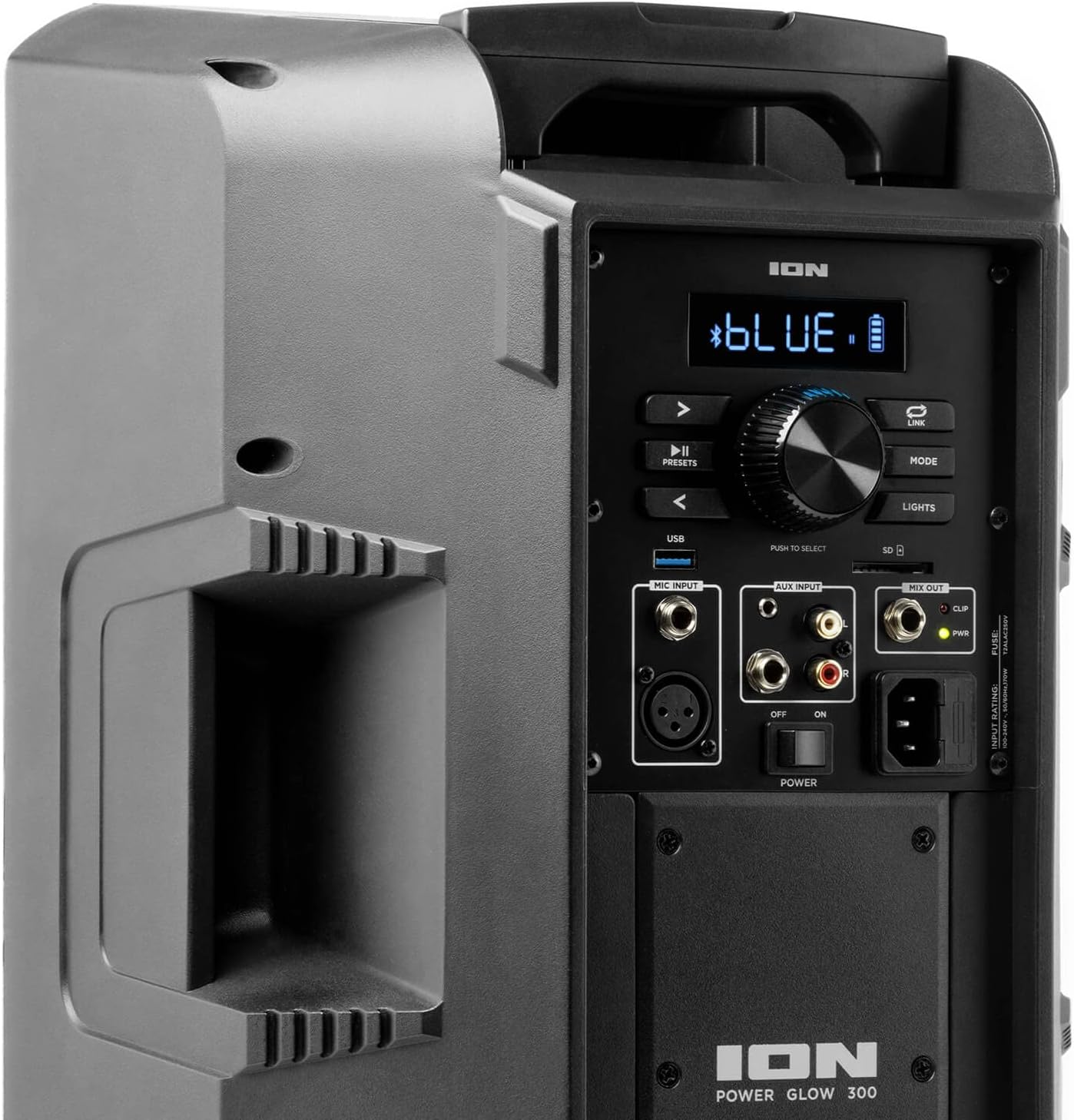
Image: Aux Inputs for external devices.
3. LED светлосни ефекти
The Power Glow 300 features dynamic multi-colored LED lights on the woofer that can pulse and change with the beat of the music. Use the 'LIGHTS' button on the control panel or the ION Sound XP APP to cycle through different lighting modes or turn them off.

Image: Speaker with green LED lighting.
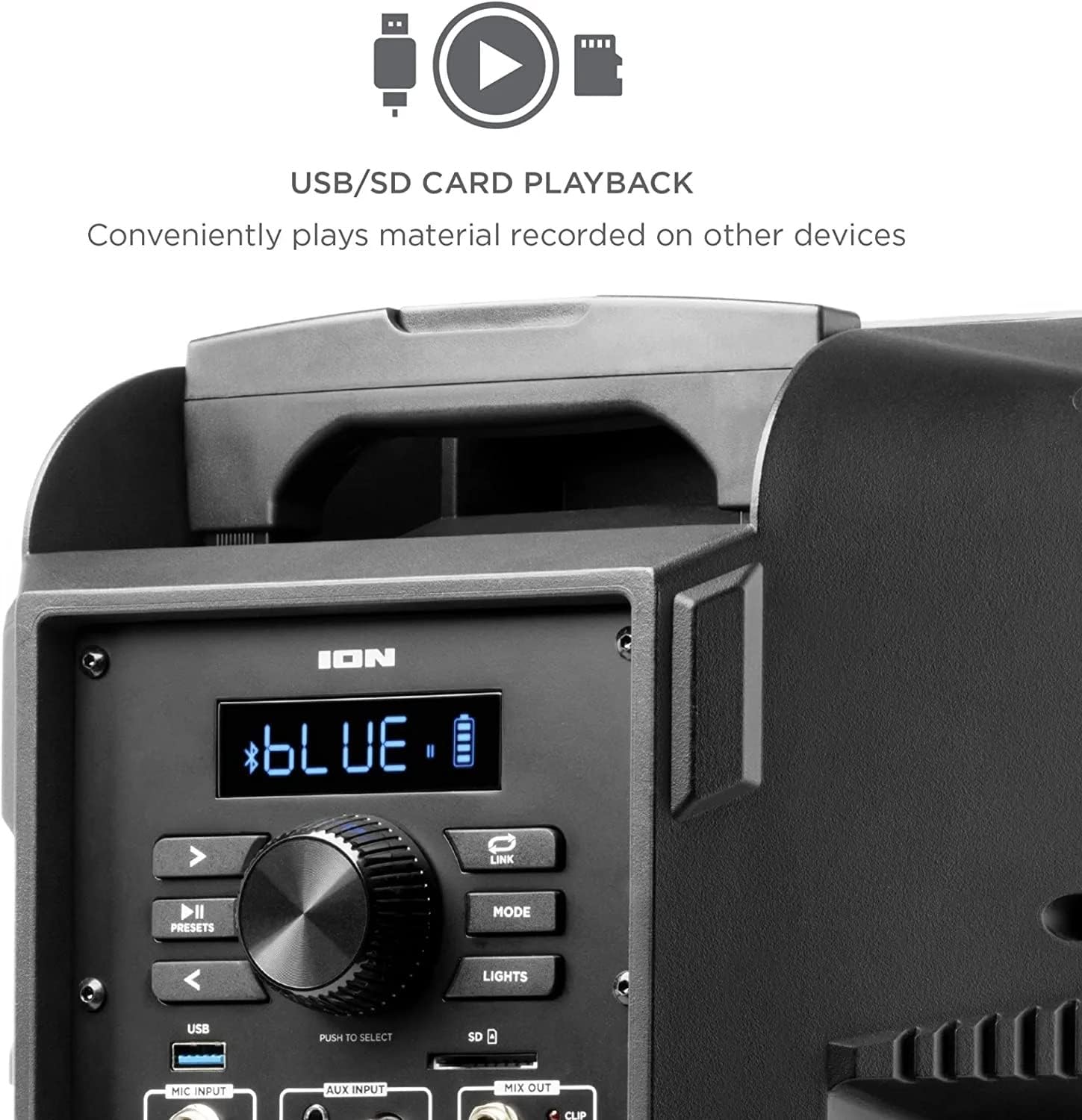
Image: Speaker with blue LED lighting.
4. Безжична стерео-врска
To connect two Power Glow 300 speakers wirelessly for stereo sound, follow the instructions provided in the ION Sound XP APP or refer to the full product manual for detailed pairing steps.
Одржување
- Чистење: Use a soft, dry cloth to clean the exterior of the speaker. Do not use harsh chemicals or abrasive cleaners.
- Нега на батеријата: За оптимален век на траење на батеријата, избегнувајте често целосно празнење на батеријата. Редовно полнете го звучникот, особено ако ќе го чувате подолг период.
- Складирање: Чувајте го звучникот на ладно и суво место, подалеку од директна сончева светлина и екстремни температури.
Решавање проблеми
- Без моќност: Ensure the power cable is securely connected and the power switch is in the 'ON' position. Check the power outlet.
- Нема звук: Verify that the volume is turned up on both the speaker and your audio source. Check all cable connections for auxiliary inputs. Ensure Bluetooth is properly paired.
- Исклучување Bluetooth: Move your Bluetooth device closer to the speaker. Ensure no other devices are interfering with the Bluetooth signal. Try unpairing and re-pairing the device.
- Искривен звук: Reduce the volume on both the speaker and your audio source. Check for proper input levels.
- Светлата не работат: Check the 'LIGHTS' button on the control panel or within the ION Sound XP APP to ensure they are enabled.
If issues persist, please refer to the comprehensive troubleshooting guide on the ION Audio webсајт или контактирајте со поддршката за корисници.
Спецификации
| Име на моделот | Моќ сјај 300 |
| Тип на звучник | Вуфер |
| Максимална излезна моќност на звучникот | 300 вати |
| Вуфер со дијаметар | 10 инчи |
| Дијаметар на високотонецот | 25.4 милиметри |
| Технологија за поврзување | Bluetooth |
| Технологија на безжична комуникација | Bluetooth |
| Опсег на Bluetooth | 100 стапки (30.48 метар) |
| Извор на енергија | Напојува со батерија |
| Тип на батерија | 1 литиум јон (вклучен) |
| Тежина на ставката | 26.3 фунти |
| Димензии на пакетот | 22 x 14.8 x 14.8 инчи |
| Вклучени компоненти | Speaker, Power cable, User manual |
| UPC | 657768184574 |
| Вид на гаранција | Ограничени |
Гаранција и поддршка
The ION Audio Power Glow 300 comes with a Limited Warranty. For detailed warranty information, product registration, and technical support, please visit the official ION Audio webлокација или контактирајте го нивниот оддел за корисничка поддршка. Чувајте ја сметката како доказ за купување за гаранциски побарувања.