
1. Вовед
This manual provides essential information for the safe and efficient use of your Cecotec Conga 11090 Spin Revolution Home&Wash T robot vacuum cleaner. Please read this manual thoroughly before operating the device and retain it for future reference.
The Conga 11090 Spin Revolution Home&Wash T is a robot vacuum and mop equipped with laser technology and an automatic self-emptying and self-cleaning base. It is designed for comprehensive floor cleaning, including vacuuming dust and mopping with rotating pads.
2. Инструкции за безбедност
За да го намалите ризикот од повреда или оштетување, почитувајте ги следниве безбедносни мерки на претпазливост:
- Обезбедете ја јачината на напојувањетоtage се совпаѓа со етикетата со спецификации на базата за полнење.
- Do not operate the robot in wet environments or near flammable materials.
- Држете ги децата и домашните миленици подалеку од роботот за време на работата.
- Do not use the robot to pick up large debris, sharp objects, or liquids other than water for mopping.
- Редовно проверувајте го кабелот за напојување и приклучокот за оштетување.
- Only use original accessories and replacement parts.
- Avoid blocking the robot's sensors or charging contacts.
- Do not attempt to repair or modify the robot yourself. Contact authorized service personnel.
3. Содржина на пакетот
Проверете дали сите артикли се присутни во пакувањето:
- 1x Robot Vacuum Cleaner
- 1x Self-emptying and Self-cleaning Base with 2 tanks (clean water and dirty water)
- 1x Dust Bag (pre-installed in the base)
- 1x странична четка
- 2x Rotating Mop Pads (pre-installed)
- 1x кабел за напојување
- 1x Self-cleaning Brush (for maintenance)
- 1x Multifunction Brush
- 1x Упатство за употреба
4. Производот завршиview
The Cecotec Conga 11090 Spin Revolution Home&Wash T integrates advanced features for automated home cleaning.
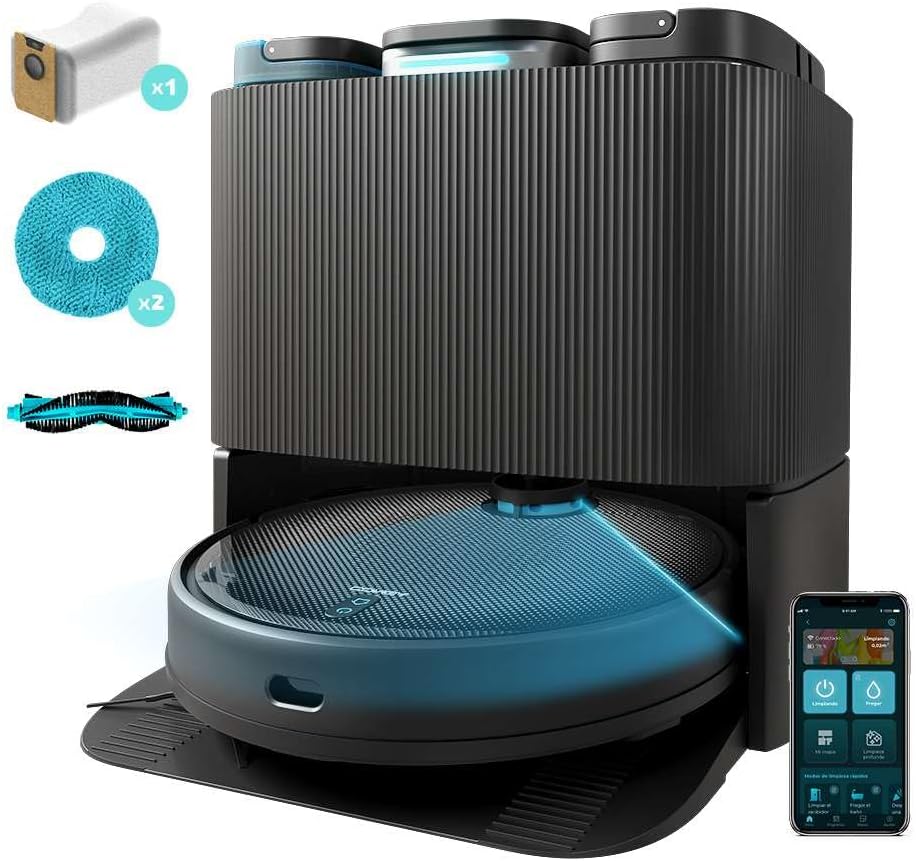
Слика 4.1: The Cecotec Conga 11090 robot vacuum cleaner docked in its self-emptying and self-cleaning base. The base features three compartments for dust, clean water, and dirty water.
4.1 Компоненти на роботот

Слика 4.2: Врвот view of the robot, showing the power/clean button and home button. The laser navigation system is visible on top.

Слика 4.3: Underside of the robot, illustrating the main brush, side brush, and two rotating mop pads for effective cleaning.
4.2 Self-Emptying and Self-Cleaning Base

Слика 4.4: Врвот view of the base, showing the three distinct tanks: a 2.5L dust tank, a 2.8L clean water tank, and a 2.4L dirty water tank.
The base automatically empties the robot's dustbin and cleans/dries the mop pads. It features automatic detection for a full dust bag or empty/full water tanks, providing alerts as needed.
5. Поставување
5.1 Поставување на базата за полнење
- Place the self-emptying and self-cleaning base against a wall in an open area.
- Ensure there is at least 0.5 meters of clear space on both sides of the base and 1.5 meters in front.
- Connect the power cable to the base and plug it into a power outlet.
- Проверете дали резервоарот за чиста вода е полн, а резервоарот за нечиста вода е празен.
- Confirm a dust bag is correctly installed in the base.
5.2 Почетно полнење
Place the robot onto the charging base. Ensure the charging contacts align. The robot will begin charging automatically. For first use, allow the robot to fully charge before operation.
5.3 Инсталација и поврзување на апликацијата
- Download the "CECOTEC" app (OS app System 3.0) from your mobile device's app store.
- Follow the in-app instructions to register an account and add your Conga 11090 robot.
- The app will guide you through connecting the robot to your home Wi-Fi network (2.4 GHz).

Слика 5.1: A user controlling the robot vacuum cleaner via the Cecotec mobile application, which offers various cleaning modes and settings.
6. Операција
6.1 Започнување на циклус на чистење
- Преку роботски копчиња: Press the power button on the robot to start a general cleaning cycle.
- Преку мобилна апликација: Use the CECOTEC app to initiate cleaning. The app allows for more advanced control, including selecting specific rooms, setting cleaning modes, and adjusting suction/water levels.
6.2 Ласерска навигација и мапирање
The robot uses laser technology for precise navigation and mapping of your home. During its first cleaning cycle, it will create a detailed map, which can be viewed and customized in the app.

Слика 6.1: The robot utilizing its laser navigation system to efficiently map and clean the environment, avoiding obstacles.
6.3 Автоматски карактеристики
- Total Surface Cleaning: If the battery runs low during a cleaning cycle, the robot returns to its base to recharge, then resumes cleaning from where it left off.
- Water Surface Cleaning: During mopping, if the mop pads become dry, the robot returns to its base to re-humidify them before continuing the mopping task.
- Customizable Mopping: Adjust the mop pad cleaning time (10, 15, or 20 minutes) and the frequency of automatic dust emptying (after one, two, or three cleaning cycles) via the app.

Слика 6.2: The robot actively mopping a floor, demonstrating its ability to clean various types of spills and dirt.
7. Одржување
Редовното одржување обезбедува оптимални перформанси и го продолжува животниот век на вашата роботска правосмукалка.
7.1 Self-Emptying Base Maintenance
- Замена на кеси за прав: The base will alert you when the dust bag is full. Replace it with a new one to maintain optimal dust collection.
- Управување со резервоарот за вода: Regularly empty the dirty water tank and refill the clean water tank. The base provides alerts for these actions.
- Чистење на подлога за бришење: The base automatically cleans the mop pads. Ensure the clean water tank is filled for this process.

Слика 7.1: Внатрешна view of the self-emptying and self-cleaning base, illustrating the water circulation for mop pad cleaning and the dust collection system.
7.2 Чистење на компонентите на роботот
- Главна четка: Remove and clean the main brush regularly using the provided self-cleaning brush. Remove any tangled hair or debris.
- Странична четка: Check the side brush for wear and tear. Replace if damaged. Clean any hair or debris caught around it.
- Влошки за бришење: Although self-cleaned by the base, periodically remove and hand-wash the rotating mop pads for thorough cleaning.
- Сензори и контакти за полнење: Wipe the robot's sensors and charging contacts, as well as the base's charging contacts, with a dry cloth to ensure proper function.
8 Смена на проблеми
If you encounter issues with your robot vacuum cleaner, refer to the following common problems and solutions.
| Проблем | Можна причина | Решение |
|---|---|---|
| Роботот не се стартува ниту реагира. | Слаба батерија; прекинувачот за напојување е исклучен; роботот е заглавен. | Наполнете го роботот; проверете дали прекинувачот за напојување е вклучен; отстранете ги сите пречки. |
| Лоши перформанси на вшмукување. | Full dust bag; clogged main brush; dirty filter. | Replace dust bag; clean main brush; clean or replace filter. |
| Mop pads are not wet or cleaning effectively. | Empty clean water tank; clogged water nozzles; dry mop pads. | Refill clean water tank; clean water nozzles; allow robot to return to base for re-humidification. |
| Роботот не може да се врати на базата за полнење. | Base obstructed; robot too far from base; dirty charging contacts. | Clear area around base; manually place robot near base; clean charging contacts. |
| Проблеми со поврзувањето со апликацијата. | Неточна лозинка за Wi-Fi; Wi-Fi мрежа од 5 GHz; роботот е предалеку од рутерот. | Verify password; ensure 2.4GHz Wi-Fi is used; move robot closer to router. |
For further assistance, consult the CECOTEC app or contact customer support.
9. Спецификации
| Карактеристика | Детал |
|---|---|
| Бренд | Цекотек |
| Број на модел | 00263 |
| Име на производ | Conga 11090 Spin Revolution Home&Wash T |
| Боја | Црното |
| Димензии (Д x Ш x В) | 34.5 x 34.3 x 10.8 cm |
| Тежина на ставката | 10.25 кг |
| Моќ на вшмукување | 5000 Па |
| Траење на батеријата (автономија) | До 140 минути (2 часа и 20 минути) |
| Dust Tank Capacity (Base) | 2.5 литри |
| Clean Water Tank Capacity (Base) | 2.8 литри |
| Dirty Water Tank Capacity (Base) | 2.4 литри |
| Тип на филтер | Ткаенина |
| Посебни карактеристики | Laser Navigation, Automatic Self-Emptying Base, Automatic Mop Cleaning & Drying, App Control |
| Поврзување | Wi-Fi (2.4 GHz), Bluetooth, App Control |
| Препорака за површина | Laminate and other hard floors |
10. Гаранција и поддршка
Cecotec offers a commitment to spare parts availability for 10 years. For warranty claims, technical support, or to purchase replacement parts, please contact Cecotec customer service through their official website or the CECOTEC app.
Зачувајте ја сметката за купување како доказ за купување за целите на гаранцијата.