
Cecotec Conga 11090 Spin Revolution Home&Wash
Упатство за користење на роботската правосмукалка Cecotec Conga 11090 Spin Revolution Home&Wash
Модел: 08105
1. Вовед
Thank you for choosing the Cecotec Conga 11090 Spin Revolution Home&Wash Robot Vacuum Cleaner. This advanced robot is designed to provide comprehensive cleaning for your home, combining powerful vacuuming with effective mopping capabilities and an automatic self-emptying and mop-washing station. Please read this manual carefully before using the product to ensure proper operation, maintenance, and safety.
2. Важни безбедносни инструкции
Секогаш следете ги основните безбедносни мерки на претпазливост при употреба на електрични апарати за да го намалите ризикот од пожар, електричен удар или повреда.
- Прочитајте ги сите упатства пред да го користите апаратот.
- Не дозволувајте деца да го ракуваат роботот. Надгледувајте ги децата и домашните миленици кога роботот работи.
- Обезбедете ја моќноста волtage одговара на томtage означено на етикетата за оценување.
- Do not use the robot on wet surfaces or in areas with standing water.
- Чувајте ги косата, широката облека, прстите и сите делови од телото подалеку од отворите и подвижните делови.
- Не земајте големи предмети, остри предмети или течности со роботот.
- Исклучете го роботот и исклучете ја станицата за полнење од струја пред да вршите какво било одржување или чистење.
- Користете само додатоци и додатоци препорачани од производителот.
- Store the robot and charging station indoors in a cool, dry place.
- Do not operate the robot if it has been dropped, damaged, left outdoors, or dropped into water.
3. Содржина на пакетот
Проверете дали сите компоненти се присутни во пакувањето:
- 1 x Роботска правосмукалка
- 1 x странични четки
- 2 x Rotating Mops
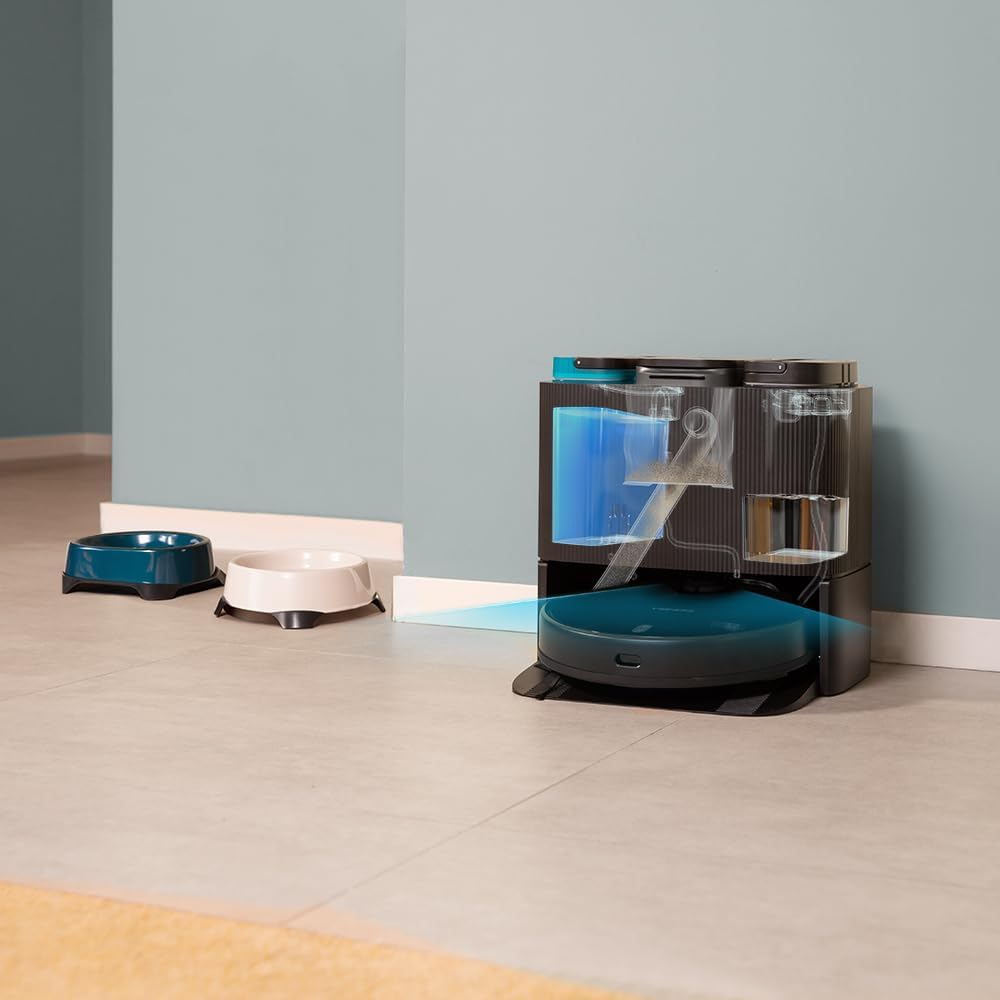
- 1 x Self-emptying Base with 2 Tanks (1 x Clean Water Tank, 1 x Dirty Water Tank)
- 1 x вреќа за прашина
- 1 x кабел за напојување
- 1 x Четка за самочистење
- 1 x Мултифункционална четка
- 1 x Упатство за употреба

4. Производот завршиview
The Conga 11090 Spin Revolution Home&Wash is an intelligent cleaning solution featuring advanced navigation and comprehensive cleaning capabilities.
4.1 Роботска правосмукалка
- Паметна навигација: Equipped with iTech Laser Eye technology for precise mapping and obstacle avoidance.
- Моќно вшмукување: Delivers up to 5000 Pa suction power for effective dirt and debris removal.
- Spin Revolution Mopping: Features two rotating mops for deep scrubbing and floor cleaning.
- Долг век на батеријата: Provides up to 140 minutes of cleaning autonomy.


4.2 Self-Emptying and Mop-Washing Station
- Автоматско собирање прашина: The robot automatically empties its dustbin into a 2L dust bag in the station.
- Автоматско перење на крпи: The station cleans the robot's mopping pads with clean water from its 2.8L tank and collects dirty water in a 2.4L tank.
- Удобен дизајн: Reduces manual intervention for a truly hands-free cleaning experience.


5. Поставување
5.1 Отпакување и поставување
- Внимателно отстранете ги сите компоненти од пакувањето.
- Choose a suitable location for the self-emptying station. Ensure there is at least 1.5 meters of clear space in front of the station and 0.5 meters on either side.
- Plug the power cable into the station and connect it to a power outlet.
5.2 Почетно полнење
Place the robot onto the charging contacts of the self-emptying station. Ensure the robot is properly aligned. The robot will begin charging automatically. For first use, it is recommended to fully charge the robot before operation.
5.3 Инсталација и поврзување на апликацијата
Download the "CECOTEC" app from your smartphone's app store (iOS or Android). Follow the in-app instructions to connect your robot to your home Wi-Fi network (2.4 GHz) and Bluetooth. The app provides enhanced control and mapping features.

6. Ракување со роботот
6.1 Започнување на циклус на чистење
- Преку роботско копче: Press the power button on the robot to start a general cleaning cycle.
- Преку апликација: Open the CECOTEC app. You can select various cleaning modes such as "Clean All", "Spot Clean", "Zone Clean", or schedule cleanings.

6.2 Мапирање и навигација
The robot uses its iTech Laser Eye to create a detailed map of your home during its first cleaning cycle. This map can be viewed and customized in the app. You can set virtual walls, restricted zones, and specific cleaning areas.

6.3 Automatic Self-Maintenance
During and after cleaning cycles, the robot will automatically return to its station to empty its dustbin and wash its mopping pads. The frequency of these actions can be configured in the app.
7. Одржување
Редовното одржување обезбедува оптимални перформанси и го продолжува животниот век на вашата роботска правосмукалка.
7.1 Чистење на роботот
- Главна четка: Remove the main brush and clean it regularly using the provided self-cleaning brush to remove tangled hair and debris.
- Странична четка: Check and clean the side brush for any tangled hair or debris. Replace if worn.
- Влошки за бришење: Although the station washes them, it is recommended to manually remove and rinse the mopping pads periodically.
- Сензори: Wipe all sensors (cliff sensors, laser sensor) with a clean, dry cloth to ensure proper navigation.

7.2 Maintaining the Self-Emptying Station
- Торба за прашина: Replace the dust bag in the station when it is full. The app will notify you.
- Резервоари за вода: Regularly empty the dirty water tank and refill the clean water tank. Clean both tanks to prevent mold or odor buildup.
- Washing Tray: Clean the washing tray where the mops are cleaned to remove any residue.

8 Смена на проблеми
Доколку наидете на проблеми со вашиот робот, погледнете ги следните вообичаени проблеми и решенија:
| Проблем | Можна причина | Решение |
|---|---|---|
| Роботот не се вклучува. | Low battery; power cable not connected. | Place robot on charging station; ensure power cable is securely connected. |
| Роботот не може да најде станица за полнење. | Station is blocked; robot is too far. | Ensure clear space around station; manually place robot closer to station. |
| Лоши перформанси на чистење. | Brushes tangled; dustbin full; mops dirty. | Clean main/side brushes; empty dustbin/replace bag; clean mopping pads. |
| Роботот често се заглавува. | Obstacles; dark surfaces; dirty sensors. | Clear obstacles; use virtual walls in app; clean sensors. |
| Проблеми со поврзувањето со апликацијата. | Incorrect Wi-Fi password; 5GHz network; Bluetooth off. | Verify Wi-Fi password; ensure 2.4GHz network; enable Bluetooth; restart robot and router. |
9. Спецификации
| Карактеристика | Детал |
|---|---|
| Бренд | Цекотек |
| Име на моделот | Conga 11090 Spin Revolution Home&Wash |
| Број на модел | 08105 |
| Боја | Црното |
| Димензии на производот (робот) | 34.3 x 34.5 x 10.8 cm |
| Тежина на производот | 11.25 кг |
| Voltage | 120 волти |
| Ниво на бучава | 75 dB |
| Работно време | Up to 2 hours and 20 minutes (140 minutes) |
| Капацитет на вреќа за прашина (станица) | 2 литри |
| Капацитет на резервоарот за чиста вода (станица) | 2.8 литри |
| Dirty Water Tank Capacity (Station) | 2.4 литри |
| Посебни карактеристики | Wireless, Automatic Shut-off, iTech Laser Eye Navigation |
| Компатибилни уреди | Smartphones (via CECOTEC App) |
10. Гаранција и поддршка
Cecotec products are manufactured to high-quality standards. For warranty information, please refer to the warranty card included in your product packaging or visit the official Cecotec website. For technical support, troubleshooting assistance, or spare parts, please contact Cecotec customer service or the retailer from whom you purchased the product.
Поддршка преку Интернет: Посетете го Продавница за брендот Cecotec на Amazon за дополнителни информации за производот и ресурси за поддршка.
Ask a question about this manual
Ask about setup, troubleshooting, compatibility, parts, safety, or missing instructions. Manuals+ will review the question and use this page’s manual context to help answer it.