
1. Вовед
Thank you for choosing the Goshyda Portable Multimedia 1080P Projector. This compact and versatile device is designed to provide a personal cinema experience, supporting various multimedia inputs for entertainment, presentations, and more. Please read this manual carefully before using the projector to ensure proper operation and to maximize its lifespan.

Image 1.1: The Goshyda YG300 Mini Portable Projector in a home entertainment setting.
2. Информации за безбедност
- Напојување: Use only the specified 5V 2A power adapter or a compatible power bank. Incorrect voltage може да го оштети уредот.
- Вентилација: Не ги блокирајте отворите за вентилација. Обезбедете соодветен проток на воздух околу проекторот за да спречите прегревање.
- Животна средина: Avoid exposing the projector to water, moisture, dust, or extreme temperatures. Operate in a clean, dry environment.
- Чистење: Исклучете го напојувањето пред чистење. Користете мека, сува крпа. Не користете течни или аеросолни средства за чистење.
- Расклопување: Не обидувајте се сами да го расклопите или поправите проекторот. За сите сервиси обратете се на квалификуван персонал.
- Заштита на очите: Не гледајте директно во објективот на проекторот кога lamp е вклучено.
3. Содржина на пакетот
Ве молиме проверете ја содржината на пакувањето по отпакувањето. Доколку недостасуваат или се оштетени некои предмети, контактирајте го вашиот продавач.
- Goshyda Portable Projector
- Далечински управувач
- AV кабел
- Адаптер за напојување
- Упатство за употреба (овој документ)

Image 3.1: Included accessories with the Goshyda Portable Projector.
4. Производот завршиview
4.1. Карактеристики на проекторот
- 1080P Resolution Support: Обезбедува јасни и детални слики.
- Компактен и пренослив дизајн: Weighing approximately 290g, it is easy to carry.
- Multi-Port Connectivity: Includes USB, HDMI, AV, memory card slot, and audio output.
- Вградени звучници: Обезбедува интегрирано аудио за погодност.
- Флексибилна моќност: Can be powered by a 5V 2A wall charger or power bank.

Image 4.1: Visual representation of the projector's main features.
4.2. Projector Ports and Controls
Familiarize yourself with the various ports and controls on your projector.
- Објектив: Проекциски објектив свртен напред.
- Фокус прстен: Ја прилагодува јасноста на сликата.
- Power Input (DC IN): Connects to the 5V 2A power adapter.
- HDMI порта: За поврзување уреди преку HDMI кабел.
- USB порта: За поврзување на USB уреди за складирање.
- AV порт: For connecting devices via AV cable.
- Слот за MicroSD картичка: За вметнување на мемориска картичка.
- Аудио излез: За поврзување на надворешни звучници или слушалки.
- Контролни копчиња: On the top panel for basic navigation and selection.

Слика 4.2: Страна view of the projector highlighting its connectivity ports.

Image 4.3: Close-up of the projector lens.
5. Поставување
5.1. Поврзување за напојување
- Connect the provided power adapter to the DC IN port on the projector.
- Приклучете го адаптерот за напојување во стандарден штекер.
- Alternatively, for portable use, connect a 5V 2A power bank to the DC IN port.

Image 5.1: Powering the projector via wall adapter or power bank.
5.2. Поставување и проекција
Place the projector on a stable, flat surface. The optimal projection distance is between 1 to 2.5 meters, allowing for a screen size of up to 60 inches.
- For a 24-inch screen, place the projector approximately 0.8 meters away.
- For a 47-inch screen, place the projector approximately 1.2 meters away.
- For a 60-inch screen, place the projector approximately 1.6 meters away.
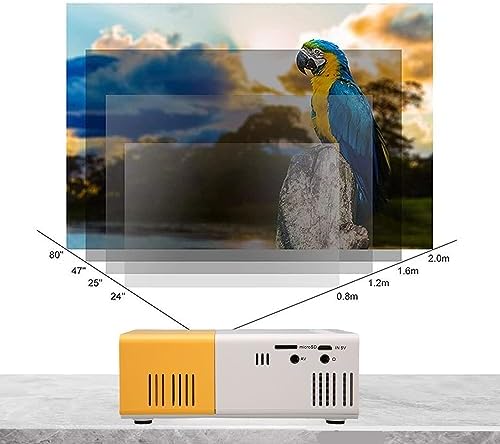
Image 5.2: Projection distance guidelines for various screen sizes. Note: Maximum recommended projection size is 60 inches.
5.3. Прилагодување на фокусот
After placing the projector and powering it on, rotate the focus ring located around the lens until the projected image appears clear and sharp.
6. Упатства за работа
6.1. Вклучување/исклучување
- Вклучување: Притиснете го копчето за вклучување на проекторот или на далечинскиот управувач.
- Исклучено: Притиснете го копчето за вклучување повторно. Проекторот ќе се исклучи.
6.2. Избор на влезен извор
Use the 'Source' button on the remote control or the projector's control panel to cycle through available input sources (HDMI, USB, AV, MicroSD).
6.3. Навигација во менито
Use the arrow buttons on the remote control or projector to navigate through menus. Press 'OK' or 'Enter' to confirm selections. Use the 'Return' or 'Back' button to go back to the previous menu.
7. Поврзување
The projector offers multiple connectivity options for various devices.

Image 7.1: Connectivity options for the Goshyda projector.
7.1. HDMI поврзување
Connect devices such as laptops, TV Sticks, game consoles (e.g., for Xbox One), or Blu-ray players using an HDMI cable. Select 'HDMI' as the input source.
7.2. USB конекција
Вметнете USB флеш-уред во USB-портата за репродукција на медиуми files directly. Select 'USB' as the input source and navigate through your files.
7.3. AV Connection
Use the provided AV cable to connect older devices like DVD players. Select 'AV' as the input source.
7.4. Smartphone/Tablet Connection
To connect directly to your smartphone or tablet, you will need an appropriate adapter (e.g., Micro USB to HDMI, Type-C to HDMI, or a dedicated HD multimedia interface device), depending on your device's operating system (OS X or Android) and available ports. These adapters are sold separately.
7.5. Аудио излез
Connect external speakers or headphones to the audio output port for enhanced sound.
8. Одржување
- Чистење леќи: Use a soft, lint-free cloth specifically designed for optical lenses to gently wipe the projector lens. Do not use abrasive materials or harsh chemicals.
- Надворешно чистење: Избришете ја надворешноста на проекторот со мека, сува крпа.
- Складирање: When not in use for extended periods, store the projector in a cool, dry place, away from direct sunlight and dust.
9 Смена на проблеми
| Проблем | Можна причина | Решение |
|---|---|---|
| Нема моќ | Power adapter not connected or faulty; insufficient power supply. | Ensure the 5V 2A power adapter is securely connected and plugged into a working outlet. Try a different power source or power bank. |
| Нема слика | Incorrect input source selected; cable not connected properly; device not outputting signal. | Select the correct input source (HDMI, USB, AV). Check all cable connections. Ensure the connected device is powered on and outputting a signal. |
| Сликата е матна | Фокусот не е прилагоден; проекторот е премногу блиску/далеку од екранот. | Rotate the focus ring to sharpen the image. Adjust the projection distance within the recommended range (1-2.5m). |
| Нема звук | Volume too low or muted; external speakers not connected; audio format not supported. | Increase the volume on the projector and the source device. Check if external speakers are properly connected. Ensure the audio format is supported. |
10. Спецификации
| Карактеристика | Детал |
|---|---|
| Бренд | Гошида |
| Број на модел | Goshyda89pkbg17g0 |
| Резолуција на екранот | 1920 x 1080 (1080P Support) |
| Осветленост | 200 лумени |
| Сооднос на аспект | 4:3 |
| Растојание на проекција | 1 - 2.5 метри |
| Големина на проекција | До 60 инчи |
| Технологија за поврзување | HDMI, USB, AV, MicroSD, Audio Out |
| Влез на енергија | 5V 2A |
| Тип на дисплеј | LCD екран |
| Димензии на производот | 12L x 8.5W x 4.6H cm (Approx. 4.7 x 3.3 x 1.8 inches) |
| Форма фактор | Пренослив |
| Тип на монтирање | Монтирање на маса |
11. Гаранција и поддршка
For warranty information and customer support, please refer to the documentation provided with your purchase or contact your retailer directly. Keep your proof of purchase for warranty claims.