1. Вовед
This manual provides instructions for the use and care of your new generic replacement remote control. This remote is designed to operate various functions of compatible Pioneer AVH-P series car audio/video receivers, specifically models AVH-P5000DVD, AVH-P5100DVD, AVH-P5150DVD, and AVH-P5200DVD. Please read this manual thoroughly before use to ensure proper operation.
Note: As a replacement remote, some advanced or specific functions of your original unit's remote may not be supported or may operate differently. This is not indicative of a product defect.
2. Производот завршиview
The remote control features a compact and ergonomic design for comfortable handling. It includes essential buttons for controlling your compatible Pioneer car audio/video receiver.
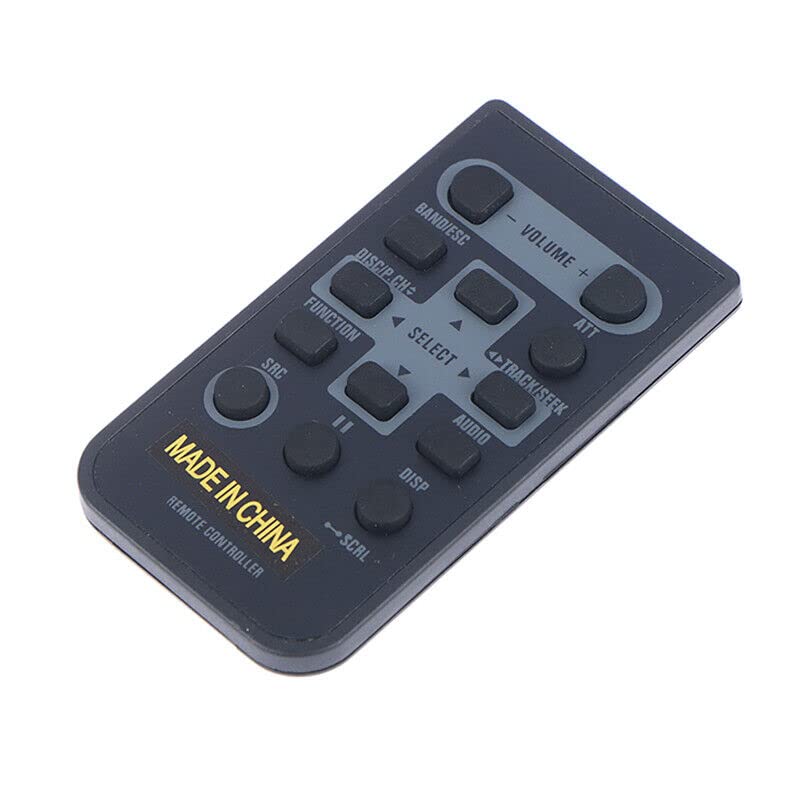
Слика 2.1: напред view of the generic replacement remote control. The remote is dark gray with light gray button labels. Key buttons include Volume, Band/ESC, ATT, Disc/P.CH, Track/Seek, Select, Function, Audio, SRC, Disp, and SCAL. The bottom of the remote has 'MADE IN CHINA' and 'REMOTE CONTROLLER' printed on it.
Функции на копчињата:
- ВОЛУМЕНТ +/-: Го прилагодува нивото на аудио излез.
- ОПСЕГ/ESC: Changes radio bands or exits a menu/function.
- ATT (Attenuate): Mutes or reduces audio volume temporarily.
- DISC/P.CH: Selects disc or program channel.
- TRACK/SEEK (◀/▶): Skips tracks/chapters or seeks radio stations.
- SELECT (Up/Down/Left/Right/Center): Се движи низ менијата и ги потврдува изборите.
- ФУНКЦИЈА: Accesses various function settings.
- АУДИО: Accesses audio settings.
- SRC (Извор): Changes the input source (e.g., Radio, CD, USB).
- DISP (Екран): Changes display information or mode.
- SCAL (Scroll): Scrolls through lists or text.
3. Поставување
Инсталација на батерија:
- Пронајдете ја преградата за батерии на задниот дел од далечинскиот управувач.
- Отворете го капакот на преградата за батерии.
- Вметнете две (2) AAA батерии, осигурувајќи се дека поларитетот е точен (+ и -) како што е наведено во внатрешноста на преградата.
- Добро затворете го капакот на преградата за батерии.
Important: Do not mix old and new batteries, or different types of batteries. Remove batteries if the remote will not be used for an extended period.
4. Упатства за работа
To operate your Pioneer AVH-P series receiver with this remote control, point the remote directly at the infrared sensor on your receiver. Ensure there are no obstructions between the remote and the receiver.
Основни операции:
- Вклучување/исклучување: The remote typically does not have a dedicated power button for the main unit. Use the power button on your Pioneer receiver to turn it on or off.
- Контрола на јачината на звукот: Притиснете Волумен + to increase volume, and ВОЛУМЕН - да се намали волуменот.
- Избор на извор: Притиснете го КРР button to cycle through available input sources (e.g., Radio, CD, DVD, USB, AUX).
- Track/Chapter Navigation: When playing media, use the TRACK/SEEK ◀ or ▶ buttons to skip to the previous or next track/chapter.
- Подесување на радио: Во радио режим, користете TRACK/SEEK ◀ or ▶ to seek for stations. Use БЕНД/ESC to change radio bands (FM1, FM2, AM).
- Навигација во менито: Користете го ИЗБЕРИ directional arrows (Up, Down, Left, Right) to navigate through on-screen menus. Press the center ИЗБЕРИ копче за да потврдите избор.
- Mute/Attenuate: Притиснете го АТТ button to temporarily mute or reduce the audio volume. Press it again to restore.
- Прикажи информации: Притиснете го DISP button to change the information shown on the receiver's display.
5. Одржување
Чистење:
Избришете го далечинскиот управувач со мека, сува крпа. За тврдокорна нечистотија, лесно избришете гоampen the cloth with water or a mild cleaning solution, then wipe dry immediately. Do not use abrasive cleaners, alcohol, or solvents, as these can damage the remote's surface or labels.
Нега на батеријата:
Replace batteries when the remote's range decreases or it becomes unresponsive. Always replace both batteries at the same time. Dispose of used batteries according to local regulations.
6 Смена на проблеми
- Далечинското не реагира:
- Проверете дали се правилно инсталирани свежи AAA батерии.
- Проверете дали има пречки помеѓу далечинскиот управувач и IR сензорот на приемникот.
- Уверете се дека сте во рамките на ефективниот работен опсег и дека далечинскиот управувач е насочен директно кон приемникот.
- Некои функции не работат:
- This is a generic replacement remote. It may not support all functions of your original Pioneer remote. This is normal for replacement units.
- Verify that the function you are trying to use is available on your specific Pioneer AVH-P model.
7. Спецификации
| Бренд | Генерички |
| Производител | е-далечинско управување |
| Compatible Pioneer Models | AVH-P5000DVD, AVH-P5100DVD, AVH-P5150DVD, AVH-P5200DVD |
| Компатибилни уреди | DVD/Blu-ray Player, Home Theater, Set Top Box, Stereo System, Television (when connected to compatible Pioneer unit) |
| Потребни се батерии | 2 x AAA батерии |
| Специјална карактеристика | Ергономски дизајн |
| Боја | Black or white (color may vary) |
| Максимален број на поддржани уреди | 1 (the specific Pioneer unit) |
8. Гаранција и поддршка
As a generic replacement product, this remote control typically does not come with a separate manufacturer's warranty. For any issues or returns, please refer to the retailer's return policy where the product was purchased. For purchases made on Amazon, a 30-day return policy is generally applicable.
For further assistance regarding your Pioneer AVH-P series receiver, please consult the original manual for your specific unit or contact Pioneer customer support.


