
zhizhi HXT72PK
User Manual: zhizhi Smart Watch
Model: HXT72PK
Вовед
Thank you for choosing the zhizhi Smart Watch. This device is designed to enhance your daily life by combining advanced fitness tracking, health monitoring, and smart communication features. This manual provides detailed instructions to help you set up, operate, and maintain your new smartwatch.

Image: The zhizhi Smart Watch in pink and black, showcasinнеговиот елегантен дизајн и дигитален дисплеј.
Што има во кутијата
Проверете ја содржината на вашиот пакет за да се осигурате дека сите предмети се присутни:
- 1 x zhizhi Smart Watch
- 1 x Pink Watch Band
- 1 x Black Watch Band
- 1 x Упатство за употреба
- 1 x магнетен полнач
Водич за поставување
1. Полнење на уредот
Before first use, fully charge your smartwatch. Connect the magnetic charger to the charging points on the back of the watch and plug the USB end into a power adapter (not included) or a computer USB port.
- Време на полнење: Приближно 2-3 часа за целосно полнење.
- Траење на батеријата: Up to 7-15 days depending on usage.
2. Downloading the FitCloudPro App
The zhizhi Smart Watch requires the "FitCloudPro" app for full functionality and data synchronization. Follow these steps:
- Вклучете ја функцијата Bluetooth на вашиот паметен телефон.
- Open the "Google Play Store" (for Android) or "APP Store" (for iOS).
- Пребарај за "FitCloudPro" and download the app.

Image: Visual guide showing how to download the FitCloudPro app from app stores and enable Bluetooth.
3. Pairing the Watch (Bluetooth Connection)
Once the app is installed, pair your smartwatch with your phone:
- Отворете ја апликацијата FitCloudPro.
- Tap "Please connect device" or navigate to the "Device" section.
- Select "Select device" and find "P72" (the watch's Bluetooth name) from the list.
- Потврдете го барањето за спарување на вашиот телефон.
4. Овозможување на функцијата за повикување
To use the call feature, additional steps are required:
- After connecting "P72" in the app, accept the mobile phone system's pop-up pairing request.
- On the watch, turn on the call Bluetooth switch. This is necessary for making calls and playing media sound through the watch.
- In your phone's Bluetooth settings, ensure all necessary permissions for "P72" are enabled.
- Once connected, you can use the watch to answer/make calls. If the call function is not needed, you can turn it off to conserve battery life.


Image: The smartwatch displaying call and message interfaces, demonstrating its communication capabilities.
Упатства за работа
Основна навигација
- Екран на допир: The 1.91" HD full-touch screen allows for intuitive navigation. Swipe left/right, up/down, and tap to select.
- Странично копче: Обично се користи за враќање на почетниот екран или за будење на уредот.
- Подигнете до будење: The screen will light up automatically when you raise your hand.
Прилагодување на изгледот на часовникот
Personalize your watch with over 100 watch faces available through the FitCloudPro app, or use your own photos.
- Промена на лица на часовникот: Access the watch face gallery in the FitCloudPro app to select and sync new designs.
- Направи сам изглед на часовникот: Upload your favorite pictures (e.g., family, pets) to create custom watch faces via the app.
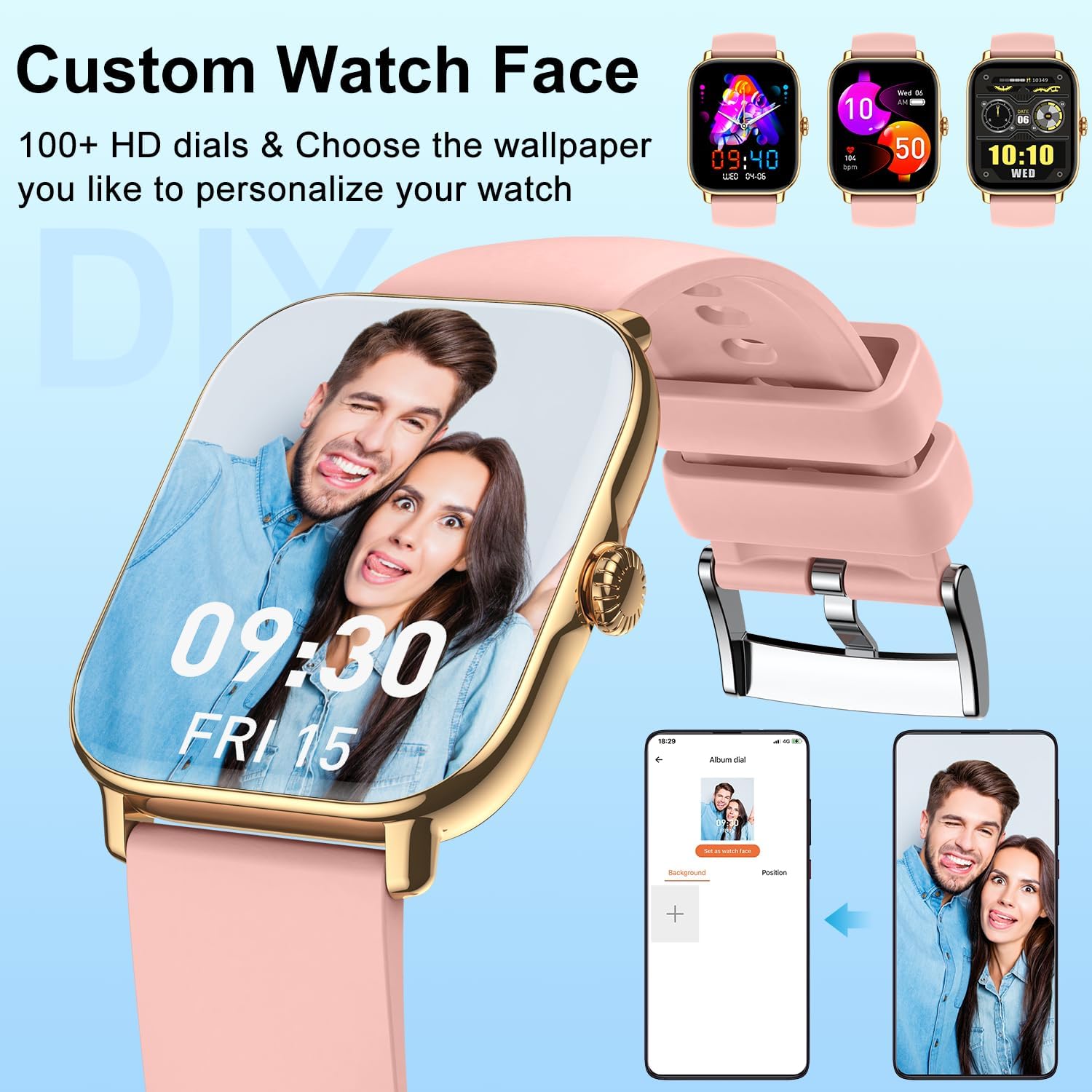
Слика: Изложбата на паметниот часовникasing a personalized watch face with a user's photo, highlighting customization options.
Карактеристики на комуникација
- Воспоставување/одговарање на повици: With the Bluetooth call function enabled, you can dial numbers, answer incoming calls, and view call history directly from your wrist using the built-in speaker and microphone.
- Примајте известувања: Get real-time alerts for calls, SMS, and app notifications (Facebook, Twitter, WhatsApp, LinkedIn, Instagram, etc.) directly on your watch. The watch will vibrate to notify you.
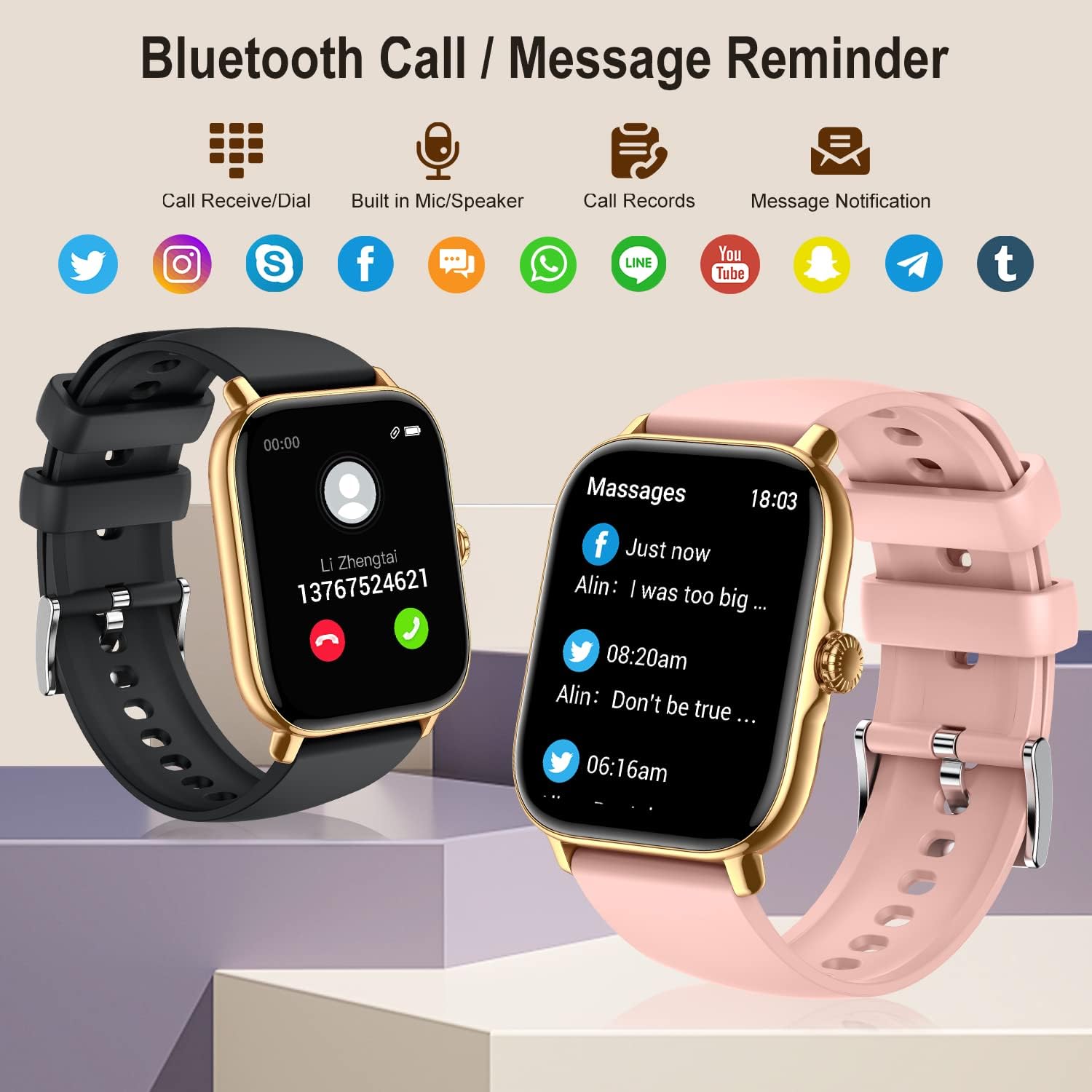
Image: The smartwatch showing its Bluetooth call and message reminder capabilities, with icons for popular social media and messaging apps.
Здравствен мониторинг
The smartwatch provides comprehensive health data to help you monitor your well-being.
- Мониторинг на отчукувањата на срцето: 24-hour continuous heart rate tracking using high-performance optical sensors.
- Мониторинг на кислород во крвта (SpO2): Real-time blood oxygen saturation monitoring.
- Следење на сонот: Automatically monitors and analyzes your sleep quality (deep sleep, light sleep, awakening) to provide insights into your sleep patterns.
- Тренинг за дишење: Guided breathing exercises to help you relax and manage stress.
- Следење на женското здравје: Track menstrual cycles, log periods, and gauge ovulation (requires setup in the app).

Image: The smartwatch showing sleep tracking details and health monitoring features like heart rate, blood oxygen, and breath training.
Следење на фитнес
Track your daily activity and workouts with precision.
- Педометар: Accurately tracks your steps, calories burned, and distance covered throughout the day.
- Мулти-спортски режими: Supports 20 different sport modes including walking, running, cycling, swimming, yoga, basketball, and more. Select the appropriate mode for accurate data recording.
- Податоци за активност: After exercise, review detailed data such as exercising time, average heart rate, distance, steps, and calories in the FitCloudPro app to analyze your performance.

Image: The smartwatch showing comprehensive activity tracking, including steps, calories, and distance, alongside a wide array of supported sports modes.
Други паметни карактеристики
- Контрола на музика: Control music playback on your smartphone directly from your watch (play, pause, skip tracks).
- Контрола на камерата: Користете го вашиот часовник како далечински бленда за камерата на вашиот телефон.
- Информации за времето: View моментални временски услови и прогнози.
- Аларм: Set multiple alarms to vibrate on your wrist.
- Штоперица и тајмер: Основни алатки за мерење на времето на активностите.
- Седентарен потсетник: Receive alerts to move if you've been inactive for too long.
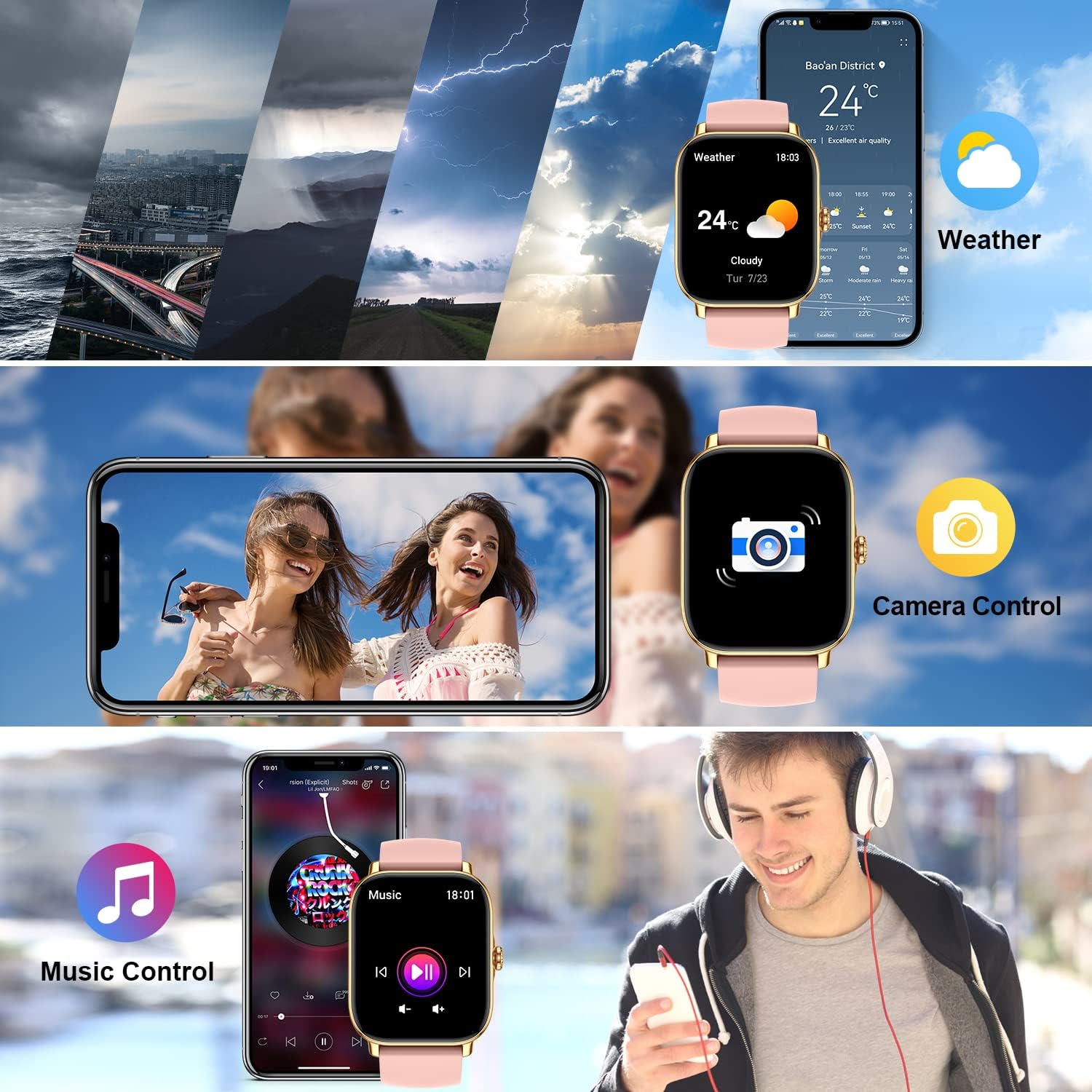
Image: The smartwatch demonstrating its weather display, remote camera control, and music playback control features.
Одржување
Чистење на вашиот паметен часовник
To ensure accurate readings and prolong the life of your device, keep it clean:
- Избришете го екранот и телото на часовникот со мека крпа што не остава влакненца.
- За тврдокорни дамки, дampИзмијте ја крпата малку со вода. Не користете груби хемикалии или абразивни средства за чистење.
- Редовно чистете ги контактите за полнење на задната страна од часовникот за да обезбедите правилно полнење.
Отпорност на вода (IPX8)
The zhizhi Smart Watch is IPX8 waterproof, meaning it can withstand immersion in water under certain conditions. It is suitable for:
- Пливање (плитка вода)
- Дожд и прскање
- Туширање (избегнувајте топла вода и пареа)
- Sweat during exercise
Важно: Do not use the watch in hot water, saunas, or steam rooms. Avoid prolonged immersion in deep water. After contact with saltwater, rinse the watch with fresh water and dry it thoroughly.

Image: The smartwatch showing blood oxygen monitoring and demonstrating its IPX8 waterproof capability during swimming.
Нега на батерии
- Избегнувајте екстремни температури, кои можат да го намалат животниот век на батеријата.
- Не го оставајте часовникот целосно празен подолг временски период.
- Use only the provided magnetic charger.
Решавање проблеми
| Проблем | Можно решение |
|---|---|
| Часовникот не се вклучува/не се полни. | Ensure the magnetic charger is correctly aligned with the watch's charging points. Try a different USB power source. Allow the watch to charge for at least 30 minutes before attempting to turn it on. |
| Cannot connect to the FitCloudPro app. | Ensure Bluetooth is enabled on your phone. Make sure the watch is charged and within range. Restart both your phone and the watch. Reinstall the FitCloudPro app if necessary. Check app permissions on your phone. |
| Call function not working. | Verify that the call Bluetooth switch is enabled on the watch. Check your phone's Bluetooth settings to ensure "P72" has all necessary permissions for calls. Ensure the watch is connected to your phone's Bluetooth for calls, not just data sync. |
| Не се примени известувања. | Check notification settings within the FitCloudPro app. Ensure app permissions for notifications are granted on your phone. Make sure the app is running in the background and not being closed by battery optimization settings. |
| Неточни податоци за здравјето/фитнесот. | Ensure the watch is worn snugly on your wrist, about one finger's width above the wrist bone. Clean the sensors on the back of the watch. Ensure your personal information (height, weight, age) is accurate in the FitCloudPro app. |
| Краток век на батеријата. | Frequent use of call function, continuous heart rate monitoring, and screen-on time can reduce battery life. Adjust settings in the app to optimize battery usage. Turn off features you don't use regularly. |
Спецификации
| Карактеристика | Детал |
|---|---|
| Број на модел | HXT72PK |
| Големина на екранот | 1.91 Inches TFT Full Touch |
| Капацитет на батеријата | Литиум полимер од 270 mAh |
| Траење на батеријата | 7-15 дена (типична употреба) |
| Отпорност на вода | IPX8 |
| Поврзување | Bluetooth |
| Компатибилност на оперативниот систем | Андроид 5.0 и погоре, iOS 9.0 и погоре |
| Сензори | Heart Rate, Blood Oxygen (SpO2), Pedometer |
| Влез со човечки интерфејс | Екран на допир, микрофон |
| Тежина на ставката | 4.6 унци |
| Димензии на пакетот | 10.75 x 3.43 x 0.67 инчи |
Гаранција и поддршка
For warranty information and customer support, please refer to the contact details provided with your purchase or visit the official zhizhi webлокација. Чувајте ја сметката за купување како доказ за какви било гаранциски побарувања.
Доколку наидете на проблеми што не се опфатени во ова упатство, ве молиме контактирајте го нашиот тим за поддршка на корисници за помош.