
1. Вовед
Ви благодарам за купувањетоasing the Sofirn SC18 Rechargeable Flashlight. This compact and powerful EDC (Everyday Carry) flashlight is designed for various applications, offering high brightness, convenient USB-C charging, and durable construction. Please read this manual carefully before use to ensure proper operation and maintenance.
2. Информации за безбедност
- Безбедност на очите: Do not shine the flashlight directly into eyes or at other people. The high lumen output can cause temporary vision impairment.
- Деца: Keep out of reach of children to prevent accidental activation or misuse.
- Топлина: The flashlight head may become hot during prolonged use at high brightness levels. Exercise caution to avoid burns.
- Безбедност на батеријата: Use only the recommended rechargeable battery. Do not disassemble, crush, or expose the battery to extreme temperatures or fire.
- Расклопување: Do not disassemble the flashlight head as this may damage the light and void the warranty.
3. Содржина на пакетот
Проверете дали сите артикли се присутни во вашиот пакет:
- Sofirn SC18 Flashlight
- Батерија што може да се полни (претходно инсталирана или посебна)
- USB-C кабел за полнење
- Ланјард
- Упатство за употреба

Image: The Sofirn SC18 flashlight shown with its included accessories, typically a USB-C cable, lanyard, and battery.
4. Поставување
4.1 Инсталација на батерија
The Sofirn SC18 typically comes with the battery pre-installed. If not, unscrew the tail cap, insert the 18650 rechargeable battery with the positive (+) end facing towards the head of the flashlight, and then screw the tail cap back on tightly.
4.2 Почетно полнење
Before first use, fully charge the flashlight. The SC18 features a built-in USB-C charging port.
- Locate the rubber cover on the side of the flashlight head.
- Gently pull open the rubber cover to expose the USB-C port.
- Connect the provided USB-C cable to the flashlight and plug the other end into a USB power source (e.g., phone charger, power bank, computer USB port).
- The indicator light on the side switch will show charging status:
- Црвено: Полнење
- Зелена: Целосно наполнето
- Once charging is complete, disconnect the cable and firmly close the rubber cover to maintain water resistance.

Image: The Sofirn SC18 flashlight with its USB-C port exposed and connected to a charging cable, illustrating the charging process and battery indicator.
5. Упатства за работа
The Sofirn SC18 uses a single side switch for all operations.
5.1 Основно работење
- Вклучи/исклучи: Едно кликнување на страничниот прекинувач за вклучување или исклучување на светлото.
- Променете ги режимите на осветленост: While the light is on, press and hold the side switch to cycle through Moon, Low, Medium, and High modes. Release the switch to select the desired mode. The flashlight has a Smart Memory function and will turn on at the last used brightness level (except Turbo and Strobe).

Image: A person holding the Sofirn SC18 flashlight, illuminating a dark path with its powerful 1800 lumen beam, demonstrating its effective beam distance.
5.2 Специјални режими
- Режим на месечева светлина: Од исклучена состојба, притиснете и држете го страничниот прекинувач 1 секунда за да го активирате режимот „Месечева светлина“.
- Турбо режим: Double-click the side switch from any state (ON or OFF) to activate Turbo mode. Double-click again to return to the previously used mode.
- Режим на строб: Triple-click the side switch from any state (ON or OFF) to activate Strobe mode. Single click to turn off or double-click to return to the previously used mode.
5.3 Функција за заклучување
The lockout function prevents accidental activation, which is useful when carrying the flashlight in a pocket or bag.
- Активирајте го заклучувањето: From OFF, quadruple-click the side switch. The main LED will flash twice to indicate lockout is active.
- Деактивирајте го заклучувањето: Quadruple-click the side switch again. The main LED will flash twice, and the flashlight will turn on in Moonlight mode, indicating lockout is deactivated.

Image: An illustration of the Sofirn SC18 flashlight with a protective shield graphic, demonstrating the safety lock mode feature to prevent accidental activation.
6. Одржување
6.1 Чистење
Исчистете го телото на фенерчето со мека, дamp cloth. Do not use abrasive cleaners or solvents. Keep the threads and O-rings clean and lubricated with silicone grease to ensure smooth operation and water resistance.
6.2 Водоотпорност
The Sofirn SC18 is rated IP68 waterproof, meaning it is protected against dust ingress and can withstand immersion in water up to 2 meters for 30 minutes. Ensure the USB-C port cover is fully sealed before exposing the flashlight to water.

Image: The Sofirn SC18 flashlight shown in two scenarios: one being splashed with water and another on wet rocks, highlighting its IP68 waterproof and drop-resistant design.
6.3 Грижа за батерии
To prolong battery life, charge the battery regularly and avoid fully discharging it. If the flashlight will not be used for an extended period, remove the battery or activate the lockout function to prevent parasitic drain.
7 Смена на проблеми
| Проблем | Можна причина | Решение |
|---|---|---|
| Фенерчето не се вклучува. | Батеријата е празна или неправилно вметната. Фенерчето е во режим на заклучување. | Charge the battery or reinsert it with the correct polarity. Deactivate lockout mode (quadruple-click). |
| Светлото трепка или неочекувано се исклучува. | Слаба батерија. Лабава опашка или глава. Валкани контакти. | Наполнете ја батеријата. Tighten the tail cap and head. Clean battery contacts and threads. |
| Cannot charge the flashlight. | USB-C cable or power source issue. Запушена порта за полнење. | Обидете се со друг USB-C кабел или адаптер за напојување. Проверете ја портата за полнење за остатоци. |
8. Спецификации
| Карактеристика | Детал |
|---|---|
| Модел | SC18 |
| Извор на светлина | LED |
| Максимален излез | 1800 лумени |
| Максимално растојание на зракот | 217 метри (712 стапки) |
| Извор на енергија | 1x 18650 Lithium-Ion Battery (included) |
| Полнење | USB-C се полни |
| Отпорност на вода | IP68 (up to 2 meters submersible) |
| Отпорност на пад | 1 метар |
| Материјал | Алуминиумска легура |
| Димензии (Д x Д) | Approx. 10.14 cm x 2.46 cm (3.99" x 0.97") |
| Тежина | Approx. 55g (1.94oz) without battery |
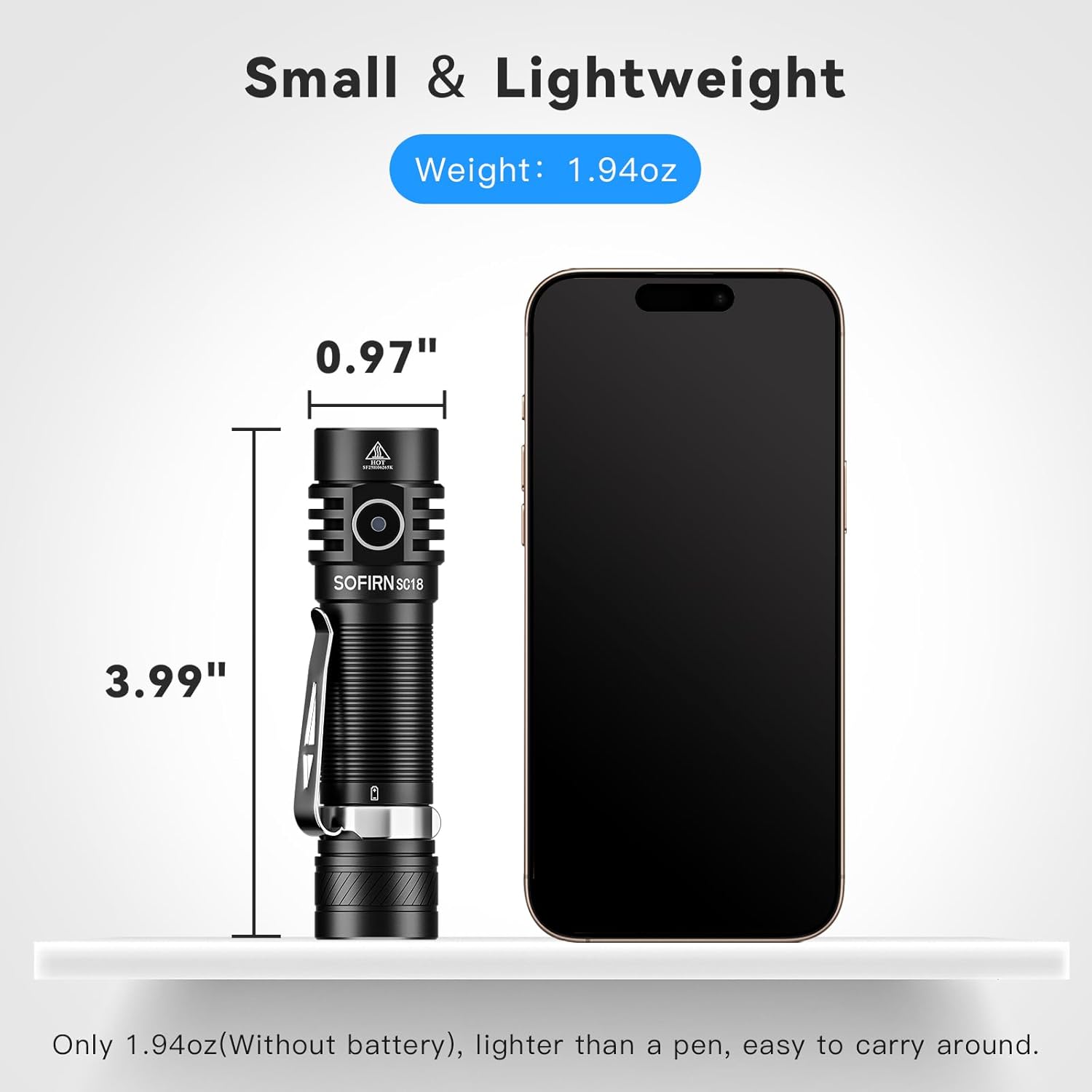
Image: The Sofirn SC18 flashlight displayed next to a smartphone, illustrating its compact size and dimensions (3.99 inches long, 0.97 inches diameter).
Brightness and Runtime Table
| Режим | Излез (лумени) | Време на траење | Растојание на зрак |
|---|---|---|---|
| Месечева светлина | 3 lm | 230ч | 11м |
| Ниско | 100 lm | 23ч | 51м |
| Средно | 350 lm | 6.3ч | 97м |
| Високо | 800 lm | 2.6ч | 150м |
| Турбо | 1800 lm | 2.3ч | 217м |
| Строб | 1800 lm | 5h | - |
Note: Runtimes are approximate and may vary based on environmental conditions and battery age.
9. Гаранција и поддршка
The Sofirn SC18 Rechargeable Flashlight comes with a 1-годишна гаранција од производителот from the date of purchase, covering defects in materials and workmanship. This warranty does not cover damage caused by misuse, unauthorized modifications, or normal wear and tear.
For warranty claims, technical support, or any questions regarding your product, please contact Sofirn customer service through the retailer where you purchased the product or visit the official Sofirn webсајт за информации за контакт.
Онлајн ресурси:
10. Видеа за производи
Sofirn SC18 Product Overview
Video: An official product video from Sofirn showcasing the features and functionality of the SC18 flashlight, including its design, charging, and various light modes.