
1. Вовед
This manual provides comprehensive instructions for the installation, operation, and maintenance of your Turing TP-MED4M28-1Y 4MP Turret IP Camera. Please read this manual thoroughly before using the product to ensure proper setup and functionality. Keep this manual for future reference.
2. Информации за безбедност
Внимавајте на следниве безбедносни мерки за да спречите повреда или оштетување на производот:
- Ensure the power supply meets the camera's specifications (DC 12V+/-25% or PoE IEEE 802.3af).
- Не го изложувајте фотоапаратот на екстремни температури, влажност или корозивни средини.
- Избегнувајте директно изложување на објективот на силни извори на светлина, бидејќи тоа може да го оштети сензорот за слика.
- Не обидувајте се да ја расклопите или модифицирате камерата. За сите сервиси обратете се на квалификуван персонал.
- Handle the camera with care to prevent physical shock or vibration.
- Обезбедете правилно заземјување за да спречите електрични опасности.
3. Содржина на пакетот
Проверете дали сите предмети се присутни во вашето пакување. Доколку некои предмети недостасуваат или се оштетени, контактирајте го вашиот продавач.
- Turing TP-MED4M28-1Y 4MP Turret IP Camera
- Монтирачки завртки и ѕидни приклучоци
- Водоотпорен конектор за етернет кабел
- Шаблон за вежба
- Водич за брз почеток
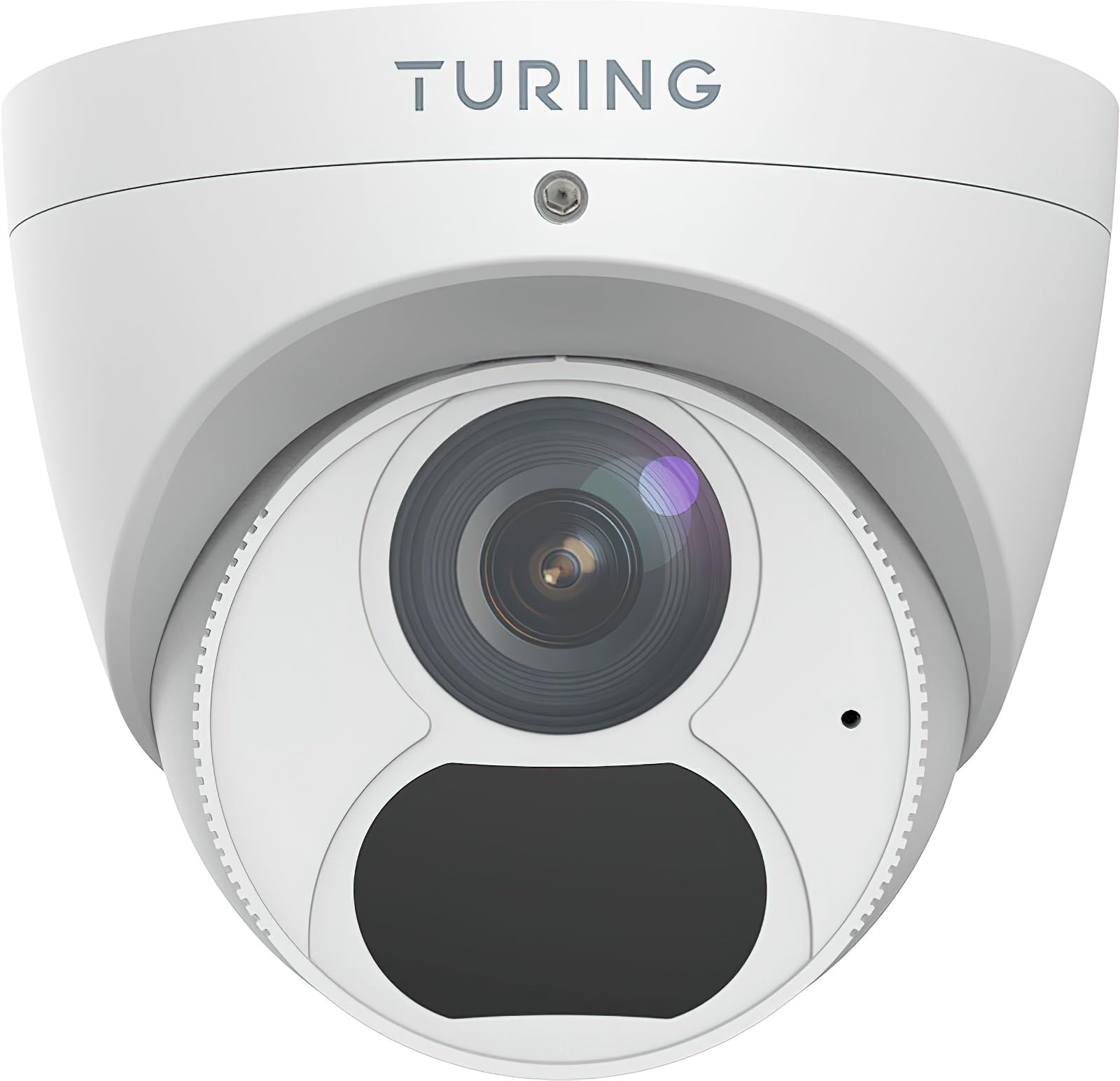
Figure 1: Turing TP-MED4M28-1Y 4MP Turret IP Camera and included accessories. The image shows the camera unit, mounting hardware, and a waterproof connector.
4. Производот завршиview
The Turing TP-MED4M28-1Y is a 4MP low-light turret IP camera designed for surveillance applications. It features a 2.8mm fixed lens, TwilightVision for enhanced low-light performance, and Smart IR up to 30m (98ft). The camera supports a 256GB microSD card for local storage and integrates with the Turing Vision Core AI platform.
Клучни карактеристики:
- Max. 4MP (2688x1520) at 30fps resolution
- 2.8mm fixed lens with 101.1° horizontal view
- TwilightVision for optimal image clarity in low light (0.002 Lux)
- Smart IR illumination up to 30m (98ft)
- IP67 weather protection, WDR (Wide Dynamic Range), PoE (Power over Ethernet)
- Built-in microphone for audio monitoring
- Supports up to 256GB microSD card (not included)
- Integrated with Turing Vision Core AI for advanced analytics (1st year license included)
- Во согласност со NDAA
5. Поставување и инсталација
Follow these steps for proper installation of your IP camera.
5.1 Монтирање на камерата
- Изберете локација: Select a suitable mounting location, typically a ceiling or wall, ensuring a clear field of view and within range of your network connection. The camera is IP67 rated for outdoor use.
- Подгответе ја површината: Use the provided drill template to mark the screw holes on the mounting surface. Drill pilot holes as needed.
- Обезбедете ја базата: Attach the camera's mounting base to the surface using the supplied screws and wall plugs. Ensure it is firmly secured.
- Управување со кабли: Route the Ethernet cable through the designated cable entry point. Use the waterproof connector for outdoor installations to protect the Ethernet connection.
5.2 Мрежна врска и напојување
- Поврзете се преку етернет: Поврзете етернет кабел од вашиот мрежен прекинувач или рутер со RJ45 портата на фотоапаратот.
- Напојување:
- PoE (Напојување преку етернет): If your network switch supports PoE (IEEE 802.3af), the camera will receive power directly through the Ethernet cable. No separate power adapter is needed.
- DC 12V: If PoE is not available, connect a DC 12V power adapter (not included) to the camera's power input port.
- Првично стартување: The camera will power on and initiate its boot sequence. This may take a few minutes.
5.3 Почетна конфигурација
Refer to the Turing Vision Quick Start Guide or the Turing Vision platform documentation for detailed instructions on adding and configuring your camera within the Turing Vision ecosystem.
- Access the camera via the Turing Vision platform or a web прелистувач користејќи ја својата IP адреса.
- Променете ја стандардната лозинка за безбедност.
- Configure network settings, video resolution, and recording schedules.
- Adjust image settings such as WDR, 2D/3D DNR, and defog for optimal video quality.
6. Ракување со камерата
The Turing TP-MED4M28-1Y camera is primarily operated and managed through the Turing Vision cloud platform or a compatible NVR/VMS system.
6.1 Во живо View и Снимање
- Access the live video feed through the Turing Vision application or web интерфејс.
- Configure continuous recording, motion-triggered recording, or scheduled recording via the platform settings.
- Review снимен footage by navigating to the playback section within the Turing Vision platform.
6.2 AI Features (Turing Vision Core AI)
With the included Turing CORE AI License, the camera leverages advanced analytics:
- People and Vehicle Search: Utilize the Turing Vision platform to quickly search for specific events involving people or vehicles.
- Интелигентни предупредувања: Receive real-time notifications for detected events based on configured rules.
- Pattern Detection: Analyze patterns across multiple locations for improved operational efficiency and safety.
6.3 Image Enhancement Features
- TwilightVision: Automatically enhances image clarity in extremely low-light conditions, providing color images where traditional cameras would switch to black and white.
- Паметна IR: Adjusts the intensity of the infrared LEDs to prevent overexposure of objects close to the camera, ensuring balanced night vision.
- WDR (широк динамички опсег): Balances areas of high contrast in the image, ensuring details are visible in both bright and dark regions simultaneously.
7. Одржување
Редовното одржување обезбедува оптимални перформанси и долготрајност на вашиот фотоапарат.
- Чистење леќи: Gently clean the camera lens with a soft, dry cloth. For stubborn dirt, use a lens cleaning solution and a microfiber cloth. Avoid abrasive materials.
- Ажурирања на фирмверот: Periodically check for and install firmware updates through the Turing Vision platform or the camera's web interface. Firmware updates often include performance improvements and security enhancements.
- Физичка инспекција: Regularly inspect the camera housing and mounting for any signs of damage, loose connections, or corrosion, especially for outdoor installations.
- Управување со складирање: If using a microSD card, periodically check its status and manage recorded data to prevent it from filling up. Format the card if necessary (this will erase all data).
8 Смена на проблеми
Доколку наидете на проблеми со вашиот фотоапарат, погледнете ги следните вообичаени проблеми и решенија:
| Проблем | Можна причина | Решение |
|---|---|---|
| Нема пренос на слики/видео | No power; Network connection issue; Incorrect IP address | Check power supply (PoE or DC 12V). Verify Ethernet cable connection. Ensure camera is on the same network subnet as your viewing device or NVR. |
| Лош квалитет на сликата | Dirty lens; Incorrect focus (fixed lens, but check for obstructions); Insufficient lighting; Incorrect image settings | Clean the lens. Ensure adequate lighting or verify Smart IR/TwilightVision settings. Adjust WDR, brightness, contrast in camera settings. |
| Cannot connect to Turing Vision | Network issues; Incorrect camera registration; Firewall blocking connection | Verify internet connectivity. Ensure the camera is correctly added to your Turing Vision account. Check firewall settings on your network. |
| MicroSD картичката не снима | Card full; Card not formatted; Faulty card; Recording schedule not set | Check card capacity. Format the microSD card via camera settings. Replace faulty card. Configure recording schedule. |
If the problem persists, contact Turing technical support for assistance.
9. Спецификации
Detailed technical specifications for the Turing TP-MED4M28-1Y camera:
| Карактеристика | Спецификација |
|---|---|
| Модел | TP-MED4M28-1Y |
| Сензор за слика | 1/3-inch 4MP 16:9 Progressive Scan CMOS |
| Резолуција | Max. 4MP (2688x1520) at 30fps |
| Леќа | Фиксна леќа од 2.8 mm |
| Агол на View (H/V/D) | 101.1 ° / 55.3 ° / 111.1 ° |
| Минимално осветлување | Color: 0.002 Lux (F1.6, AGC on); 0 Lux with IR on |
| Опсег на IR | Up to 30m (98ft) Smart IR |
| Видео компресија | Ultra 265, H.265, H.264, MJPEG |
| Дигитална обработка | 120 dB WDR, 2D/3D DNR, Defog |
| Аудио | Built-in microphone, G.711, Noise suppression |
| Вграден простор за складирање | MicroSD card slot, up to 256 GB (card not included) |
| Напојување | DC 12V+/-25%, PoE (IEEE 802.3af) |
| Потрошувачка на енергија | Макс. 4.0W |
| Заштита | IP67, 4KV Surge Protection |
| Димензии (Ø x H) | 4.4 x 3.7 инчи (111.8 x 94 mm) |
| Тежина | 0.93 фунти (0.42 кг) |
| Работна температура | -30°C до 60°C (-22°F до 140°F) |
10. Гаранција и поддршка
Turing provides a limited warranty for its products. Please refer to the official Turing website or your purchase documentation for detailed warranty terms and conditions. The first year of Turing CORE AI License is included with this product.
For technical support, product inquiries, or warranty claims, please contact Turing customer service through their official webстраницата или информациите за контакт дадени со вашето купување.
Онлајн ресурси: Visit the Turing support portal for FAQs, software downloads, and additional documentation.