1. Вовед
This user manual provides essential information for the installation, operation, and maintenance of your Palit GeForce RTX 4060 StormX 8GB graphics card. Please read this manual thoroughly before installing and using the product to ensure proper functionality and to prevent damage.
2. Содржина на пакетот
Проверете дали сите артикли се присутни во пакувањето на вашиот производ:
- Palit GeForce RTX 4060 8GB Storm X Graphics Card
- Водич за брза инсталација (доколку е вклучен)
- Driver CD/DVD (if included, otherwise download latest drivers online)
3. Поставување и инсталација
3.1 Список за проверка пред инсталација
- Осигурајте се дека вашиот уред за напојување (PSU) ги исполнува минималните ватови.tage requirement (typically 550W or higher for an RTX 4060, check specific PSU recommendations).
- Потврдете дека вашата матична плоча има слободен PCI Express x16 слот.
- Turn off your computer and disconnect the power cable before proceeding.
- Заземјете се за да го испразните статичкиот електрицитет.
3.2 Инсталација на хардвер
- Отворете го куќиштето на компјутерот.
- Пронајдете достапен PCI Express x16 слот на вашата матична плоча.
- Remove any expansion slot covers that obstruct the installation.
- Carefully align the graphics card with the PCIe slot and press it firmly until it is securely seated. Ensure the retention clip locks into place.
- Прицврстете ја графичката картичка на куќиштето со завртки.
- Connect the required 8-pin PCIe power connector from your power supply to the graphics card.
- Затворете ја кутијата за компјутер.

Слика 1: Предна страна view of the Palit GeForce RTX 4060 StormX 8GB graphics card, showing the single fan cooling solution.
3.3 Инсталација на драјвери
- Поврзете го кабелот за прикажување (HDMI или DisplayPort) од графичката картичка со мониторот.
- Вклучете го вашиот компјутер.
- Once the operating system loads, download the latest NVIDIA drivers for the GeForce RTX 4060 from the official NVIDIA webсајт (www.nvidia.com/drivers).
- Следете ги упатствата на екранот за да ја завршите инсталацијата на драјверот. Можеби ќе биде потребно рестартирање на системот.
4. Ракување со графичката картичка
4.1 Приклучоци за екранот
The Palit GeForce RTX 4060 StormX 8GB supports multiple display outputs. Connect your monitor(s) using the available ports:
- HDMI: For high-definition audio and video output.
- DisplayPort: За екрани со висока резолуција и висока брзина на освежување.
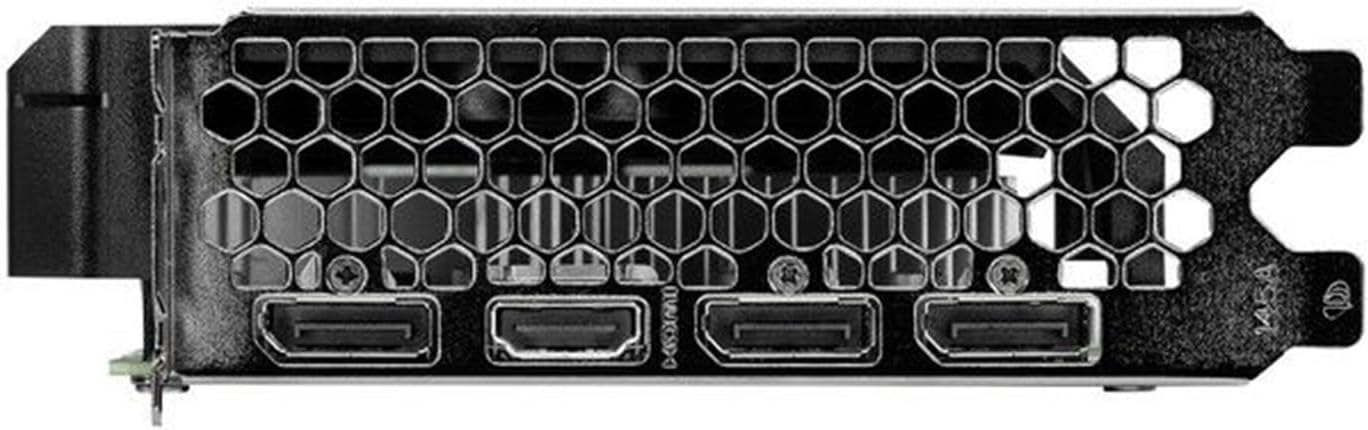
Figure 2: Rear I/O panel showing the HDMI and DisplayPort outputs.
4.2 Клучни карактеристики
- NVIDIA G-SYNC: Enjoy smooth, tear-free gameplay at high refresh rates when paired with a compatible G-SYNC monitor.
- DLSS 3 & Ray Tracing: Experience enhanced visual fidelity and performance in supported games with NVIDIA's Deep Learning Super Sampling and real-time ray tracing technologies.
- 0dB технологија: The fan remains off during light workloads, ensuring silent operation. Fan activation occurs only under heavier loads to maintain optimal temperatures.
- ThunderMaster Utility: Palit's proprietary software allows you to monitor GPU status, adjust fan speeds, and manage overclocking settings for personalized performance. Download from the official Palit webсајт.
- Mini-ITX Form Factor Support: With a compact length of 17cm, this card is suitable for small form factor PC builds, offering powerful performance in a space-saving design.
5. Одржување
Редовното одржување помага да се обезбеди долготрајност и оптимални перформанси на вашата графичка картичка.
- Отстранување прашина: Periodically clean dust from the graphics card heatsink and fan using compressed air. Ensure the computer is powered off and unplugged before cleaning. Hold the fan blades gently to prevent over-spinning during cleaning.
- Ажурирања на возачот: Одржувајте ги вашите графички драјвери ажурирани со редовно проверување на официјалниот NVIDIA website for the latest versions. Driver updates often include performance improvements, bug fixes, and support for new games.
- Следење на температурата: Use monitoring software (like Palit ThunderMaster or other third-party tools) to keep an eye on GPU temperatures, especially during heavy loads, to ensure it operates within safe limits.
6 Смена на проблеми
Ако наидете на проблеми со вашата графичка картичка, погледнете ги следниве вообичаени чекори за решавање проблеми:
- Нема излез за прикажување:
- Осигурајте се дека кабелот за екранот е безбедно поврзан и со графичката картичка и со мониторот.
- Проверете дали мониторот е вклучен и поставен на точниот влезен извор.
- Check if the graphics card is properly seated in the PCIe slot and the 8-pin power connector is firmly attached.
- Try connecting to a different display output port on the card or a different monitor if available.
- Проблеми со возачот:
- Извршете чиста инсталација на најновите драјвери од NVIDIA website. Use the 'Custom' installation option and select 'Perform a clean installation'.
- If issues persist, try rolling back to a previous stable driver version.
- Poor Performance/Crashes:
- Осигурајте се дека вашиот систем ги исполнува минималните барања за апликациите или игрите што ги користите.
- Monitor GPU temperatures to rule out overheating.
- Проверете дали има апликации во позадина што трошат системски ресурси.
- Verify your power supply unit is sufficient and providing stable power.
- Бучава од вентилаторот:
- Уверете се дека нема кабли или пречки што се мешаат со перките на вентилаторот.
- Clean any dust buildup on the fan and heatsink.
- Use the ThunderMaster utility to adjust fan curves if desired, but avoid setting fan speeds too low under load.
If these steps do not resolve your issue, please contact Palit customer support or your retailer for further assistance.
7. Спецификации
| Карактеристика | Спецификација |
|---|---|
| Графички процесор | NVIDIA GeForce RTX 4060 |
| CUDA јадра | 3072 |
| Зголемете го часовникот | 2460 MHz |
| Големина на меморија | 8 GB GDDR6 |
| Мемориски интерфејс | 128-битни |
| Брзина на меморија | 17 Gbps |
| Тип на автобус | PCI Express 4.0 x16 |
| Прикажи излези | 1x HDMI, 3x DisplayPort |
| Максимална дигитална резолуција | 8K Ultra HD |
| Конектор за напојување | 1x 8-пински |
| TDP | 115 W |
| Ладење | Active (Single Fan) |
| Димензии (ДxШxВ) | 12.6 x 7.09 x 2.36 инчи (приближно 320 x 180 x 60 мм) |
| Број на модел на ставка | NE64060019P1-1070F |
8. Гаранција и поддршка
Palit products are manufactured to the highest quality standards. This product is covered by a limited warranty provided by Palit or your retailer. Please refer to the warranty information provided with your purchase or visit the official Palit webстраница за детални услови и услови.
For technical support, driver downloads, or further assistance, please visit the official Palit webсајт на www.palit.com or contact your local retailer.