
ION Audio Highlander
Упатство за користење на преносниот звучник ION Audio Highlander
Model: Highlander
Бренд: ION Audio
1. Производот завршиview
The ION Audio Highlander is a high-powered, all-weather portable Bluetooth speaker designed to deliver rich sound and deep bass even at high volumes. Its durable construction makes it suitable for various environments, ensuring your music can accompany you wherever you go.
Клучни карактеристики:
- Аудио со висока моќност: Delivers 120 Watts of speaker maximum output power for impactful sound.
- Засилување на басот: Enhances low frequencies for maximum impact.
- Bluetooth 5.0 Enabled: Allows wireless streaming and control of your music from compatible devices.
- IPX5 Отпорен на вода: Designed to withstand splashes and rain, making it safe for outdoor use.
- Rechargeable 50-Hour Battery: Provides extended playtime on a single charge.
- Вградени рачки и тркала: Facilitates easy transportation.
2. Содржина на пакетот
Осигурајте се дека сите артикли наведени подолу се присутни во вашиот пакет:
- ION Audio Highlander Portable Speaker
- Кабел за напојување
3. Водич за поставување
3.1 Полнење на батеријата
Before first use, fully charge the Highlander speaker. The battery life is approximately 50 hours, but initial charging may take several hours.
- Connect the included power cable to the power input on the back of the Highlander speaker.
- Вклучете го другиот крај од кабелот за напојување во стандарден ѕиден штекер.
- Индикаторското светло за полнење ќе светне. Светлото ќе се промени или ќе се изгасне штом полнењето ќе заврши.
3.2 Вклучување/исклучување
To power the speaker on or off, locate the power button on the control panel.
- За вклучување: Press and hold the Power button for a few seconds until the display illuminates.
- За исклучување: Press and hold the Power button again for a few seconds until the display turns off.
3.3 Спарување преку Bluetooth
Follow these steps to connect your Bluetooth device to the Highlander speaker:
- Ensure the Highlander speaker is powered on and in Bluetooth mode. The Bluetooth indicator on the display will flash, indicating it's ready to pair.
- On your Bluetooth device (smartphone, tablet, laptop), go to its Bluetooth settings.
- Пребарај за available devices. Select "ION Highlander" from the list.
- Once paired, the Bluetooth indicator on the speaker will stop flashing and remain solid. You can now play audio through the speaker.
- To disconnect, turn off Bluetooth on your device or select "Forget This Device" in your device's Bluetooth settings.
4. Упатства за работа
4.1 Контролната табла е завршенаview
The top panel of the Highlander speaker features various controls for managing audio playback and settings.

- Копче за вклучување: Го вклучува или исклучува звучникот.
- Копче за јачина на звук: Го прилагодува целокупното ниво на јачина на звук.
- Копче Bluetooth: Го иницира режимот на спарување преку Bluetooth.
- Копче за засилување на басот: Ја активира или деактивира функцијата за засилување на басот.
- Екран за прикажување: Shows current mode, battery status, and other information.
4.2 Adjusting Volume and Bass Boost
- Волумен: Rotate the main volume knob clockwise to increase volume and counter-clockwise to decrease it.
- Засилување на басот: Press the "Bass Boost" button to enhance the bass output. Press it again to return to normal audio.
4.3 Карактеристики за преносливост
The Highlander is designed for easy transport:
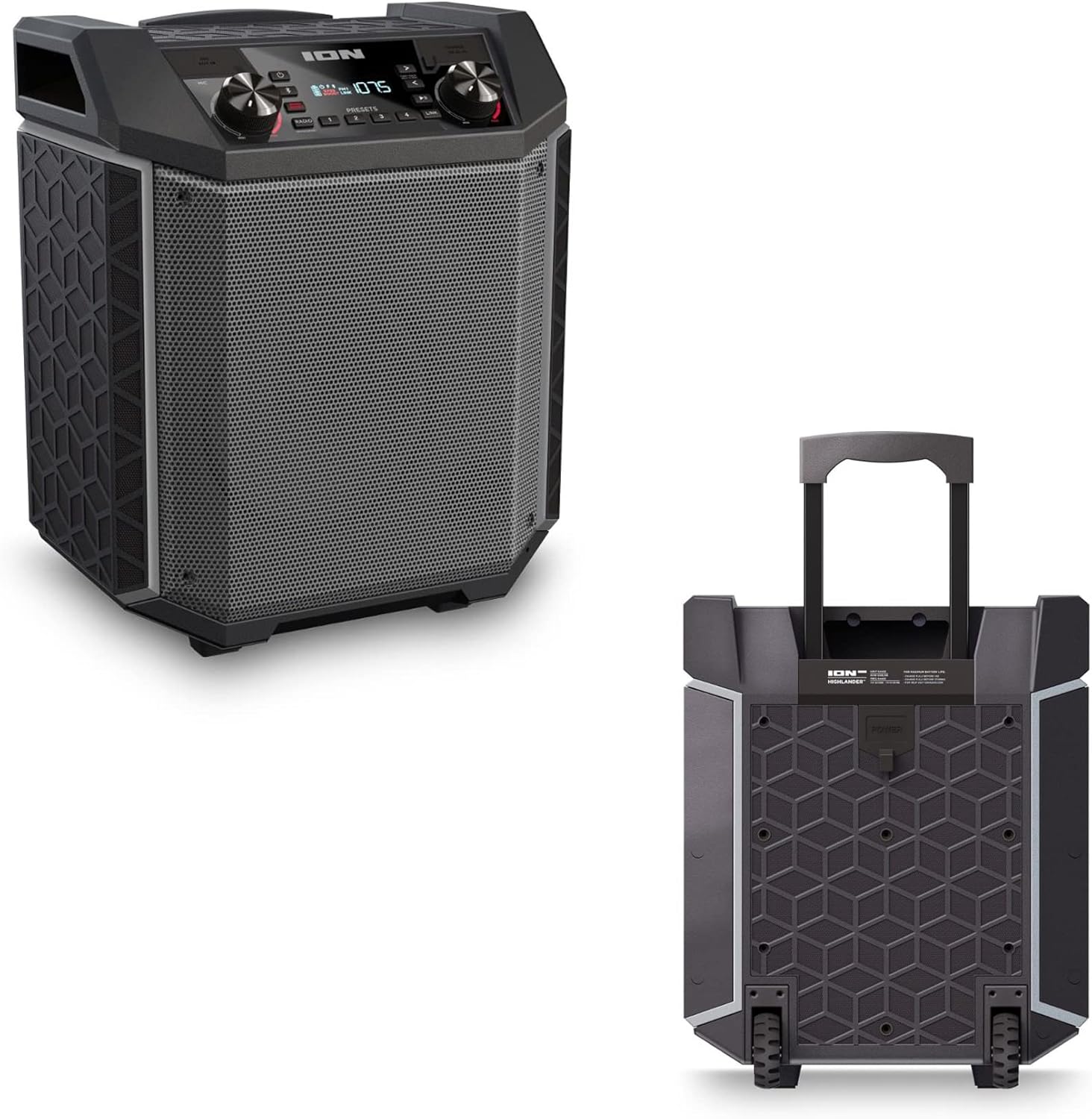

- Рачка што се извлекува: Pull up the integrated handle to roll the speaker like luggage.
- Тркала: Use the built-in wheels for smooth movement across various surfaces.
4.4 Водоотпорност (IPX5)
The Highlander speaker is IPX5 water-resistant, meaning it can withstand splashes of water from any direction. It is suitable for use by the pool or in light rain.

Важно: Do not submerge the speaker in water. Ensure all port covers are securely closed when exposed to water.
5. Одржување
5.1 Чистење
- Секогаш исклучувајте го звучникот од струја и исклучете го од изворот на енергија пред чистење.
- Користете мека, сува крпа за да ги избришете надворешните површини.
- За тврдоглава нечистотија, лесно гampИзмијте ја крпата со вода. Избегнувајте употреба на јаки хемикалии, растворувачи или абразивни средства за чистење.
- Do not spray cleaning liquids directly onto the speaker.
5.2 Складирање
- Чувајте го звучникот на ладно и суво место, подалеку од директна сончева светлина и екстремни температури.
- If storing for an extended period, ensure the battery is partially charged (around 50%) to maintain battery health. Recharge every few months if not in use.
5.3 Грижа за батерии
- Избегнувајте често целосно празнење на батеријата.
- Не изложувајте ја батеријата на прекумерна топлина или студ.
- If the battery performance significantly degrades, contact customer support for assistance.
6 Смена на проблеми
If you encounter issues with your Highlander speaker, refer to the table below for common problems and solutions.
| Проблем | Можно решение |
|---|---|
| Звучникот не се вклучува. |
|
| Не може да се спари со уред со Bluetooth. |
|
| Нема звук или има ниска јачина на звук. |
|
| Искривување на звукот. |
|
7. Спецификации
| Карактеристика | Детал |
|---|---|
| Име на моделот | Хајлендер |
| Бренд | Ваш |
| Тип на звучник | На отворено |
| Технологија за поврзување | Bluetooth 5.0 |
| Извор на енергија | Напојува со батерија |
| Траење на батеријата | 50 часа |
| Ниво на отпорност на вода | IPX5 (Водоотпорен) |
| Максимална излезна моќност на звучникот | 120 вати |
| Димензии на производот | 19.5" Д x 19.5" Ш x 14" В |
| Тежина на ставката | 23.2 фунти |
| Материјал | Water-resistant plastic or rubber, with a black coating |
| Вклучени компоненти | Кабел за напојување |
| UPC | 657768542732 |
8. Гаранција и поддршка
The ION Audio Highlander speaker comes with a Limited Warranty. For specific details regarding warranty coverage, duration, and terms, please refer to the warranty information provided with your purchase or visit the official ION Audio webсајт.
For technical support, troubleshooting assistance beyond this manual, or warranty claims, please contact ION Audio customer support through their official channels. Keep your proof of purchase handy when contacting support.
Ask a question about this manual
Ask about setup, troubleshooting, compatibility, parts, safety, or missing instructions. Manuals+ will review the question and use this page’s manual context to help answer it.