
Formovie X5
Упатство за користење на 4K ласерскиот ТВ проектор Formovie X5
Model: X5 | Brand: Formovie
Вовед
The Formovie X5 4K Laser TV Projector is a portable mini smart projector designed to deliver a cinematic experience in your home. Featuring ALDP Laser Display Technology, 2450 lumens brightness, and built-in Denon speakers, it offers stunning 4K resolution and immersive audio. This manual provides essential information for setting up, operating, and maintaining your projector.
Производот завршиview
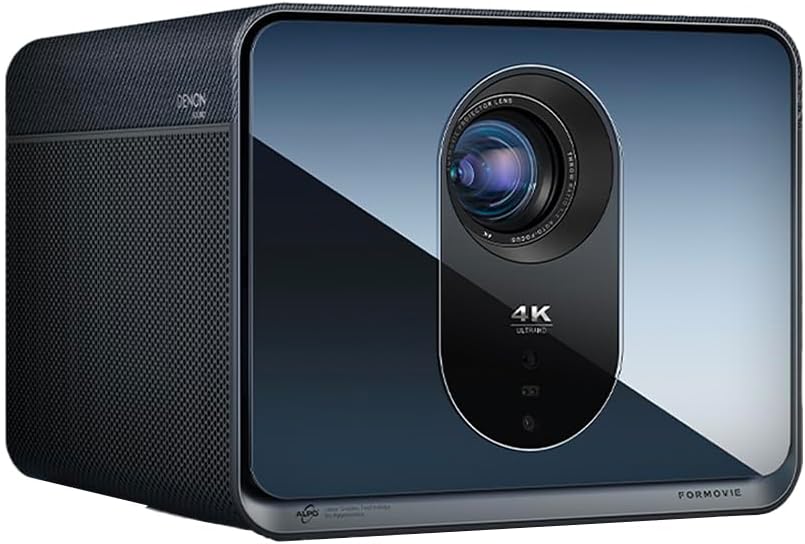
Предна страна view of the Formovie X5 projector, showcasing its sleek design and prominent lens.
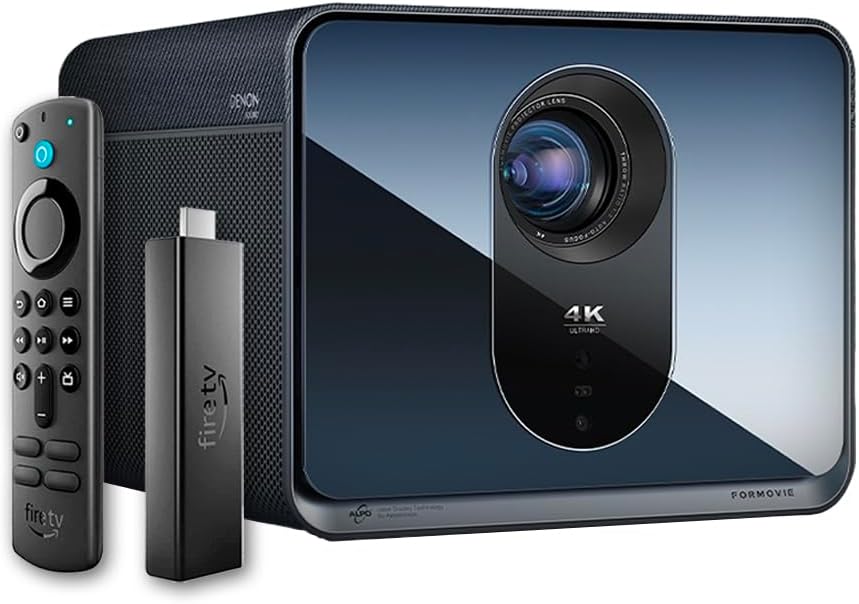
The Formovie X5 projector shown alongside its included Amazon Fire TV Stick 4K Max and remote control.

Заден дел view of the Formovie X5 projector, displaying various connectivity ports including LAN, USB, HDMI, and S/PDIF.
Водич за поставување
1. Распакување и поставување
- Внимателно извадете го проекторот и сите додатоци од пакувањето.
- Поставете го проекторот на стабилна, рамна површина. Обезбедете соодветна вентилација околу уредот.
- Position the projector directly in front of your desired projection surface (wall or screen) for optimal image geometry. While the projector has auto-correction, a direct alignment is recommended for the best experience.
2. Поврзување за напојување
- Поврзете го адаптерот за напојување со влезниот приклучок за напојување на проекторот.
- Приклучете го адаптерот за напојување во соодветен штекер.
3. Initial Power On and Auto-Focus
- Притиснете го копчето за вклучување на проекторот или далечинскиот управувач за да го вклучите уредот.
- The projector will automatically initiate its auto-focus and omnidirectional auto-correction features. Allow a few moments for the image to stabilize and sharpen.
4. Connecting the Fire TV Stick 4K Max
- Insert the Amazon Fire TV Stick 4K Max into an available HDMI port on the projector.
- Connect the Fire TV Stick to its power source.
- Select the corresponding HDMI input on the projector's menu.
Упатства за работа
Функции на далечински управувач
The included remote control allows full navigation and control of the projector and the connected Fire TV Stick.
- Копче за вклучување: Го вклучува/исклучува проекторот.
- Плочка за навигација: Се користи за навигација низ менијата и избирање опции.
- Копче за назад: Се враќа на претходниот екран.
- Копче за почеток: Се враќа во главното мени.
- Копчиња за јачина на звук: Ја прилагодува јачината на звукот.
- Копче за гласовна контрола: Activates voice commands for the Fire TV Stick.
Прилагодување на поставките за слика
The Formovie X5 features advanced automatic adjustment tools. For manual adjustments:
- Рачен фокус: If auto-focus is not satisfactory, access the projector settings to manually adjust focus.
- Корекција на клучниот камен: While omnidirectional auto-correction is standard, manual keystone adjustment is available in the settings for fine-tuning image shape.
- Ambient Light Adaptive: The projector automatically adjusts brightness based on ambient light conditions. This can be toggled or fine-tuned in the display settings.
Клучни карактеристики
- 4K ALDP Laser Display Technology: Experience breathtaking visuals with true 4K resolution and a wide color gamut, ensuring crystal-clear and vibrant images.
- Cinema-Like Projection Size: Project images from 60 inches up to a massive 1,000 inches, providing an immersive viewing experience for movies, sports, and gaming.
- Powerful Adjustment Tools: Equipped with omnidirectional auto-correction, ambient light adaptive technology, laser autofocus, and automatic curtain alignment for hassle-free setup and optimal picture quality.
- Built-In Three-Way Denon Speakers: The X5 is the first projector to feature integrated three-way speakers powered by Denon, delivering rich, immersive audio without the need for external sound systems.
- Integrated Amazon Fire TV: Stream directly from your favorite apps like Netflix, Prime Video, Disney+, and more, with the convenience of the included Fire TV Stick 4K Max.
Одржување
- Чистење леќи: Нежно избришете го објективот на проекторот со мека крпа без влакненца, специјално дизајнирана за оптички површини. Не користете абразивни средства за чистење или прекумерна сила.
- Вентилација: Ensure the projector's ventilation ports are clear of dust and obstructions to prevent overheating. Regularly clean the vents with a soft brush or compressed air.
- Складирање: Кога не го користите подолго време, чувајте го проекторот на ладно и суво место, подалеку од директна сончева светлина и екстремни температури.
Решавање проблеми
| Проблем | Можна причина | Решение |
|---|---|---|
| Не е проектирана слика | Power cable disconnected, incorrect input source, projector in standby mode. | Check power connection, select correct HDMI input, press power button to wake. |
| Сликата е матна | Out of focus, lens dirty. | Allow auto-focus to complete or manually adjust focus. Clean the lens. |
| Сликата е искривена (трапезоидна форма) | Projector not perpendicular to screen, auto-correction issue. | Reposition projector directly in front of the screen. Use manual keystone correction if needed. |
| Нема звук | Volume too low, mute activated, external audio device not connected properly. | Increase volume, check mute status, ensure external audio (if used) is correctly connected. |
| Предупредување за прегревање | Блокирана вентилација, продолжена употреба во топла средина. | Ensure vents are clear. Turn off projector and allow it to cool down. Operate in a well-ventilated area. |
Спецификации
| Карактеристика | Детал |
|---|---|
| Бренд | Формовие |
| Број на модел | X5 |
| Резолуција на екранот | 3840 x 2160 (4K) |
| Технологија на извор на светлина | ALDP Laser |
| Осветленост (ANSI лумени) | 2450 лумени |
| Технологија за поврзување | HDMI, USB, LAN |
| Посебни карактеристики | Portable, Omnidirectional Auto-Correction, Ambient Light Adaptive, Laser Autofocus, Automatic Curtain Alignment, Built-In Denon Three-Way Speakers, Integrated Amazon Fire TV |
| Тежина на ставката | 15.14 фунти |
| Димензии на производот | 8.27 x 8.54 x 6.57 инчи |
Гаранција и поддршка
For warranty information, please refer to the documentation included with your product or visit the official Formovie website. For technical support, troubleshooting assistance, or to access additional resources, please contact Formovie customer service.
- Упатство за користење (PDF): Преземи
- Упатство за корисникот (PDF): Преземи
- Visit the Formovie Store: Formovie Store
Ask a question about this manual
Ask about setup, troubleshooting, compatibility, parts, safety, or missing instructions. Manuals+ will review the question and use this page’s manual context to help answer it.