
Samsung HW-C400
SAMSUNG HW-C400 2.0Ch Soundbar User Manual
Модел: HW-C400
Вовед
This user manual provides detailed instructions for the safe and efficient operation of your SAMSUNG HW-C400 2.0Ch Soundbar with Built-in Woofer. Please read this manual thoroughly before using the product and retain it for future reference.
Информации за безбедност
- Не го изложувајте овој апарат на дожд или влага.
- Не ги блокирајте отворите за вентилација. Инсталирајте во согласност со упатствата на производителот.
- Заштитете го кабелот за напојување од одење или штипкање.
- Користете само додатоци/додатоци наведени од производителот.
- Целото сервисирање упатете го на квалификуван сервисен персонал.
Што има во кутијата
Проверете дали сите компоненти се вклучени во вашиот пакет:
- Звучна лента SAMSUNG HW-C400
- Далечински управувач
- Кабел за напојување со наизменична струја
- Audio Optical Cable

Image: The SAMSUNG HW-C400 Soundbar shown alongside its included remote control, illustrating the main components of the package.
Водич за поставување
1 Поставување
Place the soundbar directly in front of your television, centered, on a stable surface. Ensure there are no obstructions in front of the soundbar for optimal sound projection.

Image: The soundbar positioned on a media console directly beneath a television, demonstrating a typical setup configuration.
2. Врски
Connect the soundbar to your television using the provided Audio Optical Cable for the best audio quality. Alternatively, you can use Bluetooth for a wireless connection.
- Поврзување за напојување: Connect the AC power cord to the soundbar's power input and then to a wall outlet.
- Оптичка врска: Insert one end of the optical cable into the DIGITAL AUDIO OUT port on your TV and the other end into the DIGITAL AUDIO IN (OPTICAL) port on the soundbar.
- Bluetooth конекција (опционално): For wireless connection, refer to the "Bluetooth TV Connection" section under Operating.
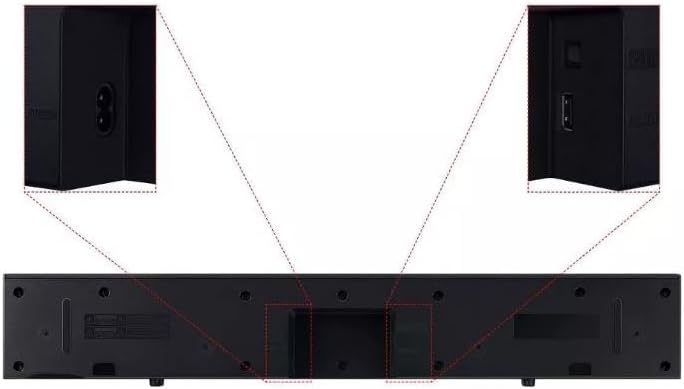
Слика: Детална view of the rear panel of the soundbar, showing the power input and optical audio input ports, with close-ups for clarity.
3. Првично вклучување
After connecting all cables, press the Power button on the soundbar or the remote control to turn on the device. The soundbar will automatically detect the input source.
Упатства за работа
Функции на далечински управувач
The included remote control allows you to manage all soundbar functions. If you have a Samsung TV, you can use your TV remote to control the soundbar's power and volume.
- Копче за вклучување: Ја вклучува или исклучува лентата за звук.
- Јачина на звук нагоре/намалување: Ја прилагодува главната јачина на звук.
- Нечујно копче: Го исклучува или укинува звукот.
- Изворно копче: Cycles through input sources (Optical, Bluetooth).
- Копче за режим на звук: Selects different sound modes (e.g., Standard, Bass Boost, Voice Enhance, Night Mode).
Bluetooth TV Connection
Connect your soundbar wirelessly to a compatible Samsung TV via Bluetooth.
- Притиснете го Извор button on the soundbar remote until "BT" or "Bluetooth" appears on the soundbar display.
- On your Samsung TV, navigate to Излез на звук settings and select your soundbar from the list of available devices.
- Once connected, the soundbar display will show "TV ARC" or "BT PAIRING" followed by "BT READY".
Note: Bluetooth audio only. Ensure your TV supports Bluetooth audio output.
Режими на звук и функции
- Вграден сабвуфер: The soundbar features an integrated subwoofer for enhanced bass performance.
- Засилување на басот: Activates a mode that amplifies low frequencies for a more impactful sound experience.
- Подобрување на гласот: Optimizes the equalizer and amplifies dialogue, making voices clearer and easier to understand, especially during movies or TV shows.
- Ноќен режим: Reduces overall volume and compresses bass levels, ideal for late-night viewing to minimize disturbance.
Одржување
Cleaning the Soundbar
To maintain the appearance and performance of your soundbar, follow these cleaning guidelines:
- Секогаш исклучувајте го саундбарот од штекерот пред чистење.
- Користете мека, сува крпа за бришење на надворешните површини.
- Не користете течни средства за чистење, аеросолни спрејови или абразивни средства за чистење, бидејќи тие може да ја оштетат завршната обработка или внатрешните компоненти.
- Избегнувајте навлегување на влага во какви било отвори.
Решавање проблеми
Доколку наидете на проблеми со вашиот саундбар, погледнете ги следните вообичаени проблеми и решенија:
| Проблем | Можно решение |
|---|---|
| Нема моќ | Ensure the AC power cord is securely connected to the soundbar and a working wall outlet. Try a different outlet. |
| Нема звук |
|
| Проблеми со поврзувањето со Bluetooth |
|
| Звукот е искривен или нејасен |
|
Спецификации
| Карактеристика | Детал |
|---|---|
| Име на моделот | HW-C400 |
| Тип на звучник | Звучна лента |
| Конфигурација на каналот за опкружувачки звук | 2.0 канал |
| Built-in Woofer | Да |
| Технологија за поврзување | Bluetooth, оптички |
| Технологија на безжична комуникација | Bluetooth |
| Максимална излезна моќност | 40 вати |
| Димензии на производот (Д x Ш x В) | 4.2" x 25.2" x 2.6" |
| Тежина на ставката | 5 фунти |
| Извор на енергија | Corded Electric (120 Volts DC Input) |
| Контролен метод | Далечински |
| Тип на монтирање | Wall Mount (though product description implies tabletop) |
| UPC | 887276728353 |
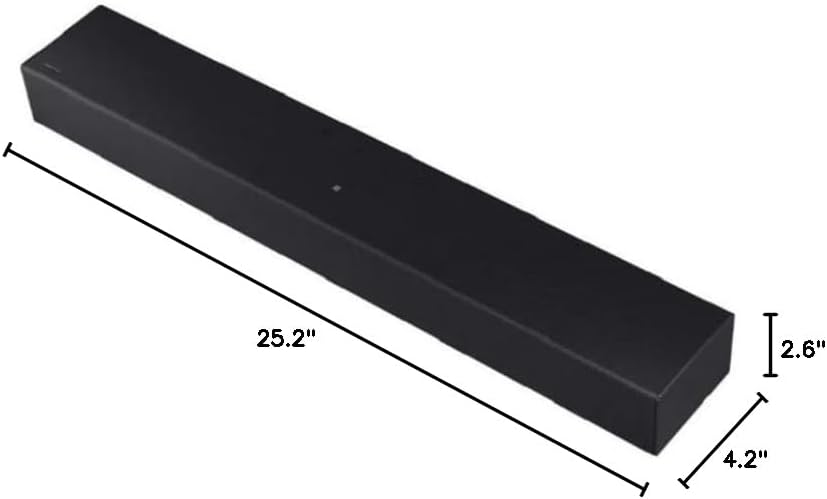
Image: A diagram illustrating the dimensions of the soundbar: 25.2 inches in width, 4.2 inches in depth, and 2.6 inches in height.
Гаранција и поддршка
Ограничена гаранција
This SAMSUNG HW-C400 Soundbar comes with a limited warranty. For specific terms and conditions, please refer to the warranty card included with your product or visit the official Samsung support webсајт.
Поддршка за корисници
For further assistance, technical support, or service inquiries, please contact Samsung Customer Service. You can find contact information on the official Samsung webвеб-страницата или во документацијата на вашиот производ.
Поддршка преку Интернет: www.samsung.com/us/support/