
1. Вовед
Ви благодарам за купувањетоasing the JVC XS-N1123PB Party Bluetooth Speaker. This manual provides essential information for the safe and efficient operation of your speaker. Please read it thoroughly before use and retain it for future reference.
2. Информации за безбедност
- Не го изложувајте звучникот на екстремни температури, директна сончева светлина или висока влажност.
- Избегнувајте паѓање или изложување на звучникот на силни удари.
- Не расклопувајте го или не обидувајте се сами да го поправите звучникот. За сите сервиси обратете се на квалификуван персонал.
- Keep the speaker away from water and other liquids to prevent electric shock or damage.
- Користете само специфицираниот волумен на полнењеtage (5 Volts) and compatible charger.
3. Содржина на пакетот
Проверете дали сите артикли се присутни во пакувањето:
- JVC XS-N1123PB Party Bluetooth Speaker
- USB кабел за полнење
- Упатство за употреба
4. Производот завршиview
4.1 фронт View

The front of the speaker features the main speaker grille with integrated RGB lighting, displaying various color patterns.
4.2 Страна View

Страната view shows the compact and portable design of the speaker, suitable for easy transport.
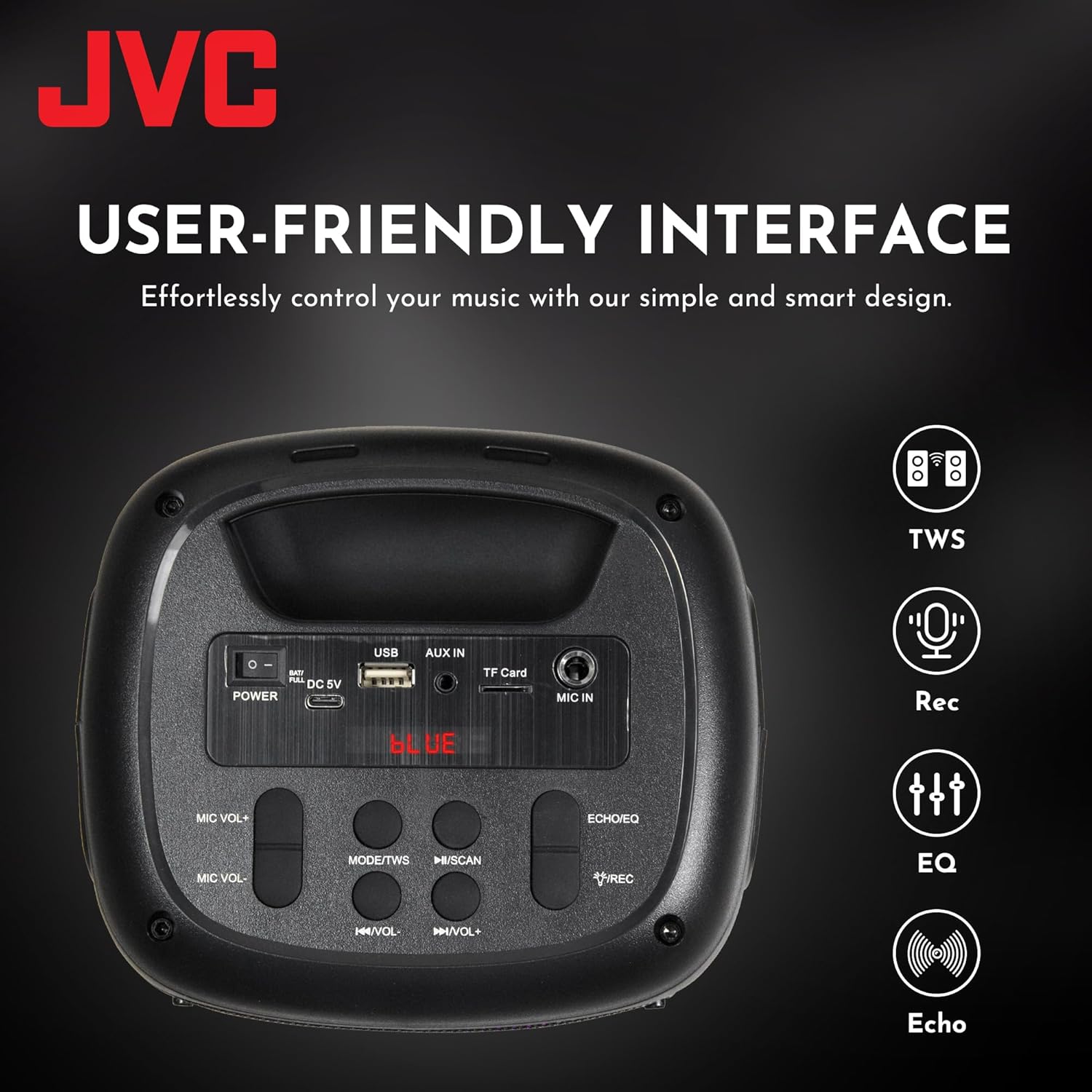
4.3 Top Panel Controls and Ports

This image displays the top control panel, including buttons for power, mode selection, volume, track control, and recording. It also shows the USB, AUX IN, TF Card, and MIC IN ports.
4.4 Заден дел View

Задниот дел view of the speaker, highlighting its robust enclosure and design.
5. Поставување
5.1 Полнење на звучникот
Before first use, fully charge the speaker. Connect the provided USB charging cable to the DC 5V port on the speaker and the other end to a USB power adapter (not included) or a computer's USB port.
- Индикаторската ламба за полнење ќе светне за време на полнењето.
- Светлото ќе се изгаси или ќе ја промени бојата кога полнењето ќе заврши.
The speaker features a 1500 mAh dual battery system for extended playback.
5.2 Вклучување/исклучување
To power on the speaker, press and hold the Power button located on the top panel. To power off, press and hold the Power button again.
5.3 Спарување преку Bluetooth
- Вклучете го звучникот. Тој автоматски ќе влезе во режим на спарување преку Bluetooth, што ќе се покаже со трепкачка LED светилка.
- Овозможете Bluetooth на вашиот мобилен уред (паметен телефон, таблет итн.).
- Пребарај за available Bluetooth devices and select "JVC XS-N1123PB" from the list.
- Откако ќе се спари, звучникот ќе емитува звук за потврда, а LED светлото ќе престане да трепка.
5.4 Спарување на вистински безжичен стерео (TWS)
TWS allows you to connect two JVC XS-N1123PB speakers for a stereo sound experience.

Pair two speakers wirelessly for a dynamic stereo sound experience.
- Проверете дали двата звучника се вклучени и не се поврзани со друг Bluetooth уред.
- On one speaker (this will be the primary speaker), press and hold the TWS button (if available, or a designated pairing button) until you hear a pairing tone.
- Двата звучника автоматски ќе се поврзат еден со друг. Ќе се огласи тон за потврда откако ќе биде успешно спарувањето преку TWS.
- Сега, поврзете го вашиот мобилен уред со примарниот звучник преку Bluetooth како што е опишано во дел 5.3. И двата звучника ќе репродуцираат аудио во стерео.
6. Упатства за работа
6.1 Избор на режим
Press the 'MODE' button on the top panel to switch between different input modes: Bluetooth, USB, TF Card, AUX, and FM Radio.
6.2 Репродукција на аудио
- Режим на Bluetooth: По успешното спарување, репродуцирајте аудио од поврзаниот уред.
- Режим на USB/TF картичка: Insert a USB drive or TF card into the respective port. The speaker will automatically detect and play audio files.
- Режим AUX: Connect an external audio device using a 3.5mm audio cable to the AUX IN port.
- Режим FM радио: In FM mode, press the Play/Pause button to auto-scan and save available radio stations. Use the Previous/Next buttons to navigate between saved stations.
6.3 Контрола на јачината на звукот
Use the 'VOL-' and 'VOL+' buttons on the top panel to decrease or increase the volume.
6.4 Контрола на траката
- Press the 'Previous Track' button to go to the beginning of the current track or the previous track.
- Press the 'Next Track' button to skip to the next track.
- Press the 'Play/Pause' button to play or pause audio.
6.5 Контрола на светлосно шоу
The speaker features built-in RGB lights. Specific controls for the light show (e.g., changing patterns, turning on/off) may be integrated with the 'MODE' button or a dedicated light button if available. Refer to the quick start guide for specific light control functions.
6.6 Microphone and Guitar Input (Karaoke Function)

Connect a microphone or guitar to the respective input ports for karaoke or live performance. Adjust microphone volume using the MIC VOL+/- buttons.
7. Одржување
7.1 Чистење
Wipe the speaker with a soft, dry cloth. Do not use abrasive cleaners, waxes, or solvents as they may damage the finish.
7.2 Складирање
When not in use for extended periods, store the speaker in a cool, dry place, away from direct sunlight and extreme temperatures. It is recommended to charge the battery periodically to maintain its lifespan.
8 Смена на проблеми
| Проблем | Можна причина | Решение |
|---|---|---|
| Звучникот не се вклучува | Слаба батерија; Копчето за вклучување не е правилно притиснато | Наполнете го звучникот; Притиснете и држете го копчето за вклучување неколку секунди |
| Нема звук | Јачината на звукот е прениска; Неточен режим на внесување; Уредот не е поврзан | Increase volume; Select correct input mode; Reconnect Bluetooth device or AUX cable |
| Спарувањето со Bluetooth не успеа | Звучникот не е во режим на спарување; Уредот е предалеку; Пречки | Ensure speaker is in pairing mode; Move device closer; Turn off other Bluetooth devices |
| Спарувањето на TWS не успее | Speakers too far apart; One speaker already connected to a device | Ensure speakers are within range; Disconnect any Bluetooth devices from both speakers before TWS pairing |
| FM радио приемот е слаб | Слаб сигнал; Пречки | Relocate the speaker; Extend the antenna (if applicable) |
9. Спецификации
| Карактеристика | Спецификација |
|---|---|
| Број на модел | XS-N1123PB (AP-W113Y) |
| Излезна моќност | 15W RMS (40 Watts Peak) |
| Големина на звучникот | 4 инчи |
| Поврзување | Bluetooth, USB, TF Card, AUX-in, FM Radio |
| Режим за излез на звук | Стерео |
| Влез волуменtage | 5 волти |
| Батерија | 1 литиум-јонска батерија (вклучена) |
| Материјал | Пластика |
| Димензии (Д x Ш x В) | 15.7 Д x 13.3 Ш x 21.8 В см |
| Посебни карактеристики | Bass Boost, RGB Light Show, TWS Function, Microphone Input |
| Земја на потекло | Кина |

Product dimensions for the JVC XS-N1123PB speaker.
10. Гаранција и поддршка
10.1 Информации за гаранцијата
This JVC XS-N1123PB Party Bluetooth Speaker comes with a 1 години гаранција from the date of purchase. Please retain your proof of purchase for warranty claims. The warranty covers manufacturing defects but does not cover damage caused by misuse, accidents, unauthorized modifications, or normal wear and tear.
10.2 Поддршка за корисници
For technical assistance, warranty claims, or further information, please contact JVC customer support through their official website or the retailer where the product was purchased. Please have your model number (XS-N1123PB) and proof of purchase ready when contacting support.