
1. Вовед
This instruction manual provides detailed information on the installation, operation, and maintenance of your Tuya Smart WiFi Wireless Lights Switch Kit. This innovative system allows you to control your lighting fixtures wirelessly, via voice commands, or through a smartphone application, offering enhanced convenience and energy management for your home or office.
The kit includes a wireless switch (transmitter) and a compact WiFi Smart Receiver, designed for seamless integration with existing electrical systems. Please read this manual thoroughly before installation and use to ensure proper functionality and safety.
2. Клучни карактеристики
- Сертифицирана безбедност: CE/RoHS/FCC certified, with overload and overheating prevention. Made from fire-resistant PC material (V0 fireproof level) and IP66 waterproof rating.
- Лесна инсталација: Create or move lamp switches without complex wiring. Neutral wire required for receiver.
- Гласовна контрола: Компатибилен со Amazon Alexa и Google Home за работа без раце.
- Далечински управувач за апликација: Control lights from anywhere using the free 'Tuya Smart' app on your smartphone or tablet.
- Функција на тајмер: Schedule automatic on/off times for connected devices to save energy.
- Компактен дизајн: Mini wireless switch (7.5x4.8x1.5 cm) and small receiver (3.9x2.3x2.2 cm) for easy placement and concealment.
- Разновидна компатибилност: Works with most fixtures including pull-chain lights, cupboard lighting, ceiling lights, and electric fans.
- Висок капацитет: Handles up to 1000W integrated power and 10A current.
- Durable & Secure Connection: Encrypted wireless signals with no interference, reaching up to 330ft indoors and 1300ft outdoors. Switch button lifespan up to 600,000 times, receiver up to 400,000 times.
- Долг век на батеријата: CR2032 button lithium battery in the switch can last 6-8 years.
3. Содржина на пакетот
По отварањето на пакувањето, проверете дали сите компоненти се присутни и неоштетени:
- 1x Wireless Transmitter (Switch Button)
- 1x WiFi Smart Receiver
 Figure 3.1: Tuya Smart WiFi Wireless Switch Kit Components
This image displays the two main components of the kit: the rectangular wireless switch on the left and the smaller, rectangular WiFi Smart Receiver on the right, both in white casing.
4. Спецификации
| Атрибут | Вредност |
|---|---|
| Димензии на производот | 4.06 x 3.11 x 1.73 инчи; 3.53 унци |
| Батерии | Потребни се 1 батерии CR2032 (вклучени) |
| Производител | ЕВЕРСЕКУ |
| ASIN | B0CLRDRYM3 |
| Земја на потекло | Кина |
| Режим на работа | ВКЛУЧЕНО ИСКЛУЧЕНО |
| Тековен рејтинг | 10 Amps |
| Оперативен волtage | 120 волти |
| Тип на контакт | Нормално отворено |
| Тип на конектор | Свиткање |
| Терминал | Лемење |
| Димензии на ставката L x Ш x В | 4.06 x 3.11 x 1.73 инчи |
| Тип на коло | 1-насочен |
| Тип на активатор | Електронско притискање на копче |
5. Информации за безбедност
Ве молиме почитувајте ги следниве безбедносни мерки за да спречите повреда или оштетување на уредот:
- Исклучување пред инсталацијата: Always ensure the main power supply to the circuit is turned off at the circuit breaker before attempting any installation or wiring.
- Се препорачува професионална инсталација: Доколку не сте сигурни во врска со електричното поврзување, консултирајте се со квалификуван електричар.
- Потребна е неутрална жица: The receiver unit requires a neutral wire for proper operation. Verify your electrical box has a neutral wire before installation.
- Употреба во затворен простор: While the product has an IP66 waterproof rating, ensure proper protection from direct water exposure if used in damp средини.
- Избегнувајте преоптоварување: Do not exceed the maximum rated load of 1000W (LED) or 10A.
- Да се чува подалеку од деца: Store the device and its components out of reach of children.
- Правилно отстранување: Отстранете ги батериите и електронските компоненти според локалните прописи.
6. Поставување и инсталација
The Tuya Smart WiFi Wireless Lights Switch Kit is designed for straightforward installation. Follow these steps carefully:
6.1. Инсталација на ресивер
- Исклучете го напојувањето: Locate the circuit breaker controlling the light fixture you intend to connect and turn off the power. Verify power is off using a voltagд тестер.
- Пристапно поврзување: Open the electrical box, light canopy, or junction box where the light fixture is wired.
- Поврзете го приемникот: The receiver has input (IN) and output (OUT) terminals. Connect the Live (L) and Neutral (N) wires from your power source to the 'IN' terminals of the receiver. Connect the Live (L) and Neutral (N) wires leading to your light fixture to the 'OUT' terminals of the receiver. Ensure all connections are secure.
 Слика 6.1: Шема на поврзување на приемникот
This diagram shows the WiFi Smart Receiver with clearly labeled input (AC80-275V City power source) and output connections to an integrated load, such as a fan or LED light, illustrating the Live and Neutral wire connections.
6.2. Wireless Switch Placement
The wireless switch does not require wiring and can be placed anywhere within range of the receiver. It can be mounted on a wall using adhesive or screws (not included) or simply used as a portable remote.
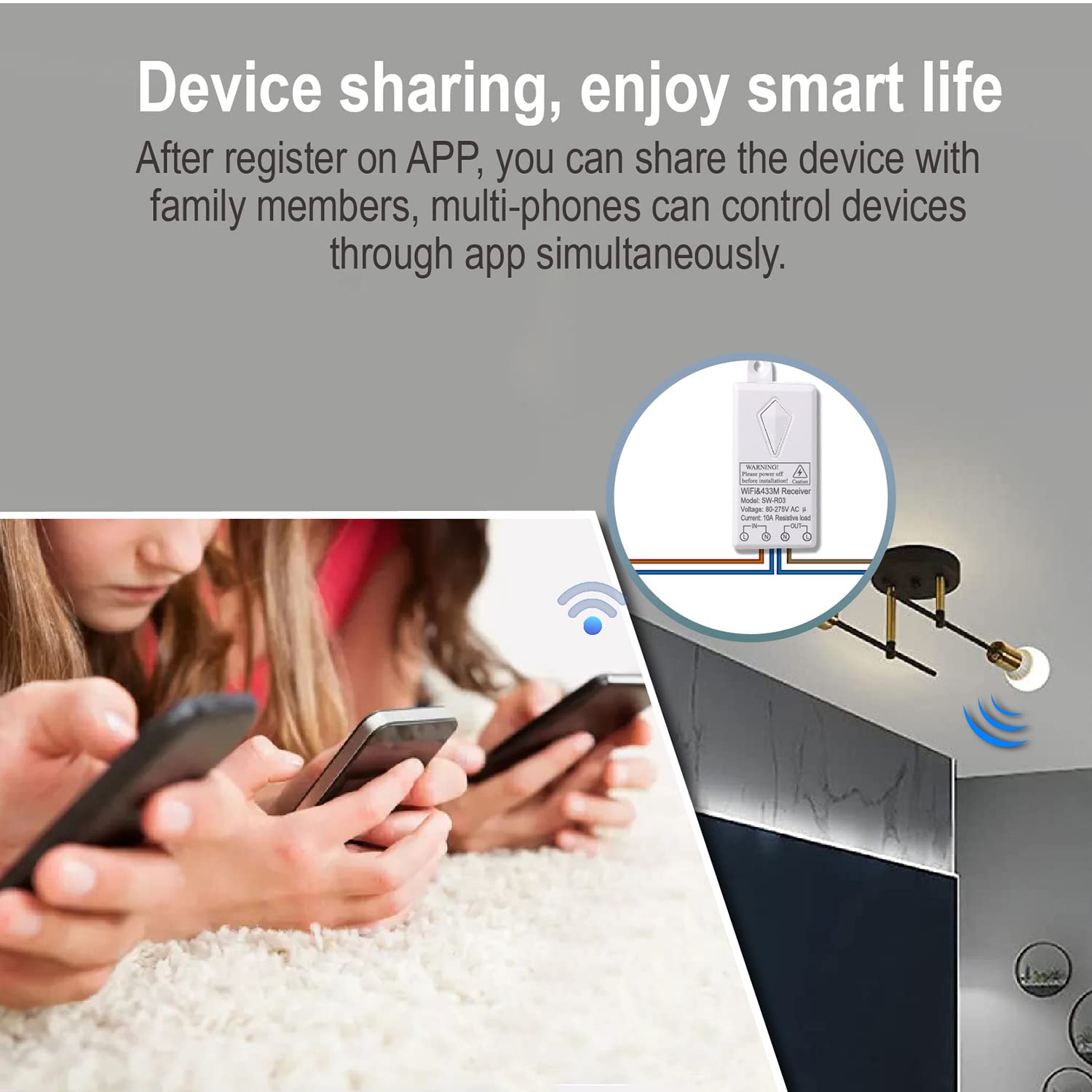 Figure 6.2: Wireless Switch Range
This image demonstrates the effective wireless range of the switch, showing a user activating the switch and the signal extending to multiple light fixtures within a large indoor space, indicating a range of 100-600 feet.
6.3. Pairing the Switch and Receiver
The switch and receiver are typically pre-paired. If re-pairing is needed or if you have multiple switches/receivers, follow the instructions provided with the product for pairing mode (usually involves pressing a button on the receiver until an indicator light flashes, then pressing the wireless switch button).
6.4. App Setup (Tuya Smart)
- Преземи апликација: Download the 'Tuya Smart' app from your smartphone's app store (iOS App Store or Google Play Store).
- Регистрација/Најава: Отворете ја апликацијата и регистрирајте се за нова сметка или најавете се ако веќе имате.
- Додај уред: In the app, tap '+' to add a new device. Follow the on-screen instructions to connect the WiFi Smart Receiver to your home Wi-Fi network (2.4GHz only).
- Преименувајте го уредот: Once connected, you can rename the device for easier identification (e.g., 'Living Room Light').
7. Операција
7.1. Wireless Switch Control
Simply press the wireless switch button to turn the connected light fixture ON or OFF. The switch provides instant control without the need for an app or voice commands.
7.2. Далечинско управување со апликација
With the 'Tuya Smart' app, you can control your lights from anywhere with an internet connection:
- Open the 'Tuya Smart' app.
- Select the light switch device you wish to control.
- Tap the ON/OFF button within the app to toggle the light.
 Слика 7.1: Далечинско управување со апликацијата
This image shows a smartphone displaying the Tuya Smart app interface, with a light bulb icon and a toggle switch, indicating remote control functionality for a connected light fixture.
7.3. Гласовна контрола (Alexa и Google Home)
Integrate your smart switch with Amazon Alexa or Google Home for convenient voice control:
- Поврзување сметки: In your Alexa or Google Home app, enable the 'Tuya Smart' skill/action and link your Tuya Smart account.
- Откријте уреди: Ask Alexa or Google Home to discover new devices.
- Гласовни команди: Користете команди како што се:
- „Алекса, вклучи го [Име на светло].“
- "Hey Google, turn off [Light Name]."
 Слика 7.2: Компатибилност со гласовна контрола
This image depicts a user speaking to an Amazon Echo device, with a thought bubble showing 'Alexa, turn on the Living room lights.', and an 'ok' response, illustrating the seamless voice control integration with Alexa and Google Home.
7.4. Функција на тајмер
Set schedules for your lights to turn on or off automatically:
- In the 'Tuya Smart' app, select your device.
- Look for the 'Timer' or 'Schedule' option.
- Set desired times for the light to turn ON or OFF, and select the days of the week for the schedule to repeat.
 Figure 7.3: Timer Function Setup
This image illustrates the timer function, showing a clock face with 'AM 06.30 ON' and 'PM 20.45 OFF' indicators, alongside a smartphone screen displaying the 'Add Schedule' interface within the Tuya Smart app, allowing users to schedule device operation.
7.5. Споделување на уреди
Share control of your smart switch with family members:
- In the 'Tuya Smart' app, go to the device settings.
- Изберете „Сподели уред“ или „Споделување уред“.
- Add family members by their Tuya Smart account or phone number. They will then be able to control the device from their own app.
 Figure 7.4: Device Sharing
This image shows multiple individuals simultaneously using their smartphones to control a single light fixture, illustrating the device sharing capability of the smart switch system.
8. Одржување
The Tuya Smart WiFi Wireless Lights Switch Kit is designed for low maintenance. Consider the following:
- Чистење: Wipe the wireless switch and receiver with a dry, soft cloth. Do not use harsh chemicals or abrasive cleaners.
- Замена на батерија: The wireless switch is powered by a CR2032 button lithium battery, which has a lifespan of 6-8 years. When the switch's performance degrades, replace the battery by opening the battery compartment (refer to product diagram for location).
- Трајност: The switch button is rated for 600,000 operations, and the receiver for 400,000 operations, ensuring long-term reliability.
9 Смена на проблеми
If you encounter issues with your smart switch kit, refer to the following common problems and solutions:
- Light Not Responding to Wireless Switch:
- Ensure the receiver has power and is correctly wired.
- Check the battery in the wireless switch. Replace if necessary.
- Verify the switch and receiver are paired. If not, re-pair them according to the pairing instructions.
- Ensure the switch is within the effective wireless range of the receiver.
- Light Not Responding to App/Voice Control:
- Check your home Wi-Fi network connection. The receiver requires a stable 2.4GHz Wi-Fi signal.
- Ensure the receiver is connected to your Wi-Fi network and is online in the Tuya Smart app.
- Verify your smartphone has an internet connection.
- For voice control, ensure your Tuya Smart account is correctly linked to Alexa or Google Home, and devices are discovered.
- Наизменично поврзување:
- Relocate your Wi-Fi router closer to the receiver or consider a Wi-Fi extender to improve signal strength.
- Ensure there are no major obstructions or sources of strong interference between the receiver and your Wi-Fi router.
- Anti-Surge Protection: The receiver includes 3000V anti-surge protection to resist lightning strikes and power fluctuations.
 Figure 9.1: Anti-Surge Protection
This image visually represents the 3000V anti-surge capability of the receiver, showing a lightning bolt graphic on one side and the receiver connected to a ceiling light on the other, emphasizing its resistance to electrical surges.
10. Гаранција и поддршка
Specific warranty information for this product is not provided in the available data. For warranty claims, technical support, or further assistance, please contact the manufacturer, EVERSECU, directly through their official webстраницата или продавачот на мало од кој е купен производот.