
Вовед
The Vekesen D02 Bluetooth Scrolling Ring is a versatile remote control designed to enhance your digital experience across various applications. This device allows for hands-free control of scrolling, media playback, and camera functions on compatible iOS and Android devices. Please read this manual carefully to ensure proper setup and operation.
Производот завршиview

Image: The Vekesen D02 Bluetooth Scrolling Ring, highlighting its multi-functional buttons for various controls.
The D02 Scrolling Ring features an ergonomic design for comfortable wear and intuitive button placement for easy control. It connects wirelessly via Bluetooth to your smartphone or tablet, providing seamless interaction with your favorite apps.
Инструкции за поставување
1. Полнење на уредот
Before initial use, ensure the scrolling ring is fully charged. Place the ring into its charging case. The indicator light on the case will show charging status.

Image: The scrolling ring in its charging case, illustrating battery life and charging duration.
2. Bluetooth спарување
- Press and hold the power button on the scrolling ring for 3 seconds until the red and blue lights flash alternately. This indicates the device is in pairing mode.
- On your smartphone or tablet, go to Поставки > Bluetooth.
- Осигурете се дека Bluetooth е вклучен.
- Look for "D02" in the list of available devices and tap to connect. Once connected, the indicator light on the ring will stop flashing.
3. iOS Specific Settings (iPhone/iPad)
For iPhone and iPad users, you must enable 'AssistiveTouch' for the scrolling ring to function correctly. Android devices do not require this step.
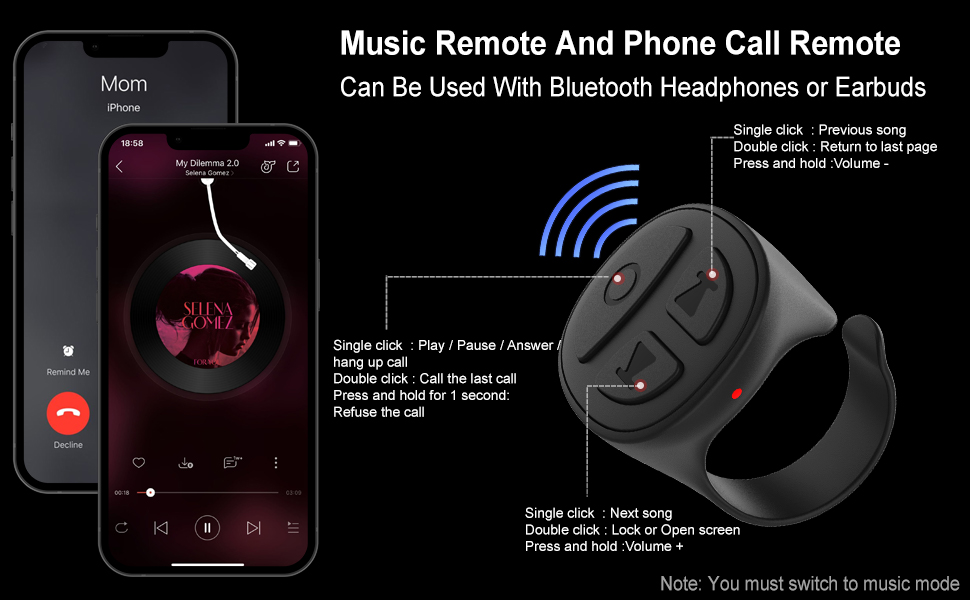
Image: Step-by-step guide to enable AssistiveTouch on iOS devices.
- Одете на Поставки > Пристапност.
- Допрете Допрете.
- Допрете AssistiveTouch.
- Вклучи AssistiveTouch to the 'On' position. A small gray dot will appear on your screen once enabled.
Упатства за работа
1. Switching Modes (TikTok Video / Music)
The D02 Scrolling Ring supports two main modes: TikTok Video mode and Music mode. To switch between modes:
- Press and hold the up and down buttons simultaneously for 2 seconds. The blue and red lights will flash 3 times, indicating a successful mode switch.

Image: Visual guide for switching between TikTok Video and Music modes.
2. TikTok Video Mode Operation
In TikTok Video mode, the ring allows for hands-free interaction with TikTok, YouTube, and Instagram videos.

Image: Detailed button functions for TikTok Video mode.
- Скролувајте нагоре/надолу: Single click the up/down arrow buttons.
- Повлечете лево/десно: Double click the left/right arrow buttons.
- Пушти/Пауза: Едно кликнување на централното копче.
- Send a Like: Кликнете двапати на централното копче.
- Continuous Likes (for Live streams): Triple click the center button to start/stop continuous likes.
- Контрола на јачината на звукот: Press and hold the up arrow button for Volume +, press and hold the down arrow button for Volume -.
- Lock/Open Screen: Притиснете и задржете го централното копче 1 секунда.
3. Kindle App Page Turning
The scrolling ring can remotely control page turning in the Kindle app. This function is only available for the Kindle app, not for Kindle e-reader devices.

Image: Guide for setting up and using the scrolling ring with the Kindle app.
- Open the Kindle app and open a book.
- Tap the middle of the screen to bring up the menu, then tap the 'Aa' icon.
- Go to the 'Layout' tab and ensure 'Continuous Scrolling' is turned OFF.
- Double click the up arrow button to turn the page forward.
- Double click the down arrow button to turn the page backward.
4. Music Mode Operation
In Music mode, the ring controls music playback and phone calls.

Image: Detailed button functions for Music and Phone Call mode.
- Пушти/Пауза: Едно кликнување на централното копче.
- Следна песна: Single click the right arrow button.
- Претходна песна: Single click the left arrow button.
- Контрола на јачината на звукот: Press and hold the up arrow button for Volume +, press and hold the down arrow button for Volume -.
- Одговори/прекини повик: Едно кликнување на централното копче.
- Одбиј повик: Притиснете и задржете го централното копче 1 секунда.
- Call Last Number: Кликнете двапати на централното копче.
5. Bluetooth Camera Shutter Remote
The scrolling ring can also function as a remote camera shutter for taking photos and recording videos within 33 feet.
- Open your phone's camera app.
- Long press either the up or down arrow button on the ring to activate the camera shutter.
Одржување
1. Полнење
The scrolling ring is powered by Lithium Polymer batteries. Charge the device using the provided charging case. A full charge takes approximately 1 hour. The charging case provides multiple recharges, extending the total usage time significantly.
2. Чистење
Избришете го уредот со мека, сува крпа. Избегнувајте употреба на груби хемикалии или абразивни материјали.
3. Складирање
Store the device in a cool, dry place away from direct sunlight and extreme temperatures. When not in use for extended periods, charge the device periodically to maintain battery health.
Решавање проблеми
- Уредот не се спарува: Ensure the ring is fully charged and in pairing mode (red and blue lights flashing alternately). Check your phone's Bluetooth settings to ensure it's on and visible. If using iOS, verify AssistiveTouch is enabled.
- Functions not working (iOS): Confirm that AssistiveTouch is enabled in your iPhone/iPad settings. Without it, the ring's functions will not register.
- Kindle page turning not working: In the Kindle app's 'Layout' settings, ensure 'Continuous Scrolling' is turned OFF.
- Повремена врска: Ensure the device is within the Bluetooth range (approximately 33 feet) of your phone. Avoid obstacles that may interfere with the signal.
- Device stopped working: Try resetting the device by turning it off and on again. Ensure it is charged. If issues persist, contact customer support.
Спецификации
- Димензии на производот: 1 x 0.86 x 1.2 инчи
- Тежина на ставката: 0.16 унци
- Број на модел на ставка: D02
- Батерии: Потребни се 2 литиум полимер батерии (вклучени)
- Бренд: Векесен
- Специјална карактеристика: Мулти-функционален
- Боја: Blue (variant specific)
- Максимален број на поддржани уреди: 1
- Компатибилни уреди: Android devices, iOS devices
Гаранција и поддршка
This Vekesen product comes with a One Year Manufacturer Warranty. If you encounter any problems with your Vekesen D02 Bluetooth Scrolling Ring, please feel free to contact us. We are committed to providing quick responses and satisfactory after-sales service to ensure a happy shopping experience for our customers.
For support, please refer to the contact information provided with your purchase or visit the official Vekesen store on Amazon.