
1. Вовед
This manual provides detailed instructions for the installation, operation, and maintenance of your EVTSCAN Digital Thermoregulator. This device is designed to precisely control heating equipment, such as wall-mounted boilers and gas boilers, ensuring a stable and energy-efficient temperature environment. Please read this manual thoroughly before installation and use to ensure proper function and safety.
2. Информации за безбедност
Always observe the following safety precautions to prevent damage to the device or personal injury:
- Уверете се дека напојувањето е исклучено пред инсталацијата или одржувањето.
- Инсталацијата треба да ја изврши квалификуван професионалец ако не сте сигурни за електричното поврзување.
- Не го изложувајте уредот на вода или прекумерна влажност.
- Use only the specified battery type (2 AA batteries) and ensure correct polarity.
- Чувајте го уредот подалеку од запаливи материјали.
3. Производот завршиview
The EVTSCAN Digital Thermoregulator features a clear LCD display for easy monitoring and a simple interface for temperature control. Its compact design allows for discreet integration into your living space.

Слика 3.1: Предна страна view of the Digital Thermoregulator. The LCD screen displays current settings and room temperature, with a rotary knob below for adjustments.
Клучни компоненти:
- LCD дисплеј: Shows set temperature, room temperature, time, and operational icons.
- Control Knob/Button: Се користи за навигација низ менијата и прилагодување на поставките.
- Оддел за батерии: Located on the rear or side for 2 AA batteries.
- Терминали за жици: For connection to the heating system.
4. Спецификации
| Карактеристика | Спецификација |
|---|---|
| Модел | EVTSCANok0g9ct2zq |
| Режим на напојување | 2 AA батерии (не се вклучени) |
| Screen Accuracy | 0.5 ℃ |
| Сензор за сонда | NTC (10k) 1% |
| Капацитет за контакт | Greater than 30-230 V DC working voltage, lower current. Reference: 5 A 30 V (HF relay) or 2 A 30 V (NEC relay) |
| Опсег на приказ на температура | 1 до 40 ℃ |
| Default Temperature Adjustment Range | 5 до 35 ℃ |
| Опсег на работна температура | 0 до 50 ℃ |
| Водење програма | Set once a week |
| Излез | Префрлување реле |
| Материјал | Поликарбонат отпорен на пламен |
| Тежина | 170 гр |
5. Поставување и инсталација
The EVTSCAN Digital Thermoregulator is designed for simple installation. Follow these steps carefully:
5.1. Отпакување и проверка
Внимателно отстранете ги сите компоненти од пакувањето. Проверете дали сите предмети наведени во содржината на пакувањето се присутни и неоштетени.
- 1 Digital Temperature Controller
- 2 Завртки
5.2. Инсталација на батерија
The device requires 2 AA batteries for operation. These are not included in the package.
- Locate the battery compartment on the back of the thermoregulator.
- Отворете го капакот на преградата за батерии.
- Вметнете 2 AA батерии, обезбедувајќи правилен поларитет (+/-).
- Добро затворете го капакот на преградата за батерии.

Слика 5.1: Аголна view of the thermoregulator, illustrating its compact size and potential location for battery access or mounting points.
5.3. Монтирање и жици
The thermoregulator is designed for wall mounting. Ensure the power to your heating system is turned off before proceeding with wiring.
- Choose a suitable location on an interior wall, away from direct sunlight, drafts, or heat sources that could affect temperature readings.
- Mount the backplate (if detachable) to the wall using the provided screws.
- Connect the thermoregulator to your boiler or heating system according to the wiring diagram provided with your boiler and the thermoregulator's terminal markings. This typically involves connecting the switching relay output to the boiler's control input.
- Secure the thermoregulator onto the mounted backplate.
Забелешка: For wiring, consult a qualified electrician if you are unfamiliar with electrical installations.
6. Упатства за работа
The EVTSCAN Digital Thermoregulator uses a microcomputer control technology to maintain your desired temperature efficiently.
6.1. Powering On and Initial Display
Once batteries are installed, the LCD display will illuminate, showing the current room temperature, set temperature, and time.
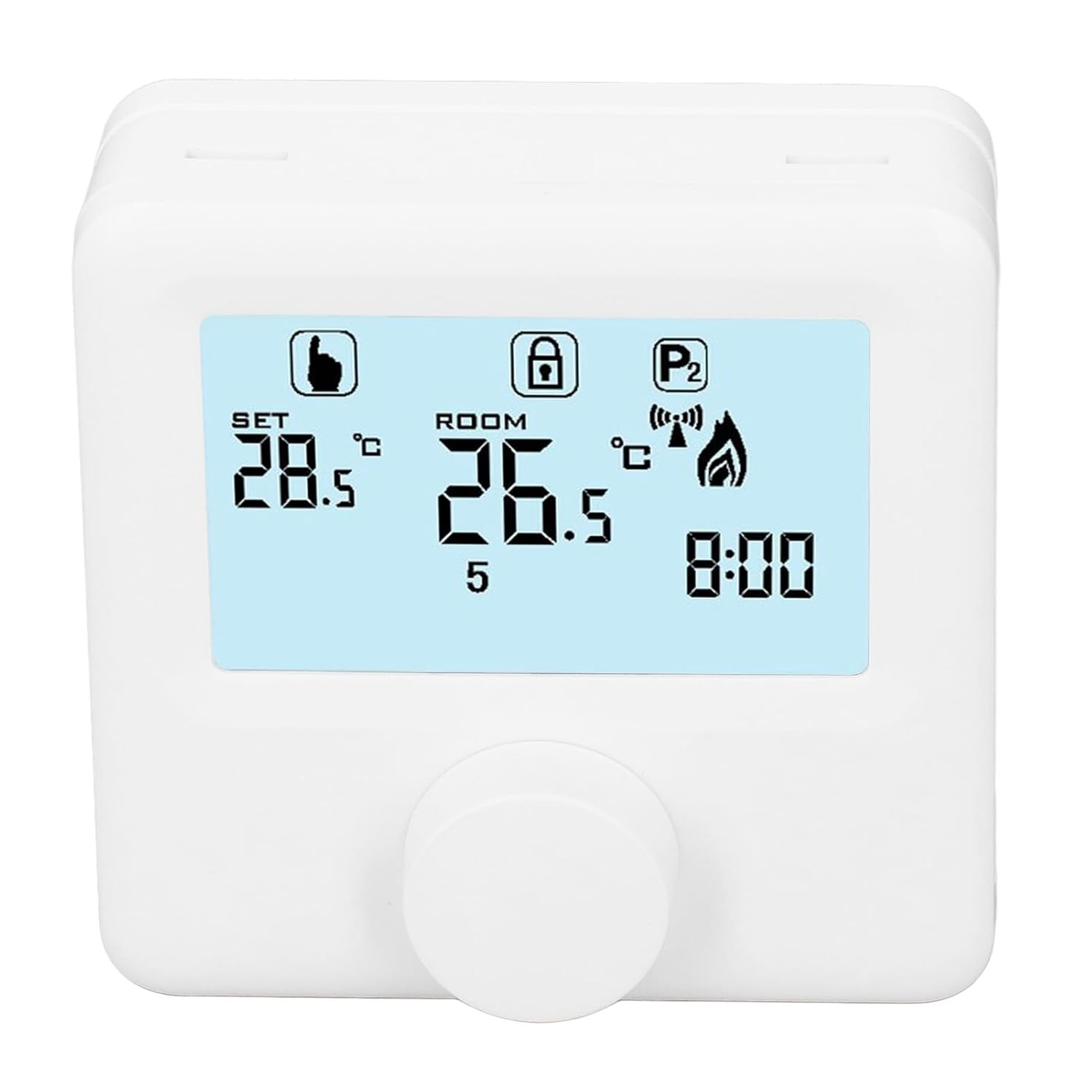
Слика 6.1: Детално view of the LCD display. It shows the set temperature (SET), room temperature (ROOM), a lock icon, a program icon (P2), a signal icon, a flame icon indicating heating, and the current time.
6.2. Поставување на температурата
За да ја прилагодите саканата температура:
- Rotate the control knob to increase or decrease the set temperature. The "SET" value on the display will change accordingly.
- The device will automatically activate or deactivate the heating system to maintain the set temperature within the range of 1 to 40 ℃. The default adjustment range is 5 to 35 ℃.
6.3. Неделен распоред на програмирање
The thermoregulator supports a weekly programming schedule. This allows you to set different temperatures for various times of the day across the week.
- Press and hold the control knob (or a designated button, if available) to enter programming mode.
- Use the control knob to navigate through days of the week and time slots.
- Adjust the desired temperature for each programmed period.
- Confirm your settings to save the weekly program. The device will then operate according to this schedule.
6.4. Understanding Display Icons
- СЕТ: Indicates the target temperature you have set.
- СОБА: Ја прикажува моменталната собна температура.
- Икона на пламен: Свети кога системот за греење е активен.
- Икона за заклучување: May indicate a keypad lock feature to prevent accidental changes.
- P1/P2 Icon: Indicates the current program mode (e.g., P1 for comfort, P2 for economy, or specific weekly program segments).
- Икона за сигнал: May indicate wireless communication status if applicable.
7. Одржување
Regular maintenance ensures the longevity and optimal performance of your thermoregulator.
- Чистење: Избришете го уредот со мека, сува крпа. Не користете абразивни средства за чистење или растворувачи.
- Замена на батерија: Replace batteries when the low battery indicator appears on the display. Always replace both batteries simultaneously with new AA batteries.
- Област на сензорот: Ensure the temperature sensor area (usually a small vent on the device) is free from dust and obstructions for accurate readings.
8 Смена на проблеми
If you encounter issues with your EVTSCAN Digital Thermoregulator, refer to the following common problems and solutions:
- Екранот е празен:
- Проверете дали батериите се правилно инсталирани.
- Заменете ги старите батерии со нови.
- Системот за греење не реагира:
- Ensure the thermoregulator is powered on and the flame icon is displayed when heating is expected.
- Verify wiring connections to the boiler are secure and correct.
- Check the boiler's power supply and status.
- Осигурајте се дека поставената температура е повисока од моменталната собна температура.
- Неточни мерења на температурата:
- Ensure the device is not exposed to direct sunlight, drafts, or heat sources.
- Clean any dust or debris from the sensor area.
- Cannot change settings:
- Check if the lock icon is displayed. If so, refer to the operating instructions to unlock the keypad.
Ако проблемот продолжи, контактирајте со поддршката за корисници.
9. Гаранција и поддршка
Specific warranty information for this product is not provided in the available data. Please refer to the product packaging or the retailer's webсајт за детали за гаранцијата.
For technical support or further assistance, please contact EVTSCAN customer service through their official channels or the retailer from whom you purchased the product.
You can visit the EVTSCAN store on Amazon for more information: EVTSCAN Store