1. Вовед
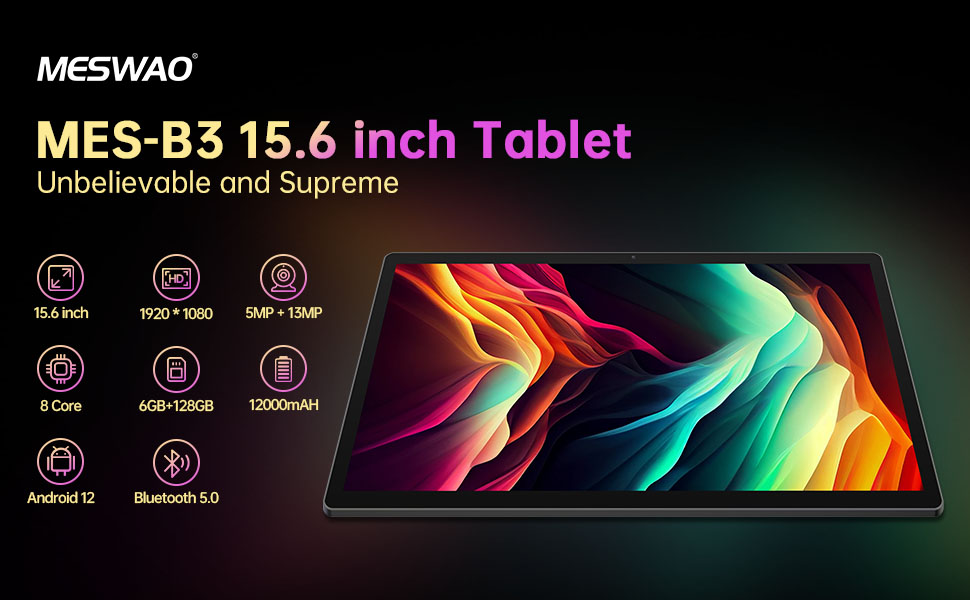
Welcome to the user manual for your MESWAO MES-B3 15.6-inch Android 13 Tablet. This document provides essential information for setting up, operating, maintaining, and troubleshooting your device. The MES-B3 tablet features a large 15.6-inch IPS HD display, an Octa-Core processor, 6GB RAM, 128GB internal storage (expandable), and a 12000mAh battery, designed for a versatile user experience.

Figure 1: MESWAO MES-B3 Tablet Overview
2. Информации за безбедност
Please read all safety instructions carefully before using your tablet to prevent injury or damage to the device. Keep this manual for future reference.
- Безбедност на батеријата: Do not attempt to replace the battery yourself. Do not expose the tablet to extreme temperatures, direct sunlight, or fire. Do not puncture, drop, or disassemble the battery.
- Вода и влага: This tablet is not waterproof. Avoid exposing it to water, rain, or high humidity.
- Чистење: Use a soft, dry cloth to clean the tablet. Do not use liquid cleaners or aerosols.
- Ракување: Avoid dropping the tablet or subjecting it to strong impacts.
- Заштита на слухот: When using headphones, set the volume to a moderate level to avoid hearing damage.
3. Содржина на пакетот
Проверете дали сите артикли се присутни во пакувањето:
- MESWAO MES-B3 15.6-inch Android 13 Tablet
- Адаптер за напојување
- USB-C кабел
- Упатство за употреба (овој документ)
4. Уредот завршиview
Familiarize yourself with the physical components of your MESWAO MES-B3 tablet.

Figure 2: Buttons and Connectors
- Копче за вклучување: Press and hold to turn the tablet on or off. Press briefly to turn the screen on or off.
- Копчиња за јачина на звук: Прилагодете ја јачината на звукот.
- Предна камера: За видео повици и селфиња (5MP).
- Rear Camera with Flashlight: За снимање фотографии и видеа (13MP).
- Type-C порта: За полнење на таблетот и поврзување со компјутер.
- Слот за картичка TF: Insert a MicroSD card to expand storage.
- Стерео звучници: Обезбедете аудио излез.
5. Поставување
5.1 Полнење на таблетот
Before first use, fully charge your tablet. Connect the USB-C cable to the tablet's Type-C port and the other end to the power adapter. Plug the adapter into a wall outlet. The battery indicator on the screen will show charging status.
5.2 Вклучување/исклучување
- За вклучување: Press and hold the Power Button until the MESWAO logo appears.
- За исклучување: Press and hold the Power Button until the power options appear, then select 'Power off'.
- За рестартирање: Притиснете го и задржете го копчето за вклучување додека не се појават опциите за вклучување, а потоа изберете „Рестарт“.
5.3 Волшебник за почетно поставување
При првото вклучување, таблетот ќе ве води низ процесот на почетно поставување:
- Изберете го претпочитаниот јазик.
- Поврзете се на Wi-Fi мрежа.
- Најавете се со вашата сметка на Google или креирајте нова.
- Review и прифатете ги условите и одредбите.
- Поставете заклучување на екранот (PIN, шема, лозинка).
5.4 Вметнување на MicroSD картичка
To expand the tablet's storage, you can insert a MicroSD card (up to 256GB, as per some product information, though 1TB is also mentioned in images, please verify with product packaging for exact maximum). Locate the TF card slot on the side of the tablet. Gently insert the MicroSD card with the gold contacts facing down until it clicks into place.

Figure 3: Storage Expansion with MicroSD Card
6. Ракување со вашиот таблет
6.1 Основна навигација
The MESWAO MES-B3 runs on Android 13, offering an intuitive touch interface.
- Допрете: Изберете ставка или отворете апликација.
- Повлечете: Движете се низ екраните, скролувајте ги листите или отфрлајте ги известувањата.
- Штипнете за зумирање: Зголемете или намалете ја содржината на екранот.
- Почетен екран: Access your apps and widgets. Swipe down from the top for notifications and quick settings.
Слика 4: Интерфејс за Android 13
6.2 Wi-Fi конекција
- Одете на Поставки > Мрежа и интернет > Интернет.
- Вклучете Wi-Fi.
- Изберете ја саканата мрежа од листата и внесете ја лозинката доколку се побара.
6.3 Спарување преку Bluetooth
The tablet supports Bluetooth 5.0 for connecting wireless accessories.
- Одете на Поставки > Поврзани уреди > Поставки за поврзување > Bluetooth.
- Вклучете Bluetooth.
- Проверете дали вашиот Bluetooth уред е во режим на спарување.
- Select your device from the 'Available devices' list and follow on-screen prompts to pair.
6.4 Управување со апликации
- Инсталирајте апликации: Отворете ја апликацијата Google Play Store, пронајдете ја саканата апликација и допрете „Инсталирај“.
- Деинсталирајте апликации: Притиснете и задржете ја иконата на апликацијата на почетниот екран или фиоката за апликации, потоа повлечете ја до „Деинсталирај“ или изберете „Информации за апликацијата“ и изберете „Деинсталирај“.
- Управувајте со апликации: Одете на Поставки > Апликации до view, force stop, or clear data for installed applications.
6.5 Поставки на екранот
Прилагодете ја вашата viewискуство:
- Одете на Поставки > Приказ.
- Прилагодете се Ниво на осветленост.
- Поставете Истекување на времето на екранот (sleep duration).
- Промена Големина на фонтот и Големина на екранот.
- Овозможи Темна тема за намалено напрегање на очите.
6.6 Управување со батерии
The MES-B3 features a 12000mAh battery for extended use.

Слика 5: Продолжен век на траење на батеријата
- Одете на Поставки > Батерија до view usage and optimize settings.
- Овозможи Штедач на батерија режим за продолжување на траењето на батеријата кога е потребно.
- Затворете ги неискористените апликации што работат во заднина.
- Намалете ја осветленоста на екранот.
7. Одржување
7.1 Чистење
- Користете мека крпа без влакненца за нежно да го избришете екранот и куќиштето.
- За тврдокорни дамки, малку дampИзмијте ја крпата со вода или со средство за чистење екрани специјално дизајнирано за електроника.
- Avoid using abrasive materials, alcohol, or chemical solvents.
7.2 Складирање
- Чувајте ја таблетата на ладно и суво место, подалеку од директна сончева светлина и екстремни температури.
- Доколку го складирате подолго време, осигурајте се дека батеријата е наполнета до околу 50% за да го продолжите нејзиниот век на траење.
7.3 Ажурирања на софтверот
Редовно проверувајте за ажурирања на софтверот за да обезбедите оптимални перформанси и безбедност.
- Одете на Поставки > Систем > Системско ажурирање.
- The tablet will check for available updates. Follow the on-screen instructions to download and install any updates.
8 Смена на проблеми
Еве решенија за вообичаени проблеми со кои може да се соочите:
| Проблем | Решение |
|---|---|
| Таблетот не се вклучува | Проверете дали таблетот е наполнет. Поврзете го на полначот најмалку 30 минути, а потоа обидете се повторно да го вклучите. |
| Проблеми со Wi-Fi конекцијата | Restart your Wi-Fi router and the tablet. Go to Settings > Network & internet > Internet, forget the network, and reconnect. |
| Бавни перформанси | Close unused apps. Clear cache for frequently used apps (Settings > Apps > [App Name] > Storage & cache > Clear cache). Restart the tablet. |
| Батеријата брзо се троши | Reduce screen brightness. Disable Wi-Fi/Bluetooth when not in use. Close background apps. Check battery usage in Settings > Battery to identify power-hungry apps. |
| Апликациите паѓаат или замрзнуваат | Force stop the app (Settings > Apps > [App Name] > Force stop). Clear the app's cache. If the problem persists, uninstall and reinstall the app. |
9. Спецификации
Detailed technical specifications for the MESWAO MES-B3 tablet:

Слика 6: Клучни карактеристики и спецификации
| Карактеристика | Спецификација |
|---|---|
| Бренд | MESWAO |
| Број на модел | МЕД-Б3 |
| Оперативен систем | Андроид 13 |
| Процесор | MediaTek Octa-Core (MTK6789) |
| RAM меморија | 6 GB |
| Внатрешно складирање | 128 GB |
| Складирање што може да се прошири | Up to 256 GB (via TF/MicroSD card) |
| Големина на екранот | 15.6 инчи |
| Резолуција на екранот | 1920 x 1080 пиксели (IPS HD) |
| Предна камера | 5 MP |
| Задна камера | 13 MP |
| Капацитет на батеријата | 12000 mAh |
| Траење на батеријата | Приближно 10 часа (во зависност од употребата) |
| Поврзување | Bluetooth 5.0, Wi-Fi (802.11ac, 2.4G/5G) |
| Пристаништа | USB Type-C, TF Card Slot |
| Боја | Греј |
| Димензии (Д x Ш x В) | 36.85 x 22.25 x 0.93 cm |
| Тежина | 1.1 килограми |
10. Гаранција и поддршка
Your MESWAO MES-B3 tablet is covered by a standard manufacturer's warranty. Please refer to the warranty card included in your package for specific terms and conditions, including warranty duration and coverage details.
For technical support, troubleshooting assistance beyond this manual, or warranty claims, please contact MESWAO customer service through the retailer where you purchased the product or visit the official MESWAO webсајт за информации за контакт.