
VTech ES2050
Упатство за користење на безжичниот телефон VTech ES2050 DECT
Модел: ES2050
1. Производот завршиview
The VTech ES2050 is a DECT cordless phone designed for home and office use, featuring an integrated digital answering machine, call blocking capabilities, and enhanced audio functions. This manual provides detailed instructions for setting up, operating, and maintaining your phone.

The VTech ES2050 DECT Cordless Phone with its base unit, showcasing the handset's backlit display and keypad, and the base unit's answering machine controls.

The VTech ES2050 DECT Cordless Phone positioned in a contemporary living space, highlighting its sleek design and integration into a home environment.

Illustration of the VTech ES2050's Nuisance Call Blocker feature, showing how it helps prevent unwanted calls from ringing through. Up to 100 numbers can be blacklisted.

The VTech ES2050's Digital Answering System, capable of recording up to 30 minutes of messages, with a digital message counter on the base unit.

Depiction of the VTech ES2050's easy one-touch features, including Mute/Alarm, adjustable ring volume and melodies, and a high-quality handsfree speakerphone.

Visual representation of the VTech ES2050's Volume Booster function, which amplifies incoming sounds for enhanced clarity and loudness, beneficial for hearing-impaired users.

The VTech ES2050 handset with its backlit display and keypad illuminated, demonstrating improved visibility in low-light conditions.

A composite image illustrating key features: 100 name and number phonebook, calling numbers displayed with 20 call list records, 10 last number redial, and up to 18 hours talk time / 250 hours standby time.
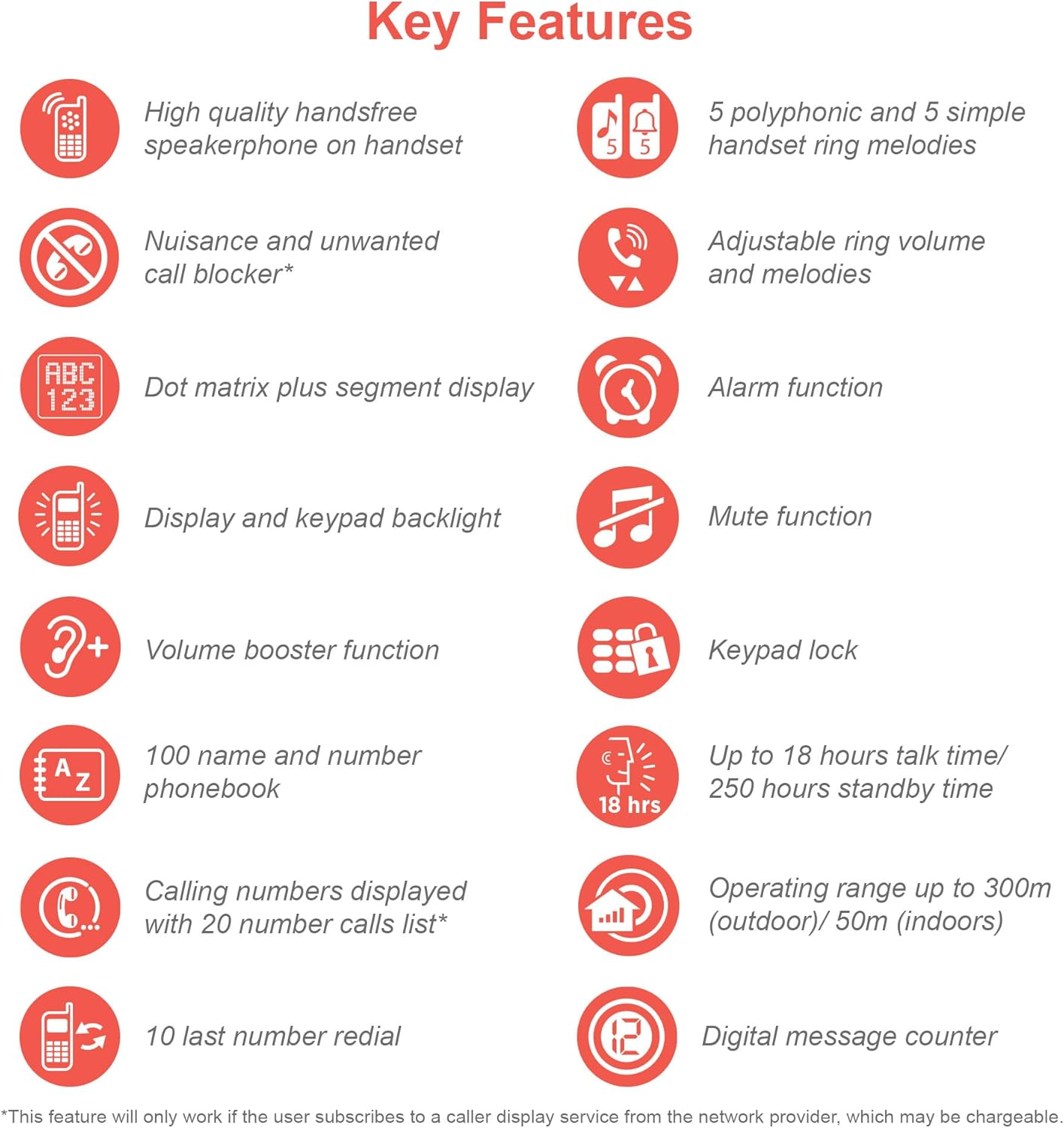
An infographic summarizing the VTech ES2050's key features, including speakerphone, call blocker, polyphonic ringtones, alarm, mute, keypad lock, volume booster, phonebook, call list, redial, talk time, operating range, and digital message counter.
Клучни карактеристики:
- Дигитална телефонска секретарка: 30 minutes recording time.
- Блокатор на досадни повици: Block up to 100 blacklisted numbers.
- Volume Booster: Amplifies incoming sounds for enhanced clarity.
- Долг век на батеријата: Up to 18 hours talk time / 250 hours standby time.
- Екран и тастатура со позадинско осветлување: Лесно viewна слабо светло.
- Спикерфон без раце: High-quality speakerphone on handset.
- Именик: 100 name and number capacity.
- За брзо бирање: 3 speed dial numbers.
- ЕКО режим: For reduced power consumption.
- Идентификација на повикувач / Повик на чекање: Stores 20 records.
- Повторно бирање: 10 last number redial.
- Функција за аларм: Integrated alarm.
- Функција за исклучување на звукот: For privacy during calls.
- Заклучување на тастатура: Prevents accidental dialing.
2. Што има во кутијата
Пред да започнете, проверете дали сите компоненти се присутни:
- 1 Базна единица
- 1 Безжична слушалка
- 1 Charger (for handset)
- 1 Battery Pack (2 AAA batteries included)
- Кабел за телефонска линија
- Водич за брз почеток (погледнете го ова упатство за сите детали)
3. Водич за поставување
3.1. Инсталација и полнење на батеријата
- Locate the battery compartment cover on the back of the handset. Slide it open.
- Цврсто поврзете го приклучокот на батеријата во приклучокот во внатрешноста на преградата.
- Place the 2 AAA batteries (included) into the compartment, ensuring correct polarity (+ and -).
- Заменете го капакот на преградата за батерии.
- Place the handset on the base unit or charger. The charging indicator light on the handset should illuminate.
- Оставете го телефонот да се полни најмалку 16 часа пред првата употреба за да се осигурате дека батеријата е целосно наполнета.
3.2. Поврзување на основната единица
- Поврзете го едниот крај од телефонскиот кабел со приклучокот TEL LINE на задната страна од базата.
- Поврзете го другиот крај од телефонскиот кабел со телефонскиот ѕиден приклучок.
- Приклучете го малиот крај од адаптерот за напојување во приклучокот POWER на задната страна од базата.
- Вклучете го големиот крај на адаптерот за напојување во стандарден електричен штекер.
- Ensure all cables are securely connected and routed to prevent tripping hazards.
3.3. Initial Setup (Date and Time)
After the handset is charged, you will need to set the date and time. Follow the on-screen prompts on the handset display. If prompted multiple times, ensure each step is confirmed before proceeding.
- Притиснете го МЕНИ / ОК копче.
- Одете до Датум и време користејќи ги копчињата со стрелки.
- Притиснете МЕНИ / ОК да изберете.
- Enter the current date and time using the keypad.
- Притиснете МЕНИ / ОК да заштедите.
4. Упатства за работа
4.1. Остварување и примање повици
- За да остварите повик: Подигнете ја слушалката или притиснете ја РАБОТИ копче. Бирајте го бројот.
- За да добиете повик: Кога телефонот ќе заѕвони, подигнете ја слушалката или притиснете го копчето РАБОТИ копче.
- За да завршите повик: Place the handset back on the base unit/charger or press the КРАЈ копче.
4.2. Користење на звучникот
За време на повик, притиснете на ЗВУЧНИК button to activate the handsfree speakerphone. Press it again to switch back to the handset earpiece.
4.3. Digital Answering Machine
- Репродукција на пораки: На основната единица, притиснете ИГРАЈ/СТОП.
- Бришење пораки: За време на репродукцијата на пораката, притиснете ИЗБРИШИ на основната единица.
- Снимање на излезна порака (OGM): Refer to the handset menu for OGM recording options.
4.4. Nuisance Call Blocker
This feature allows you to block unwanted calls. You can add numbers to a blacklist.
- To Block a Number from Call History: Access the Call History, select the number, and choose the "Block" option.
- To Manually Add a Number to Blacklist: Navigate to the Call Blocker menu in the handset settings and add the number.
- The phone can store up to 100 blacklisted numbers.
4.5. Volume Booster
На amplify the incoming sound during a call, press the ПОБОСТ button (often marked with a speaker icon or "+") on the handset. Press it again to deactivate.
4.6. Телефонски именик и брзо бирање
- Додавање контакти: Access the Phonebook menu, select "Add New Entry", and enter the name and number.
- Бирање од телефонскиот именик: Притиснете го ИМЕНИК копчето, скролувајте до саканиот контакт и притиснете РАБОТИ.
- За брзо бирање: Assign frequently called numbers to speed dial keys (e.g., 1, 2, 3). Refer to the handset menu for speed dial setup.
4.7. ЕКО режим
The phone automatically enters ECO mode when the handset is close to the base unit, reducing power consumption and transmission power. This mode is indicated by an ECO icon on the display.
5. Одржување
- Чистење: Избришете го телефонот и базата со мека, дamp крпа. Не користете абразивни средства за чистење или растворувачи.
- Нега на батеријата: For optimal battery life, avoid overcharging by leaving the handset off the charger for extended periods once fully charged. If the phone will not be used for a long time, remove the batteries.
- Локација: Поставете ја базата на централна локација подалеку од други електронски уреди што можат да предизвикаат пречки.
6 Смена на проблеми
If you experience issues with your VTech ES2050 phone, try the following solutions:
| Проблем | Можно решение |
|---|---|
| Нема тон за бирање / Не може да се воспоставуваат или примаат повици. |
|
| Лош квалитет на звук / Статичен. |
|
| Телефонската секретарка не снима пораки. |
|
| Handset display is blank or unresponsive. |
|
| Difficulty with menu navigation or settings. |
|
7. Спецификации
| Карактеристика | Детал |
|---|---|
| Број на модел | ES2050 |
| Тип на телефон | Безжичен DECT |
| Тип на одговорен систем | Дигитален |
| Капацитет на снимање | 30 минути |
| Време за разговор на телефон | До 18 часа |
| Време на подготвеност на телефонот | До 250 часа |
| Батерии | 2 AAA батерии (вклучени) |
| Извор на енергија | Напојува со батерија |
| Тип на бирач | Единечна тастатура |
| Компатибилни уреди | Standard Landline Telephone Networks |
| Боја | Црното |
| Производител | VTech |
| Земја на потекло | Кина |
8. Гаранција и поддршка
За информации за гаранцијата и техничка поддршка, ве молиме погледнете го официјалниот VTech webлокација или контактирајте ја службата за корисници на VTech. Зачувајте ја сметката за купување како доказ за купување.
Производител: VTech
For the most up-to-date support resources, visit the VTech support page or refer to the contact information provided with your product packaging.
Ask a question about this manual
Ask about setup, troubleshooting, compatibility, parts, safety, or missing instructions. Manuals+ will review the question and use this page’s manual context to help answer it.