
1. Производот завршиview
The VBESTLIFE D400 is a versatile Bluetooth 5.3 HiFi audio receiver designed to upgrade your existing stereo systems and speakers with wireless audio streaming capabilities. It supports multiple audio inputs and outputs, including AUX, optical, and coaxial, and features NFC for quick pairing. This device allows you to stream high-fidelity audio from your Bluetooth-enabled devices to your home audio setup.
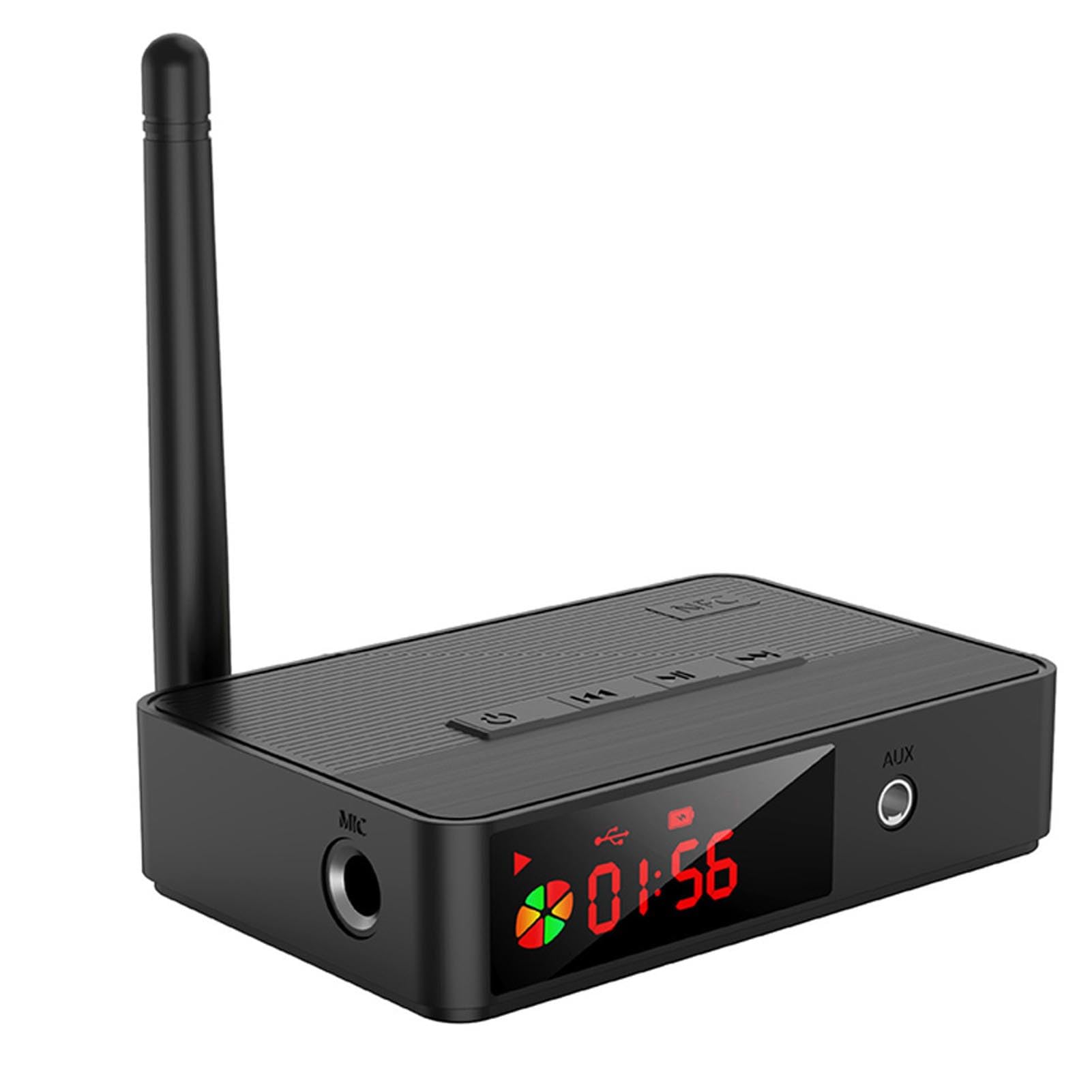
Image 1.1: VBESTLIFE D400 Bluetooth 5.3 HiFi Audio Receiver. This image shows the front view of the compact black audio receiver with various ports and controls visible.
2. Содржина на пакетот
Ве молиме означете го полето за следните ставки:
- 1 x VBESTLIFE D400 Bluetooth Receiver
- 1 x далечински управувач
- 1 x кабел за полнење USB-C
- 1 x Audio Cable (e.g., RCA or 3.5mm)
- 1 x Auxiliary Cable (3.5mm to 3.5mm)
- 1 x Упатство за употреба
3. Спецификации
- Модел: D400 (VBESTLIFEtomd83pync)
- Bluetooth верзија: V5.3
- Аудио декодирање: SBC
- Bluetooth Protocol Support: A2DP, AVRCP
- Поддржано File Formats (USB/SD): MP3, WAV, WMA, FLAC, APE
- Опсег на фреквенција: 2400 MHz до 2483.5 MHz
- Фреквентен одговор: 20 Hz до 20 KHz
- Излезно оптоварување: 16 to 320 Ω Adaptive
- Растојание на пренос: Approx. 10-30m / 32.8-98.4ft (open area)
- Аудио влез: Bluetooth Audio, USB, Memory Card (up to 32GB, not included)
- Аудио излез: AUX (3.5mm), Optical Audio, Coaxial Audio
- Капацитет на батеријата: 500mAh Lithium Battery (built-in)
- Батерија за далечински управувач: CR2025 x 1 (not included)
- Интерфејс за напојување: USB C 5V
- Компатибилност: Android, iOS mobile phones, tablets, TVs, game consoles, and other Bluetooth devices, as well as audio equipment with audio input interface.
- Тежина: 204 грама
- Број на канали: 2
- Материјал: ABS
4. Поставување
4.1. Поврзување за напојување
- Connect the provided USB-C charging cable to the "USB C 5V" port on the receiver.
- Plug the other end of the USB-C cable into a 5V USB power adapter (not included) or a compatible USB port on a computer or wall charger.
- The device will power on automatically or can be turned on using the power button.
4.2. Конекција за аудио излез
Choose one of the following methods to connect the receiver to your audio system:
- AUX излез: Use the 3.5mm auxiliary cable to connect the receiver's AUX output port to the AUX input of your stereo system, active speakers, or headphones.
- Оптички излез: Use an optical audio cable (not included) to connect the receiver's optical output port to the optical input of your ampлафич или звучен систем.
- Коаксијален излез: Use a coaxial audio cable (not included) to connect the receiver's coaxial output port to the coaxial input of your ampлафич или звучен систем.
5. Упатства за работа
5.1. Bluetooth спарување
- Осигурајте се дека приемникот е вклучен.
- The receiver will automatically enter Bluetooth pairing mode, indicated by a flashing LED indicator (if present).
- На вашиот уред со Bluetooth (паметен телефон, таблет, компјутер), одете во поставките за Bluetooth.
- Пребарај за available devices and select "D400" (or similar name) from the list.
- Once connected, the LED indicator will become solid, and you can now stream audio wirelessly.
5.2. NFC Pairing (Near Field Communication)
For NFC-enabled mobile devices:
- Проверете дали NFC е овозможен на вашиот мобилен уред.
- Gently tap your NFC-enabled device on the NFC area of the D400 receiver.
- Your device will automatically connect to the receiver without manual pairing.
5.3. USB Drive / Memory Card Playback
- Insert a USB flash drive or a memory card (up to 32GB, formatted with supported file systems like FAT32) containing audio files (MP3, WAV, WMA, FLAC, APE) into the respective port on the receiver.
- The receiver should automatically detect the storage and begin playing audio.
- Use the remote control to navigate tracks, adjust volume, and control playback.
5.4. Функции на далечински управувач
The included remote control allows for convenient operation of the receiver. Functions typically include:
- Вклучување/исклучување
- Јачина на звук нагоре/надолу
- Пушти/Пауза
- Следна/Претходна песна
- Input Mode Selection (Bluetooth, USB, Memory Card)
Note: The remote control requires 1 x CR2025 battery (not included). Please insert the battery before use, observing polarity.
6. Одржување
- Чистење: Use a soft, dry cloth to clean the surface of the receiver. Do not use liquid cleaners or abrasive materials.
- Складирање: Чувајте го уредот на ладно и суво место, подалеку од директна сончева светлина и екстремни температури кога не го користите подолг период.
- Батерија: If the remote control will not be used for a long time, remove the CR2025 battery to prevent leakage.
7 Смена на проблеми
| Проблем | Можно решение |
|---|---|
| Нема моќ | Ensure the USB-C power cable is securely connected to a working 5V power source. Check the power adapter. |
| Не може да се спари преку Bluetooth | Ensure the receiver is in pairing mode (LED flashing). Turn off and on Bluetooth on your source device. Move closer to the receiver. Clear previous Bluetooth connections on your device. |
| Нема излез на звук | Verify the audio cable (AUX, Optical, Coaxial) is correctly connected to both the receiver and your audio system. Check the input selection on your audio system. Adjust volume on both the receiver and your source device. |
| NFC спарувањето не работи | Ensure NFC is enabled on your mobile device. Make sure your device is tapping the correct NFC area on the receiver. |
| USB/Memory card not playing | Ensure the USB drive or memory card is inserted correctly. Check if the files are in a supported format (MP3, WAV, WMA, FLAC, APE). Ensure the memory card is not larger than 32GB and is formatted correctly. |
8. Гаранција и поддршка
This VBESTLIFE D400 Bluetooth 5.3 HiFi Audio Receiver comes with a 1 година гаранција против дефекти од производителот од датумот на купување.
For technical support or warranty claims, please refer to the contact information provided by your retailer or the official VBESTLIFE support channels. Keep your purchase receipt as proof of purchase for warranty services.