
1. Вовед
Thank you for choosing the WORKPRO 7.2V Cordless Rotary Tool. This manual provides essential information for the safe and effective operation, maintenance, and troubleshooting of your tool. Please read it thoroughly before use and retain it for future reference.
The WORKPRO 7.2V Cordless Rotary Tool is a versatile and compact device designed for various DIY and craft projects. Its lightweight design and variable speed settings make it suitable for tasks such as sanding, engraving, cutting, drilling, grinding, and polishing.

Figure 1: WORKPRO 7.2V Cordless Rotary Tool with included accessories and storage bag.
2. Информации за безбедност
Секогаш почитувајте ги основните безбедносни мерки на претпазливост за да го намалите ризикот од пожар, електричен удар и телесни повреди при ракување со електрични алати.
- Прочитајте ги сите инструкции: Запознајте се со работата на алатката и безбедносните упатства.
- Носете заштита за очи: Секогаш носете заштитни очила или заштитни очила со странични штитови.
- Безбеден работен дел: Секогаш clamp или на друг начин обезбедете го работниот дел за да спречите движење за време на работата.
- Одржувајте чист работен простор: Преполните области предизвикуваат несреќи.
- Избегнувајте опасни средини: Не користете електрични алати во гamp или влажни локации, или изложете ги на дожд. Одржувајте ја работната површина добро осветлена.
- Држете ги децата подалеку: Сите посетители треба да се држат на безбедно растојание од работната површина.
- Облечете се правилно: Do not wear loose clothing or jewelry. They can be caught in moving parts. Non-skid footwear is recommended. Wear protective hair covering to contain long hair.
- Користете ја вистинската алатка: Не присилувајте ја алатката или додатокот да врши работа за која не е дизајнирана.
- Исклучете го напојувањето: Disconnect the tool from its power source before making adjustments, changing accessories, or storing it.
- Не пречекорувајте: Одржувајте правилна основа и рамнотежа во секое време.
- Одржувајте ги алатките внимателно: Чувајте ги алатките остри и чисти за подобри и побезбедни перформанси. Следете ги упатствата за подмачкување и менување додатоци.
- Проверете дали има оштетени делови: Пред понатамошна употреба на алатот, штитник или друг дел што е оштетен треба внимателно да се провери за да се утврди дали ќе работи правилно и дали ќе ја изврши замислената функција.
- Do Not Operate While Charging: For safety reasons, do not use the tool while it is being charged.
3. Производот завршиview
The WORKPRO 7.2V Cordless Rotary Tool is designed for precision work. Understanding its components is key to effective operation.
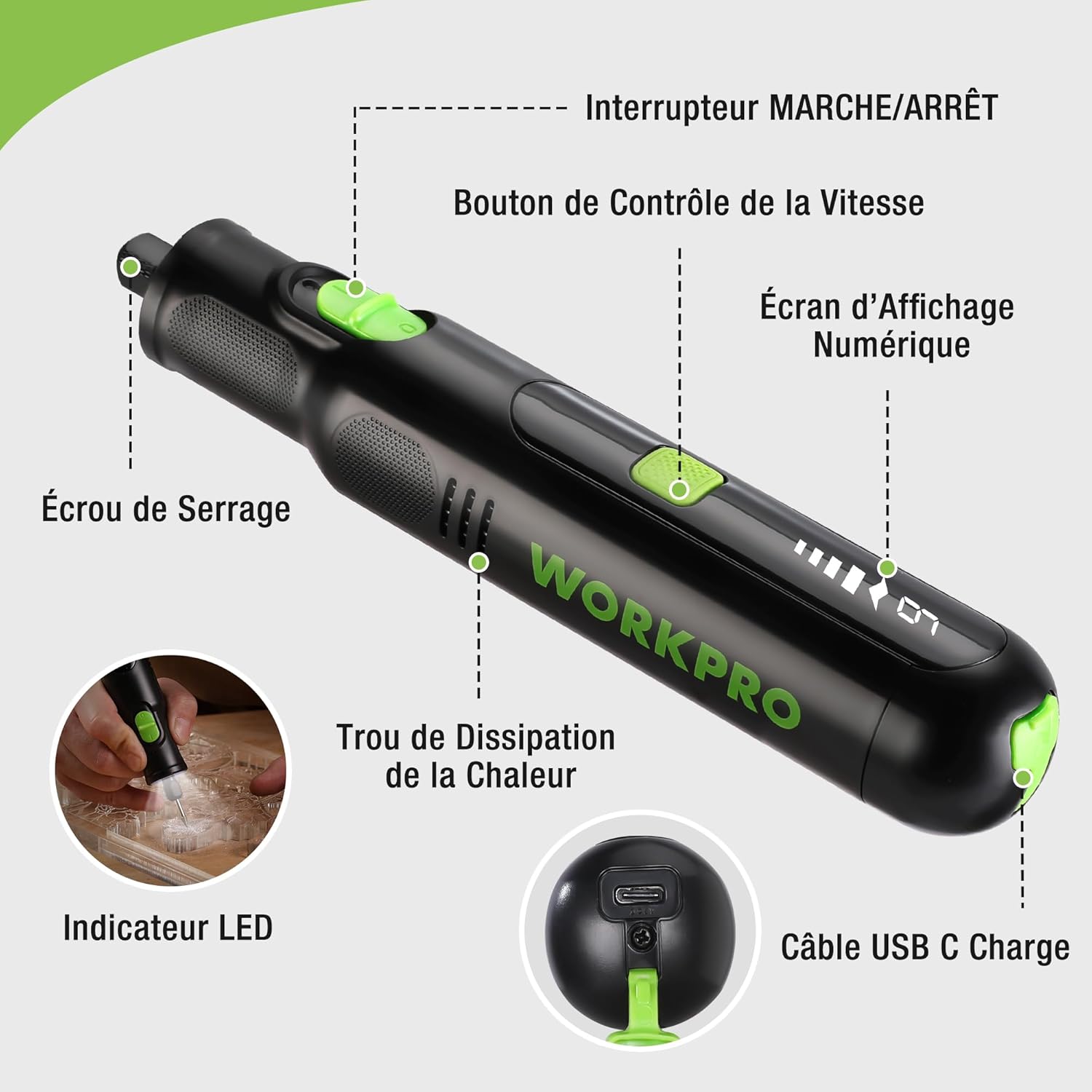
Figure 2: Key components of the rotary tool.
Компоненти:
- ВКЛУЧЕН/ИСКЛУЧЕН прекинувач: Ја активира и деактивира алатката.
- Копче за контрола на брзината: Adjusts the rotational speed of the tool.
- Дигитален екран: Shows the current speed setting.
- Навртка за колче: Secures the accessory bits in place.
- Дупка за дисипација на топлина: Ensures proper cooling of the motor during operation.
- LED индикатор: Обезбедува осветлување за работната површина.
- Приклучок за полнење USB-C: За полнење на внатрешната батерија.
Вклучени додатоци:
Your WORKPRO rotary tool comes with 117 diverse accessories, enabling a wide range of applications. These include:

Слика 3: Готовоview од 117 вклучени додатоци.
- Брусење/острење: Grinding stones and wheels for material shaping and sharpening.
- Резба: Diamond bits for detailed carving and engraving.
- Полирање: Wool felt wheels, felt wheels, screw mandrels, and metal brushes for achieving smooth, shiny finishes.
- Мелење: Milling bits for precise material removal.
- Сечење: Cutting discs and saw blades for various cutting tasks, along with a cutting disc holder.
- Брусење: Sandpaper, rubber sanding drums, and sanding bands for surface preparation and finishing.
- Колети: 2.35mm and 3.2mm collets to accommodate different shank sizes.
- Дупчење: 2.35mm and 3.2mm drill bits for small-scale drilling.
- Клуч: For securing and loosening collet nuts.
4. Поставување
4.1 Полнење на алатката
The tool is equipped with a 7.2V 1100mAh Lithium-ion rechargeable battery. Before first use, fully charge the tool.
- Connect the provided USB-C charging cable to the tool's USB-C charging port.
- Connect the other end of the USB cable to a compatible USB power source (e.g., computer, USB wall adapter).
- The digital display will indicate charging status. A full charge typically takes approximately 2 hours.
- Откако ќе се наполни целосно, исклучете го кабелот за полнење.
Note: For optimal battery life, it is recommended to store the tool with the battery charged between 50% and 75%. Recharge the tool at least once every 3 to 6 months if not used regularly.

Figure 4: Charging the rotary tool via USB-C.
4.2 Инсталирање додатоци
The WORKPRO rotary tool features an automatic spindle lock design for easy and secure accessory changes.
- Осигурајте се дека алатката е исклучена.
- Unscrew the collet nut at the front of the tool.
- Select the appropriate collet size for your desired accessory (2.35mm or 3.2mm). Insert the collet into the tool if not already present.
- Insert the shank of the accessory bit into the center of the collet nut. Ensure the bit is fully seated.
- Hand-tighten the collet nut. For a secure fit, use the included wrench to tighten the collet nut firmly. Do not overtighten.

Figure 5: Two-step accessory replacement process.

Figure 6: Detailed installation steps for various accessories.
Note: The automatic spindle lock engages when the tool is off, allowing for accessory changes without needing to press a separate button. A slight clicking sound when the tool stops is normal due to this mechanism.
5. Упатства за работа
5.1 Вклучување/исклучување
To turn the tool ON, slide the ON/OFF switch to the 'ON' position. To turn it OFF, slide the switch to the 'OFF' position.
5.2 Прилагодување на брзината
The tool features 6 variable speed settings, ranging from 5000 RPM to 30000 RPM. Press the Speed Control Button to cycle through the speeds. The current speed setting will be displayed on the digital screen.
- Speed I: 5000 RPM
- Speed II: 10000 RPM
- Speed III: 15000 RPM
- Speed IV: 20000 RPM
- Speed V: 25000 RPM
- Speed VI: 30000 RPM
Choose the appropriate speed for your task and material. Lower speeds are generally suitable for polishing, delicate work, and softer materials, while higher speeds are for cutting, grinding, and harder materials.

Figure 7: Variable speed settings and powerful motor.
5.3 Интегрирано LED светло
The tool includes an integrated LED light that illuminates the work area, improving visibility in dimly lit spaces and for detailed tasks.

Figure 8: Using the LED light for precision engraving.
5.4 Апликации
The WORKPRO rotary tool is highly versatile and can be used for:
- Сечење: Use appropriate cutting discs for various materials.
- Резба/Гравирање: Utilize diamond bits for intricate designs on wood, plastic, or soft metals.
- Полирање: Apply felt wheels and polishing compounds to restore shine to surfaces.
- Брусење: Use sanding bands and drums for smoothing rough edges or preparing surfaces.
- Дупчење: Employ small drill bits for precision holes.

Слика 9: Прamples of versatile applications.
6. Одржување
6.1 Чистење
- Секогаш исклучувајте ја алатката од кој било извор на енергија пред чистење.
- Користете мека, гamp крпа за бришење на надворешноста на алатката. Не користете груби хемикалии или абразивни средства за чистење.
- Use a small brush or compressed air to clear dust and debris from the heat dissipation holes and around the collet area.
6.2 Грижа и складирање на батеријата
- To prolong battery life, avoid completely discharging the battery regularly.
- For long-term storage, ensure the battery is charged to approximately 50-75%. Recharge the tool every 3 to 6 months to prevent deep discharge and maintain battery health.
- Чувајте го алатот на ладно и суво место, подалеку од директна сончева светлина и екстремни температури.
6.3 Простор за складирање на додатоци
Keep all accessories organized in the provided storage bag or a suitable container to prevent loss and damage.
7 Смена на проблеми
This section addresses common issues you might encounter with your WORKPRO rotary tool.
| Проблем | Можна причина | Решение |
|---|---|---|
| Алатката не се вклучува. | Батеријата е испразнета. | Charge the tool fully using the USB-C cable. |
| Алатката неочекувано запира за време на употребата. | Батеријата е слаба или алатката е преоптоварена. | Recharge the battery. Reduce pressure on the tool or use a lower speed setting for the task. |
| Clicking sound when turning off. | Normal operation of the automatic spindle lock. | This is a normal function and does not indicate a fault. |
| Accessory bit is loose or wobbles. | Collet nut not tightened sufficiently or incorrect collet size. | Ensure the correct collet size is used for the accessory. Tighten the collet nut firmly with the included wrench. |
| Reduced performance or short runtime. | Battery degradation or improper charging/storage. | Ensure proper charging and storage practices are followed (refer to Section 6.2). If the issue persists, the battery may need replacement. |
8. Спецификации
Below are the technical specifications for the WORKPRO 7.2V Cordless Rotary Tool (Model W123024A).
| Карактеристика | Спецификација |
|---|---|
| Бренд | WORKPRO |
| Број на модел | W123024A |
| Voltage | 7.2 волти |
| Тип на батерија | Литиум-јон (1 вклучен) |
| Капацитет на батеријата | 1100 mAh |
| Максимална брзина на ротација | 30000 вртежи во минута |
| Променливи брзини | 6 (5000-30000 вртежи во минута) |
| Време на полнење | Прибл. 2 часа |
| Runtime (Max Speed) | Прибл. 45 минути |
| Тежина | 227 грама |
| Димензии (Д x Ш x В) | 25.2 x 16.8 x 5.5 cm |
| Специјална карактеристика | Cordless, Integrated LED Light, Automatic Spindle Lock |
| Вклучени компоненти | 117 Додатоци |
| Производител | Ханг Џоу Грејт Стар Индустриска Ко., ООД |
9. Гаранција и поддршка
For warranty information, please refer to the documentation provided at the time of purchase or contact your retailer. WORKPRO is committed to providing quality products and customer satisfaction.
If you encounter any issues or have questions regarding your WORKPRO 7.2V Cordless Rotary Tool, please contact the seller or WORKPRO customer support through their official website or contact channels. Please have your model number (W123024A) and purchase details ready when seeking support.