
Вовед
This manual provides essential information for the installation, operation, maintenance, and troubleshooting of the Cisco Catalyst C9300L-24P-4X-E Network Essentials Switch. This device is designed for enterprise-grade access, offering 24 Gigabit PoE+ ports and four 10 Gbps SFP+ uplinks for robust network connectivity.
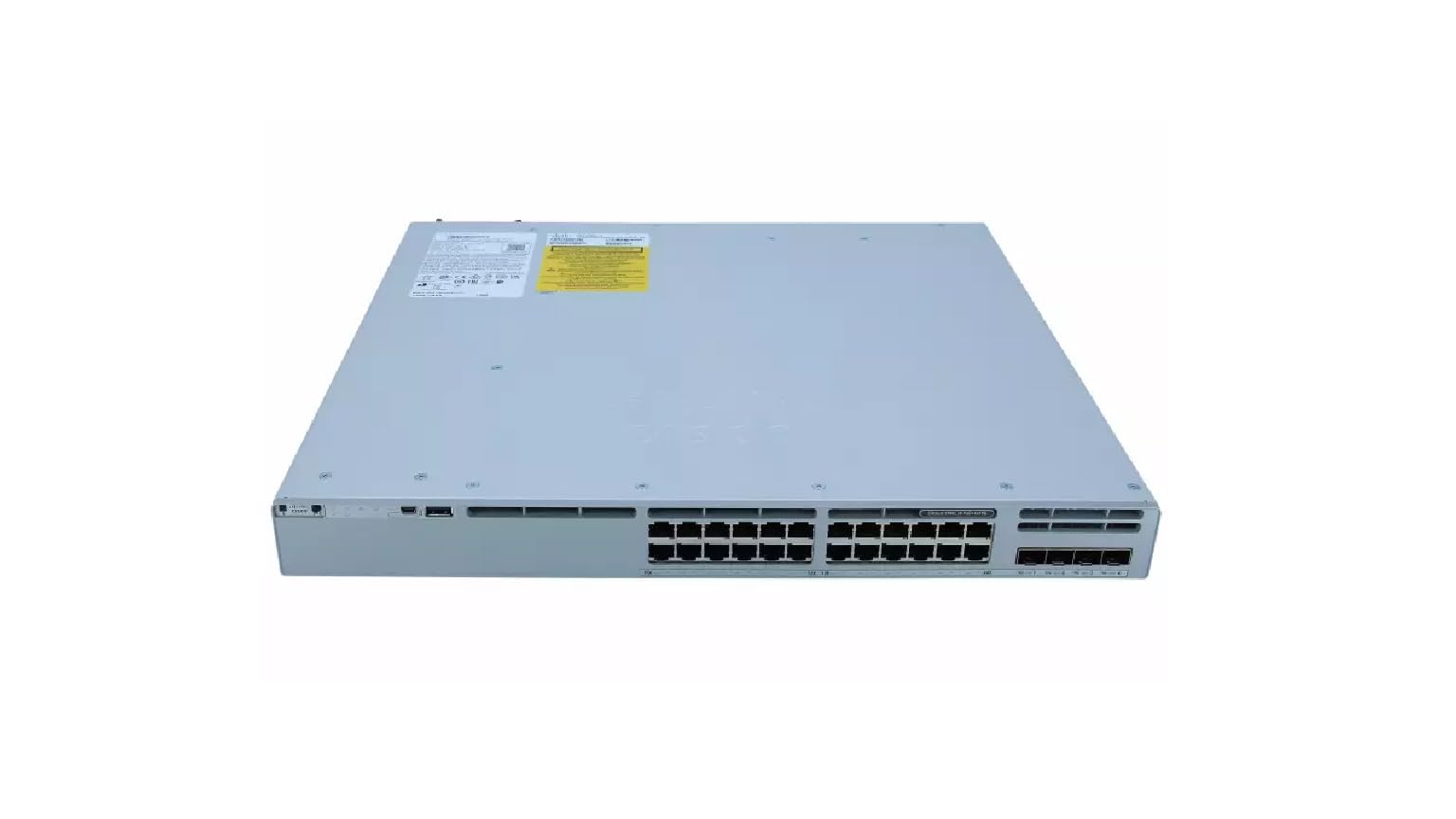
This image displays the rear panel of the Cisco Catalyst C9300L-24P-4X-E switch, highlighting the various ports, cooling fans, and the power supply unit.
Информации за безбедност
Внимавајте на следниве безбедносни мерки за да спречите повреди и оштетување на опремата:
- Обезбедете правилно заземјување пред да го поврзете напојувањето.
- Не го користете прекинувачот во влажна или претерано влажна средина.
- Use only approved power cords and accessories.
- Обезбедете соодветна вентилација за да спречите прегревање.
- Исклучете го напојувањето пред да извршите какви било процедури за одржување или инсталација.
Содржина на пакетот
Потврдете дека вашиот пакет ги содржи следниве ставки:
- Cisco Catalyst C9300L-24P-4X-E Switch
- Кабел за напојување
- Комплет за монтирање на решетка (доколку е применливо)
- Кабел за конзола (RJ-45 до DB-9)
- Документација (Водич за брз почеток, Информации за безбедност)
Физички опис
The Cisco Catalyst C9300L-24P-4X-E switch features a robust design for network deployments. The rear panel includes:
- 24 Gigabit Ethernet PoE+ Ports: For connecting network devices and providing power over Ethernet.
- 4x 10Gbps SFP+ Uplink Ports: For high-speed connections to the distribution or core layer.
- Порта на конзолата: For command-line interface access.
- USB порти: За file management and system configuration.
- Modular Power Supply Bay: For installing power supply units.
- Вентилатори за ладење: For thermal management.
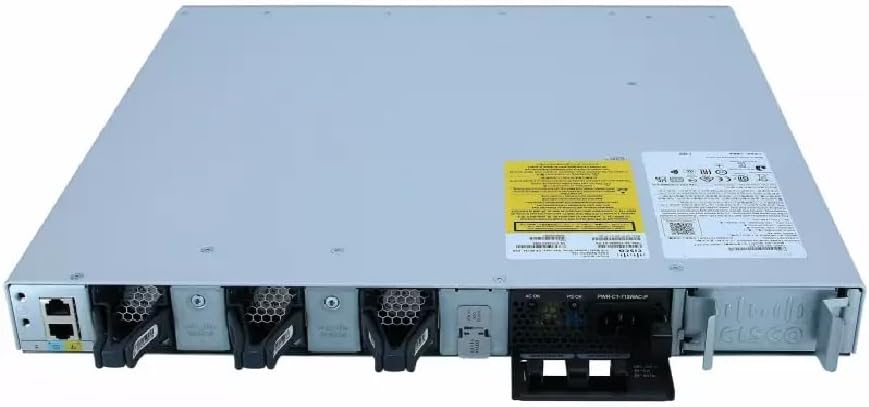
Детален view of the rear panel of the Cisco Catalyst C9300L-24P-4X-E switch, illustrating the 24 Gigabit PoE+ ports, four 10Gbps SFP+ uplink ports, and the modular power supply bay.
Поставување
1. Отпакување и проверка
Carefully remove the switch from its packaging. Inspect the device for any signs of physical damage. If damage is found, contact your supplier immediately.
2. Монтирање на прекинувачот
The switch can be mounted in a standard 19-inch equipment rack or placed on a desktop.
- Инсталација на решетка: Прикачете ги испорачаните држачи за монтирање на решетка на страните од прекинувачот користејќи ги завртките. Прицврстете го прекинувачот во решетка со соодветни завртки за решетка.
- Инсталација на работна површина: Ensure the surface is flat, stable, and allows for adequate ventilation around the switch. Attach the rubber feet (if provided) to the bottom of the switch.
3. Поврзување на енергија
Insert the power cord into the AC power connector on the rear of the switch. Connect the other end of the power cord to a grounded electrical outlet. Ensure the power supply is properly seated in its bay.
4. Мрежни врски
- PoE+ Порти: Connect Ethernet cables from your network devices (e.g., IP phones, access points, surveillance cameras) to the 24 Gigabit PoE+ ports. These ports will provide both data connectivity and power.
- SFP+ Uplink Ports: Insert compatible SFP+ transceivers into the four 10Gbps SFP+ uplink ports. Connect fiber optic cables from these transceivers to your distribution or core network devices.
- Порта на конзолата: For initial configuration or troubleshooting, connect a console cable from your management workstation to the console port on the switch.
Ракување со прекинувачот
1. Првично вклучување
After connecting power, the switch will automatically power on. Observe the system LED indicators for boot status. The system LED should turn green once the boot process is complete.
2. Основна конфигурација
The Cisco Catalyst C9300L-24P-4X-E runs on Cisco IOS XE. Initial configuration can be performed via the console port using a command-line interface (CLI) or through a web-based graphical user interface (GUI) if enabled. Refer to Cisco's official documentation for detailed configuration guides.
3. LED индикатори
The switch features various LED indicators to provide status information:
- Системски LED: Indicates overall system status (e.g., green for normal operation, amber for warning).
- PoE LED: Indicates Power over Ethernet status for the ports.
- LED диоди за статус на порта: Означете го статусот и активноста на врската за секој мрежен порт.
Одржување
Редовното одржување обезбедува оптимални перформанси и долготрајност на вашиот прекинувач:
- Чистење: Периодично чистете ја надворешноста на прекинувачот со мека, сува крпа. Осигурајте се дека отворите за вентилација се без прашина и остатоци. Не користете течни средства за чистење директно на уредот.
- Ажурирања на фирмверот: Keep the switch firmware updated to the latest version provided by Cisco. This ensures access to new features, security patches, and performance improvements.
- Контрола на животната средина: Одржувајте ја работната средина во рамките на наведените опсези на температура и влажност за да спречите дефект на хардверот.
- Управување со кабли: Ensure all cables are neatly organized and properly secured to prevent accidental disconnections or damage.
Решавање проблеми
Доколку наидете на проблеми со прекинувачот, разгледајте ги следниве чекори за решавање проблеми:
- Без моќност: Verify the power cord is securely connected to both the switch and the power outlet. Check the power source and any circuit breakers. Ensure the power supply unit is correctly installed.
- Нема мрежна конекција: Check the link status LEDs on the affected ports. Ensure Ethernet cables are properly connected and undamaged. Verify connected devices are powered on and functioning correctly.
- PoE уредот не се вклучува: Confirm the PoE+ port is enabled and the device is PoE compatible. Check the PoE budget and ensure it's not exceeded.
- Бавни перформанси: Check for network congestion, duplex mismatches, or errors on ports. Ensure uplink bandwidth is sufficient.
- Accessing the Switch: If unable to access via network, try connecting directly to the console port for CLI access.
Спецификации
| Карактеристика | Детал |
|---|---|
| Бренд | Cisco |
| Број на модел | C9300L-24P-4X-E |
| Број на пристаништа | 24 Gigabit PoE+ ports, 4x 10Gbps SFP+ uplinks |
| Интерфејс | PoE, SFP+ |
| Стапка на пренос на податоци | 1 Gigabits Per Second (Gigabit Ethernet), 10 Gigabits Per Second (Uplinks) |
| Voltage | 240 волти (AC) |
| Тип на прекинувач | Managed, Fixed, PoE+, Layer 2 |
| Тип на материјал на куќиштето | Пластика |
| Компатибилни уреди | Desktop, Laptop, Printer (and other network devices) |
Информации за гаранцијата
Овој производ доаѓа со а 90 дена ограничена гаранција. Please refer to the warranty documentation provided with your purchase for specific terms and conditions. For warranty claims, contact your reseller or the manufacturer's support channels.
Техничка поддршка
For further assistance, technical support, or advanced configuration guidance, please refer to the official Cisco documentation available on their website. You may also contact your authorized Cisco reseller or support provider for specialized assistance.
Поддршка на Cisco Webсајт: https://www.cisco.com/c/en/us/support/index.html