
Вовед
This manual provides essential information for the installation, operation, and maintenance of your NVIDIA GeForce RTX 4070 Super 12GB GDDR6X Graphics Card. Designed for high-performance gaming and creative applications, this graphics card leverages the NVIDIA Ada Lovelace architecture to deliver advanced features such as fast ray tracing and AI-accelerated performance with DLSS 3. Please read this guide thoroughly before proceeding with installation or use.
Поставување
1. Распакување и содржина на пакувањето
Carefully open the packaging and ensure all components are present. The package typically includes:
- NVIDIA GeForce RTX 4070 Super Graphics Card
- 16-pin (12VHPWR) to 2x 8-pin PCIe power adapter cable
- Водич за брз почеток
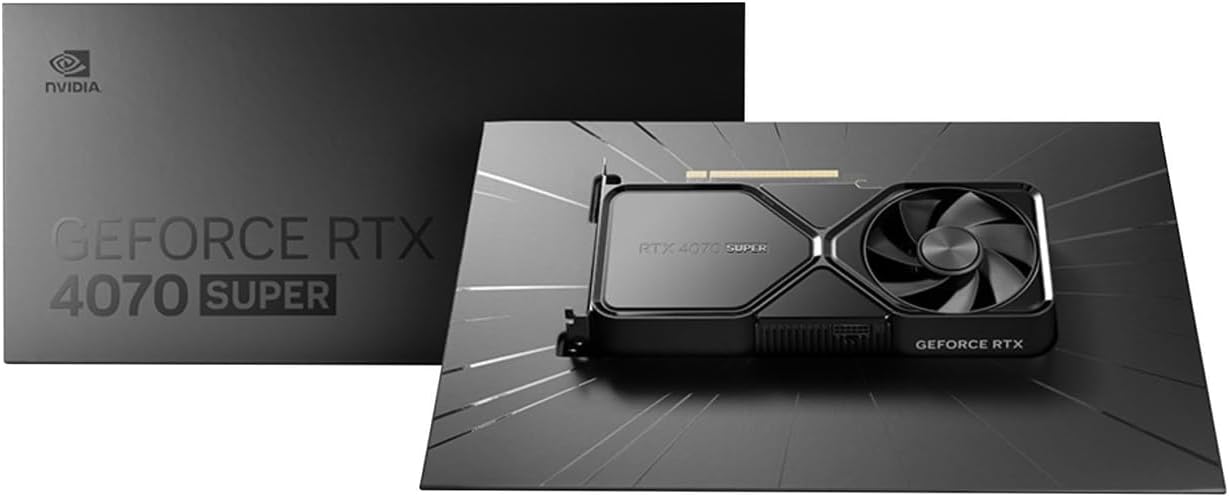
Image: Contents of the NVIDIA GeForce RTX 4070 Super package, including the graphics card and adapter cable.
2. Физичка инсталација
Before installation, ensure your computer is powered off and unplugged from the wall outlet. Ground yourself to prevent electrostatic discharge.
- Отворете го куќиштето на компјутерот.
- Пронајдете достапен PCI Express x16 слот на вашата матична плоча.
- Remove the metal slot cover(s) corresponding to the chosen PCIe slot.
- Внимателно порамнете ја графичката картичка со PCIe слотот и цврсто притиснете ја додека не се смести безбедно. Може да се слушне клик.
- Secure the graphics card to the case with the retaining screw(s).

Слика: Напред под агол view of the NVIDIA GeForce RTX 4070 Super Graphics Card, showing its cooling fans and shroud.
3. Поврзување за напојување
The GeForce RTX 4070 Super requires external power. Use the provided 16-pin (12VHPWR) to 2x 8-pin PCIe power adapter cable.
- Connect the 16-pin end of the adapter cable to the power connector on the graphics card. Ensure it is fully seated.
- Connect two separate 8-pin PCIe power cables from your power supply unit (PSU) to the two 8-pin connectors on the adapter cable. Do not use a single PCIe cable with a pigtail connector for both 8-pin inputs, as this may lead to insufficient power delivery and potential system instability or damage.
4. Инсталација на драјвери
After physical installation and power connection, close your computer case and reconnect all peripherals. Power on your computer.
- Откако ќе се вчита оперативниот систем, одете до официјалната NVIDIA страница. webсајт (www.nvidia.com/drivers).
- Select your product type (GeForce), product series (GeForce RTX 40 Series), product (GeForce RTX 4070 Super), and your operating system.
- Download the latest recommended drivers.
- Run the installer and follow the on-screen instructions to complete the driver installation. A system restart may be required.
Оперативни
The NVIDIA GeForce RTX 4070 Super is designed to enhance your computing experience, particularly for gaming, content creation, and professional applications. Once drivers are installed, the card will be fully operational.
- Играње: Experience high frame rates and advanced visual fidelity in modern games with features like Ray Tracing and DLSS 3. Ensure your games are updated to support these technologies for optimal performance.
- Создавање содржина: Accelerate video editing, 3D rendering, and graphic design tasks with NVIDIA's powerful GPU architecture and dedicated AI cores.
- Поврзување на екранот: Connect your monitor(s) to the DisplayPort or HDMI outputs on the graphics card. The card supports multiple displays and high resolutions up to 7680x4320.
Одржување
1. Чистење
Редовното чистење помага во одржувањето на оптимални перформанси и го продолжува животниот век на вашата графичка картичка.
- Periodically use compressed air to remove dust from the fans and heatsink fins. Ensure the computer is powered off and unplugged before cleaning.
- Држете ги лопатките на вентилаторот нежно за да спречите брзо вртење за време на чистењето, што може да ги оштети лежиштата.
- Избегнувајте употреба на течни средства за чистење директно на картичката.
2. Ажурирања на драјвери
NVIDIA regularly releases new drivers that include performance optimizations, bug fixes, and support for new games and applications. It is recommended to keep your drivers updated.
- Use the NVIDIA GeForce Experience software (if installed) to automatically check for and install driver updates.
- Alternatively, manually check for updates on the NVIDIA webсајт (www.nvidia.com/drivers).
Решавање проблеми
Доколку наидете на проблеми со вашата графичка картичка, разгледајте ги следниве вообичаени чекори за решавање проблеми:
| Прашање | Можно решение |
|---|---|
| Нема излез на екранот |
|
| Нестабилност на системот или падови |
|
| Лоши перформанси во играта |
|
If issues persist, consult the NVIDIA support webсајт или контактирајте со нивната служба за корисници.
Спецификации
Key technical specifications for the NVIDIA GeForce RTX 4070 Super Graphics Card:
- Графички копроцесор: NVIDIA GeForce RTX 4070 SUPER
- Бренд: NVIDIA
- Graphics RAM Size: 12 GB
- Брзина на часовникот на графичкиот процесор: 2.48 GHz
- Интерфејс за видео излез: DisplayPort, HDMI
- Graphics RAM Type: GDDR6X
- Компатибилни уреди: Десктоп, лаптоп
- Максимална резолуција на екранот: 7680x4320
- Интерфејс за графичка картичка: PCI Express
- Брзина на мемориски часовник: 21 GHz
- Име на модел: GeForce RTX 4070 СУПЕР
- UPC: 812674025575

Слика: Горе view of the NVIDIA GeForce RTX 4070 Super Graphics Card, highlighting its cooling design.
Гаранција и поддршка
Информации за гаранцијата
NVIDIA graphics cards typically come with a limited manufacturer's warranty. The duration and terms of the warranty may vary by region and retailer. Please retain your proof of purchase for warranty claims. For detailed warranty information, refer to the official NVIDIA webстраницата или документацијата вклучена со вашиот производ.
Поддршка за корисници
For technical assistance, driver downloads, or further information, please visit the official NVIDIA support resources:
- Поддршка од NVIDIA Webсајт: www.nvidia.com/support
- Преземања на драјвери: www.nvidia.com/drivers