
OSOTEK H200 PRO
OSOTEK H200 Pro Cordless 4-in-1 Wet and Dry Vacuum Cleaner
Упатство за употреба
1. Вовед
Thank you for choosing the OSOTEK H200 Pro Cordless 4-in-1 Wet and Dry Vacuum Cleaner. This appliance is designed to provide efficient and versatile cleaning for various floor types, combining vacuuming, mopping, washing, and drying functions. Please read this manual thoroughly before first use to ensure proper operation, maintenance, and to maximize the lifespan of your device.
2. Производот завршиview
Familiarize yourself with the main components of your OSOTEK H200 Pro.

Image: The OSOTEK H200 Pro vacuum cleaner, showcasing its sleek design and main body with the floor head.
Клучни компоненти:
- Главно тело со рачка
- Резервоар за чиста вода (CWT)
- Резервоар за валкана вода (DWT)
- Четка за ролери
- Floor Head Assembly
- LED дисплеј екран
- База за полнење
- Адаптер за напојување
3. Поставување и првична употреба
3.1 Собрание
- Внимателно отпакувајте ги сите компоненти од пакувањето.
- Вметнете ја рачката во главното тело додека не кликне безбедно на своето место.
- Проверете дали резервоарот за чиста вода и резервоарот за нечиста вода се правилно поставени во нивните соодветни прегради.
3.2 Почетно полнење
- Поставете ја правосмукалката на нејзината основа за полнење.
- Поврзете го адаптерот за напојување со базата за полнење и вклучете го во ѕиден штекер.
- The LED display will indicate charging status. For first use, fully charge the device, which typically takes several hours.
4. Операција
4.1 Полнење на резервоарот за чиста вода
- Извадете го резервоарот за чиста вода од главното тело.
- Fill the tank with clean tap water up to the MAX fill line. For enhanced cleaning, a small amount of non-foaming floor cleaning solution can be added (refer to solution instructions).
- Securely close the tank and reinsert it into the vacuum cleaner.
4.2 Powering On and Cleaning Modes
- Притиснете го копчето за вклучување за да ја вклучите правосмукалката.
- The device will typically start in Auto mode, which intelligently adjusts suction and water flow based on floor conditions.
- Additional modes such as Boost mode for stubborn messes or Water Suction mode for liquid spills can be selected via the mode button on the handle.
4.3 Напредни функции за чистење
- 180° Flat Cleaning: The OSOTEK H200 Pro features a unique design that allows the main body to lay nearly flat, enabling easy cleaning under low-clearance furniture such as beds and sofas.

Image: The OSOTEK H200 Pro demonstrating its 180-degree flat cleaning capability, allowing it to reach under low furniture.
- Чистење од раб до раб: Designed with dual-sided edge cleaning, the vacuum effectively cleans along baseboards and into corners, leaving no dirty edges behind.

Image: The OSOTEK H200 Pro cleaning close to a wall, illustrating its improved edge-to-edge cleaning feature.
- Forward Traction: The motorized brush roll provides forward traction, making the vacuum easier to maneuver and reducing user effort during cleaning.

Image: A visual representation of the OSOTEK H200 Pro's forward traction, indicating effortless movement during cleaning.
4.4 LED дисплеј и гласовни инструкции
- The integrated LED display provides real-time information on battery level, cleaning mode, and maintenance alerts.
- Intelligent voice prompts guide you through operation and alert you to necessary actions, such as emptying the dirty water tank or cleaning the brush roll.
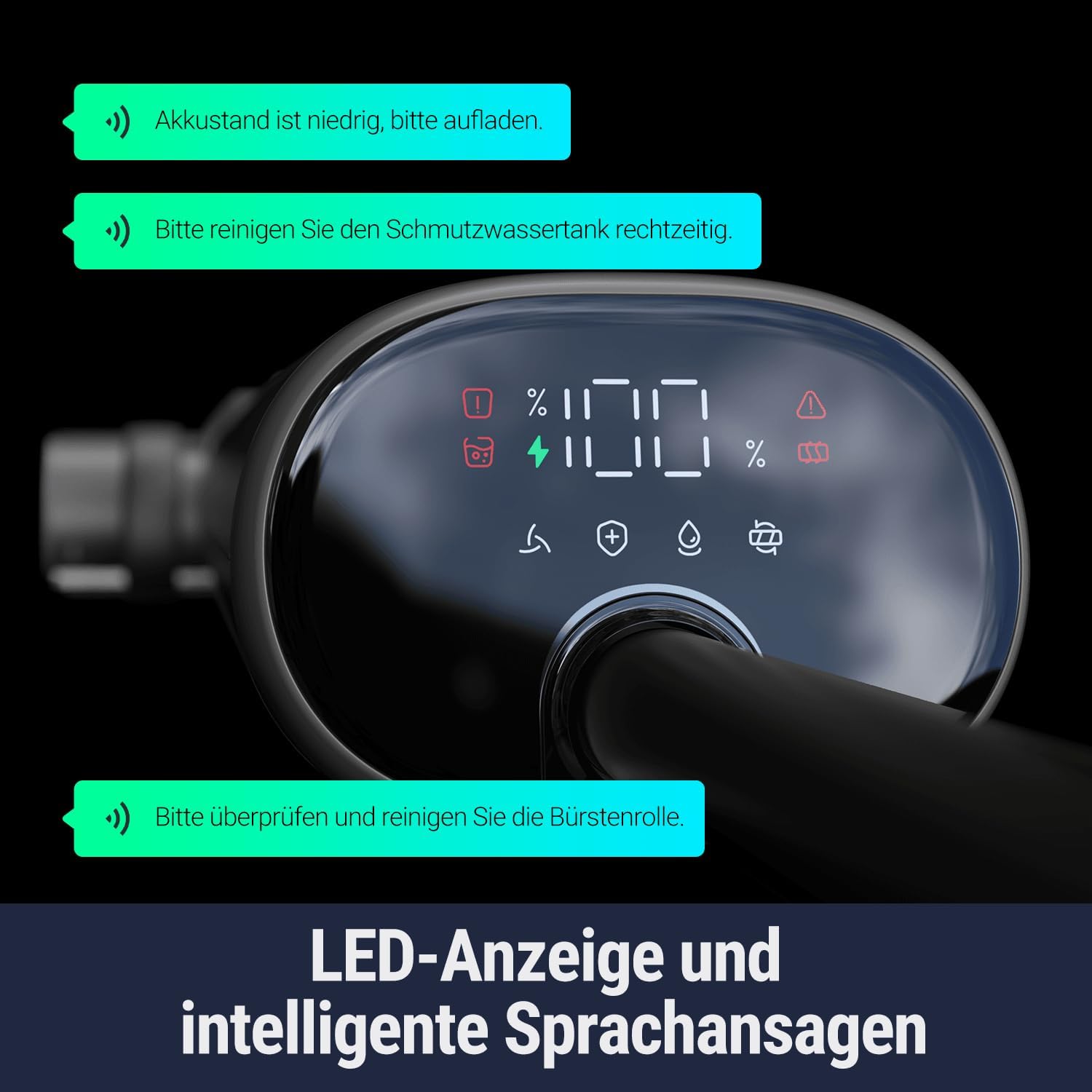
Image: Close-up of the OSOTEK H200 Pro's LED display showing battery level, mode indicators, and examples of intelligent voice prompts.
4.5 Runtime and Coverage
- The OSOTEK H200 Pro offers up to 40 minutes of runtime on a single charge, capable of cleaning areas up to 250 m².
- The clean water tank has a capacity of 0.75 liters, and the dirty water tank has a capacity of 0.64 liters.

Image: An illustration showing the OSOTEK H200 Pro's 40-minute runtime and the capacities of its clean (0.75L) and dirty (0.64L) water tanks.
4.6 Сценарија за користење
- The versatile design of the OSOTEK H200 Pro makes it suitable for various rooms and floor types, including kitchens, bedrooms, bathrooms, and living rooms.

Image: A collage of images demonstrating the OSOTEK H200 Pro being used in different household environments like the kitchen, bedroom, bathroom, and for cleaning under furniture in the living room.
5. Одржување
Редовното одржување обезбедува оптимални перформанси и го продолжува животниот век на вашата правосмукалка.
5.1 One-Click Self-Cleaning & Hot Air Drying
- По секоја употреба, поставете ја правосмукалката на нејзината база за полнење.
- Press the dedicated self-cleaning button. The device will automatically clean the roller brush and internal pipes.
- Following the self-cleaning cycle, the hot air drying function will activate, drying the roller brush to prevent odors and bacterial growth.

Image: An illustration depicting the one-click self-cleaning and hot air drying process of the OSOTEK H200 Pro, showing hot air circulating to dry the brush.
5.2 Self-Cleaning with 2-Direction Rotation
- During the self-cleaning cycle, the roller brush rotates in two directions to ensure a thorough clean, dislodging hair and debris effectively.

Image: A diagram illustrating the two-direction rotation of the brush during self-cleaning, designed to prevent tangles and ensure thorough cleaning.
5.3 Празнење на резервоарот за валкана вода
- After each cleaning session or when the DWT full indicator appears, remove the dirty water tank.
- Carefully empty the contents into a drain.
- Rinse the tank with clean water and allow it to air dry before reinserting.
5.4 Чистење на валјакот
- Even with self-cleaning, it is recommended to periodically remove the roller brush for manual inspection and cleaning, especially if hair or debris is tangled.
- Користете го приложениот алат за чистење за да отстраните заплеткана коса или остатоци.
- Rinse the brush under running water and allow it to air dry completely before reattaching.
5.5 Одржување на филтерот
- The OSOTEK H200 Pro uses a HEPA filter. Periodically check the filter for dirt and debris.
- Rinse the filter under running water as needed. Ensure it is completely dry before reinserting to prevent damage to the motor.
6 Смена на проблеми
Refer to this section for common issues and their solutions. For persistent problems, contact customer support.
| Проблем | Можна причина | Решение |
|---|---|---|
| Уредот не се вклучува | Low battery; improper assembly | Charge the device fully; ensure handle and tanks are securely installed. |
| Лошо вшмукување или перформанси на чистење | Dirty water tank full; clean water tank empty; clogged brush roll/filter | Empty DWT; refill CWT; clean brush roll and filter. |
| Пруги на подот | Dirty roller brush; excessive cleaning solution; dirty water tank not emptied | Run self-cleaning cycle; clean brush roll manually; use recommended amount of solution; empty DWT. |
| Непријатен мирис | Dirty water tank not cleaned; roller brush not dried properly | Thoroughly clean DWT; ensure hot air drying cycle completes or manually dry brush. |
| Voice prompts active | System alerts for maintenance or status | Follow instructions from the voice prompt (e.g., "Akku stand ist niedrig, bitte aufladen." - Battery level is low, please charge. "Bitte reinigen Sie den Schmutzwassertank rechtzeitig." - Please clean the dirty water tank in time. "Bitte überprüfen und reinigen Sie die Bürstenrolle." - Please check and clean the brush roll.). |
7. Спецификации
Technical specifications for the OSOTEK H200 Pro.
| Карактеристика | Детал |
|---|---|
| Бренд | ОСОТЕК |
| Број на модел | H200 PRO |
| Димензии (Д x Ш x В) | 26.8 x 23.3 x 109.9 cm |
| Тежина | 5.1 килограми |
| Капацитет на резервоар за чиста вода | 0.75 литри |
| Капацитет на резервоар за валкана вода | 0.64 литри |
| Voltage | 230 волти |
| Време на траење | До 40 минути |
| Посебни карактеристики | Self-cleaning and hot air drying |
| Тип на филтер | ХЕПА филтер |
| Извор на енергија | Battery Powered (Lithium-polymer) |
| Препорачана површина | Various hard and soft surfaces |
8. Гаранција и поддршка
Your OSOTEK H200 Pro comes with a standard manufacturer's warranty. Please refer to the warranty card included in your product packaging for specific terms and conditions. For technical support, spare parts, or any inquiries, please contact OSOTEK customer service through the contact information provided on the official OSOTEK webстраницата или вашата платформа за купување.
Чувајте го вашиот доказ за купување за барања за гаранција.
Поврзани документи - H200 PRO
 |
Упатство за употреба на OSOTEK Horizon правосмукалка за мокро и суво чистење H200 Упатство за употреба на правосмукалката за мокро и суво чистење OSOTEK Horizon H200, со детални упатства за безбедност, производ погореview, инсталација, употреба, одржување, решавање проблеми и спецификации. |
 |
Упатство за употреба и упатства за роботска правосмукалка OSOTEK G6 Сеопфатен водич за роботската правосмукалка OSOTEK G6 (Модел RDA11.A1). Вклучува информации за поставување, работа, одржување, решавање проблеми, безбедност и гаранција. Научете како да се поврзете на Wi-Fi и да ја користите апликацијата Smart Life. |
 |
Упатство за употреба на правосмукалка за мокро и суво чистење OSOTEK HotWave Сеопфатно упатство за употреба за правосмукалката за влажно и суво чистење OSOTEK HotWave, со детални упатства за безбедност, производ на крајот од текстот.view, инсталација, употреба, одржување, решавање проблеми и спецификации. |
 |
MOVA M50 Ultra : Aspirateur Eau et Poussière Податлива и растеглива | Nettoyage Agile Decouvrez le MOVA M50 Ultra, со врвна аспираторна вода и со еластична и растеглива au monde. Надвор од мрежата агилен, une aspiration puissante de 22 000 Pa, et des fonctionnalités intelligentes pour un entretien беспрекорна во својот дом. |
 |
Manuel Utilisateur Roborock H60 Hub Pro : Aspirateur balai sans fil Decouvrez le manuel користи комплетен Roborock H60 Hub Pro. Guidez-vous à travers l'installation, l'utilisation, l'entretien et le dépannage de votre aspirateur balai sans fil Roborock. |
 |
Водич за сопственост AirFly Pro - Адаптирачки аудио Bluetooth Twelve South Употреба на коментари за уредување адаптирачки аудио Bluetooth AirFly Pro од Twelve South. Водич за комплетирање на опремата avec AirPods и écouteurs sans fil, les modes de transmission and reception, le charge, et le depannage pour une une exérience audio sans file optimize. |