
1. Производот завршиview
The Waveshare ESP32-H2-DEV-KIT-N4 is an entry-level RISC-V microcontroller development board designed for various applications including smart home, industrial automation, healthcare, and consumer electronics. It integrates Bluetooth 5 and IEEE 802.15.4 (Zigbee 3.0 and Thread) wireless communication capabilities.
This board features the ESP32-H2-MINI-1-N4 module, equipped with a RISC-V 32-bit single-core processor operating at up to 96MHz. It includes a built-in 4MB Flash memory and offers a rich set of peripheral interfaces such as SPI, UART, I2C, I2S, LED PWM, and ADC. The onboard CH343 and CH334 USB HUB chips facilitate simultaneous USB and UART development through a single USB-C port. Its pinout is compatible with the ESP32-H2-DevKitM-1 development board, ensuring strong compatibility and expandability with various peripheral modules.
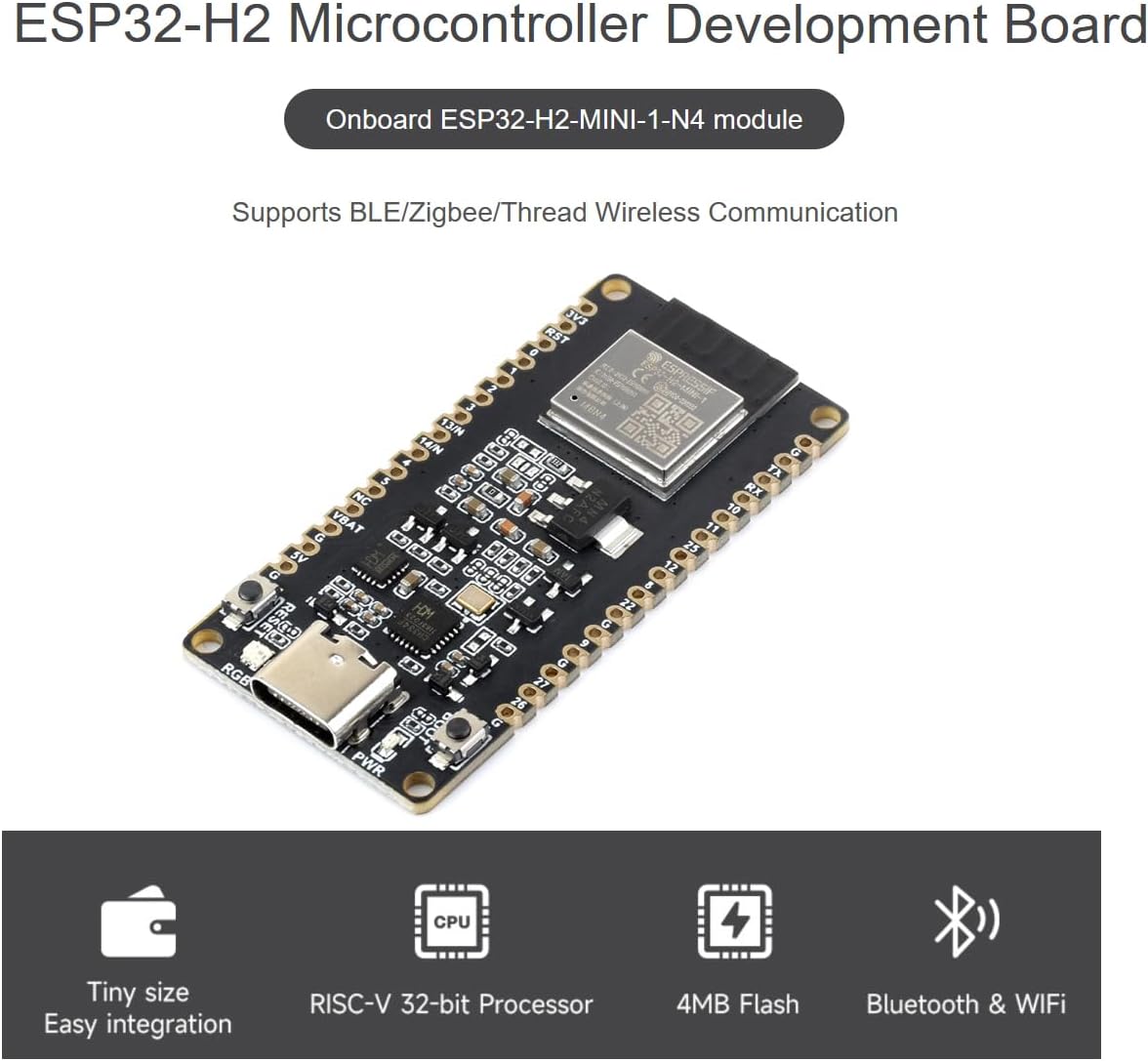
Figure 1: Waveshare ESP32-H2 Development Board highlighting its compact size, RISC-V 32-bit processor, 4MB Flash, and Bluetooth & WiFi capabilities.
Клучни карактеристики:
- Adopts ESP32-H2-MINI-1-N4 module with RISC-V 32-bit single-core processor, up to 96MHz main frequency, built-in 4MB Flash.
- Integrated Bluetooth 5 and IEEE 802.15.4 (Zigbee 3.0 and Thread) wireless communication, offering superior RF performance.
- Features a Type-C connector for ease of use and connectivity.
- Onboard CH343 and CH334 chips support both USB and UART development via the Type-C interface.
- Rich peripheral interfaces, compatible with the pinout of the ESP32-H2-DevKitM-1 development board, ensuring strong compatibility and expandability.
- Castellated module design allows for direct soldering to carrier boards.
2. Започнување: Поставување
To begin using your Waveshare ESP32-H2 Development Board, follow these basic setup steps:
- Connect the Board: Use a standard USB-C cable to connect the development board to your computer. The onboard CH343 and CH334 chips will manage both USB and UART communication through this single connection.
- Инсталирајте драјвери: Your operating system may require drivers for the CH343/CH334 USB-to-serial converter. These drivers are typically available from the chip manufacturer's webвеб-страницата или страницата на производот на Waveshare.
- Choose Development Environment: The board supports popular development environments such as ESP-IDF (Espressif IoT Development Framework) and Arduino IDE. Select the environment that best suits your project needs.
- Инсталирајте Toolchain: Follow the instructions for your chosen development environment to install the necessary toolchain and SDKs. Waveshare provides online examples and tutorials for the ESP-IDF development environment to help you get started quickly.

Слика 2: Готовоview of BLE 5, Zigbee, Thread support, and a functional block diagram of the ESP32-H2 Development Board, including ESP-IDF and Arduino IDE support.
3. Operating the Development Board
The ESP32-H2 Development Board is designed for flexible operation, allowing you to leverage its powerful processor and extensive connectivity options.
Безжична комуникација
The board integrates Bluetooth 5 and IEEE 802.15.4, supporting Zigbee 3.0 and Thread protocols. These capabilities enable the development of a wide range of wireless applications, from low-power sensor networks to smart home devices. Refer to the ESP-IDF documentation for detailed programming guides for these wireless features.
Периферни интерфејси
The board provides numerous peripheral interfaces for connecting external components. Understanding the pinout is crucial for proper operation:

Figure 3: Detailed pinout definition of the ESP32-H2 Development Board, compatible with ESP32-H2-DevKitM-1.
The pinout diagram (Figure 3) illustrates the functions of each pin, including General Purpose Input/Output (GPIO), Analog-to-Digital Converter (ADC), PWM capable pins, and various communication interfaces like SPI, UART, and I2C. Ensure correct voltage levels and current limits when connecting external devices.
Внатрешни ресурси
Familiarize yourself with the onboard components for effective use:

Figure 4: Labeled diagram of onboard resources, including the Reset button, RGB LED, USB Type-C port, 3.3V power indicator, BOOT button, USB HUB chip, and voltagд регулатор
- Копче за ресетирање: Used to restart the microcontroller.
- Копче за подигање: Used to enter download mode for flashing firmware.
- RGB LED: A programmable LED for status indication or user feedback.
- USB тип-C: Provides power, USB communication, and UART communication.
- 3.3V Power Indicator: Illuminates when the board is powered.
4. Нега и одржување
To ensure the longevity and reliable operation of your ESP32-H2 Development Board, observe the following care and maintenance guidelines:
- Ракувајте со внимание: Avoid dropping the board or subjecting it to excessive physical force, which can damage components or solder joints.
- Одржување на суво: Protect the board from moisture and liquids. Water damage can lead to short circuits and permanent malfunction.
- Prevent Static Discharge: Static electricity can harm sensitive electronic components. Handle the board on an anti-static mat or by touching a grounded object first.
- Чистота: Keep the board free from dust and debris. Use a soft, dry brush or compressed air for cleaning. Avoid using harsh chemicals.
- Складирање: When not in use, store the board in an anti-static bag in a cool, dry environment.
5. Решавање на вообичаени проблеми
If you encounter issues while using your ESP32-H2 Development Board, consider the following troubleshooting steps:
- Нема напојување/LED диоди исклучено:
- Ensure the USB-C cable is securely connected to both the board and your computer.
- Обидете се со друг USB-C кабел или USB порт на вашиот компјутер.
- Проверете дали USB-портата на вашиот компјутер обезбедува доволно напојување.
- Computer Not Recognizing Board:
- Check if the necessary USB-to-serial drivers (for CH343/CH334 chips) are installed correctly on your operating system.
- Restart your computer and try reconnecting the board.
- Failed to Upload Code:
- Ensure you have selected the correct board and COM port in your development environment (e.g., Arduino IDE, ESP-IDF).
- Press and hold the BOOT button, then press and release the Reset button, then release the BOOT button to enter download mode before uploading.
- Проверете дали вашиот код се компајлира без грешки.
- Проблеми со безжичната комуникација:
- Check your antenna connection if an external antenna is used.
- Ensure your wireless code is correctly configured for Bluetooth 5, Zigbee, or Thread.
- Verify that other wireless devices are not causing interference.
- Периферниот уред не работи:
- Double-check your wiring against the pinout diagram (Figure 3).
- Ensure external components are powered correctly and within voltage/current specifications.
- Verify your code correctly initializes and communicates with the peripheral.
For more advanced troubleshooting or specific error messages, consult the official Espressif documentation for the ESP32-H2 series and the Waveshare product support pages.
6. Технички спецификации
Below are the detailed technical specifications for the Waveshare ESP32-H2 Development Board:

Figure 5: Textual representation of the ESP32-H2 Development Board's specifications.
| Карактеристика | Спецификација |
|---|---|
| Бренд | Waveshare |
| Име на моделот | ESP32-H2 Dev Kit |
| Капацитет за складирање на меморија | 4 MB |
| Брзина на процесорот | 96 MHz |
| Технологија за поврзување | Bluetooth 5, Zigbee 3.0, Thread, SPI, UART, I2C, I2S, ADC, USB |
| Брзина на процесорот | 96 MHz |
| Компатибилност на оперативниот систем | Linux (and other OS with appropriate drivers) |
| Бренд на процесор | Еспресиф |
| Безжична компатибилност | Bluetooth, IEEE 802.15.4 (Zigbee, Thread) |
| Компатибилни уреди | ESP32-H2-DevKitM-1, Devices supporting ESP-IDF or Arduino |
| Технологија на RAM меморија | DDR (internal to module) |
| Број на процесори | 1 (RISC-V 32-bit single-core) |
| Вкупно USB порти | 1 (USB-C for data and power) |
| UPC | 790885235634 |
| ASIN | B0CWLLH6TB |
7. Содржина на пакетот
The Waveshare ESP32-H2 Development Board package includes the following items:
- ESP32-H2-DEV-KIT-N4 Development Board x1
- 40PIN Male Pinheader (black) x2
8. Поддршка и ресурси
Waveshare provides comprehensive online development resources and technical support to assist you with your projects. For detailed documentation, examples, and tutorials related to the ESP-IDF development environment, please refer to the official Waveshare product page or Espressif documentation.
If you encounter any problems or require further assistance, please do not hesitate to contact Waveshare's technical support team. You can typically find contact information and support forums on the official Waveshare webсајт: Waveshare Store.
9. Информации за гаранцијата
Specific warranty details for the Waveshare ESP32-H2 Microcontroller Development Board are not provided in the available product information. For warranty terms and conditions, please refer to the official Waveshare webстраницата или директно контактирајте ја нивната служба за корисници.