
Вовед
This manual provides detailed instructions for setting up and operating your Majority Frameo Snap10 WiFi Digital Picture Frame. This 10.1-inch digital frame allows you to display photos and videos shared via the Frameo app, offering a convenient way to share memories with family and friends. It features a touchscreen, 32GB of internal storage, auto-rotate functionality, and a motion sensor for efficient use.

The Majority Frameo Snap10 Digital Picture Frame, showcasing a family photo on its 10.1-inch screen.
Што има во кутијата
Проверете ја содржината на пакувањето за да се осигурате дека сите артикли се присутни:
- Majority Frameo Snap10 Digital Picture Frame
- Кикстанд
- Адаптер за напојување
- Далечински управувач
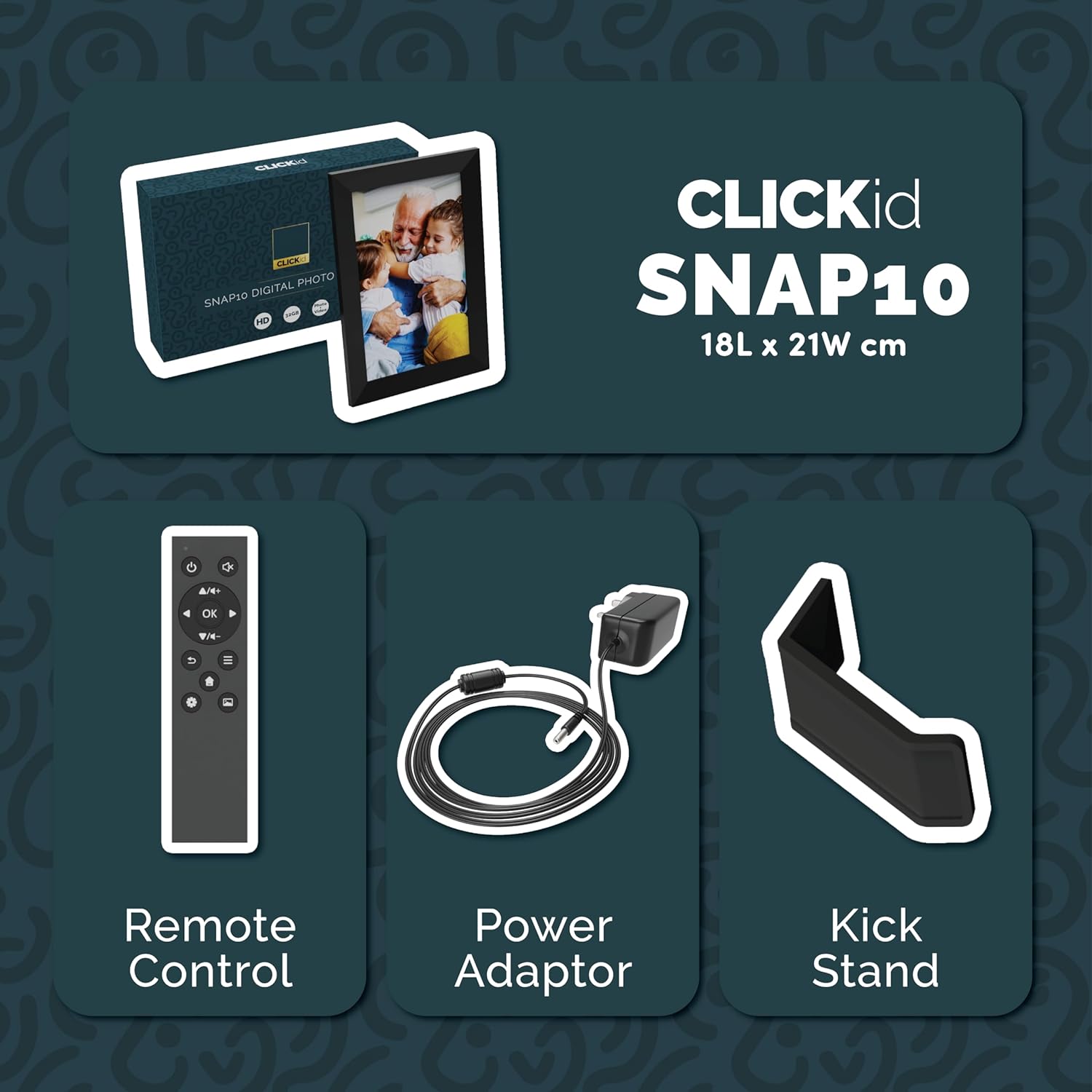
Included accessories: Remote Control, Power Adapter, and Kickstand.
Водич за поставување
- Распакувајте ја рамката: Внимателно извадете ја дигиталната рамка за слики и сите додатоци од пакувањето.
- Attach the Kickstand: Insert the kickstand into the designated slot on the back of the frame. The frame supports both horizontal and vertical orientations.
- Поврзете напојување: Plug the power adapter into the DC port on the back of the frame, then connect it to a power outlet. The frame will automatically power on.
- Почетно поставување: Follow the on-screen instructions to select your language, time zone, and connect to a Wi-Fi network.
- Install Frameo App: Преземете ја апликацијата „Frameo“ од продавницата за апликации на вашиот паметен телефон (достапна за iOS и Android).
- Connect Frame to App: Open the Frameo app and create an account. On your digital frame, tap "Add Friend" to get a unique code. Enter this code into the Frameo app on your smartphone to link the devices.

The back of the frame features essential ports for power, USB, and Micro SD card.
Упатства за работа
Испраќање фотографии и видеа
Once your frame is connected to the Frameo app, you can easily send photos and short videos from your smartphone.
- Отворете ја апликацијата Frameo на вашиот паметен телефон.
- Изберете ги фотографиите или видеата што сакате да ги испратите.
- Choose the connected digital frame as the recipient.
- Add a caption if desired, then tap "Send."

The Frameo app simplifies photo and video uploads from your smartphone.
Користење на екранот на допир
The 10.1-inch LCD touchscreen allows for intuitive navigation. Swipe left or right to browse photos, tap to view options, and pinch to zoom.
Функции на далечински управувач
The included remote control provides convenient access to various frame functions from a distance.
- Навигација: Use arrow keys to move through menus and photos.
- Во ред/Внесете: Потврдете ги изборите.
- Назад: Вратете се на претходниот екран.
- Пушти/Пауза: Control slideshows or video playback.
- Волумен: Прилагодете го аудио за видеа.

The included remote control for convenient operation.
Сензор за движење
The integrated motion sensor can be enabled to automatically turn the display on when movement is detected and off when the area is vacant, conserving energy. This setting can be adjusted in the frame's system settings.
Функција за автоматско ротирање
The frame automatically adjusts the photo orientation (portrait or landscape) based on how the frame is positioned. Ensure the auto-rotate feature is enabled in the settings for optimal display.

The auto-rotate feature adjusts display based on frame orientation.
Карактеристиките завршијаview
- 10.1-инчен LCD екран на допир: Provides a clear display and interactive control.
- 32GB внатрешна меморија: Ample space to store thousands of photos and videos.
- Wi-Fi поврзување: Enables seamless photo and video sharing from anywhere via the Frameo app.
- Интеграција на апликацијата Frameo: Manage your frame, send media, and invite friends/family to share their moments.
- Сензор за движење: Automatically turns the screen on/off to save energy.
- Автоматско ротирање: Adjusts photo orientation automatically.
- Weather and Calendar Display: Integrated widgets provide current weather and calendar information.
- Слот за мемориска картичка: Supports Micro SD cards for additional storage or direct media import.
Одржување
- Чистење: Користете мека, сува крпа за чистење на екранот и рамката. Избегнувајте абразивни средства за чистење или спрејови директно на екранот.
- Ажурирања на софтверот: The frame may receive automatic software updates via Wi-Fi. Ensure your frame is connected to the internet to receive the latest features and improvements.
- Управување со складирање: Периодично повторноview your stored photos and videos. You can delete unwanted media directly from the frame or through the Frameo app to free up space.
Решавање проблеми
- Рамката не се вклучува:
- Осигурајте се дека адаптерот за напојување е безбедно поврзан и со рамката и со функционален штекер.
- Не може да се поврзе на Wi-Fi:
- Verify your Wi-Fi password. Ensure the frame is within range of your Wi-Fi router. Try restarting your router and the frame.
- Фотографии што не се појавуваат на рамката:
- Confirm that the frame is connected to Wi-Fi and linked to your Frameo app account. Check the Frameo app to ensure photos were successfully sent. Allow some time for photos to download, especially large batches.
- Frame is stuck on a white screen with a loading bar:
- This may indicate a software issue. Try performing a soft reset by disconnecting the power for 30 seconds and then reconnecting. If the issue persists, a factory reset might be necessary (refer to the frame's settings for this option, noting it will erase all data).
- Далечинскиот управувач не работи:
- Check if the batteries in the remote control need replacement. Ensure there are no obstructions between the remote and the frame's IR receiver.
Спецификации
| Бренд | Мнозинството |
| Број на модел | Snap10 |
| Боја | Црното |
| Големина на екранот | 10.1 инчи |
| Резолуција | 800*1280 г |
| Сооднос на аспект | 2.10:1 |
| Капацитет за складирање на меморија | 32 GB |
| Технологија за поврзување | Wi-Fi |
| Контролен метод | App, Touchscreen, Remote |
| Извор на енергија | Електричен со кабел |
| Тежина на ставката | 491 грама |
| Димензии на ставката (Д x Ш) | 7.08"Д x 8.26"Ш |
Гаранција и поддршка
The Majority Frameo Snap10 Digital Picture Frame comes with a 2-годишна продолжена гаранција. Registration is required to activate the extended warranty. Please refer to the product packaging or the manufacturer's webстраница за детали за тоа како да го регистрирате вашиот производ.
For technical support, troubleshooting assistance, or warranty claims, please contact Majority customer service through their official webстраницата или информациите за контакт наведени во документацијата за вашиот производ.
Видео за производот
This video demonstrates the ease of sharing photos and videos with the Frameo app and viewing them on the digital picture frame, highlighting its use for connecting family members.