
Вовед
Thank you for choosing the VTech ES2051 Digital Cordless Phone. This manual provides comprehensive instructions for setting up, operating, and maintaining your new phone system. The ES2051 is designed for ease of use, featuring a digital answering machine, call blocking capabilities, volume amplification, and an antibacterial plastic construction for enhanced hygiene.
Please read this manual thoroughly before using your phone to ensure proper operation and to take full advantagе од неговите карактеристики.
Информации за безбедност
Секогаш следете ги основните безбедносни мерки на претпазливост при користење на овој производ за да го намалите ризикот од пожар, електричен удар и повреди на лица.
- Не користете го овој производ во близина на вода или кога сте влажни.
- Избегнувајте користење на телефонот за време на грмотевици. Може да постои мал ризик од електричен удар од гром.
- Не користете го овој производ за да пријавите истекување на гас во близина на истекувањето.
- Use only the power adapter and batteries provided with this product.
- Не фрлајте батерии во оган. Може да експлодираат. Проверете ги локалните прописи за посебни упатства за отстранување.
- Исклучете го овој производ од ѕидниот штекер пред да го чистите. Не користете течни или аеросолни средства за чистење. Користете рекламаamp крпа за чистење.
Содржина на пакетот
Осигурајте се дека сите предмети се присутни во вашиот пакет:
- Main Base Unit with Digital Answering Machine
- Cordless Handset(s) (typically two for this model)
- Handset Charger(s) (for additional handsets)
- Адаптер(и) за напојување
- Кабел за телефонска линија
- NiMH AAA Rechargeable Batteries (4 included)
- Упатство за употреба (овој документ)
Поставување
1. Поврзување на основната единица
- Приклучете го малиот крај од адаптерот за напојување во приклучокот за напојување на задната страна од базата.
- Вклучете го големиот крај на адаптерот за напојување во ѕиден штекер што не се контролира со ѕиден прекинувач.
- Приклучете го едниот крај од телефонскиот кабел во телефонскиот приклучок на задната страна од базата.
- Вклучете го другиот крај од телефонскиот кабел во телефонски ѕиден приклучок.
2. Инсталирање и полнење батерии
- Отворете го капакот на преградата за батерии на задниот дел од слушалката.
- Insert the supplied NiMH AAA batteries, observing the correct polarity (+ and -).
- Затворете го капакот на преградата за батерии.
- Place the handset in the base unit or charger to charge. The handset will beep, indicating it is charging.
- Allow the handset to charge for at least 16 hours before initial use. For optimal battery performance, keep the handset in the charger when not in use.

Image: The VTech ES2051 Digital Cordless Phone system, showing the main base with one handset and a charging cradle for the second handset, ready for setup.
Упатства за работа
Упатување и примање повици
- За да остварите повик: Притиснете Зборувајте / трепкајте or ЗВУЧНИК, потоа бирајте го телефонскиот број.
- За да одговорите на повик: Притиснете Зборувајте / трепкајте or ЗВУЧНИК кога ќе заѕвони телефонот.
- За да завршите повик: Притиснете ИСКЛУЧЕНО/ЧИСТИ или вратете ја слушалката во базата/полначот.
Дигитална телефонска секретарка
The integrated digital answering machine can record up to 30 minutes of messages. It automatically answers calls when you are unavailable.
- Репродукција на пораки: Притиснете ИГРАЈ/СТОП на основната единица.
- Бришење пораки: Притиснете ИЗБРИШИ за време на репродукција на пораки.
- Снимање на објава: Follow the instructions in the full manual for custom outgoing message recording.

Image: A woman interacting with the VTech ES2051 phone, highlighting the digital message counter on the base unit, which indicates the number of new messages.
Блокатор на повици
The selective call blocking feature allows you to block up to 100 unwanted numbers, preventing them from ringing your phone.
- За блокирање на број: During a call or from the Caller ID log, press the ПОВИК БЛОК button (often represented by a specific icon) and follow the on-screen prompts to add the number to the blacklist.
- Управување со блокирани броеви: Access the call block list through the handset menu to review or remove blocked numbers.

Image: A visual representation of the call blocker feature, showing a family in a kitchen setting with an icon indicating unwanted calls are being blocked.
Волумен Ampживописен
Волуменот amplification feature enhances incoming sounds and voices, improving clarity and volume in the handset earpiece. This is particularly useful for users with hearing impairments or those who prefer a louder audio experience.
- Activating/Adjusting: During a call, press the dedicated ЗГОЛЕМУВАЊЕ НА ВОЛУМЕНТОТ button (often indicated by a speaker icon with a plus sign) or use the volume up/down keys to increase the earpiece volume.
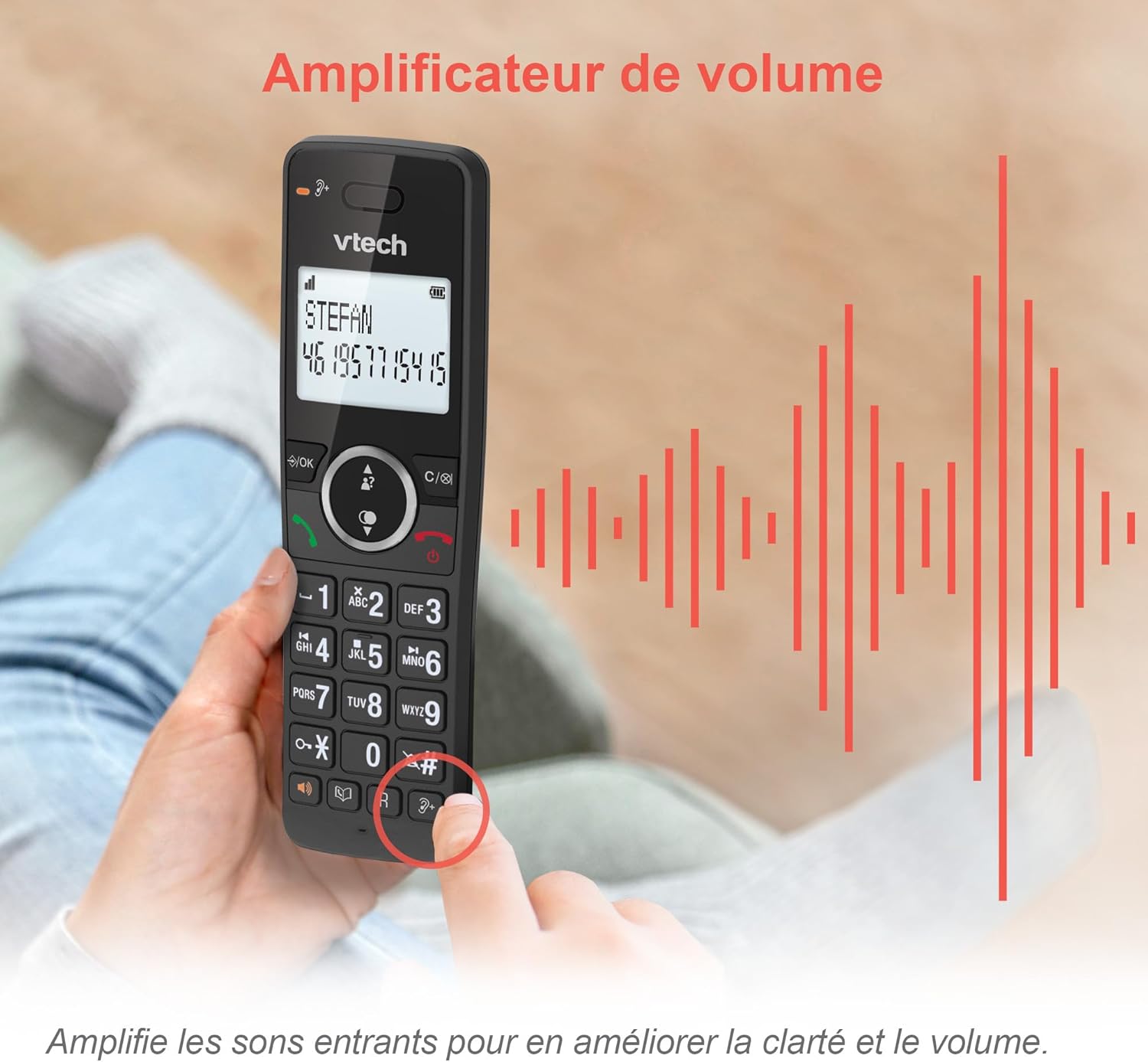
Image: A hand holding the VTech ES2051 handset, with graphic sound waves emanating from the earpiece, illustrating the volume amplification feature.
Conference Function
The conference function allows multiple users to participate in a single conversation. You can set up a three-way conference call with two internal callers (handsets) and one external caller.
- Започнување на конференциски повик: Refer to the detailed instructions in the full manual for specific steps on how to add a third party to an ongoing call.

Image: Three people engaged in a conversation, visually representing the three-way conference call capability of the VTech ES2051 phone system.
Функција за домофон
The intercom feature allows you to communicate between handsets within your home without using the landline. This is useful for calling family members in different rooms.
- Користење на домофон: Притиснете го ИНТЕРКОМ button (if available) or access the intercom function through the handset menu, then select the desired handset to call.
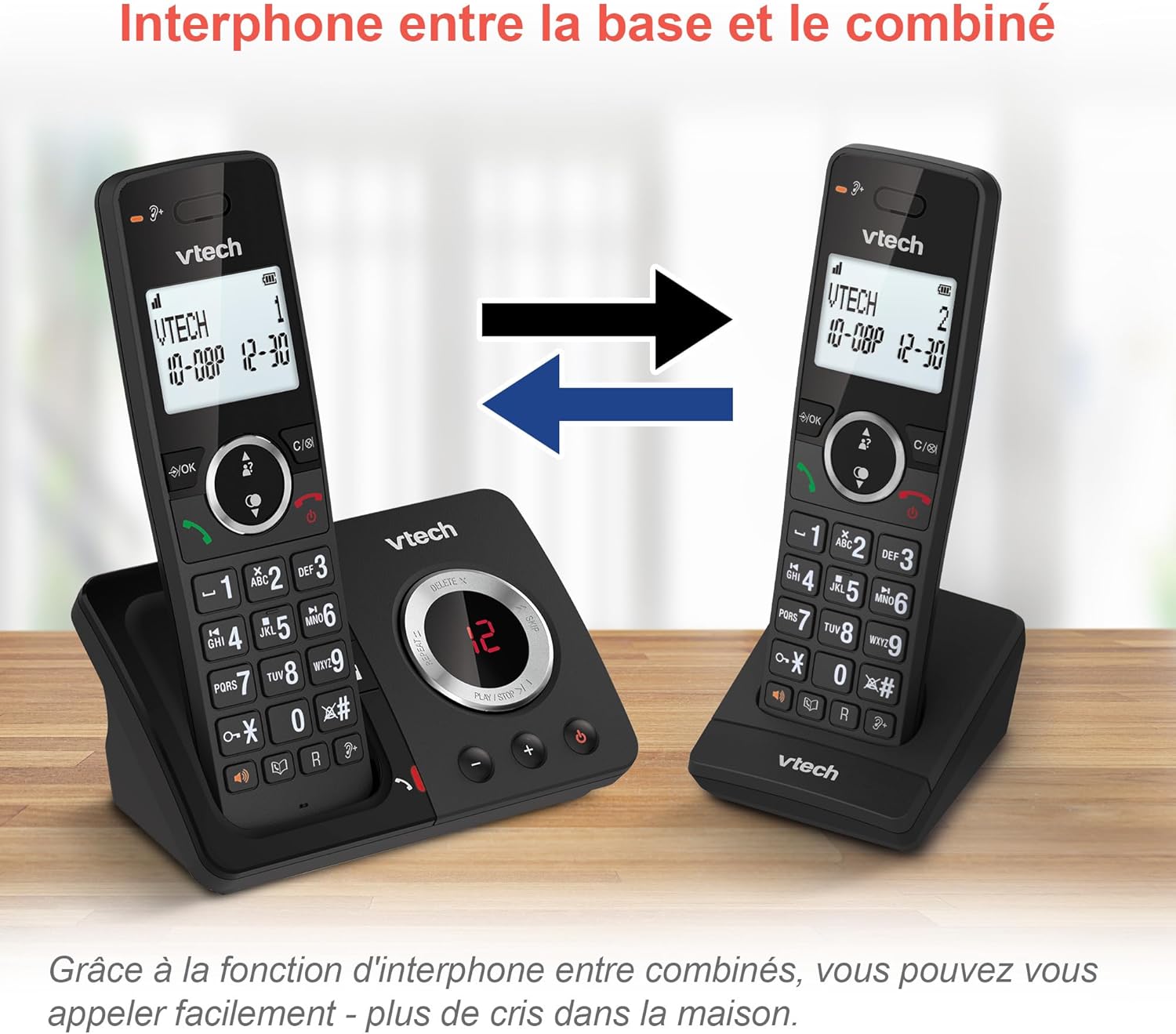
Image: A diagram showing two VTech ES2051 handsets with arrows indicating communication between them, illustrating the intercom feature.
Phonebook and Call Features
The phone includes a 100-name and number phonebook, 8 speed dial keys, and a backlit screen and keypad for easy visibility.
- Складирање контакти: Navigate to the phonebook menu to add, edit, or delete contacts.
- За брзо бирање: Assign frequently called numbers to the 8 speed dial keys for quick access.
- Дневник на идентификација на повикувач: Review the last 20 incoming calls with Caller ID information.
- Повторно бирање: Access the list of the last 10 dialed numbers for quick redialing.

Слика: Колаж од слики што прикажуваатasing various VTech ES2051 phone features, including the 100-entry phonebook, call display, redial function, and an 18-hour talk time battery life indicator.
ЕКО режим
The ECO mode automatically adjusts and minimizes the radio frequency power based on the distance between the handset and the base unit. This feature helps conserve energy and reduce power consumption.
Одржување
Чистење на телефонот
The VTech ES2051 is made with antibacterial plastic and features a seamless, easy-to-clean design. To clean your phone:
- Unplug the base unit from the wall outlet and telephone line.
- Избришете ги површините на телефонот со мека, дamp крпа. Не користете течни или аеросолни средства за чистење.
- Ensure the phone is completely dry before plugging it back in.
Нега на батерии
- Use only the supplied rechargeable NiMH AAA batteries.
- Не фрлајте ги батериите во оган.
- Доколку телефонот не се користи подолг период, извадете ги батериите за да спречите протекување.
Решавање проблеми
If you experience any issues with your VTech ES2051 phone, try the following troubleshooting steps:
| Проблем | Решение |
|---|---|
| Нема тон за бирање | Ensure the telephone line cord is securely plugged into both the base unit and the wall jack. Check if other phones on the same line are working. |
| Не може да се остваруваат или примаат повици | Check the power connection to the base unit. Ensure the handset batteries are charged. If using a DSL service, you may need a DSL filter. |
| Handset displays "Out of Range" or "No Power at Base" | Move the handset closer to the base unit. Ensure the base unit's power adapter is securely plugged in. |
| Телефонската секретарка не снима пораки | Check if the answering machine is turned ON. Ensure there is enough recording time available (max 30 minutes). |
| Лош квалитет на звук или статичен звук | Move the handset closer to the base unit. Avoid placing the base unit near other electronic devices (e.g., microwaves, Wi-Fi routers) that may cause interference. |
If the problem persists after trying these steps, please refer to the VTech support webлокација или контактирајте ја службата за корисници за дополнителна помош.
Спецификации
| Карактеристика | Детал |
|---|---|
| Бренд | VTech |
| Број на модел | ES2051 |
| Боја | црна |
| Тип на телефон | Безжичен |
| Тип на одговорен систем | Дигитален |
| Време на снимање на телефонската секретарка | До 30 минути |
| Компатибилни уреди | Landlines, Answering Machine |
| Батерии | 4 AAA - вклучени |
| Состав на батерија | NiMH |
| Извор на енергија | Напојува со батерија |
| Материјал | Пластика (антибактериска) |
| Тип на бирач | Едноставна тастатура |
| Димензии на ставката (Д x Ш x В) | 18.3 x 13.5 x 11 сантиметри |
| Земја на потекло | Кина |
Гаранција и поддршка
VTech products are manufactured to high-quality standards. For information regarding warranty coverage, please refer to the warranty card included with your product or visit the official VTech webсајт за вашиот регион.
For technical support, frequently asked questions, or to download the full user manual, please visit the VTech support section online or contact their customer service helpline. Contact details can typically be found on the VTech webна локацијата или на пакувањето на производот.