1. Вовед
This manual provides detailed instructions for the setup, operation, and maintenance of your Cheerlux C50 Projector. Please read this manual thoroughly before using the product to ensure proper function and to prevent damage.
The Cheerlux C50 is a high-performance projector featuring Android 9.0, Wi-Fi 5.0G, Bluetooth 5.1, autofocus, and 4P keystone correction. It offers a brightness of 4000 Lumens and a contrast ratio of 2500:1, delivering a full HD 1920x1080 resolution display.
2. Информации за безбедност
- Do not block the ventilation openings of the projector. Ensure adequate space around the device for proper airflow.
- Избегнувајте да гледате директно во објективот на проекторот кога lamp е вклучено, бидејќи силната светлина може да предизвика оштетување на очите.
- Do not place the projector on unstable surfaces.
- Држете го проекторот подалеку од вода, влага и екстремни температури.
- Користете го само адаптерот за напојување што е испорачан со проекторот.
- Не обидувајте се сами да го расклопите или поправите проекторот. Контактирајте квалификуван сервисер за помош.
- Да се чува подалеку од дофат на деца.
3. Содржина на пакетот
Проверете дали сите артикли се присутни во пакувањето:
- Проектор Cheerlux C50
- Далечински управувач
- Приклучок за напојување
- Кабел за AV сигнал
- Упатство за употреба (овој документ)
- Support Base (1x)
- Платно за чистење на леќи
- VGA кабел
- Комплет за чистење
4. Производот завршиview
Запознајте се со компонентите и портите на проекторот.
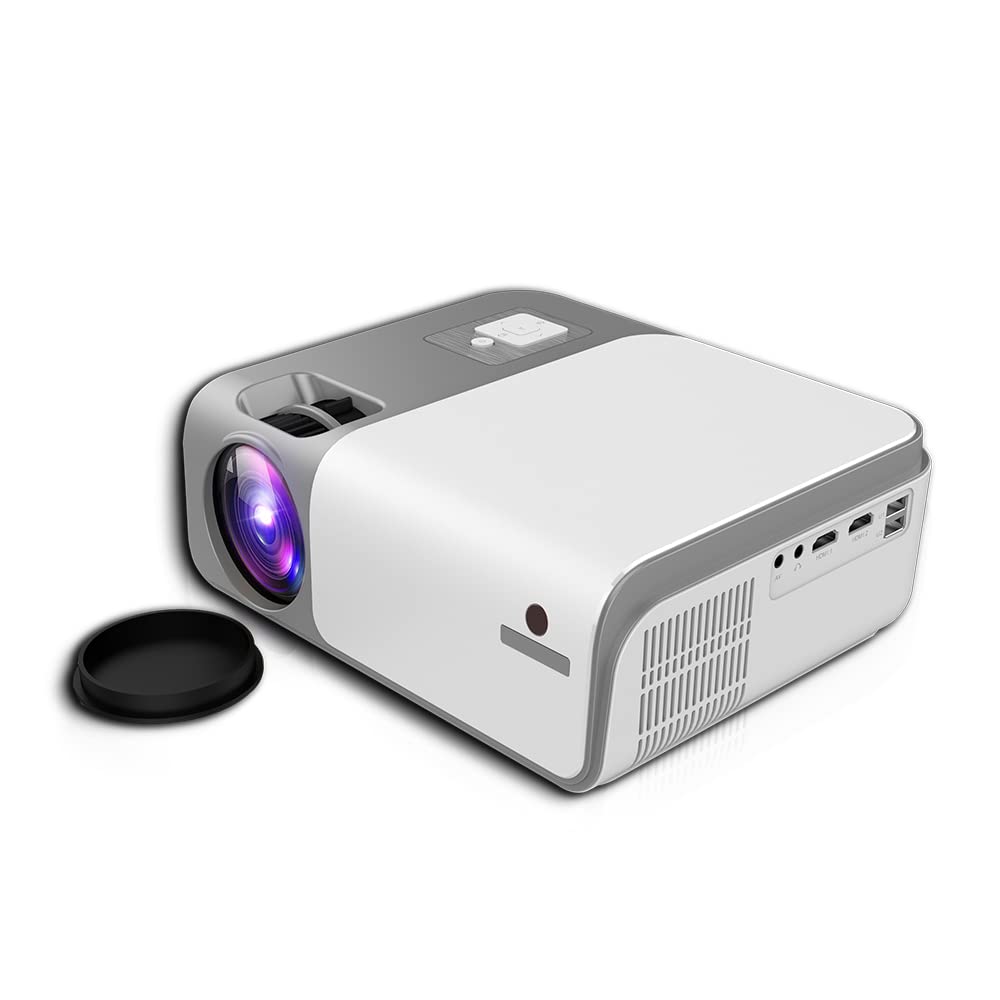
Слика 4.1: Предни и странични view of the Cheerlux C50 Projector. This image shows the projector's lens, ventilation grilles, and various input ports on the side, including USB and HDMI.

Слика 4.2: The Cheerlux C50 Projector demonstrating screen mirroring with a smartphone. A wireless signal icon indicates the mirroring function, allowing content from a mobile device to be displayed on the projector.
Влезни/излезни порти:
- 2x USB Sockets: For connecting USB drives or other USB devices.
- 2x HDMI Sockets: For connecting HDMI-enabled devices like laptops, gaming consoles, or media players.
- 1x Composite AV Socket: For connecting older devices using AV cables.
- Приклучок за слушалки: За поврзување на надворешни аудио уреди или слушалки.
5. Поставување
5.1 Поставување
Position the projector on a stable, flat surface or mount it securely. Ensure the projector lens is perpendicular to the projection surface for optimal image quality.
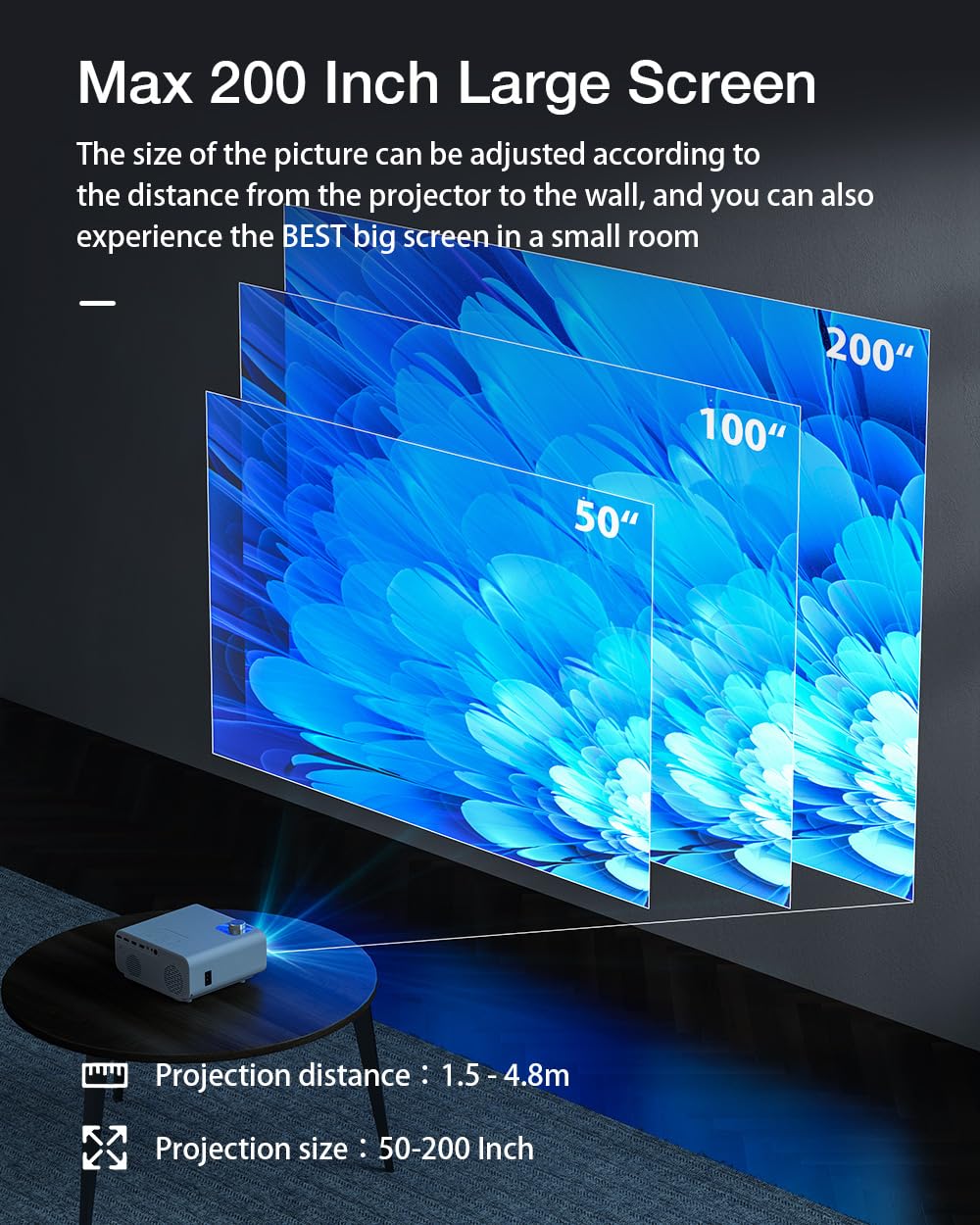
Слика 5.1: Projection distance and screen size guide. The projector can achieve a screen size of 50 to 200 inches with a projection distance ranging from 1 to 8 meters (approximately 3.3 to 26.2 feet).
- Растојание на проекција: 1 - 8 метри (3.3 - 26.2 стапки)
- Проектирана големина на слика: 50 - 200 инчи
- Сооднос: 16:9
5.2 Поврзување за напојување
- Поврзете го кабелот за напојување со влезниот приклучок за напојување на проекторот.
- Вклучете го другиот крај од кабелот за напојување во соодветен штекер.
- Индикаторската ламба за напојување на проекторот треба да светне.
5.3 Фокус и корекција на трапезоидот
- Автоматски фокус: The Cheerlux C50 features an autofocus function. The projector will automatically adjust the image clarity upon startup or movement.
- 4P корекција на трапезоид: If the projected image appears distorted (trapezoidal), use the 4P keystone correction feature to adjust each corner of the image independently until it forms a perfect rectangle. This is particularly useful when the projector is not perfectly aligned with the screen. Refer to the on-screen menu for keystone adjustment options.
6. Упатства за работа
6.1 Вклучување/исклучување
- Вклучување: Press the power button on the projector or the remote control. The projector will start up and display the Android 9.0 home screen.
- Исклучено: Press the power button again. A shutdown confirmation prompt may appear. Select "Power Off" to safely shut down the projector.
6.2 Android 9.0 оперативен систем
The Cheerlux C50 Projector runs on Android 9.0, providing access to a smart interface and various applications.

Слика 6.1: The Android 9.0 operating system interface on the Cheerlux C50 Projector. The screen shows various streaming and social media application icons, indicating smart functionality.
- Навигација: Користете го далечинскиот управувач за навигација низ интерфејсот на Android.
- Апликации: Access pre-installed applications or download new ones from the app store (if available) to watch videos, browse the internet, and more.
- Поставки: Adjust system settings, network connections, display options, and other preferences through the settings menu.
6.3 Пресликување на екранот
The projector supports screen mirroring from compatible smartphones and tablets.
- Ensure both your mobile device and the projector are connected to the same Wi-Fi network.
- On the projector's Android interface, select the "Mirroring" or "Screen Share" application.
- On your mobile device, activate its screen mirroring feature (e.g., "Smart View" on Samsung, "Screen Cast" on Android, "AirPlay" on iOS).
- Select the projector's name from the list of available devices on your mobile device.
- The mobile device's screen content will now be displayed on the projector.
7. Поврзување
7.1 Wi-Fi конекција
Connect the projector to a wireless network to access online content and enable screen mirroring.
- Go to the projector's "Settings" menu.
- Select "Network & Internet" or "Wi-Fi".
- Вклучете Wi-Fi и изберете ја саканата мрежа од листата.
- Внесете ја лозинката за Wi-Fi ако е побарано и поврзете се.
7.2 Bluetooth конекција
Connect Bluetooth speakers, headphones, or other compatible devices for audio output.
- Go to the projector's "Settings" menu.
- Изберете „Поврзани уреди“ или „Bluetooth“.
- Вклучете го Bluetooth и ставете го вашиот Bluetooth уред во режим на спарување.
- Select your device from the list of available devices on the projector and pair.
7.3 Wired Connections (HDMI, USB, AV)
- HDMI: Connect an HDMI cable from your source device (e.g., laptop, gaming console) to one of the projector's HDMI ports. Select the corresponding HDMI input source from the projector's input menu.
- USB: Insert a USB flash drive or external hard drive into a USB port. The projector's media player will typically detect the device, allowing you to browse and play media files.
- АВ: Connect an AV cable from your source device to the projector's AV input. Select the AV input source from the projector's input menu.
8. Одржување
- Чистење леќи: Use the provided lens cleaning cloth or a soft, lint-free cloth to gently wipe the projector lens. Do not use abrasive cleaners or solvents.
- Отстранување прашина: Редовно чистете ги отворите за вентилација на проекторот со мека четка или компримиран воздух за да спречите насобирање прашина, што може да влијае на перформансите и животниот век.
- Складирање: Кога не го користите подолго време, чувајте го проекторот на ладно и суво место, заштитено од прашина и директна сончева светлина.
9 Смена на проблеми
- Без моќност:
- Ensure the power cable is securely connected to both the projector and a working power outlet. Check if the power indicator light is on.
- Нема слика:
- Verify that the correct input source (HDMI, AV, USB) is selected. Check cable connections. Ensure the lens cap is removed.
- Заматена слика:
- Allow the autofocus to adjust. If still blurry, manually adjust focus if an option is available, or ensure the projector is within the recommended projection distance.
- Искривена слика (трапезоид):
- Use the 4P keystone correction feature in the projector's settings menu to adjust the image corners.
- Нема звук:
- Check the volume settings on both the projector and the source device. Ensure external speakers or headphones are properly connected if used. Verify that the correct audio output is selected in settings.
- Проблеми со пресликување на екранот:
- Ensure both devices are on the same Wi-Fi network. Restart both the projector and the mobile device. Check for compatibility issues with your mobile device's mirroring protocol.
10. Спецификации
| Бренд | Генерички |
| Име на моделот | Cheerlux C50 |
| Оперативен систем | Андроид 9.0 |
| Осветленост | 4000 лумени |
| Сооднос на контраст | 2500:1 |
| Мајчин резолуција | 1920 x 1080 пиксели (Full HD) |
| Тип на дисплеј | LED |
| Сооднос на аспект | 16:9 |
| Растојание на проекција | 1 - 8 метри |
| Projected Image Size | 50 - 200 инчи |
| Технологија за поврзување | Wi-Fi 5.0G, Bluetooth 5.1 |
| Хардверски интерфејс | 2x HDMI, 2x USB, 1x Composite AV, Headphone Socket |
| Посебни карактеристики | Autofocus, 4P Keystone Correction, Screen Mirroring, Built-In Wi-Fi |
| Компатибилни уреди | Gaming Console, Smartphone, Laptop, TV, Speakers |
| Димензии на производот | 260 x 210 x 102 мм (21 x 26 x 10 см) |
| Тежина на ставката | 1 кг |
| Ватtage | 150 вати |
| Стапка на освежување | 480 MHz |
11. Гаранција и поддршка
За информации за гаранцијата и техничка поддршка, ве молиме погледнете ја документацијата доставена при купувањето или контактирајте го вашиот продавач. Зачувајте го доказот за купување за какви било рекламации за гаранција.


