Вовед
This manual provides comprehensive instructions for the W26 Pro Max Smart Watch with Bluetooth Earphones. It covers setup, operation, maintenance, and troubleshooting to ensure optimal use of your device. The W26 Pro Max is a versatile 2-in-1 device, combining a smartwatch with integrated wireless Bluetooth earphones, designed to keep you connected and active.
Содржина на пакетот
По отварањето на пакувањето, проверете дали се присутни сите компоненти:
- W26 Pro Max Smart Watch
- Integrated Wireless Bluetooth Earphones
- Кабел за полнење
- Упатство за употреба (овој документ)
- Additional Watch Strap (if included as a free gift)

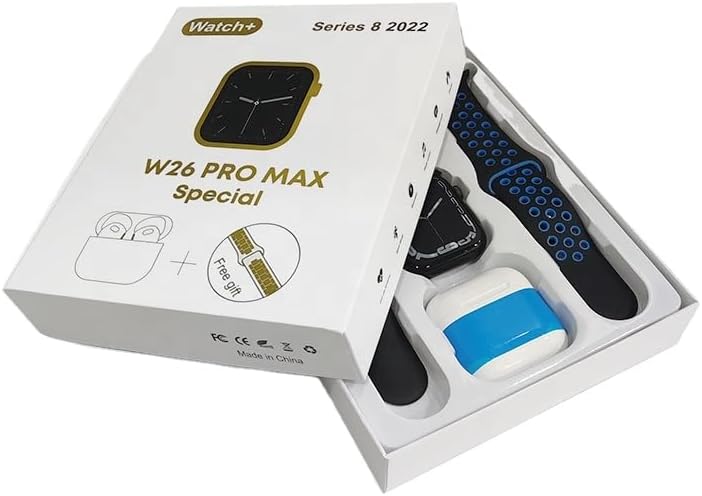
Image: The W26 Pro Max Smart Watch and its accompanying Bluetooth earphones, along with an extra watch strap, are neatly arranged within their retail packaging. The watch face is visible, and the earphones are housed in their charging case.

Слика: Од горе надолу view of the W26 Pro Max Smart Watch and Bluetooth Earphones within their packaging. The watch, earphones, and an additional strap are clearly visible, indicating the complete product set.
Водич за поставување
1. Почетно полнење
Before first use, fully charge both the smartwatch and the integrated earphones. Connect the provided charging cable to the watch and a compatible USB power source. The watch display will indicate charging status. Ensure the earphones are properly seated in their charging case within the watch.
2. Вклучување/исклучување
- Вклучување: Press and hold the side button on the smartwatch until the screen illuminates.
- Исклучено: Притиснете го и задржете го страничното копче, а потоа изберете ја опцијата „Исклучи“ на екранот.
3. Спарување со вашиот паметен телефон
To unlock full functionality, pair your W26 Pro Max with your smartphone via Bluetooth.
- Проверете дали Bluetooth е овозможен на вашиот паметен телефон.
- On the W26 Pro Max, navigate to the Bluetooth settings.
- On your smartphone, search for available Bluetooth devices and select "W26 Pro Max" from the list.
- Потврдете го барањето за спарување на двата уреди доколку се побара.
- For optimal performance, download and install the recommended companion application (e.g., "FitPro app" as mentioned in product description) from your smartphone's app store.
4. Earphone Pairing
The integrated earphones automatically pair with the smartwatch when removed from their charging slots. To pair them with another device (e.g., directly with your phone):
- Remove the earphones from the smartwatch.
- Овозможете Bluetooth на уредот со кој сакате да се спарите.
- Пребарај за "W26 Pro Max Earphones" (or similar name) in the Bluetooth device list and select to connect.
Упатства за работа
Navigating the Smartwatch
- Екран на допир: Повлечете лево/десно, горе/долу за да се движите низ менијата и да пристапите до функциите. Допрете за да изберете.
- Странично копче: Press to return to the home screen or wake the device. Long press for power options or voice assistant.
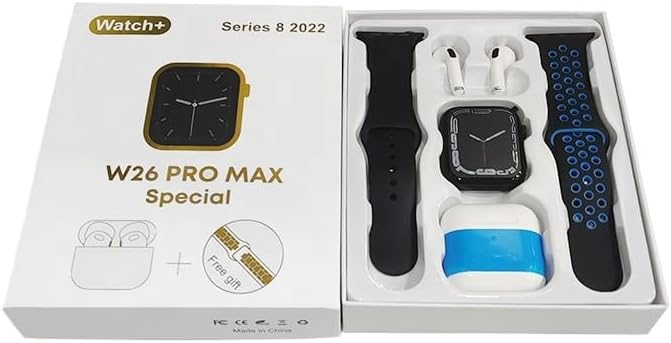
Image: The W26 Pro Max Smart Watch screen shows a voice assistant interface, with text bubbles indicating "Call Linda!" and "What's the weather like today?". This illustrates the voice command functionality.
Клучни карактеристики
Следење на фитнесот и здравјето
The W26 Pro Max is equipped with sensors to monitor various health metrics.
- Мониторинг на отчукувањата на срцето: The optical heart rate sensor continuously tracks your heart rate. View real-time data on the watch or in the companion app.
- Педометар: Ги следи вашите дневни чекори, растојание и согорени калории.
- Следење на спиење: Ги следи вашите навики на спиење, вклучувајќи длабок сон, лесен сон и време на будење.

Image: The W26 Pro Max Smart Watch screen displays heart rate information, showing a graph of heart rate over time, current beats per minute (bpm), and blood pressure readings. This demonstrates the health monitoring capabilities.
Слика: Детална view of the W26 Pro Max Smart Watch screen showing heart rate and blood pressure monitoring. The text explains that an optical heart rate sensor is used for precise calculation and data can be viewed on the watch or via the FitPro app.
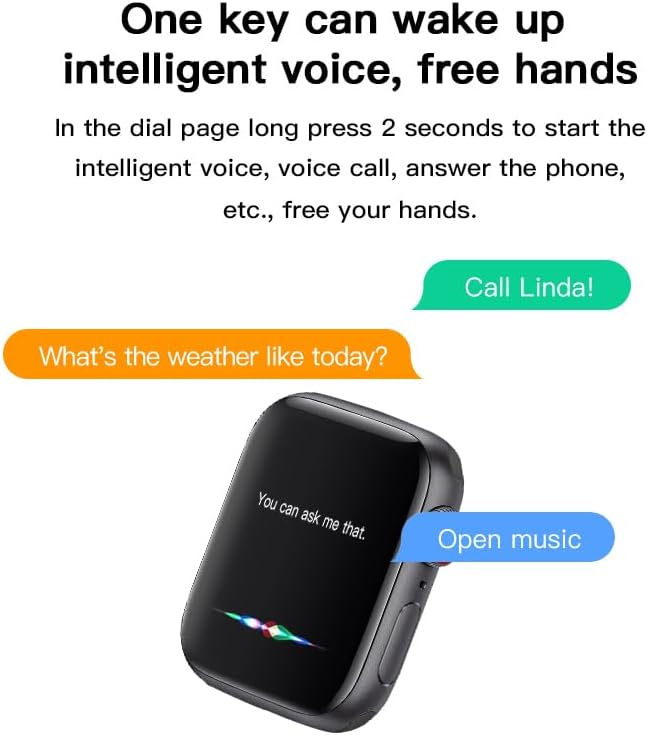
Image: The W26 Pro Max Smart Watch screen displays sleep monitoring data, showing sleep quality (Excellent), percentages of deep sleep, light sleep, and awake time, along with total sleep duration. This highlights the sleep tracking feature.
Communication and Media
- Повици со Bluetooth: Make and receive calls directly from your smartwatch using the integrated microphone and speaker.
- Известувања: Добивајте известувања за повици, пораки и известувања од апликации од вашиот поврзан паметен телефон.
- Репродукција на музика: Control music playing on your smartphone or listen directly via the integrated earphones.

Image: The W26 Pro Max Smart Watch screen shows music playback controls, including play/pause and skip track buttons, along with a visualizer. This indicates the watch's capability to control audio.
Гласовен асистент
Long press the side button to activate the intelligent voice assistant. Use voice commands for calls, weather inquiries, music control, and more, providing hands-free operation.
Одржување и нега
- Чистење: Wipe the watch and earphones with a soft, dry, lint-free cloth. For stubborn dirt, slightly dampИзмијте ја крпата со вода. Избегнувајте груби хемикалии или абразивни материјали.
- Отпорност на вода: The W26 Pro Max has an IP68 rating, meaning it is resistant to dust and can withstand immersion in water up to 1.5 meters for 30 minutes. However, it is not suitable for diving, hot showers, or saunas. Always dry the device thoroughly after exposure to water.
- Нега на батеријата: To prolong battery life, avoid fully discharging the device frequently. Charge it regularly and store it in a cool, dry place when not in use for extended periods.
- Складирање: Чувајте го уредот на ладно и суво место, подалеку од директна сончева светлина и екстремни температури.
Решавање проблеми
| Проблем | Можна причина | Решение |
|---|---|---|
| Уредот не се вклучува. | Слаба батерија. | Charge the device for at least 30 minutes before attempting to power on again. |
| Не може да се спари со паметен телефон. | Bluetooth is off on phone/watch; device not in pairing mode; interference. | Ensure Bluetooth is enabled on both devices. Restart both devices. Move closer to the phone. Forget previous pairings and try again. |
| Earphones not connecting. | Earphones not properly seated; low earphone battery. | Ensure earphones are fully seated in their charging slots within the watch. Charge the watch to ensure earphones are charging. |
| Неточни здравствени податоци. | Неправилно вклопување; опструкција на сензорот. | Уверете се дека часовникот е цврсто носен на вашиот зглоб, не е премногу стегнат или премногу лабав. Исчистете го сензорот на задната страна од часовникот. |
| Краток век на батеријата. | Честа употреба на функции што трошат многу енергија; стара батерија. | Reduce screen brightness, limit notifications, disable unnecessary features. Ensure full charge cycles. |
Спецификации
| Карактеристика | Детал |
|---|---|
| Број на модел | W26 Pro Max |
| Приказ | 1.78" AMOLED Touchscreen |
| Оперативен систем | Носете ОС |
| Поврзување | Bluetooth |
| Капацитет на батеријата | 280mAh (watch) |
| Траење на батеријата | До 3 дена (типична употреба) |
| Отпорност на вода | IP68 |
| Посебни карактеристики | Integrated Bluetooth Earphones, Heart Rate Sensor, Pedometer, Sleep Tracker, Microphone, Speaker, Voice Assistant |
| Капацитет за складирање на меморија | 16 MB |
| Димензии на пакетот | 16.8 x 12.8 x 3 cm |
| Тежина | 170 гр |
Гаранција и поддршка
For information regarding warranty coverage and customer support, please refer to the documentation provided with your purchase or contact the retailer where the product was acquired. As this product is manufactured by "Generic", specific warranty details may vary by region and seller.
For technical assistance or further inquiries, please reach out to the customer service channels provided by your point of purchase.


