1. Вовед
Thank you for choosing the RONGUAN Laser Measure. This portable digital measuring tool is designed for high-precision distance measurement, offering a range of up to 40 meters (132 feet) with millimeter-level accuracy. It is ideal for various applications including house decoration, mapping, and general construction tasks. This manual provides essential information on the product's features, setup, operation, maintenance, and troubleshooting to ensure safe and effective use.
2. Информации за безбедност
Ве молиме прочитајте ги и разберете ги сите безбедносни упатства пред да го користите уредот. Непочитувањето на овие упатства може да резултира со изложеност на ласерско зрачење, електричен удар, пожар или сериозни повреди.
- Ласерско зрачење: This product is a Class II laser product. Do not stare into the laser beam or direct it at other people. Avoid direct eye exposure.
- Извор на енергија: Use only the specified Type-C charging cable and a compatible power adapter (not included) for charging.
- Животна средина: Do not operate the device in explosive atmospheres, such as in the presence of flammable liquids, gases, or dust. Keep the device dry and away from extreme temperatures.
- Одржување: Не обидувајте се да го расклопите или модифицирате уредот. За сите сервисирања обратете се кај квалификуван сервисер.
- Деца: Чувајте го уредот подалеку од дофат на деца.
3. Производот завршиview
The RONGUAN Laser Measure is a compact and robust device designed for ease of use and accuracy. Familiarize yourself with its components:
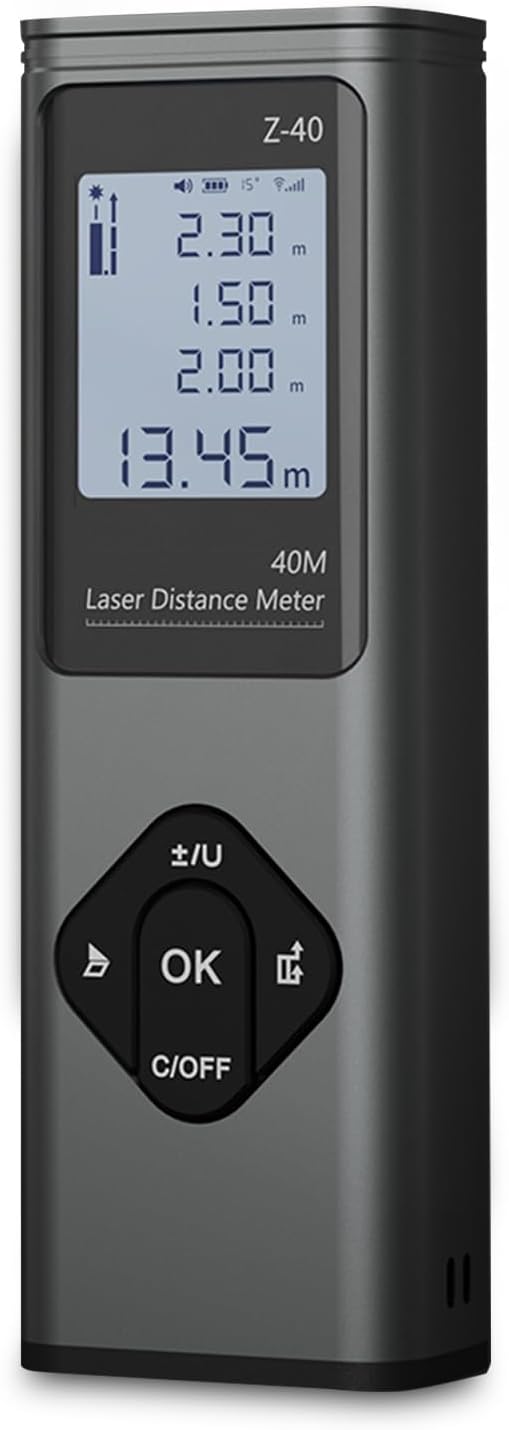
Слика 3.1: Предна страна view of the RONGUAN Laser Measure. It features a clear digital display at the top, showing measurement readings and battery status. Below the display are four control buttons: a left arrow button, an 'OK' button in the center, a right arrow button, and a 'C/OFF' button at the bottom for clearing and powering off.

Figure 3.2: The RONGUAN Laser Measure is highlighted as a laser rangefinder and line thrower, emphasizing its dual functionality for both distance measurement and cross laser line projection.
3.1 Клучни компоненти:
- Дигитален екран: Shows measurement results, battery level, and mode indicators.
- Ласерски емитер/приемник: Се наоѓа на врвот на уредот.
- Контролни копчиња:
- OK / Measure Button: Иницира мерења и потврдува избори.
- Копче C/OFF: Clears current measurement or powers off the device.
- +/- / Unit Button: Switches between measurement units (e.g., meters, feet) and adjusts settings.
- Копче за режим: Циклусно се менува низ различни режими на мерење.
- Пристаниште за полнење од тип C: Located on the side for convenient charging.
4. Поставување
4.1 Почетно полнење
Before first use, fully charge the device. The RONGUAN Laser Measure has a built-in 200mAh battery.
- Пронајдете го приклучокот за полнење Type-C на страната од уредот.
- Поврзете го испорачаниот кабел за полнење Type-C со уредот.
- Connect the other end of the cable to a standard USB power adapter (e.g., phone charger, computer USB port).
- The battery indicator on the display will show charging status. Once fully charged, the indicator will change.
4.2 Вклучување/исклучување
- За вклучување: Притиснете го OK копчето накратко. Екранот ќе светне.
- За исклучување: Притиснете и задржете го C/OFF button for a few seconds until the display turns off. The device will also automatically power off after a period of inactivity to conserve battery.
5. Упатства за работа
The RONGUAN Laser Measure offers multiple measurement modes to suit various needs. The device features a fast response time, completing measurements in 0.3 seconds.

Figure 5.1: Visual representation of the multiple measurement modes supported by the device, including single measurement, continuous measurement, even area measurements, volumetric measurements, cross-hatched line, cosine measurement, Pythagoras measurement, and cumulative additions and subtractions.
5.1 Основно мерење (единечно мерење)
- Power on the device. It will typically default to single measurement mode.
- Насочете го ласерот кон целната површина.
- Притиснете го OK button briefly. The measurement will be displayed instantly.
5.2 Континуирано мерење
This mode allows for dynamic measurement as you move the device, displaying real-time distance updates.
- Притиснете го Режим button until the continuous measurement icon appears on the display.
- Притиснете го OK button to start continuous measurement.
- Move the device; the distance will update continuously.
- Притиснете OK повторно да престане.
5.3 Cross Laser Projection
The device can project a cross laser line, useful for alignment and leveling tasks. This feature has an effective distance of up to 8 meters.

Figure 5.2: The device projecting a clear red cross laser line, demonstrating its utility in aiding complex tasks such as pointing, marking, mounting, and fixing objects on a surface.
- Притиснете го Режим button until the cross laser icon appears.
- The device will project a horizontal and vertical laser line.
- To turn off the cross laser, press the Режим повторно копче или C/OFF копче.
5.4 Мерење на површина и волумен
These modes allow for quick calculation of areas (length x width) and volumes (length x width x height).
- Притиснете го Режим button to select Area or Volume mode. The display will prompt for the first dimension.
- Measure the first dimension (e.g., length) by pointing the laser and pressing OK.
- The display will then prompt for the next dimension (e.g., width). Measure it.
- For Volume, measure the third dimension (height).
- Ќе се прикаже пресметаната површина или волумен.
5.5 Мерење на Питагоровата теорема
Use this mode to calculate indirect distances (e.g., height of a building) using two or three measurements.
- Притиснете го Режим button to select the desired Pythagorean mode (e.g., two-point or three-point).
- Follow the on-screen prompts to take the necessary measurements (e.g., hypotenuse, base).
- The device will automatically calculate and display the unknown side.
5.6 Data Storage and Voice Announcements
The system automatically stores up to 50 sets of historical data, allowing for easy review without manual recording. The device also features intimate voice announcements for convenience.
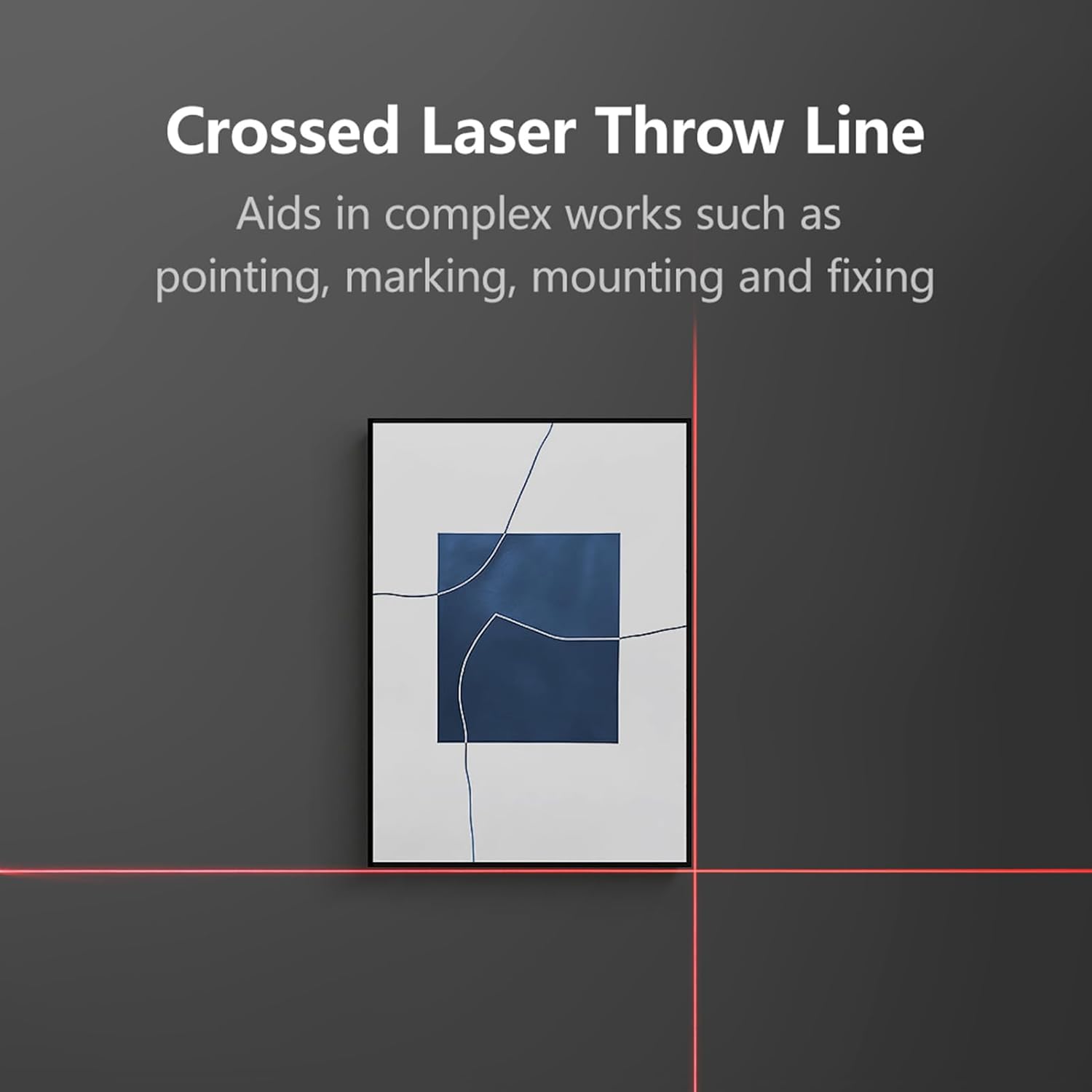
Figure 5.3: The RONGUAN Laser Measure, illustrating its capabilities for voice announcements and automatic data storage, providing easy access to historical measurements.
- Accessing History: Користете ги копчињата со стрелки за да се движите низ зачуваните мерења.
- Гласовни најави: The device provides audible feedback for measurements and mode changes. This feature can typically be toggled on/off via settings or a dedicated button (refer to specific button functions on your device).
6. Одржување
Proper maintenance ensures the longevity and accuracy of your RONGUAN Laser Measure.
- Чистење: Користете мека, гamp cloth to clean the device. Do not use abrasive cleaners or solvents. Pay special attention to the laser lens, keeping it free from dust and smudges.
- Складирање: Store the device in a cool, dry place, away from direct sunlight and extreme temperatures. If storing for an extended period, ensure the battery is partially charged (around 50%) to prolong its lifespan.
- Избегнувајте влијание: Protect the device from drops and impacts, which can affect its calibration and internal components.
7 Смена на проблеми
Доколку наидете на проблеми со вашиот уред, погледнете ги следните вообичаени проблеми и решенија:
| Проблем | Можна причина | Решение |
|---|---|---|
| Уредот не се вклучува. | Слаба батерија; дефект на уредот. | Charge the device fully. If still unresponsive, contact support. |
| Неточни мерења. | Laser lens dirty; unstable surface; environmental factors (e.g., strong light). | Clean the laser lens. Ensure a stable measurement surface. Avoid measuring in direct sunlight or highly reflective surfaces. |
| Laser beam is weak or invisible. | Low battery; strong ambient light. | Charge the device. Measure in areas with less intense ambient light. |
| Екранот прикажува код за грешка. | Мерењето е надвор од опсегот; внатрешна грешка. | Ensure target is within 0.05-40m range. Restart the device. If error persists, contact support. |
8. Спецификации
Technical specifications for the RONGUAN Laser Measure:

Figure 8.1: The RONGUAN Laser Measure with its dimensions indicated: 100mm in height and 33mm in width.
| Карактеристика | Спецификација |
|---|---|
| Боја | Црното |
| Материјал | Алуминиумска легура |
| Мерен опсег | 0.05 - 40 meters (132 feet) |
| Мерење точност | ± (2mm + 5*10^-5*D), where D is distance |
| Display Indexing | 1 мм |
| Ласерска класа | Класа II |
| Тип на ласер | 630-670 nm, < 1mW |
| Капацитет на батеријата | 200 mAh |
| Тип на полнење | Тип-C |
| Големина на производот | 100 x 33 x 20 mm |
| Тежина на производот | 60 гр |
9. Гаранција и поддршка
This product comes with a standard manufacturer's warranty. Please refer to the product packaging or purchase documentation for specific warranty terms and conditions.
For technical support, troubleshooting assistance, or warranty claims, please contact the retailer or manufacturer directly through the contact information provided at the point of purchase.


