
Вовед
Thank you for choosing the Apexcam K20 Action Camera. This manual provides essential information for the proper setup, operation, and maintenance of your device. Please read it thoroughly before use to ensure optimal performance and longevity of your camera.

Поставување
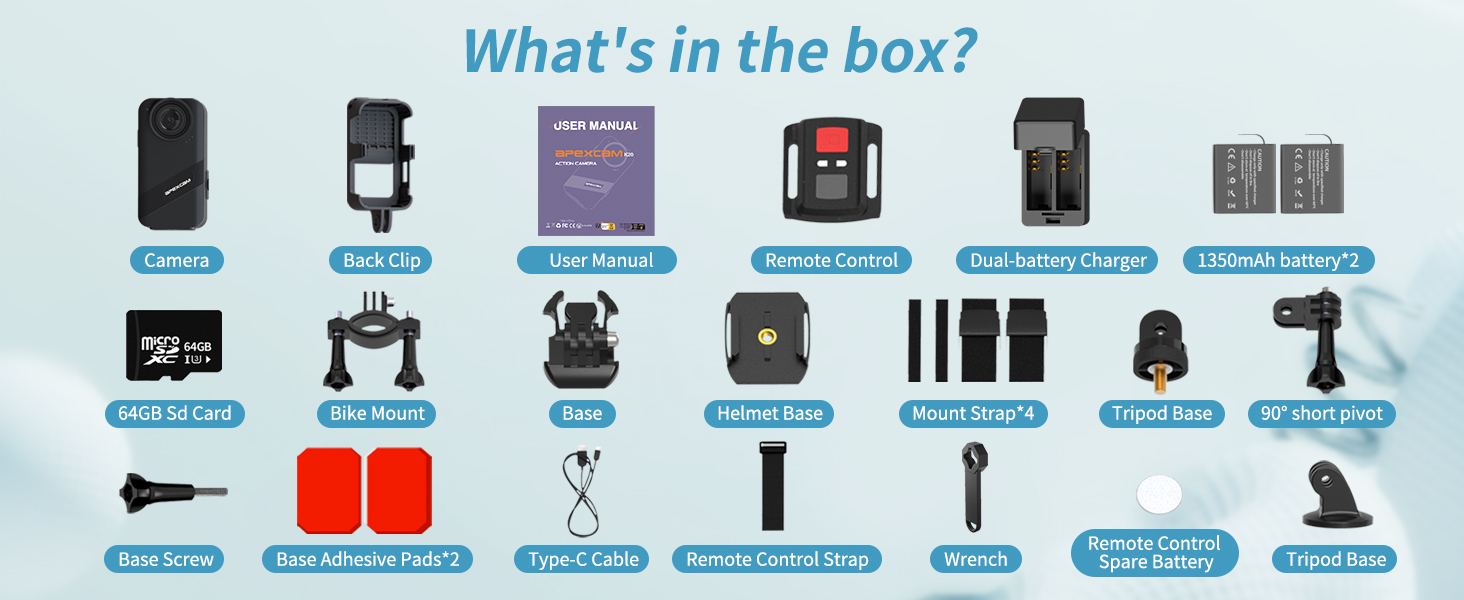
1. Распакување и компоненти
Carefully unpack all items from the box. Ensure all components are present:
- Apexcam K20 Camera Body
- 2 x 1350 mAh Batteries
- Dual-battery Charger
- 64 GB Micro SD картичка
- Wrist 2.4G Remote Control
- Заден клип
- Монтирање велосипед
- Base Mounts (various)
- Основа за шлемови
- Mount Straps (4)
- База со статив
- 90° Short Pivot
- Основна завртка
- Base Adhesive Pads (2)
- Кабел тип-C
- Remote Control Strap
- Клуч
- Remote Control Spare Battery
- Упатство за употреба
2. Инсталација и полнење на батеријата
- Locate the battery cover on the camera.
- Turn down the black folding clasp.
- Pinch the black folding clasp and gently lift it upwards to open the battery compartment.
- Insert a fully charged 1350 mAh battery into the compartment, ensuring correct polarity.
- Добро затворете го капакот на батеријата.
- To charge batteries, use the provided dual-battery charger and Type-C cable. Connect the charger to a USB power source.

3. Инсталација на Micro SD картичка
The camera supports Micro SD cards up to 64GB. A 64GB card is included.
- With the battery compartment open, locate the Micro SD card slot.
- Вметнете ја Micro SD картичката со златните контакти свртени кон задната страна на камерата додека не кликне на своето место.
- За да ја извадите, нежно притиснете ја картичката додека не испадне.
4. Монтирање на камерата
The Apexcam K20 comes with various mounts for different activities. Refer to the specific mount instructions for secure attachment to helmets, bikes, or other surfaces.
Упатства за работа
1. Вклучување/исклучување
- To power on: Press and hold the Power/Mode button until the screen illuminates.
- To power off: Press and hold the Power/Mode button until the screen turns off.
2. Навигација на екран на допир
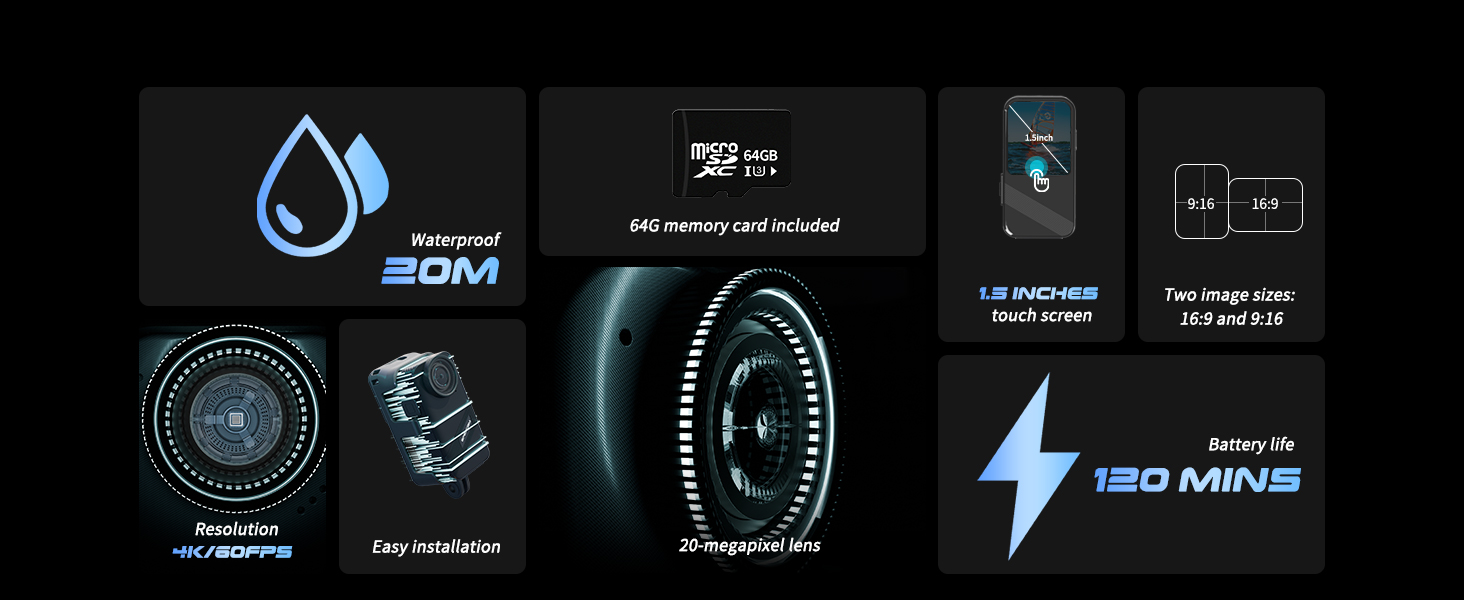
The 1.5-inch touch screen allows for intuitive control. Swipe and tap to navigate menus and settings.

3. Режими на снимање
The K20 offers various shooting modes:
- Снимање видео: Capture 4K 60FPS video. Press the Shutter button to start/stop recording.
- Фотографирање: Take 48MP photos. Press the Shutter button to take a photo.
- Рафална фотографија: Captures multiple photos in quick succession. Ideal for fast-moving subjects.
- Бавно движење: Снима видео со поголема брзина на слики за репродукција во забавено движење.
- Брзо движење: Accelerates video playback.
- Пред-снимање: Records a short segment of video before the Shutter button is pressed, ensuring no moment is missed.
- Снимање на јамка: Континуирано снима, пребришувајќи ја најстарата хранаtage when the memory card is full. Useful as a dash cam.
- Time-Lapse Video/Photo: Captures a series of photos or video frames over time to create a sped-up sequence.
- Вертикално снимање: Optimizes video capture for vertical display, suitable for mobile viewинг.
- Режим на возење: Functions as a dash cam.


4. Електронска стабилизација на слика (EIS)
The K20 features 6-axis Electronic Image Stabilization (EIS) to reduce blur and stabilize footage, especially during active use. This feature can be toggled on or off in the camera settings.

5. Поврзување преку Wi-Fi
Connect your K20 camera to your smartphone via Wi-Fi to preview footage, download content, and control settings remotely. Download the official Apexcam app from your device's app store.

6. Далечински управувач
Use the included 2.4G wrist remote to conveniently start and stop recording or take photos from a distance.
7. Водоотпорно работење
The Apexcam K20 is body-waterproof up to 20 meters (66 feet) without an additional waterproof case. This design allows for better audio capture underwater. Ensure all ports and covers are securely closed before submerging the camera.
Одржување
- Чистење: Користете мека, сува крпа за чистење на телото на фотоапаратот. За објективот, користете специјализирана крпа и раствор за чистење објективи.
- Изложеност на вода: After use in saltwater, rinse the camera thoroughly with fresh water and dry completely before opening any compartments.
- Складирање: Чувајте го фотоапаратот на ладно и суво место, подалеку од директна сончева светлина. Отстранете ги батериите ако го чувате подолго време.
- Нега на батеријата: Do not expose batteries to extreme temperatures. Charge fully before first use and periodically during long storage.
- Ажурирања на фирмверот: Check the Apexcam official webстраница за сите достапни ажурирања на фирмверот за да се обезбедат оптимални перформанси и нови функции.
Решавање проблеми
- Камерата не се вклучува:
- Проверете дали батеријата е целосно наполнета и правилно вметната. Обидете се да користите друга наполнета батерија.
- Не може да снима видео/фотографира:
- Check if the Micro SD card is inserted correctly and has sufficient free space. Format the SD card if necessary (this will erase all data). Ensure the camera is not in a mode that prevents recording (e.g., playback mode).
- Лош квалитет на видео/фотографии:
- Clean the camera lens. Ensure adequate lighting. Check camera settings for resolution and EIS. For underwater use, ensure the lens is clean and free of water droplets.
- Проблеми со Wi-Fi конекцијата:
- Ensure Wi-Fi is enabled on the camera and your smartphone. Restart both devices. Make sure you are within range of the camera's Wi-Fi signal. Reinstall the Apexcam app if problems persist.
- Камерата се замрзнува или не реагира:
- Remove and reinsert the battery to perform a hard reset. If the issue persists, try formatting the Micro SD card or performing a factory reset via the camera's settings menu.
Спецификации
| Карактеристика | Детал |
|---|---|
| Модел | K20 |
| Видео резолуција | 4 илјади (60 FPS) |
| Резолуција на фотографијата | 48 MP |
| Водоотпорна длабочина | Up to 20 meters (66 feet) without case |
| Големина на екранот | 1.5 инчен екран на допир |
| Стабилизација на слика | 6-axis EIS (Electronic Image Stabilization) |
| Зумирајте | 8X дигитален зум |
| Поврзување | Wi-Fi, USB |
| Складирање | Micro SD (up to 64GB, 64GB card included) |
| Батерија | 2 x 1350 mAh Lithium Ion (included) |
| Режими на снимање | Burst Photo, Slow Motion, Fast Motion, Pre-recording, Loop Recording, Anti-shake, Time-Lapse, Vertical Shooting, Drive Mode |
| Леќа | Широк агол од 170° |
Гаранција и поддршка
Информации за гаранцијата
The Apexcam K20 Action Camera comes with a 1-годишна гаранција од датумот на купување. Оваа гаранција ги покрива производствените дефекти и неисправности при нормална употреба. Не ги покрива штетите предизвикани од злоупотреба, несреќи, неовластени модификации или природни катастрофи.
Ве молиме чувајте го вашиот доказ за купување за барањата за гаранција.
Поддршка за корисници
For technical assistance, troubleshooting, or warranty inquiries, please contact Apexcam customer support through the official website or the contact information provided in your product packaging. Our support team is available to assist you with any questions or concerns regarding your K20 Action Camera.
Можете исто така да ја посетите Apexcam Store on Amazon за повеќе информации за производот и ресурси.
Видео демонстрации
Watch this official video for a visual guide on using your Apexcam K20 Action Camera.
APEXCAM K20 Mini Action Cam Overview
Ова видео дава крајview of the Apexcam K20 mini action camera, showcasing its features and design. It highlights key functionalities and its compact form factor.