1. Вовед
Ви благодарам за купувањетоasing the STN-28 Colorful Cat Ear Luminous Bluetooth Headset. This headset combines wireless audio technology with a unique luminous cat ear design, offering a comfortable and immersive listening experience. This manual provides essential information on how to set up, operate, and maintain your new headset.
2. Информации за безбедност
- Не ги изложувајте слушалките на екстремни температури, влажност или корозивни супстанции.
- Избегнувајте испуштање или изложување на слушалките на силни удари.
- Do not disassemble or attempt to repair the headset yourself. This will void the warranty.
- Чистете ги слушалките со мека, сува крпа. Не користете груби хемикалии или абразивни материјали.
- Продолженото слушање со голема јачина на звук може да предизвика оштетување на слухот. Прилагодете ја јачината на звукот на безбедно ниво.
3. Содржина на пакетот
- STN-28 Wireless Headset Body
- USB кабел за полнење
- Упатство за употреба (овој документ)
4. Производот завршиview и Контроли
Familiarize yourself with the headset's components and control buttons.
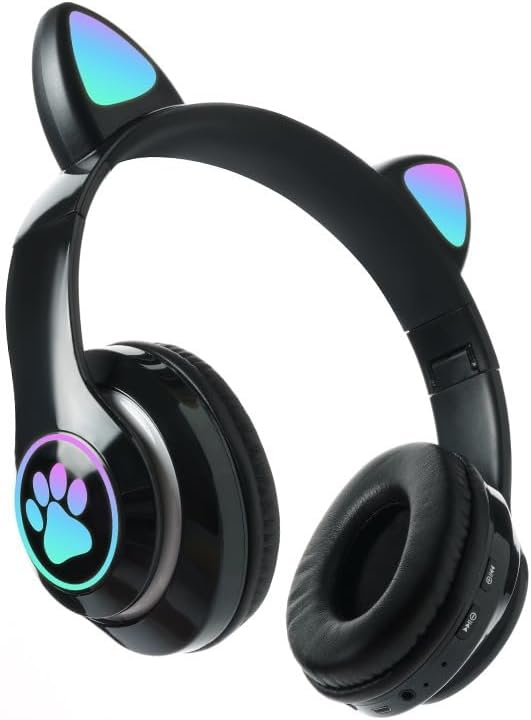
Слика: напред view of the STN-28 headset in black, showcasing the luminous cat ears and paw print design on the earcups.

Image: Two STN-28 headsets, one in purple and one in pink, displayed on a wooden stand, highlighting their colorful design and cat ear feature.
Control Buttons (Typical Layout - Refer to your specific model for exact placement):
- Копче за вклучување: Вклучено/Исклучено, Репродукција/Пауза, Одговорување/Завршување на повик.
- Јачина на звук (+): Зголеми јачина на звук, Следна песна (долго притискање).
- Намалување на јачината на звукот (-): Намали јачина на звук, Претходна песна (долго притискање).
- Копче за режим (М): Switch between Bluetooth and TF Card mode.
- USB порта за полнење: За полнење на слушалките.
- Слот за картичка TF: Insert external TF card for music playback.
- LED индикаторско светло: Shows power, connection, and charging status.
5. Поставување
5.1 Полнење на слушалките
- Connect the USB charging cable to the headset's USB charging port.
- Поврзете го другиот крај од кабелот со USB извор на напојување (на пр., USB порт на компјутер, USB адаптер за ѕид).
- The LED indicator light will show a red light during charging.
- A full charge takes approximately 2 hours. The red light will turn off when fully charged.
Note: Ensure the headset is fully charged before first use for optimal battery life.
5.2 Вклучување/исклучување
- За вклучување: Press and hold the Power button for a few seconds until the LED indicator lights flash red and blue.
- За исклучување: Press and hold the Power button for a few seconds until the LED indicator light turns off.
5.3 Спарување преку Bluetooth
- Осигурајте се дека слушалките се целосно наполнети и исклучени.
- Press and hold the Power button until the LED indicator lights flash red and blue alternately. This indicates the headset is in pairing mode.
- На вашиот уред (паметен телефон, таблет, лаптоп), овозможете Bluetooth и пребарајте достапни уреди.
- Select "STN-28" or "LX-B39C" from the list of found devices.
- Once successfully paired, the LED indicator light on the headset will flash blue slowly.
Note: The headset supports Bluetooth 5.0+EDR for stable and efficient connection.
6. Упатства за работа
6.1 Репродукција на музика (Bluetooth режим)
- Пушти/Пауза: Кратко притиснете го копчето за вклучување.
- Јачина на звук нагоре: Кратко притиснете го копчето „+“.
- Намалување на јачината на звукот: Кратко притиснете го копчето „-“.
- Следна песна: Долго притиснете го копчето „+“.
- Претходна песна: Долго притиснете го копчето „-“.
6.2 Телефонски повици
- Одговори на повикот: Кратко притиснете го копчето за вклучување кога ќе ѕвони дојдовен повик.
- Крај на повикот: Кратко притиснете го копчето за вклучување за време на повик.
- Одбијте го повикот: Долго притиснете го копчето за вклучување кога ѕвони дојдовен повик.
6.3 Репродукција на TF картичка
- Вметнете TF (MicroSD) картичка со MP3 аудио files во отворот за TF картичка.
- The headset will automatically switch to TF card playback mode, or you may need to short press the "M" (Mode) button to switch.
- Use the Play/Pause, Volume Up/Down, and Next/Previous Track buttons as described in section 6.1.
6.4 Luminous Cat Ear Feature
The cat ears and paw print on the earcups feature luminous accents. This feature is typically activated automatically when the headset is powered on. There is no specific control mentioned for this feature, implying it's always on when the headset is active.
7. Одржување и грижа
- Чистење: Wipe the headset regularly with a soft, dry, lint-free cloth. Do not use liquid cleaners or sprays.
- Складирање: When not in use, store the headset in a cool, dry place away from direct sunlight and extreme temperatures.
- Нега на батеријата: За да го продолжите животниот век на батеријата, избегнувајте често целосно празнење на батеријата. Полнете ги слушалките редовно, дури и ако не се користат подолг период.
- Отпорност на вода: The headset is listed as "Waterproof". While it offers protection against water, avoid submerging it in water or exposing it to heavy rain for prolonged periods to prevent damage.
8 Смена на проблеми
| Проблем | Можна причина | Решение |
|---|---|---|
| Слушалките не се вклучуваат. | Слаба батерија. | Charge the headset fully (approx. 2 hours). |
| Не може да се спари со уредот. | Слушалките не се во режим на спарување; Bluetooth е исклучен на уредот; уредот е предалеку. | Ensure headset is flashing red/blue; enable Bluetooth on device; keep devices within 10 meters. Try forgetting the device on your phone and re-pairing. |
| Нема звук или има ниска јачина на звук. | Јачината на звукот е прениска на слушалките или уредот; слушалките не се поврзани. | Increase volume on both headset and connected device. Ensure headset is properly paired. |
| TF картичката не се репродуцира. | Картичката не е правилно вметната; не е поддржана file format; headset not in TF card mode. | Reinsert TF card; ensure files are MP3; press 'M' button to switch to TF card mode. |
9. Спецификации
| Модел | STN-28 / LX-B39C |
| Метод на носење | Head-mounted folding |
| Bluetooth верзија | Bluetooth 5.0 + EDR |
| Supported Bluetooth Modes | A2DP 1.2, AVRCP 1.0, HSP, HSF 1.5 |
| Капацитет на батеријата | 400mAh Polymer A-grade Lithium Battery |
| Speaker Size / Impedance | 40 mm / 32Ω |
| Опсег на пренос | ≤10 meters (33 feet) |
| Време на полнење | Прибл. 2 часа |
| Време на репродукција на музика | ≤6 часа |
| Време за разговор | ≤6 часа |
| Време на мирување | 200 часа |
| Опсег на фреквенција | 20 Hz - 20,000 Hz |
| Ниво на отпорност на вода | Водоотпорен |
| Тип на контрола | Media Control, Touch (via buttons) |
| Посебни карактеристики | Luminous Cat Ears, TF Card Playback |
10. Гаранција и поддршка
This product comes with a standard manufacturer's warranty. For specific warranty terms, conditions, and duration, please refer to the warranty card included with your purchase or contact the retailer where you purchased the product.
For technical support or inquiries, please contact your retailer or the manufacturer directly. Keep your purchase receipt as proof of purchase for warranty claims.