
1. Вовед
This manual provides detailed instructions for the installation, operation, and maintenance of your WINFREE HC-R1-8545 Smart Door Lock Set. Please read this manual thoroughly before installation and use to ensure proper function and safety. Keep this manual for future reference.

Image 1.1: WINFREE HC-R1-8545 Smart Door Lock Set. This image displays the complete smart door lock set, featuring the exterior handle with an integrated fingerprint sensor and digital keypad, alongside the interior deadbolt component.
2. Информации за безбедност
- Не обидувајте се сами да ја расклопите или поправите бравата. Контактирајте ја службата за корисници за помош.
- Use only specified batteries (4 AAA/1.5V alkaline batteries). Do not mix old and new batteries or different types of batteries.
- Избегнувајте изложување на бравата на директна сончева светлина, дожд или екстремни температури подолг период.
- Ensure all components are securely installed before use.
- Keep physical keys in a safe location outside the property.
3. Содржина на пакетот
Проверете дали сите артикли се присутни во вашиот пакет:
- Smart Door Lock Handle (Exterior)
- Deadbolt Assembly (Interior)
- Mounting Hardware (Screws, Spindle, etc.)
- Physical Keys (2-3)
- RFID Cards (2-3)
- Шаблон за инсталација
- Упатство за употреба (Овој документ)
4. Спецификации
| Карактеристика | Детал |
|---|---|
| Бренд | БЕСПЛАТНО |
| Име на моделот | HC-R1-8545 |
| Тип на заклучување | Биометриски, со завртка, тастатура |
| Методи за отклучување | Fingerprint, Passcode, RFID Card, Physical Key, App Control |
| Материјал | Алуминиум |
| Димензии (Д x Ш x В) | 9.1 x 5.9 x 4 инчи |
| Тежина на ставката | 3 фунти |
| Извор на енергија | 4 AAA/1.5V Alkaline Batteries (not included) |
| Посебни карактеристики | Anti-Peeping Password, Auto-Lock, Low Battery Alert, Emergency Power Supply, Backlit Keypad |
| Компатибилност на дебелината на вратата | 35-55 мм (1.38-2.17 инчи) |

Image 4.1: Dimensional Diagram. This image provides detailed measurements of the lock components and specifies the compatible door thickness range of 35-55mm, indicating it can be adjusted for left or right-hand opening.
5. Инсталација
5.1 Список за проверка пред инсталација
- Осигурајте се дека дебелината на вратата е помеѓу 35 и 55 мм.
- Confirm door handing (left or right) and adjust the lock handle if necessary.
- Gather necessary tools: screwdriver, drill (if new holes are needed), measuring tape.
5.2 Чекор-по-чекор инсталација
- Подгответе ја вратата: Use the provided template to mark and drill holes if installing on a new door. For existing doors, ensure the current holes align with the lock's requirements.
- Install the Latch/Deadbolt: Insert the deadbolt mechanism into the door edge. Secure it with screws. Ensure the latch bolt operates smoothly.
- Install the Exterior Handle: Feed the spindle and connecting cables through the door. Position the exterior handle assembly.
- Инсталирајте го внатрешниот склоп: Connect the cables from the exterior handle to the interior assembly. Secure the interior assembly to the door using the provided screws.
- Вметнете батерии: Open the battery cover on the interior assembly. Insert 4 AAA/1.5V alkaline batteries, ensuring correct polarity. Close the battery cover.
- Тест операција: After installation, test the lock with a physical key and ensure the handle operates correctly.
6. Упатства за работа
The WINFREE Smart Door Lock offers multiple convenient ways to unlock your door.

Image 6.1: Multiple Unlocking Methods. This image illustrates the five primary methods for unlocking the WINFREE Smart Door Lock: fingerprint, RFID card, digital password, physical key, and control via the TUYA app.
6.1 Отклучување со отпечаток од прст
The lock features an advanced fingerprint sensor for quick access.
- Enroll Fingerprints: Refer to the app instructions for adding new fingerprints.
- Отклучи: Place your registered finger on the fingerprint sensor. The lock will unlock in approximately 0.1 seconds if the fingerprint is recognized.

Image 6.2: Fingerprint Unlock Feature. This image highlights the lock's fingerprint recognition capabilities, including 360-degree support and a fast 0.1-second unlocking speed.
6.2 Отклучување со лозинка
Use the digital touchscreen keypad to enter your passcode.
- Поставете лозинка: Follow the app or lock programming instructions to set up user passcodes.
- Отклучи: Enter your registered passcode on the keypad, then press '#'.
- Anti-Peeping Feature: To prevent others from guessing your code, you can enter random digits before or after your actual passcode. For example, if your passcode is 123456, you can enter 789123456012 #.
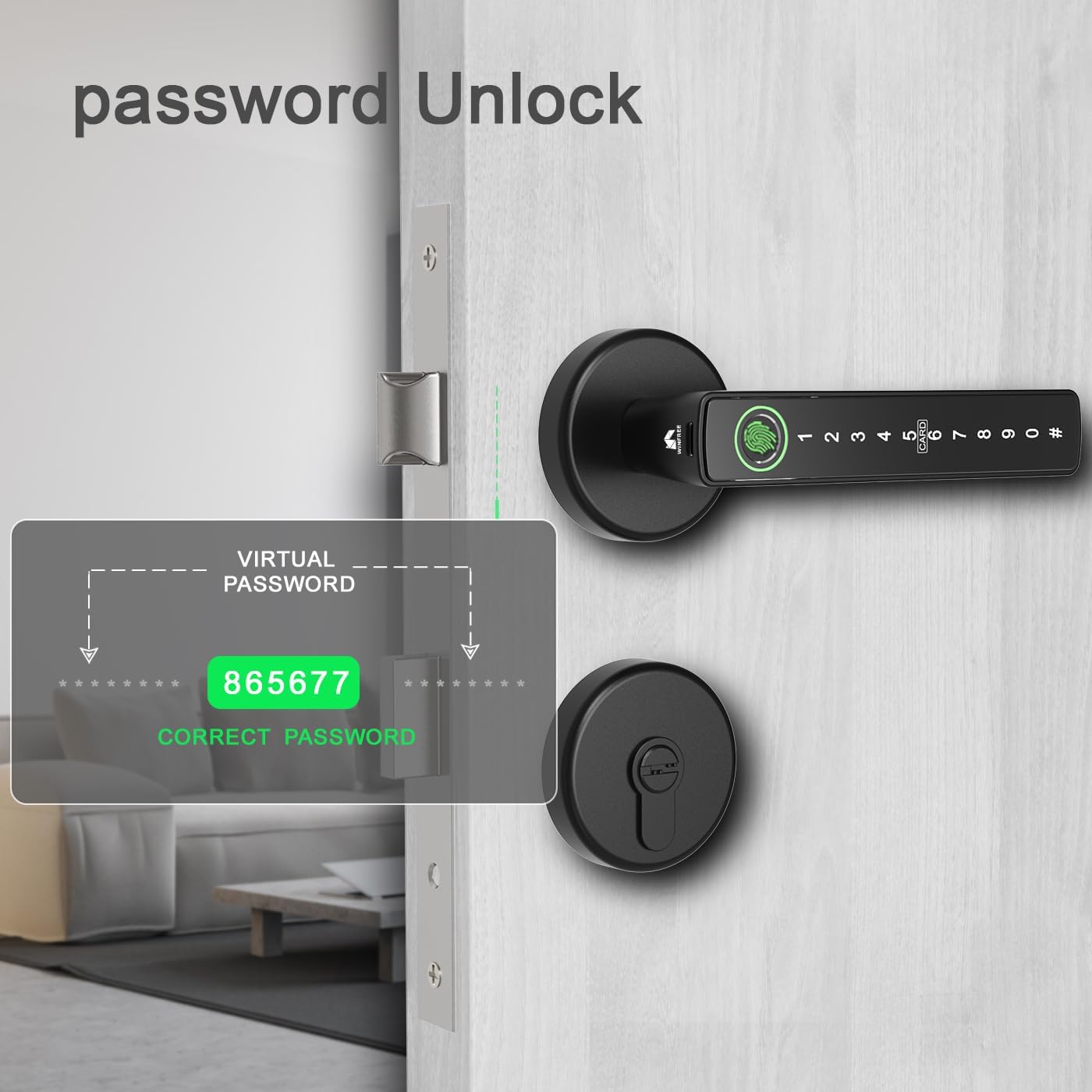
Image 6.3: Passcode Unlock with Anti-Peeping. This image demonstrates the virtual password feature, allowing users to input random digits before and after their actual passcode to enhance security against observation.
6.3 Отклучување со RFID картичка
Register the provided RFID cards for convenient tap-to-unlock access.
- Регистрациски картички: Use the app or lock programming menu to add RFID cards.
- Отклучи: Present a registered RFID card to the 'CARD' area on the lock's keypad.
6.4 Отклучување со физички клуч
In case of emergency or battery depletion, use the physical key.
- Отклучи: Insert the physical key into the keyhole on the exterior deadbolt and turn to unlock.
6.5 App Control (TUYA App)
Manage your lock remotely using the TUYA Smart app.
- Преземи апликација: Download the 'TUYA Smart' app from your smartphone's app store.
- Pair Lock: Follow the in-app instructions to pair your WINFREE Smart Lock.
- Карактеристики: Апликацијата ви овозможува да:
- Generate temporary passwords.
- View отклучување историја.
- Remotely unlock the door (requires a compatible gateway, sold separately).
- Manage users and access methods.

Image 6.4: TUYA App Control. This image illustrates the TUYA app interface on a smartphone, showcasing features such as generating temporary passwords, reviewing unlock history, and remote unlocking capabilities for the smart door lock.
6.6 Функција за автоматско заклучување
The lock is equipped with an auto-lock function that automatically secures the door after a set period (configurable via the app).
7. Одржување
7.1 Замена на батеријата
The lock is powered by 4 AAA/1.5V alkaline batteries, which typically last for approximately 9 months depending on usage.
- Предупредување за слаба батерија: The lock will provide an audible and/or visual alert when batteries are low. Replace them promptly.
- Замена: Open the battery cover on the interior assembly, remove old batteries, and insert new 4 AAA/1.5V alkaline batteries, ensuring correct polarity.

Image 7.1: Battery Information. This image indicates that the smart lock requires 4 AAA/1.5V alkaline batteries and suggests a typical battery life of 9 months.
7.2 Напојување за итни случаи
If the batteries completely drain, you can use a portable power bank to temporarily power the lock via the emergency USB port (usually located at the bottom of the exterior handle) to gain access.

Image 7.2: Key Features. This image highlights several important features of the smart lock, including a low battery alert system, an emergency power supply option via USB, and a convenient backlit keypad for visibility in low light.
7.3 Чистење
Wipe the lock surface with a soft, dry cloth. Do not use abrasive cleaners or solvents, as these can damage the finish and electronic components.
8 Смена на проблеми
| Проблем | Можна причина | Решение |
|---|---|---|
| Заклучувањето не реагира | Мртви батерии, лабава врска | Replace batteries. Check cable connections. Use emergency power. |
| Отпечатокот од прст не е препознаен | Finger not placed correctly, unregistered fingerprint, dirty sensor | Ensure finger covers the sensor completely. Re-enroll fingerprint. Clean sensor. |
| Passcode not working | Incorrect passcode, lock frozen | Verify passcode. Try resetting the lock (refer to app/manual for specific steps). |
| Auto-lock not engaging | Feature disabled, incorrect settings | Check auto-lock settings in the TUYA app. |
| Проблеми со поврзувањето на апликацијата | Bluetooth/Wi-Fi off, lock out of range, app glitch | Ensure Bluetooth/Wi-Fi is on. Move closer to the lock. Restart app/phone. |
9. Информации за гаранцијата
WINFREE products are designed for reliability and performance. This product comes with a standard manufacturer's warranty against defects in materials and workmanship under normal use. Please retain your proof of purchase for warranty claims. For specific warranty terms and duration, refer to the warranty card included in your package or contact WINFREE customer support.
10. Поддршка
If you encounter any issues or have questions not covered in this manual, please contact WINFREE customer support:
- Е-пошта: support@winfree.com (Прample email, please refer to your product packaging for actual contact details)
- Webсајт: Visit the official WINFREE webстраница за често поставувани прашања и дополнителни ресурси.