Вовед
Welcome to your new Nontaus D15 Wooden Multimedia 2.0 Channel Speaker. This manual provides detailed instructions for setup, operation, maintenance, and troubleshooting to ensure optimal performance and longevity of your speakers. Please read this manual thoroughly before using the product.
Производот завршиview
Содржина на пакетот
- Speaker Unit (2 speakers)
- Аудио кабел од 3.5 мм
- USB кабел за напојување
Карактеристики на звучникот
- 2.0 Channel Stereo Sound
- 6 Watt Deep Stereo Audio (3W x 2 RMS)
- Wooden Enclosure for enhanced acoustics
- Vibrant RGB LED lighting
- Напојување со USB
- 3.5mm Audio Jack Connectivity
- Допрете Контрола
Компоненти на звучникот

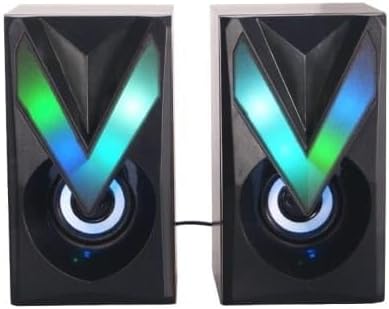
The Nontaus D15 speaker system consists of two units. Each unit features a main speaker driver and an integrated RGB LED lighting panel. The primary control unit (one of the speakers) houses the volume control and input connections.

The rear of the speakers may include a bass port for enhanced low-frequency response and the fixed cable for connecting the two speaker units.
Поставување
Поврзување на вашите звучници
- Позиционирање: Place the two speaker units on a stable, flat surface, ideally equidistant from your listening position for optimal stereo separation.
- Connect Speaker Units: Ensure the cable connecting the two speaker units is securely plugged in. This cable is usually fixed to one speaker and plugs into the other.
- Аудио конекција: Plug the 3.5mm audio jack into the audio output port of your device (computer, laptop, smartphone, MP3 player, tablet).
- Поврзување за напојување: Insert the USB power cable into an available USB port on your computer, laptop, or a compatible USB power adapter (5V/1A recommended).
- Вклучување: Once connected, the speakers should power on automatically, and the RGB LED lights will illuminate.

Ensure all connections are firm to prevent audio interruptions or power issues.
Упатства за работа
Контрола на јачината на звукот
The Nontaus D15 speakers feature touch controls. Locate the touch-sensitive area, typically on the front or top of one of the speaker units.
- Зголемете ја јачината на звукот: Tap or slide your finger on the designated area to increase the volume.
- Намалување на јачината на звукот: Tap or slide your finger on the designated area to decrease the volume.
- Исклучи/вклучи звук: A quick tap might mute or unmute the audio. Refer to the specific touch control interface on your speaker.
Контрола на RGB LED осветлување
The RGB LED lighting is designed to be vibrant. Control options may vary:
- Автоматски циклус: The lights may cycle through colors automatically.
- Контрола на допир: Some models allow changing light modes or turning lights on/off via a dedicated touch area.
Одржување
Чистење
To clean your speakers:
- Disconnect the speakers from power before cleaning.
- Use a soft, dry cloth to wipe down the speaker surfaces.
- Не користете течни средства за чистење, аеросоли или абразивни материјали, бидејќи тие можат да ја оштетат завршната обработка или внатрешните компоненти.
Складирање
Кога не ги користите подолг период, чувајте ги звучниците на ладно и суво место, подалеку од директна сончева светлина и екстремни температури.
Решавање проблеми
| Проблем | Можна причина | Решение |
|---|---|---|
| Нема звук |
|
|
| Искривен звук |
|
|
| RGB светлата не работат |
|
|
Спецификации
| Карактеристика | Детал |
|---|---|
| Име на моделот | Nontaus D15 |
| Бренд | Генерички |
| Тип на звучник | Мултимедија |
| Технологија за поврзување | Wired (3.5mm audio, USB power) |
| Режим за излез на звук | Стерео |
| Конфигурација на каналот за опкружувачки звук | 2.0 |
| Максимална излезна моќност на звучникот | 6 вати (3W x 2 RMS) |
| Извор на енергија | Електрична кабли (USB) |
| Контролен метод | Допрете |
| Материјал | Дрво |
| Боја | Brown (Wooden finish) |
| Димензии на производот (Д x Ш x В) | 8 cm x 15 cm x 17 cm |
| Тежина на ставката | 350 грама |
| Компатибилни уреди | Tablet, Laptop, Computer, MP3 Player, Smartphone |
| Вид на гаранција | Ограничени |
Гаранција и поддршка
Информации за гаранцијата
This product comes with a limited warranty. Please refer to the warranty card included in your package for specific terms and conditions, or contact your retailer for details.
Поддршка за корисници
For technical assistance or customer service inquiries, please contact your point of purchase or visit the manufacturer's webсајт.


