1. Вовед
This manual provides comprehensive instructions for the setup, operation, maintenance, and troubleshooting of your new Universal TV Remote Control. Designed for ease of use, this remote is compatible with a wide range of major TV brands, offering a convenient replacement for your original remote.
Ве молиме внимателно прочитајте го ова упатство пред да го користите далечинскиот управувач за да обезбедите оптимални перформанси и долготрајност.

Figure 1: Universal TV Remote Control

Figure 2: Compatible with Major TV Brands
2. Упатства за поставување
Before first use, insert two AAA batteries into the remote control. Ensure correct polarity (+/-) as indicated inside the battery compartment.
2.1. Brand Setting (Recommended Method)
This method is recommended for major TV brands that have a dedicated button on the remote control (e.g., Samsung, LG, Sony, TCL, Vizio, Hisense, Sanyo, Insignia, Philips, Panasonic, Sharp, Toshiba, Hitachi, JVC, Vestel, Seiki, RCA, Magnavox, Westinghouse, Haier).
- Identify the button on the remote control corresponding to your TV brand.
- Press and hold the corresponding brand button for approximately 3 seconds.
- The LED indicator on the remote will flash three times, indicating that the setting is complete.

Figure 3: Brand Setting Method
Корисен совет: Under the Initial Setting Mode, this remote can directly control many TV brands, including LG, SAMSUNG, PHILIPS, SONY, PANASONIC, SHARP and other TV brands listed on the remote control.
2.2. Code Setting Method
Use this method for TV brands that do not have a dedicated brand button on the remote, or if the Brand Setting method does not work.
- Притиснете и задржете го Исклучи звук копчето и Моќ копчето истовремено неколку секунди.
- Release both buttons when the LED indicator light illuminates.
- Refer to the provided code list in the physical manual (not included here) and enter the 3 or 4-digit code for your TV brand using the number buttons.
- If the code is correct, the LED will turn off, indicating successful setup. If the code is incorrect, the LED will remain lit, and you will need to re-enter the code.

Figure 4: Code Setting Method
Забелешка: The new chip provides stronger power-off memory. Once set up, the TV brand memory will be maintained permanently, even after power off.
3. Упатства за работа
Once set up, your universal remote control functions similarly to your original TV remote. Below are some common button functions:

Figure 5: Other Button Functions
- Копче за вклучување: Го вклучува или исклучува телевизорот.
- Копче за внесување: Cycles through video input sources (HDMI, AV, etc.).
- Копче за титлови (CC): Вклучува или исклучува затворени титлови.
- Паметно копче: Accesses the Smart TV hub or home screen.
- Копче на NETFLIX: Директен пристап до апликацијата Netflix.
- Копче 3D: Го активира или деактивира 3D режимот (доколку е поддржано од телевизорот).
- Навигациска подлога (горе, долу, лево, десно, во ред): Се користи за навигација и избор во менито.
- Копче за мени: Го отвора главното мени на телевизорот.
- Копче за апликации: Accesses the TV's application list.
- Vol +/- Buttons: Го прилагодува нивото на јачина на звук.
- Ch +/- Buttons: Го менува каналот.
- Нечујно копче: Го исклучува звукот или го вклучува звукот на телевизорот.
- Копчиња со броеви (0-9): Директен влез на канал.
- Копче за излез: Излегува од тековното мени или апликација.
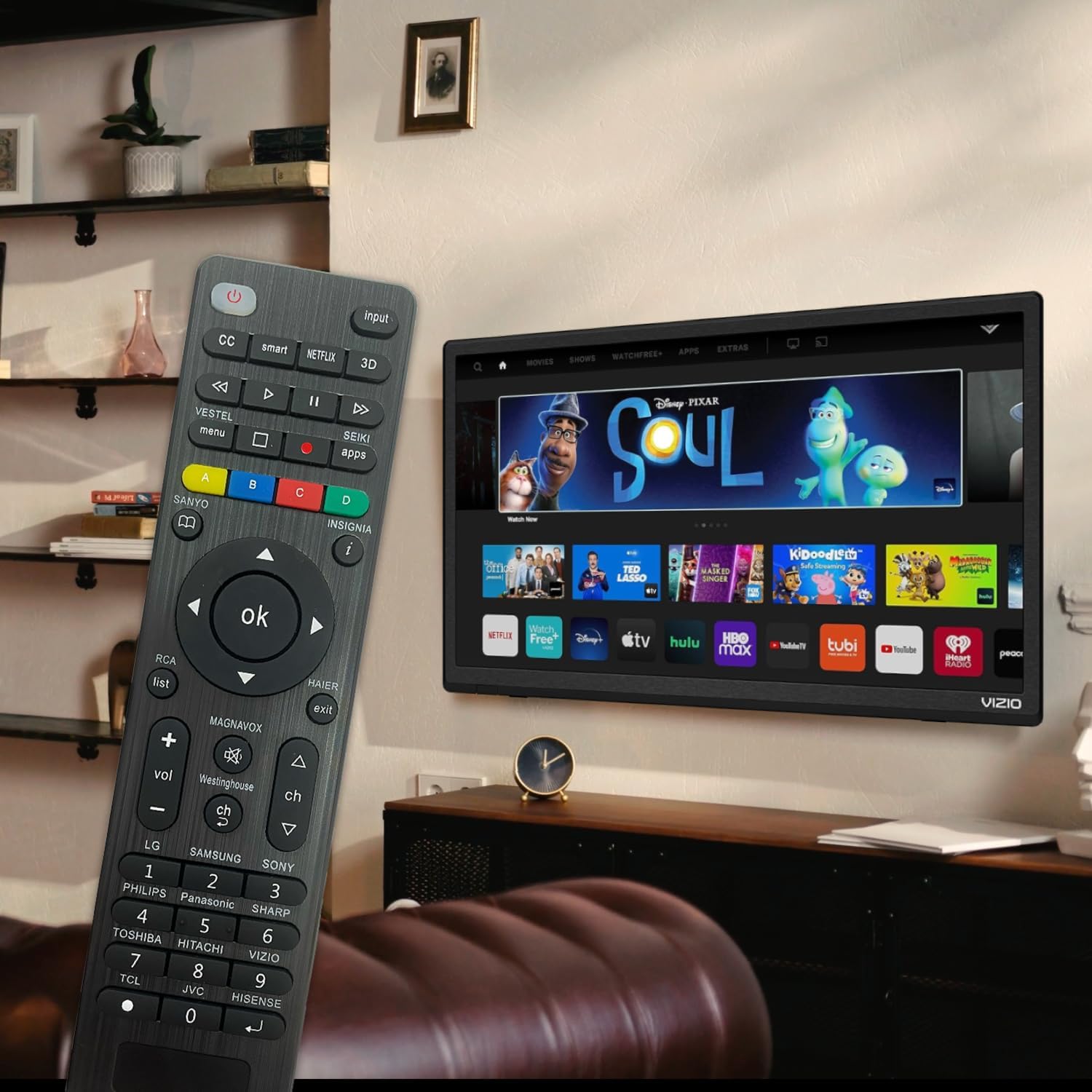
Figure 6: Remote in use with a Smart TV
4. Одржување
- Чистење: Користете мека, сува крпа за чистење на далечинскиот управувач. Не користете течни средства за чистење или абразивни материјали, бидејќи тие може да ја оштетат површината или внатрешните компоненти.
- Замена на батерија: Replace batteries when the remote's response becomes sluggish or the LED indicator does not light up. Always replace both batteries at the same time with new AAA batteries. Do not mix old and new batteries or different types of batteries.
- Складирање: Доколку далечинскиот управувач нема да се користи подолг период, извадете ги батериите за да спречите протекување и потенцијално оштетување. Чувајте го далечинскиот управувач на ладно и суво место, подалеку од директна сончева светлина и екстремни температури.
- Трајност: The remote features upgraded material with a metal dome added to the control buttons for enhanced flexibility and extended life. Avoid dropping the remote or exposing it to excessive force.
5 Смена на проблеми
| Проблем | Можна причина | Решение |
|---|---|---|
| Далечинскиот управувач не работи. | Batteries are dead or inserted incorrectly. Remote is not paired with the TV. Obstruction between remote and TV. | Check and replace batteries, ensuring correct polarity. Re-attempt Brand Setting or Code Setting. Ensure clear line of sight to TV's IR receiver. |
| Некои копчиња не работат. | Incorrect code or partial pairing. TV does not support certain functions. | Try a different code from the manual's code list. Verify if your TV model supports the specific function. |
| Remote is slow to respond. | Ниска батерија. Пречки. | Replace batteries. Ensure no strong light sources or other IR devices are interfering. |
| LED indicator keeps lighting up during code setting. | Внесен е неточен код. | Re-enter the correct 3 or 4-digit code from the manual's code list. |
| Cannot find my TV brand button. | Brand not listed on dedicated buttons. | Use the Code Setting Method (Section 2.2) with the provided code list. |
If issues persist, please refer to the original product packaging for customer support contact information or visit the manufacturer's webсајт.
6. Спецификации
- Број на модел: BVTVRemote-01
- Димензии на производот: 1.38 x 0.6 x 6.5 инчи
- Тежина на ставката: 2.39 унци
- Потребни батерии: 2 x AAA (не е вклучено)
- Боја: Црното
- Специјална карактеристика: Programmable, Power-off Memory
- Максимален број на поддржани уреди: 3 (typically for TV, DVD/Blu-ray Player, though primarily designed for TV)
- Компатибилни уреди: Television, DVD/Blu-ray Player (Universal compatibility with major TV brands)
- Производител: BoostVision
- Земја на потекло: Кина
7. Гаранција и поддршка
For warranty information, please refer to the documentation included with your purchase or contact the seller directly. This product is typically covered by a standard manufacturer's warranty against defects in materials and workmanship.
For technical support or further assistance, please contact BoostVision customer service through their official website or the contact details provided on the product packaging.
Продавач: BoostVision TV Remote
Страница на производот на Амазон: https://www.amazon.com/dp/B0DHCZB2DT


