
Вовед
Thank you for choosing the Ninestars 13 Gallon Automatic Motion Sensor Trash Can. This touchless trash bin is designed for convenience and hygiene in various indoor environments such as kitchens, bedrooms, living rooms, offices, and hotels. Featuring a motion sensor for hands-free operation and a durable stainless steel body, this D-shaped trash can offers a large 13-gallon (50-liter) capacity.
This manual provides detailed instructions for setup, operation, maintenance, and troubleshooting to ensure optimal performance and longevity of your product. Please read it carefully before use and retain it for future reference.
Што има во кутијата
Внимателно распакувајте ги сите компоненти и проверете дали сте ги добиле следниве ставки:
- Тело за канта за отпадоци
- Trash Can Lid (with motion sensor)
- Лагер прстен
Поставување
1. Инсталација на батерија
The trash can operates on 2 D-sized batteries (not included). For optimal performance, use new, high-quality alkaline batteries.
- Пронајдете ја преградата за батерии на долната страна на капакот.
- Отворете го капакот на преградата за батерии.
- Insert 2 D-sized batteries, ensuring the correct polarity (+/-) as indicated inside the compartment.
- Добро затворете го капакот на преградата за батерии.

Image: Battery compartment for 2 D-sized batteries, located on the lid.
2. Инсталација на вреќи за ѓубре
Follow these steps to properly install a trash bag using the liner ring:
- Отстранете го капакот од телото на корпата за отпадоци.
- Place the trash bag into the trash can body.
- Fit the top edge of the trash bag over the liner ring, ensuring it is securely held in place.
- Insert the liner ring with the trash bag into the trash can body, tucking any excess bag material neatly.
- Place the lid back onto the trash can body, aligning it properly.

Image: Step-by-step guide for trash bag installation.
Упатства за работа
Работа на сензорот за движење
The Ninestars trash can features an infrared motion sensor for hands-free operation.
- When an object or hand is within 10 inches (25 cm) of the sensor window, the lid will automatically open.
- The lid will remain open as long as the object is within the sensor range.
- Once the object moves away from the sensor range, the lid will close automatically after approximately 3-5 seconds.
- The lid features a soft-closing mechanism for quiet operation.
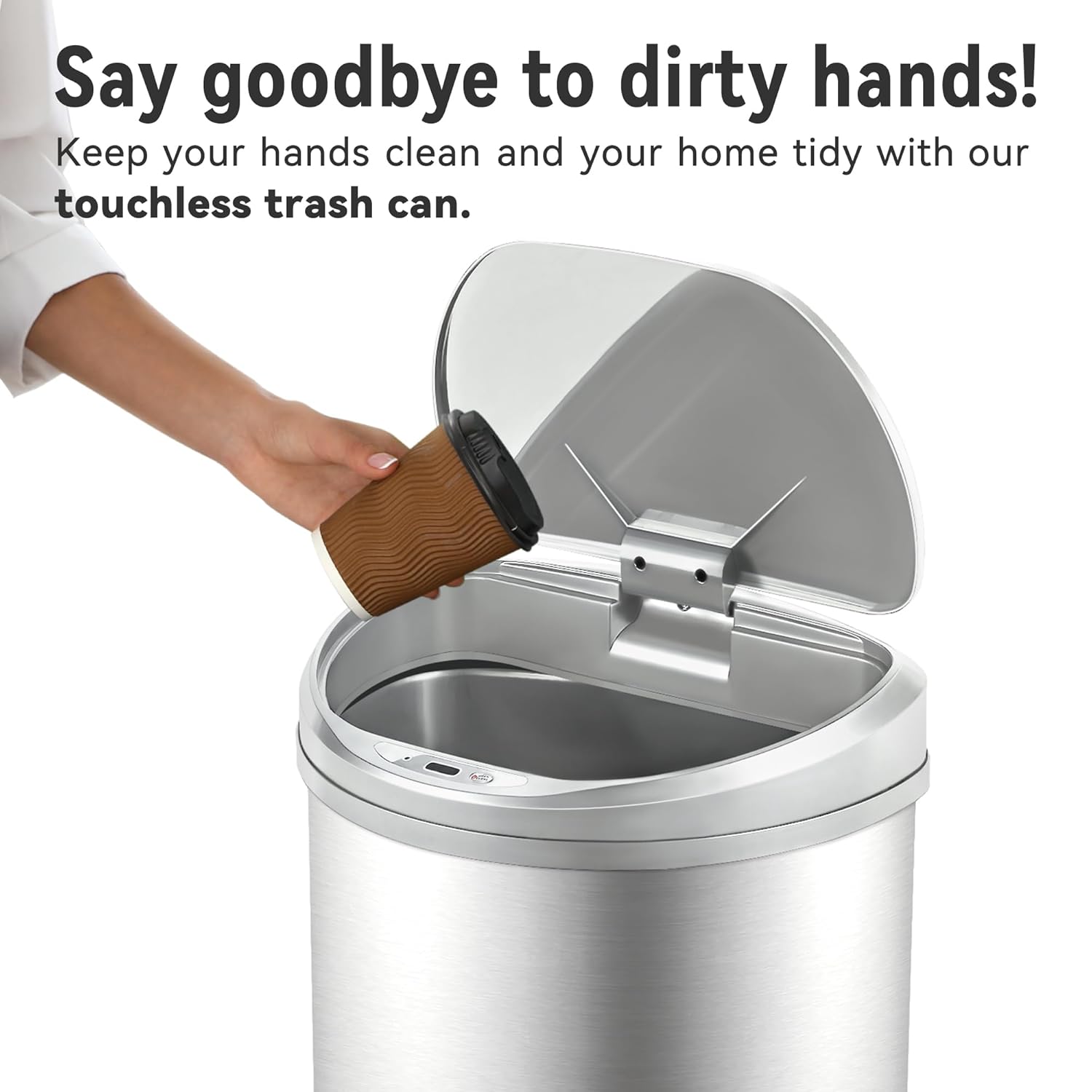
Image: Demonstrating touchless operation with the motion sensor.
Manual Open/Close Button
For extended opening or manual control, use the 'OPEN/CLOSE' buttons located on the lid.
- Press the 'OPEN' button to keep the lid open indefinitely.
- Press the 'CLOSE' button to close the lid. The motion sensor will reactivate after the lid is closed manually.
Одржување
Чистење
To maintain the appearance and functionality of your trash can:
- Избришете ја надворешноста на телото од не'рѓосувачки челик со мека, дamp крпа. Избегнувајте абразивни средства за чистење или груби хемикалии кои може да го оштетат финишот.
- The stainless steel is designed to be fingerprint, scratch, and oil resistant.
- Clean the sensor window on the lid with a soft, dry cloth to ensure proper function.
- Do not immerse the lid in water or place it under running water, as this can damage the electronic components.
- The interior of the trash can body can be cleaned with mild soap and water. Ensure it is completely dry before reinserting the liner ring and lid.

Image: Stainless steel construction features for easy maintenance.
Замена на батеријата
When the lid's operation becomes slow or inconsistent, it is time to replace the batteries. Refer to the 'Battery Installation' section for detailed steps.
Решавање проблеми
If you encounter issues with your Ninestars Automatic Motion Sensor Trash Can, please refer to the following common problems and solutions:
| Проблем | Можна причина | Решение |
|---|---|---|
| Lid does not open when sensor is activated. | Потрошени или ниски батерии. Прозорецот на сензорот е валкан или затнат. Капакот не е правилно порамнет. | Replace batteries with new D-sized batteries. Исчистете го прозорецот на сензорот со мека, сува крпа. Ensure the lid is correctly seated on the trash can body. |
| Капакот се отвора или затвора бавно. | Ниска моќност на батеријата. | Replace batteries with new D-sized batteries. |
| Lid remains open or opens randomly. | Sensor is continuously detecting an object. Sensor is exposed to direct sunlight or strong artificial light. | Ensure no objects are within the sensor's range. Relocate the trash can to an area with less direct light interference. |
| Lid makes unusual noises. | Опструкција на механизмот. | Check for any debris or foreign objects obstructing the lid's opening/closing mechanism. |
Спецификации
- Бренд: Нинестарс
- Модел: 13 Gallon D-Shaped
- Капацитет: 13 галони (50 литри)
- Механизам за отворање: Сензор за движење
- Материјал: Пластика, не'рѓосувачки челик
- Облик: Во облик на Д
- Тип на завршница: Брусен
- Моќност: 2 x D-sized batteries (not included)
- Димензии на производот: 15.12"Д x 12.13"Ш x 26.61"В (38.4 см Д x 30.8 см Ш x 67.6 см В)
- Препорачана употреба: Kitchen, Indoor Room, Home Office, Laundry Room, Garage, Lobby, Classroom
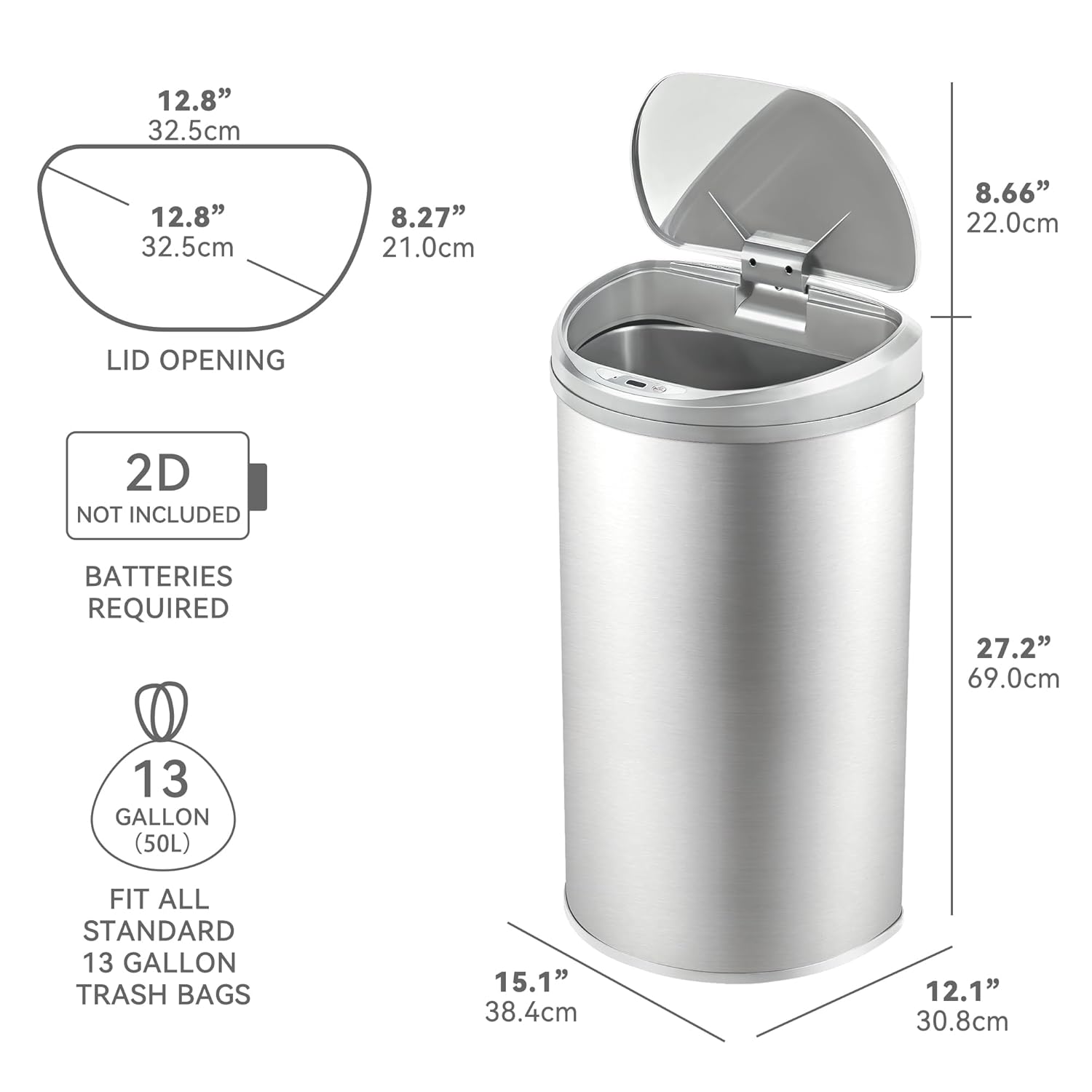
Image: Product dimensions and battery requirement.
Гаранција и поддршка
Информации за гаранцијата
This Ninestars product typically comes with a 2-year warranty. Please refer to your purchase documentation or the manufacturer's official webстраница за специфични услови за гаранција.
Поддршка за корисници
For further assistance, troubleshooting not covered in this manual, or warranty claims, please contact Ninestars customer support through their official webстраницата или информациите за контакт дадени со вашето купување.