
1. Вовед
Thank you for choosing the Sharkoon AK6 RGB ATX PC Case. This manual provides essential information for the proper installation, operation, and maintenance of your new PC case. Please read this guide thoroughly before beginning the assembly process to ensure optimal performance and longevity of your components.
2. Информации за безбедност
- Секогаш исклучувајте го напојувањето од ѕидниот штекер пред да инсталирате или отстраните какви било компоненти во куќиштето на компјутерот.
- Handle tempered glass panels with care. They are fragile and can break if dropped or subjected to impact.
- Avoid exposing the case to extreme temperatures, humidity, or direct sunlight.
- Држете ги малите делови и завртките подалеку од дофат на деца.
- Ensure proper grounding to prevent electrostatic discharge (ESD) damage to sensitive electronic components.
3. Содржина на пакетот
Ве молиме проверете дали сите артикли се присутни во вашиот пакет:
- Куќичка за компјутер Sharkoon AK6 RGB ATX
- Кутија за додатоци (содржи завртки, врвки за кабел и други мали делови)
- Упатство за употреба (овој документ)
4. Производот завршиview
The Sharkoon AK6 RGB ATX PC Case is designed with a modern glass aesthetic, featuring seamless integration of tempered glass on the front and side panels. It includes four pre-installed 120mm addressable RGB PWM fans for optimal airflow and visual appeal. The case supports a wide range of components, including BTF motherboards, and offers ample space for high-performance hardware.

Figure 4.1: Front interior view of the Sharkoon AK6 RGB PC case, showcasing the pre-installed addressable RGB fans and the spacious main chamber.

Слика 4.2: Аголна view of the Sharkoon AK6 RGB PC case, highlighting the tempered glass side panel and the top mesh for ventilation.

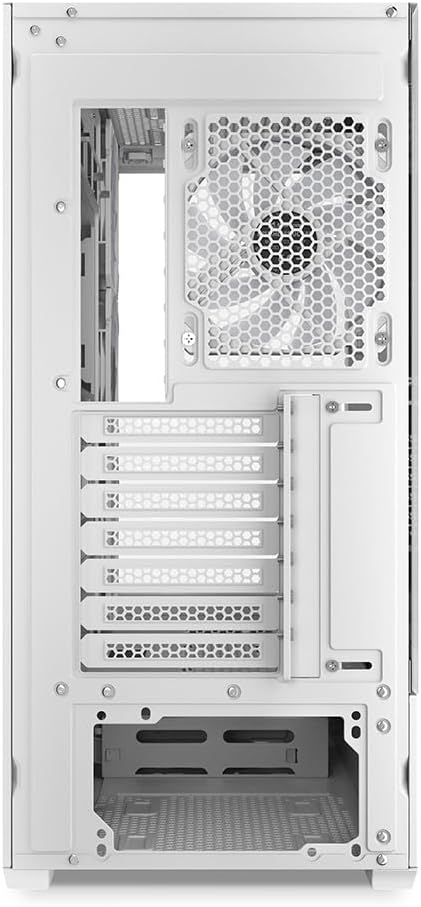
Слика 4.3: Заден дел view of the Sharkoon AK6 RGB PC case, showing the I/O shield cutout, rear exhaust fan mount, and expansion slots.
Преден I/O панел
The front I/O panel is located on the side of the case and includes:
- Копче за напојување
- Копче за ресетирање
- 2 x USB Ports (Type-A)
- 1 x USB Type-C порта
- Audio Jacks (TRRS)
5. Поставување и инсталација
Follow these steps to install your components into the Sharkoon AK6 RGB PC Case.
5.1 Подготовка на случајот
- Поставете го куќиштето на рамна, стабилна површина.
- Carefully remove the tempered glass side panel by unscrewing the thumb screws at the rear and gently pulling the panel away.
- Remove the rear metal side panel by unscrewing the thumb screws.
5.2 Инсталација на матична плоча
The AK6 RGB supports Mini-ITX, Micro-ATX, ATX, and BTF motherboards.
- Install the I/O shield into the cutout at the rear of the case (if not pre-installed on your motherboard).
- Align your motherboard with the standoffs inside the case. Ensure all standoffs match the motherboard's mounting holes.
- Прицврстете ја матичната плоча со соодветните завртки од кутијата со додатоци.
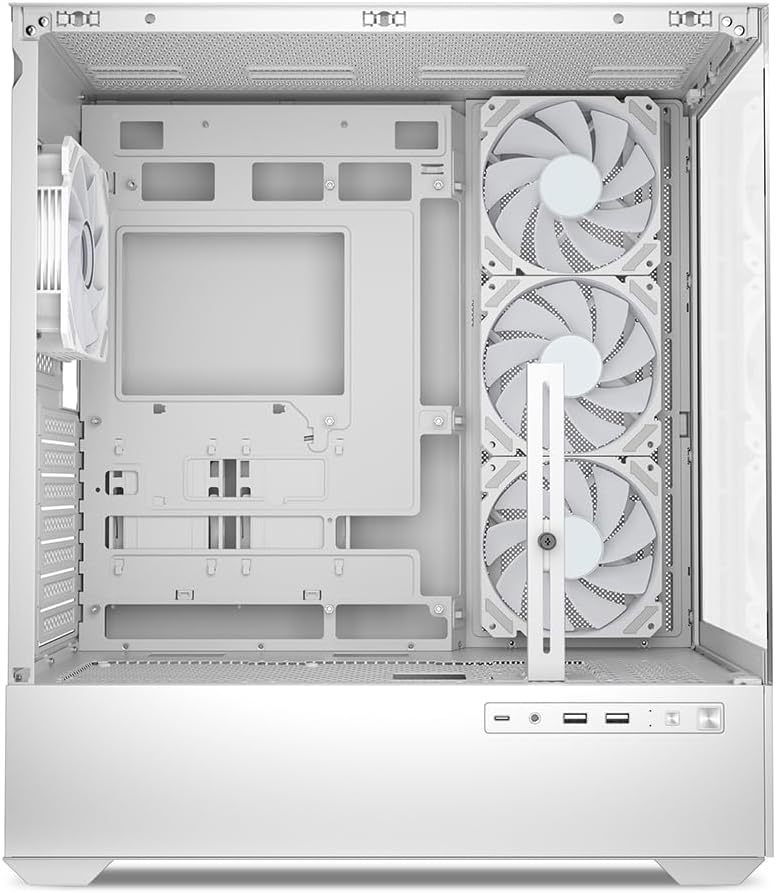
Слика 5.1: Внатрешност view of the Sharkoon AK6 RGB PC case, illustrating the motherboard tray, cable management cutouts, and front fan mounting points.
5.3 Инсталација на напојување
The case features a bottom-mount power supply design.
- Лизнете го напојувањето (PSU) во наменскиот преграда на долниот дел од задната страна на куќиштето.
- Align the PSU with the screw holes at the rear of the case.
- Secure the PSU with the provided screws.
5.4 Инсталација на уред за складирање
The AK6 RGB supports up to two 3.5" HDDs or four 2.5" SSDs.
- For 3.5" HDDs: Locate the drive cages beneath the PSU shroud. Slide the HDD into a drive tray and secure it with screws.
- For 2.5" SSDs: SSDs can be mounted on the dedicated brackets behind the motherboard tray or on the 3.5" drive trays using adapter screws.
Слика 5.2: Заден внатрешен дел view of the Sharkoon AK6 RGB PC case, detailing the drive cages for 3.5-inch HDDs and 2.5-inch SSDs, and the power supply shroud area.
5.5 Инсталација на графичка картичка и картичка за проширување
- Отстранете ги потребните капаци за слотовите за проширување на задниот дел од куќиштето.
- Вметнете ја вашата графичка картичка или други картички за проширување во соодветните PCIe слотови на вашата матична плоча.
- Secure the cards with screws. The case includes a rubberized graphics card support for larger cards.
5.6 CPU Cooler and Radiator Installation
The case supports CPU coolers up to 17 cm in height and allows for extensive liquid cooling setups.
- Инсталирајте го ладилникот на процесорот според упатствата на производителот.
- For liquid cooling, the case can accommodate a 360mm radiator at the top and an additional 280mm radiator.
5.7 Управување со кабли
Користете ги отворите за управување со кабли и точките за врзување зад фиоката на матичната плоча за да ги насочите и обезбедите каблите. Ова го подобрува протокот на воздух и естетиката.
6. Упатства за работа
6.1 Вклучување
After all components are installed and cables are connected, replace the side panels. Connect the power cable to your PSU and a wall outlet, then press the power button on the front I/O panel to start your system.
6.2 RGB Fan Control
The AK6 RGB comes with four pre-installed addressable RGB PWM fans. These fans are connected to an RGB controller which also provides connections for up to four LED elements and four PWM fans. The RGB lighting can typically be controlled via your motherboard's RGB software (if compatible) or through a dedicated button on the case (if present and connected).
6.3 Оптимизација на протокот на воздух
The case is designed for ideal airflow, with three inverted fans drawing air from the side into the case. The top and rear fan mounts allow for additional exhaust fans. Ensure proper fan orientation for optimal cooling performance.

Слика 6.1: Прample of a fully assembled system within the Sharkoon AK6 RGB PC case, featuring various components and active RGB lighting.
7. Одржување
Редовното одржување помага да се обезбеди долготрајност и перформанси на компонентите на вашиот компјутер.
- Филтри за прашина: Periodically clean the removable dust filters (e.g., on the top and bottom) to maintain optimal airflow and prevent dust buildup inside the case. Use compressed air or a soft brush.
- Стаклени панели: Чистете ги панелите од калено стакло со мека крпа што не остава влакненца и средство за чистење стакло. Избегнувајте абразивни материјали што би можеле да ја изгребат површината.
- Чистење на ентериерот: Use compressed air to remove dust from internal components and fans. Ensure the system is powered off and unplugged before cleaning.
8 Смена на проблеми
If you encounter issues with your PC case, refer to the following common troubleshooting steps:
- Без моќност: Ensure the power supply is properly connected to the wall outlet and the motherboard. Check all internal power cables (24-pin ATX, 8-pin CPU, PCIe power).
- Вентилаторите не се вртат/RGB не работи: Verify that all fan and RGB cables are correctly connected to the motherboard or the included RGB controller. Check your motherboard's BIOS/UEFI settings or RGB software for fan speed and lighting control.
- Front I/O Ports Not Functioning: Confirm that the front panel connectors (USB, audio, power/reset switches) are correctly plugged into the corresponding headers on your motherboard.
- Прегревање: Ensure all fans are spinning correctly and oriented for proper airflow. Clean dust filters and internal components. Verify CPU cooler installation.
For further assistance, please contact Sharkoon support.
9. Спецификации
| Карактеристика | Спецификација |
|---|---|
| Бренд | Шаркун |
| Име на моделот | AK6 RGB |
| Број на модел | C-AK6W |
| Тип на случај | ATX кула |
| Боја | Бело |
| Материјал | Калено стакло |
| Компатибилност со матична плоча | Mini ITX, Micro ATX, ATX, BTF |
| Тип на монтирање на напојување | Долна монтажа |
| Метод на ладење | Воздух |
| Претходно инсталирани вентилатори | 4 x 120mm Addressable RGB PWM Fans |
| Максимална висина на ладилникот на процесорот | 17 см |
| Максимална должина на графичка картичка | 41 cm (with rubberized support) |
| Максимална должина на PSU | 23.5 см |
| Поддршка за радијатор | Top: up to 360mm, Additional: up to 280mm |
| Диск Бејс | 2 x 3.5" HDD или 4 x 2.5" SSD |
| Предни влезни порти | 2 x USB Type-A, 1 x USB Type-C, Audio (TRRS) |
| Тежина на ставката | 6.1 килограми |
| Посебни карактеристики | RGB Lighting, Unique Glass Appearance, BTF Motherboard Support |
10. Гаранција
Sharkoon products are manufactured to high quality standards. For detailed warranty information, please refer to the warranty card included with your product or visit the official Sharkoon webлокација. Гаранцијата обично ги покрива дефектите во материјалите и изработката при нормална употреба.
11. Поддршка
If you require technical assistance or have questions regarding your Sharkoon AK6 RGB ATX PC Case, please visit the official Sharkoon website for support resources, FAQs, and contact information. You may also find updated drivers or software for the RGB controller there.
Webсајт: www.sharkoon.com